Your rep opens six tabs to research one account. The contact data is eight months old. A hot reply has sat unanswered since Tuesday, and nobody knows who owns the deal. That is not a talent problem. It is a workflow problem.
An AI sales copilot is software that works beside a seller inside the sales workflow. It finds leads, drafts messages, reads replies and CRM records, flags risky deals, and suggests the next step. The rep reviews and approves every action that matters. It does not replace the seller. It removes the grunt work between research and the close.
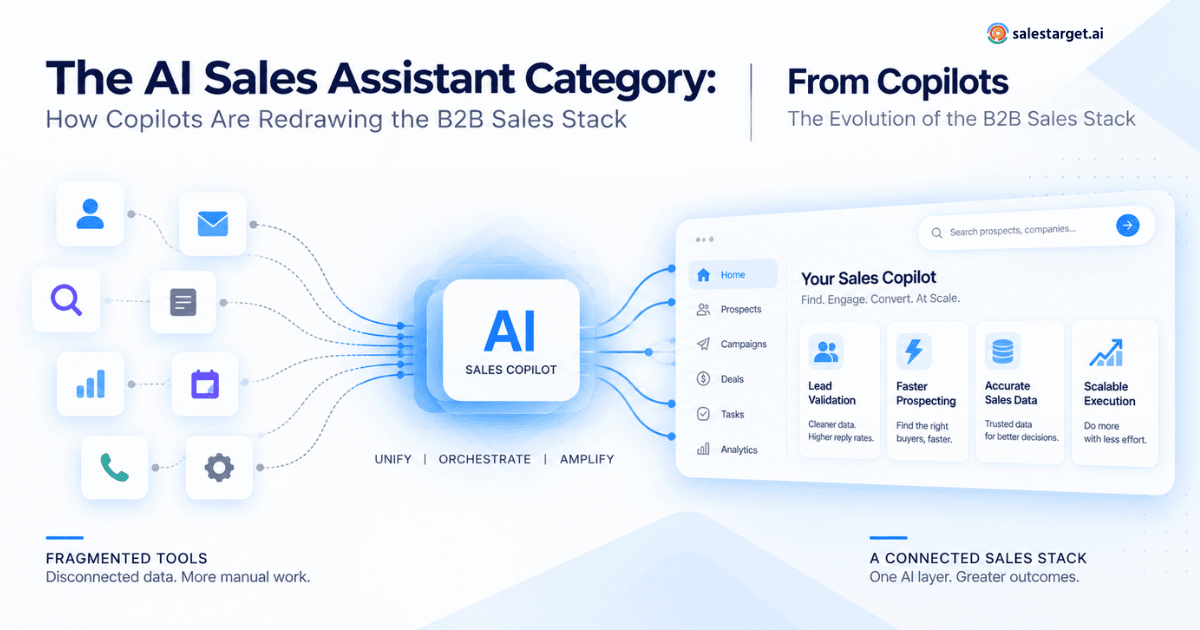
SalesTarget.ai builds this into one workspace, with lead data, outreach, validation, a CRM, and a copilot on the same records. This guide covers where sales workflows break, what a copilot does, how to measure it, and how to run a pilot.
The Sales Workflow Gaps an AI Sales Copilot Can Address
A copilot closes three gaps: repeated research, slow follow-up, and records that no longer match reality. Teams that want the longer version can read how modern sales teams cut manual work and close more deals.
Repeated Research, Stale Contact Data, and Disconnected Records
Reps research one account in LinkedIn, a database, and a company site, then paste the result into a CRM. Each copy ages on its own. Within a quarter, one contact exists in three versions.
SalesTarget.ai enriches a lead at the moment you find it. Verified email, personal email, phone, and mobile attach at that point, not whenever the data was first scraped.
Missed Replies, Delayed Follow-Ups, and Unclear Deal Ownership
An interested reply that lands Friday afternoon and gets answered Tuesday has already lost momentum. The cause is rarely laziness. Replies pile up across shared inboxes with no owner.
Unibox pulls every reply into one view, sorts it by intent (Interested, Follow-Up, Not a Fit), assigns an owner, and syncs the deal to the CRM.
Where Copilot Assistance Can Reduce Manual Work and Support Seller Decisions
A copilot works best on tasks with clear inputs and checkable outputs: list building, first drafts, task creation, and deal-risk flags. It works worst on judgment calls, such as reading office politics or setting a discount.
That split is the first filter for any copilot project. Automate what a manager could verify in ten seconds. Keep the rest human.
AI Sales Copilot Explained: Capabilities, Data, and Human Control
An AI sales copilot turns buyer data and sales context into suggested actions that a person approves. Three parts matter: the data it reads, the context it remembers, and the actions it can take.
How Buyer Data and Sales Context Become Recommendations and Actions
The data layer in SalesTarget.ai covers 840M+ professional profiles, 146M+ business entities, and 4,000+ intent and buyer signals from 50+ sources. Signals include Bombora Intent Topics, plus funding rounds, hiring spikes, and leadership changes on a 30 to 90 day lookback.
The context layer is your CRM history and campaign results. A Memory feature can pull your website content so drafts sound like your company. The action layer is the output: a lead list, a full email sequence, a task, an assignment. Read more on how a copilot works.
AI Sales Copilot vs AI Sales Agent, AI Assistant, and CRM Automation
A copilot proposes and a human approves. An agent acts alone. An assistant answers questions but has no view of your workspace. CRM automation runs fixed if-then rules and cannot read a reply.
The practical test: who is accountable when the output is wrong? With a copilot, the rep is, which is why review gates matter later in this guide.
AI Sales Copilot CRM Integration and Its Place in the Revenue Stack
A copilot sits on top of the CRM and the outreach tools, not beside them. SalesTarget.ai has a built-in CRM and connects to HubSpot, Salesforce, Zoho, Google Calendar, Google Meet, Calendly, Slack, and Zapier. Zoom and Pipedrive are coming soon.
The point of the stack is one record per buyer. See where the copilot fits as the revenue layer of your sales stack.
AI Sales Copilot Use Cases by Role and Sales Motion
The same copilot serves five roles differently. Match the use case to the job, not to the feature list.
AI Sales Copilot for Founders and Lean Sales Teams
Founders have no SDR and little time. They can ask the copilot for leads in plain English, get a personalized sequence in seconds, and review it before sending. This is how teams sell before hiring their first SDR.
AI Sales Copilot for SDRs, BDRs, and Account Executives
SDRs use it for account lists, drafts, and A/B variations by role, industry, and company size. AEs use it for meeting prep and deal follow-ups. Here is how a copilot assists SDRs at every workflow step.
Sales Leaders: Deal Reviews, Rep Coaching, and Team Performance
Managers can ask in plain language which deals are at risk, which meetings happened, and which tasks are overdue. The copilot flags at-risk deals and recommends a next move. Coaching improves when activity logs replace gut feel, as covered in AI sales coaching.
RevOps and Agencies: Data Quality, Routing, Client Access, and Reporting
RevOps cares about clean records, lead routing, and reports that match the pipeline. Agencies add one more need: client campaigns must stay separate. SalesTarget.ai keeps workspace data private, but confirm client access rules before onboarding any account.
AI Sales Copilot Workflows Across the B2B Sales Cycle
Seven workflows cover the cycle from account choice to stalled-deal recovery. Each one pairs a copilot task with a human check.
Account Strategy, Buying Roles, and Prospect Prioritization
Start with the ICP Builder and rank accounts by intent score. Then name the buying roles: economic buyer, champion, and technical evaluator. A short list of 100 in-market accounts beats a list of 5,000 guesses.
Contact Discovery, Enrichment, Email Verification, and List Checks
Use Smart Prospect Search to stack Business and People filters, such as industry, seniority, tech stack, and Intent Topics. One-click enrichment adds contact data. The validator then runs MX and SMTP checks, flags disposable addresses, and scores risk before anything sends.
To see this on your own market, run a search in Lead Explorer.
AI Sales Copilot Prompt Templates for Account Research and Personalized Messages
Good prompts name the persona, the trigger, and the limit. Template for research: “Summarize this account in five lines: what they sell, recent funding or hiring, and one problem our product solves. Mark anything you could not verify.”
Template for messages: “Write a first email to a VP of Operations at a 100-person logistics firm. Reference their hiring spike. Under 90 words. One question as the call to action.” More are in these prompt templates.
Email and LinkedIn Sequence Planning, Timing, and Follow-Ups
Plan email and LinkedIn as one flow. Conditional sequences branch on a reply, an accepted request, or silence. Timezone-aware scheduling keeps sends inside working hours. Build the plan around how an AI copilot reshapes outbound sales workflows.
One mistake reps repeat: sending the follow-up on the same channel at the same hour. Switch channel and hour.
Reply Qualification, Meeting Preparation, and Buyer Commitments
Sort replies by intent first. Before each meeting, ask the copilot for a brief: what the buyer clicked, replied, and promised. After the meeting, log what the buyer committed to, with a date. Vague commitments are the most common reason a deal stalls.
Deal Follow-Ups, Opportunity Stages, and CRM Updates
In the SalesTarget.ai CRM, campaign leads land automatically, every email and call logs to the timeline, and a follow-up task appears when a lead replies or a meeting ends. The company reports 91% follow-up completion for CRM users.
Define exit criteria for each stage in writing. A copilot cannot move a deal forward on a stage nobody defined.
Stalled-Deal Recovery and Relevant Re-Engagement
Pull deals with no activity for 30 days, then check the last buyer message. Re-engage with something new: a funding event, a hire, a changed priority. A generic check-in email does not count. See the pipeline recovery playbook.
An Outbound Workflow Walkthrough With Inputs, Outputs, and Review Notes
This walkthrough shows one outbound campaign from brief to approved send. It follows the steps in how to use an AI sales copilot. The campaign below is an illustration, not a reported result.
The Campaign Brief, Starting Data, and Baseline
Brief: reach VPs of Operations at logistics firms with 50 to 200 staff that posted three or more hiring roles in 60 days. Starting data: 200 enriched contacts. Baseline to record before launch: research hours per rep, bounce rate, reply rate, and meetings held in your last comparable campaign.
Without a baseline, you cannot prove anything later.
The Prompt, AI Output, Human Edits, and Approved Action
Prompt: “Build a three-step email sequence for this list. Lead with the hiring spike. Keep each email under 90 words.”
AI output: three emails with subject lines and a four-day pacing plan. Human edits: the rep deletes an unverified claim about the prospect's fleet size, corrects one job title, and shortens the second subject line. Approved action: the sequence goes live for 50 contacts first, not 200.
Screenshots, CRM Records, Errors, and Observed Results
Capture four things from your own run: the prompt and output, the CRM record created, every error the copilot made, and the final numbers against the baseline. Log errors by type: wrong title, outdated company fact, duplicate contact.
[Add your own screenshots and observed results here before publishing.]
Data Quality, Human Handoffs, and AI Sales Copilot Limitations
A copilot is only as safe as its handoff rules. Write them before launch, not after the first bad email.
Escalation Rules for Buying Intent, Pricing, Technical Questions, and Uncertain Answers
Route these to a human within a set time: any reply showing buying intent, any pricing question, any technical question beyond the docs, and any answer where the copilot is unsure. Set the time limit in hours, not “soon.” The full logic is in human handoff and escalation rules.
Controls for Incorrect Contacts, Duplicate Actions, and Failed CRM Updates
Verify emails before sending. Block a contact from two active sequences at once. Check CRM sync logs weekly for failed writes. A failed update is silent: the rep believes the task exists and it does not.
Permissions, Review Gates, and Conversation Ownership
Let reps approve their own drafts. Require manager approval for new templates and any message to a named strategic account. Every conversation gets one owner. Shared ownership means no ownership.
Workflow Conditions That Make a Copilot a Poor Fit
A copilot is a poor fit when the market holds a few hundred accounts and every touch is relationship-led, when no ICP exists, when legal must approve every message, or when nobody owns weekly review. Fix those first.
AI Sales Copilot Software Categories and Comparison Criteria
Copilot software falls into five categories. Pick by the workflow you need to fix, not by the demo.
CRM-Native, Prospecting, Meeting, Pipeline, and All-in-One Platforms
CRM-native tools work on records you already hold. Prospecting tools find contacts. Meeting tools record and summarize calls. Pipeline tools score and forecast deals. All-in-one platforms combine several. Compare the field in this guide to AI sales copilot software.
Apollo offers data and engagement but needs separate deliverability and CRM tools. Instantly, Smartlead, and Lemlist focus on cold email and have no native B2B database, LinkedIn automation, or real CRM. SalesTarget.ai covers all of it in one platform.
AI Sales Copilot Features Mapped to Required Sales Tasks
Write the task first, then match the feature. Find leads: search plus enrichment. Contact them: sequences plus validation. Track replies: inbox plus CRM sync. Find revenue drivers: campaign-to-deal reporting. Any feature with no matching task is a distraction.
Native Capabilities, Integration Requirements, and Features Still on the Roadmap
Split every vendor claim into three buckets: built in today, needs an integration, or on the roadmap. Roadmap items do not count in a pilot. Ask for the live feature, not the slide.
A Comparison Scorecard for Data, Actions, Permissions, and Costs
Score each vendor from 1 to 5 on four lines. Data: coverage and verification at the point of use. Actions: what the copilot can do, not only say. Permissions: who approves what. Costs: license, usage limits, setup, and review time, all on the same workload.
How to Measure AI Sales Copilot ROI
Measure ROI at three levels: rep time, sales outcomes, and revenue. Skip any metric you cannot tie to money or meetings.
Research Time, Review Time, and Qualified Output per Rep
Net time saved equals research time cut minus the new review time. SalesTarget.ai reports about 6 hours saved per rep per week in its CRM. Verify that number against your own timesheets. See how copilots lift SDR productivity and outreach.
Held Meetings, Opportunity Conversion, Win Rate, and Sales Cycle Length
Count meetings held, not booked. Then track opportunity conversion, win rate, and days per stage. SalesTarget.ai reports 2.4X more meetings from the same leads and 3.2X faster deal cycles for CRM users. Treat these as targets to test, not promises.
Campaign Revenue Attribution Across Contacts, Accounts, and Deals
Attribution breaks when three contacts at one account reply to three campaigns. Credit at the account and deal level, not the contact level. Learn how a copilot can identify which campaigns drive revenue.
An ROI Model Using Incremental Gross Profit, Realized Savings, and Total Costs
ROI equals incremental gross profit plus realized savings, minus total costs, divided by total costs. Realized savings count only when hours turn into cash or into reassigned selling time.
Illustration: four extra closed deals at $3,000 gross profit each is $12,000. Add $1,500 in realized savings. Subtract $5,000 in total costs. ROI is 1.7, or 170%.
How to Choose an AI Sales Copilot and Run a Measurable Pilot
Choose on fit, then prove it in a short pilot with a written pass or fail line.
Match Your Sales Motion, Data Readiness, Team Size, and Budget
Outbound-heavy teams need data, sequences, and a CRM together. Teams with clean CRM data and a fixed stack may need only a CRM-native tool. Small teams need low setup. Use this checklist from how to choose an AI sales copilot.
An AI Sales Copilot Implementation Plan With Owners and Review Checkpoints
Week 1: RevOps cleans data and defines the ICP. Week 2: a sales lead writes prompts and escalation rules. Weeks 3 and 4: two reps run the campaign with daily review. Week 5: the manager reviews results against the baseline. Each step has one named owner.
Want a safe place to start? Start a free trial and run the Week 3 campaign on 50 contacts.
Pilot Success Criteria, Stop Criteria, and Rollout Decisions
Write the numbers down first. Success: reply rate and held meetings beat the baseline, with bounce rate under your limit. Stop: bounces spike, errors repeat after fixes, or review time erases the savings. Roll out in stages, one team at a time.
Software Pricing, Usage Credits, Integration Work, and Review Costs
Total cost has four parts: the license, usage limits such as credits, integration and setup work, and the hours spent reviewing output. Ask every vendor to quote the same workload. Count review hours as real cost.
Why Choose SalesTarget.ai
SalesTarget.ai is an all-in-one AI sales intelligence and outbound platform. Find the buyer, reach them across channels, and close in one CRM, with one bill and one set of records.
B2B Lead Discovery and Contact Enrichment
Search 840M+ profiles in plain English or with stacked filters. Enrichment runs in the same click, with 99% verified contact data. Leads move straight into sequences or the CRM with no CSV.
Email and LinkedIn Outreach Within One Platform
Email Outreach builds multi-step sequences from a plain-English audience description, and the company reports 35% faster campaign creation. LinkedIn Outreach automates connection requests, DMs, and follow-ups with rate limits and auto-pause safeguards. Both run as one flow, so context carries across channels.
Email Validation, Inbox Rotation, and Sending Controls
The Email Validator checks MX and SMTP records, catches disposable addresses, and scores risk. About 90% of emails are validated before sending. Unlimited inboxes get automatic AI warm-up, rotation, and SPF, DKIM, and DMARC checks.
A Built-In CRM for Leads, Deals, Replies, and Follow-Up Tasks
The built-in CRM has five modules: Lead Management, Deal Pipeline, Tasks and Follow-Ups, Activity Tracking, and Reports and Analytics. A built-in dialer logs click-to-call automatically. Setup takes under a day.
AI Copilot for Lead Searches, Campaign Drafts, Results Analysis, and Task Management
The AI Copilot finds leads, drafts personalized sequences with A/B variations, tracks which campaigns drive revenue, answers questions about CRM deals, meetings, and tasks, and creates or assigns tasks. Strategy stays with your team.
Start With One Measurable Sales Workflow in SalesTarget.ai
The opening problem was six tabs, stale data, and a reply nobody owned. The fix is not more tools. It is one workflow, one owner, and one baseline.
Pick the workflow that wastes the most rep time, write the pass line, and run it for a month. Salestarget.ai puts the data, outreach, validation, CRM, and copilot in one place, so the pilot starts today instead of after an integration project.