Every CRM has a back room. It holds the deals that went quiet after a promising demo, the ones marked closed-lost because the quarter ended, and the opportunities that lost their only contact when a champion changed jobs. Most teams never go back. Reps chase new leads instead, because sorting through old deals by hand is slow and nobody owns the job.
That back room is often the warmest pipeline you have. These buyers already know your product, already sat through discovery, and in many cases never chose anyone else. An AI sales copilot makes it practical to work that list properly instead of sending one hopeful email to all of it.
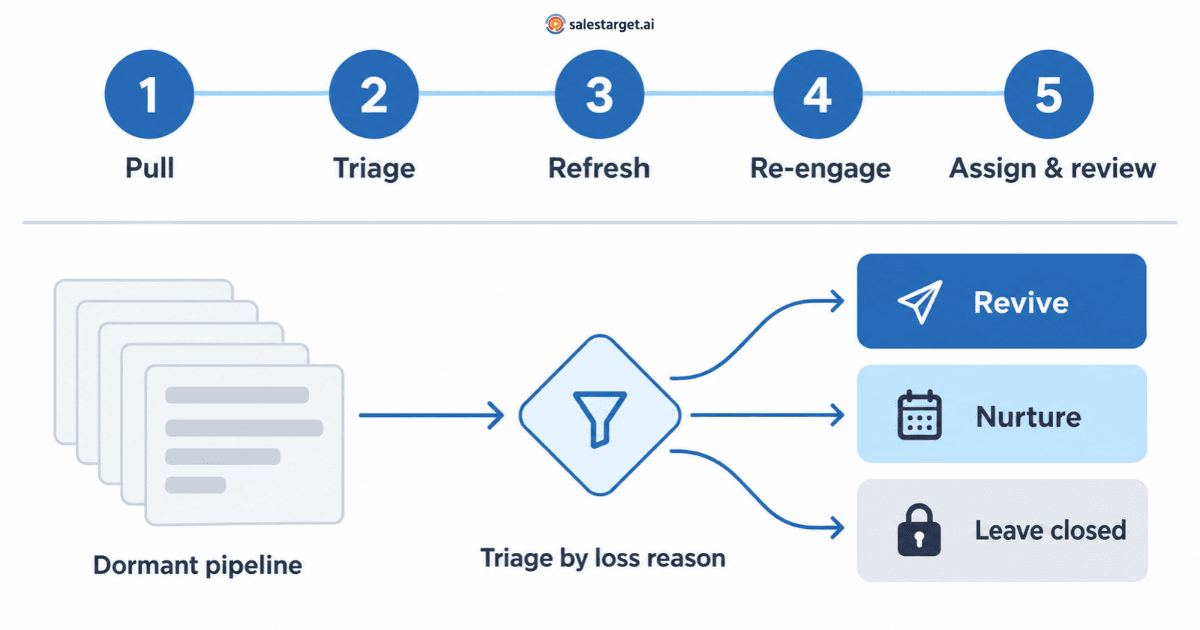
An AI sales copilot helps recover stalled and closed-lost pipeline by doing the work reps skip: pulling dormant deals from the CRM, grouping them by why they stalled, checking whether the contacts are still current, drafting re-engagement that fits each loss reason, and assigning follow-up tasks with review dates. A rep still decides which deals deserve another attempt and handles every reply.
SalesTarget.ai Copilot lets you query deals, build re-engagement sequences and assign follow-ups from a single chat, so reviewing old pipeline becomes a routine instead of a quarterly cleanup project.
What is pipeline recovery?
Pipeline recovery is the structured process of reviewing stalled and closed-lost opportunities, deciding which ones have a realistic path back to a sale, and re-engaging those accounts with a reason that is relevant now. It differs from prospecting, because the account already has history with you. It also differs from deal-risk management, which tries to stop open deals from slipping in the first place. If your team is still setting that up, a deal risk scorecard in your CRM is the preventive half of the same problem.
An AI sales copilot suits this job because recovery is mostly triage: reading many records, sorting them and preparing the next action. If you are new to the category, start with how an AI sales copilot works . This guide assumes the basics and focuses on one workflow.
Not every old deal is recoverable
| Deal state | Typical signal | Default action |
|---|---|---|
| Stalled open deal | No buyer reply for 21+ days and no scheduled next step | Diagnose and re-engage this month |
| Closed-lost: timing, budget or no decision | Buyer agreed on the problem but did not commit | Schedule a revival window |
| Closed-lost: chose a competitor | Signed with another vendor | Light-touch nurture timed to their renewal |
| Closed-lost: poor fit | Wrong size, use case or a missing capability | Leave closed unless the blocker is gone |
| Champion left the company | Bounced email or a new name in the role | Re-map the account and follow the former champion |
Treat 21 days as a starting point. Set the threshold to roughly the normal gap between buyer touches in your sales cycle.
Why closed-lost deals deserve a system, not a one-off email blast
Three patterns make old pipeline more valuable than it looks, and harder to work than it seems.
Many lost deals were never lost to a competitor. In research for The JOLT Effect, Matthew Dixon and Ted McKenna analyzed about 2.5 million recorded sales conversations and found that between 40% and 60% of deals stall in indecision rather than ending in a loss to another vendor (interview with Matt Dixon, CustomerThink). A buyer who froze last quarter may still have the same problem today.
Your contacts have probably moved. Median employee tenure with a current employer was 3.9 years in January 2024, and 22% of wage and salary workers had been with their employer a year or less, according to the U.S. Bureau of Labor Statistics. A closed-lost list from last year will contain people who have left. That hurts deliverability and kills deals that depended on one person.
Decisions are made by groups. Gartner reports that the typical buying group for a complex B2B solution involves six to 10 decision makers . (Gartner) . Deals that stalled with a single contact often stalled because nobody else on the buying side was involved.
Together, these explain why the usual “any update on your side?” email rarely works. It goes to the wrong person, ignores why the deal stopped and gives the buyer no new reason to act. A copilot makes the alternative practical: different treatment for each loss reason, applied across dozens of accounts at once.
The five-step AI sales copilot workflow for pipeline recovery
Step 1: Pull the dormant pipeline into one view
Start with plain-language questions instead of building a report. SalesTarget.ai Copilot can query deals, meetings and tasks in plain language, so the first pass can be a few requests like these. What comes back depends on what your CRM records.
- “Show open deals with no activity in the last 30 days, grouped by stage.”
- “List deals closed as lost in the past 12 months, with deal value and last contact date.”
- “Which open deals are at risk, and what is the suggested next step for each?”
The goal is one list showing deal value, stage at loss, last activity date, primary contact and the loss reason the rep recorded. If your CRM has no reliable loss-reason field, ask each deal owner to tag their own deals during the triage meeting. They remember more than the record shows.
Step 2: Triage by loss reason
This is where most revival efforts fall apart, because every deal gets the same email. Sort each deal into one of three groups: revive now, nurture until a trigger or leave closed. The loss reason tells you which group, and what to say.
| Loss reason | What may have changed | Revival trigger | Re-engagement angle |
|---|---|---|---|
| Timing (“not this quarter”) | The window they named has arrived | The date the buyer gave you | Reference their own timeline and the problem they described |
| Budget | New fiscal year, funding or reprioritized spend | Budget cycle, funding or hiring news | Propose a smaller, lower-risk starting scope |
| No decision | The problem persists; fear of a wrong choice | A new signal of the same pain | Make one clear recommendation and reduce risk with a pilot or phased start |
| Champion left | Someone new owns the problem | A new hire in the role | Introduce yourself to the successor with context, and reconnect with the former champion at their new company |
| Chose a competitor | Their contract is running | The approach of renewal | A short, useful check-in before renewal decisions are made |
| Poor fit | Usually nothing | A product change that removes the blocker | Reach out only if the blocker is truly gone |
Rule of thumb: if you cannot say in one sentence what has changed since the deal stopped, it goes to nurture, not revive.
The copilot can do the first sort, but a rep should confirm every “revive” decision. CRM loss reasons are often shorthand. “Budget” sometimes means “we didn’t build enough value,” and only the person who ran the deal knows which.
Step 3: Refresh the account before writing a word
Old deals carry old data. Before any outreach:
- Verify every email address. Run the list through an email validator that checks format, domain, mail server and mailbox status. Bounces from a stale list damage the domain you use for all your other outreach.
- Find who owns the problem now. Describe the role and account you need in plain English, and the copilot turns the description into search filters. To spot what has changed at an account, Lead Explorer business-event filters such as funding rounds, hiring spikes and leadership changes can show which closed-lost accounts have something new going on.
- Rebuild the buying group. If the deal died single-threaded, plan for two or three contacts this time. This guide to mapping a buying committee covers which roles to look for.
- Follow the champion. A former champion at a new company is a separate and often warmer opportunity. Here is how to build a list from champions who just switched companies .
Step 4: Draft re-engagement that matches the reason
Ask the copilot for a short sequence per group, not one message for everyone. SalesTarget.ai Copilot writes multi-step sequences tailored to industry and persona, and its Memory feature can draw on your website content for on-brand language. Give it the context it needs: the loss reason, what the buyer said and what is new.
Example request: “Write a three-step email sequence for deals lost to no decision in the last six months. Reference the problem from our last conversation, recommend a 30-day pilot as the next step and keep each email under 90 words.”
Example first email for the no-decision group (names are fictional):
Subject: The reporting backlog you mentioned
Hi Priya, when we spoke in March, month-end reporting was taking your team four days. If that is still the case, I’d suggest one specific starting point: a 30-day pilot on a single region, so you can judge it on your own numbers before committing further. Worth a 20-minute call to scope it?
Rules that keep revival emails from reading like spam:
- Reference something real from the deal history, and check it against the CRM timeline. AI drafts can state the wrong detail with full confidence when notes are thin.
- Bring one new thing: a changed circumstance, a new capability, a relevant result or a smaller offer.
- Keep sequences short. Three touches over two to three weeks is plenty for people who already know you.
- Make the ask easy to answer. “Is this still a priority?” beats “Do you have 30 minutes on Thursday?”
- Test two angles. Use the built-in A/B variations to compare, for example, a recommendation-led email against a question-led one within the same group.
For tone, see how to write a follow-up that doesn’t sound desperate .
Step 5: Assign owners, tasks and review dates
Recovery fails quietly when nobody owns it. For every “revive” deal, have the copilot create a follow-up task and assign it to the original deal owner with a due date. For every “nurture” deal, create a task dated to its trigger, such as the budget cycle, the renewal window or 90 days out, so the account resurfaces on its own instead of relying on memory.
Then let results guide the next round. Ask the copilot which recovery sequences are producing replies and meetings, which groups are underperforming and which reopened deals are stalling again. This is sales workflow intelligence in practice: the system reads the outcome data and points you to where the next hour should go. You can see the deal, task and analytics features in SalesTarget.ai Copilot.
An example 60-day recovery sprint
Here is how a five-rep team might run its first pass. The numbers are illustrative, not benchmarks.
| When | Activity | Output |
|---|---|---|
| Week 1 | The copilot pulls 140 deals that stalled or were lost in the last 12 months. Reps confirm loss reasons in a 45-minute triage meeting. | 30 revive, 60 nurture, 50 leave closed |
| Week 2 | Validate contacts, find successors and add one or two new stakeholders per revive account. | A clean contact list with departed contacts removed |
| Weeks 3–5 | Run three-touch sequences by group. Reps answer every reply personally. | Replies and reopened conversations logged in the CRM |
| Weeks 6–8 | Review results by loss reason, reopen qualified deals as opportunities and reschedule nurture tasks. | Evidence of which loss reasons are recoverable for your business |
The last output is often the most valuable. After one sprint you know whether “budget” losses come back for you and whether “no decision” deals respond to a pilot offer. That sharpens qualification on new deals, too.
Where human judgment still decides the outcome
A copilot speeds up triage and drafting. It does not make these decisions for you:
- Whether the loss reason was real. Only the deal owner can tell “no budget” from “no value.”
- Relationship calls. Some buyers ended the process on bad terms. Those deals stay closed, whatever the data says.
- Consent and opt-outs. Honor every past unsubscribe and do-not-contact request, and follow the email rules that apply in your buyers’ regions.
- Commercial conversations. If a revived buyer asks about cost or terms, a person answers. The same goes for any positive reply. The rules for when an AI copilot should hand off to a human apply to revived deals as much as new ones.
- Sending volume. Re-engaging an old list in one burst is how domains get flagged. Google advises keeping spam rates reported in Postmaster Tools below 0.1% (Google). Send in small batches and watch complaints.
How to measure pipeline recovery
Track recovery as its own motion so its results do not disappear inside net-new numbers.
| Metric | What it tells you |
|---|---|
| Revival reply rate | Share of “revive” accounts where a current stakeholder replied |
| Reopened opportunities | Deals moved back into an active stage, by original loss reason |
| Meetings from recovered accounts | Whether replies turn into real conversations |
| Recovered pipeline value | Value of reopened opportunities, tracked separately from new pipeline |
| Win rate on revived deals | Whether reopened deals close as well as net-new ones |
| Guardrails: bounce, unsubscribe and spam complaint rates | Whether recovery is costing you deliverability |
Review these by loss reason every month. Over time, the data shows you which “no” really meant “not yet.”
Common pipeline recovery mistakes
- Blasting the whole closed-lost list. One generic email to every lost deal wastes the context that makes these accounts valuable.
- Reviving deals lost for fit. If nothing has changed, you will lose the same deal again.
- Writing only to the original contact. A departed or single-threaded contact is often why the deal stopped.
- Sending AI drafts without checking the history. One wrong detail tells the buyer nobody read their file.
- Running it once. Recovery works as a monthly habit with dated nurture tasks, not as a one-time campaign.
Turn old pipeline into a recurring source of deals
Stalled and closed-lost deals are not a graveyard. They are a list of buyers who already know you, waiting for a relevant reason to talk again. An AI sales copilot for B2B sales makes it practical to work that list properly: sorting deals by why they stopped, refreshing each account, drafting reason-specific outreach and keeping every follow-up on a dated task. Your reps keep the decisions that matter.
Ready to run your first recovery review? SalesTarget.ai Copilot can pull your dormant deals, draft the re-engagement sequences and assign the follow-ups in one conversation.