Manage Every Reply in One Inbox
Unibox pulls all campaign replies into one workspace so you can respond, qualify intent, and send opportunities to CRM — without switching inboxes.
What Unibox does
Centralizes replies → helps you follow up and convert faster.

One inbox for all replies

Assign status & owners

Push to CRM

Faster qualification
All Replies. One Place.
See every conversation from all connected inboxes in a single, organized list — no tab switching, no missed messages.
- You can also:
 Filter conversations by campaign or inbox
- Search replies instantly
- Open full message history in one click
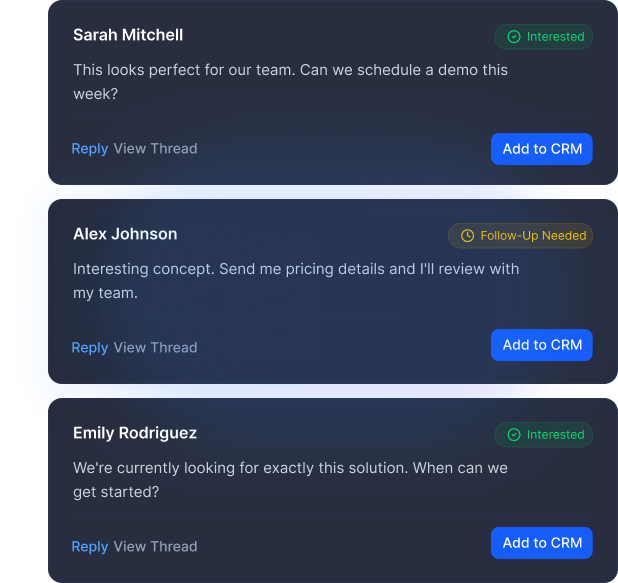
See Who's Interested — Fast
Unibox groups reply by intent so teams know who to prioritize.
Statuses
 Interested
 Follow-Up Needed
 Not Interested
 Closed
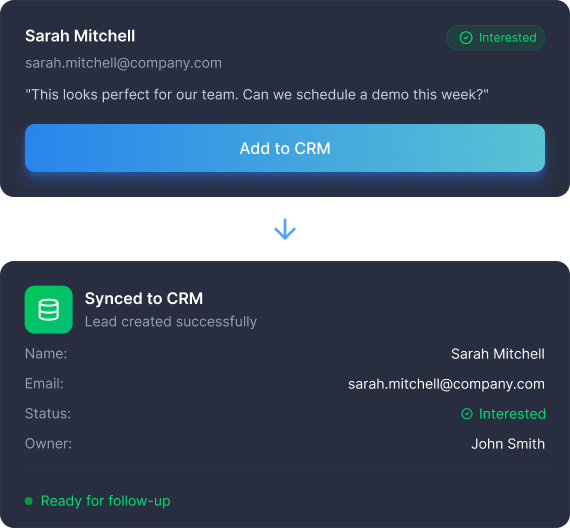
Send to CRM in One Click
Qualify a reply — sync to CRM — continue deal flow. No manual work, no context switching, no dropped leads.
- You can also:
 Add a status before syncing
 Keep CRM fields clean and organized
 Route leads to the right owner instantly
Simple Workflow

Run campaign
Pulls all replies from connected inboxes

Replies land in Unibox
Centralizes conversations, shows full threads, and lets you filter, tag intent, and assign statuses

Sync to CRM
Pushes qualified leads with clean, structured fields
Key Benefits

Handle Replies Faster
Launch your outreach and let SalesTarget.ai pull all replies from connected inboxes automatically.

Stay in One Inbox
Manage every campaign reply from one unified workspace — no toggling or context-switching.

Qualify Leads Clearly
Tag intent, assign statuses, and see who’s interested in seconds.

Keep CRM Clean
Sync only qualified replies to CRM, ensuring an organized and accurate pipeline.
Never Miss a Reply Again
Unibox brings all your conversations into one inbox — so you can reply faster, qualify instantly, and move deals to CRM without switching tabs.