You cleaned the list, watched every row turn green, and hit launch. Then the bounce notices started landing, and your sender reputation took the damage before anyone could pause the sequence.
Emails bounce after email verification since a verifier checks a mailbox at one moment, from one server, under one set of rules. Between that check and your send, people change jobs, mailboxes fill up, gateways mask the answer, and your own authentication can break. A verified status lowers bounce risk. It does not guarantee delivery. The fix is to read the bounce code, find out whether the fault sits with the contact or with your sending setup, and verify close to the send.
Why Do Emails Still Bounce After Email Verification?
Verification predicts delivery. It does not promise it.
Why verified email addresses are not a guarantee of successful delivery
A verifier asks the receiving server a question and reads the reply. That reply can be stale, vague, or wrong, and it says nothing about what happens when your real message arrives.
What changes between email verification and the actual sending process?
Time passes and the sender changes. Contacts leave, domains tighten filters, and your message now carries your IP, your authentication records, and your content. The verification probe tested none of those.
How to identify whether the bounce comes from the recipient's mailbox or your sending domain
Group bounces by recipient domain and by sending inbox. Failures spread across many recipient companies from one inbox point to your setup. Failures stacking up at a single company point to that company's mail server or policy.
What Are the 8 Common Reasons Verified B2B Emails Still Bounce?
Most post-verification bounces trace back to the same handful of causes.
Outdated email addresses after employee job changes or company departures
People leave, and IT deletes the mailbox weeks later. A check run before the deletion still passes. Older prospect databases carry the most of these.
Catch-all email addresses that hide inactive or nonexistent mailboxes
A catch-all domain accepts every address at the SMTP check, real or invented. The verifier cannot tell the difference, so the rejection shows up after the server sorts the mail internally.
Corporate email security gateways that block SMTP verification
Many security gateways refuse or mask mailbox probes. The verifier gets a vague reply and labels the address unknown, or valid by default.
Greylisting and temporary email server rejections
Greylisting rejects a first-time sender with a temporary error and waits for a retry. A verifier that does not retry reads it as a failure. A sender that does not retry loses the message.
Full, suspended, or deactivated recipient mailboxes
A mailbox can exist and still refuse mail. Full storage, suspended accounts, and expired licenses all return rejections for addresses that looked fine.
Sender IP blocks and poor domain reputation
Receiving servers judge your IP and domain before they look at the recipient. A blocklisted IP or weak reputation gets perfectly valid addresses rejected.
SPF, DKIM, and DMARC authentication failures
Missing or misaligned records make strict receivers reject mail outright. Major mailbox providers now expect authentication from bulk senders, so one broken record turns good contacts into bounces.
Incorrect email verification results and stale contact databases
No verifier is perfect, and every result is only as fresh as its date. A contact verified long ago and never rechecked is a stale guess.
Hard Bounce vs. Soft Bounce: Why Does the Difference Matter in B2B Outreach?
A hard bounce is a permanent rejection. A soft bounce is a temporary one. Treating them the same either burns good contacts or keeps hammering dead ones.
What causes a hard bounce, and when should an address be suppressed?
Nonexistent mailboxes, deleted accounts, and invalid domains cause hard bounces. Suppress the address after the first confirmed hard bounce and never retry it.
What causes a soft bounce, and when should you retry?
Full mailboxes, greylisting, and server hiccups cause soft bounces. Retry a few times across several days, then move the contact to review if it keeps failing.
How temporary server failures differ from permanent mailbox rejections
Temporary failures use 4xx codes and mean try later. Permanent rejections use 5xx codes and mean stop. The code class tells you which path to take before you read anything else.
Which bounce types require list cleaning, and which require sending configuration fixes?
Unknown user and invalid mailbox bounces need list cleaning. Authentication, blocklist, and policy rejections need sending fixes. Mixing the two up wastes weeks of work on the wrong problem.
How a High Email Bounce Rate Affects B2B Sales Teams and Revenue Pipelines
Bounces cost more than the lost message. They hit reputation, rep time, and the numbers leadership trusts.
How repeated hard bounces damage sender reputation
Mailbox providers read hard bounces as proof you do not know your recipients. Reputation drops, and soon even clean contacts land in spam.
Why bounced emails waste SDR and BDR prospecting efforts
Every bounce is a rep who researched, wrote, and queued a message that never arrived. Worse, the touch gets logged and the rep moves on, assuming the prospect ignored them.
How poor email deliverability affects campaign performance and meetings
Reply rates fall when delivery falls, and booked meetings fall with them. Teams then rewrite copy and tweak offers when the real problem sits in the list.
How bad contact data affects RevOps reporting and agency campaign results
Bad data skews funnel reports and inflates the top of the pipeline. Agencies feel it hardest, since a dirty list drags down results they promised a client.
How to Identify Why a Verified Email Address Bounced
The bounce message already holds the answer. Most teams skim past it.
How to read SMTP error codes and email bounce notifications
Skip the generic delivery-failure banner. Read the enhanced status code and the plain-text line under it. The first digit gives the class, and the text names the reason.
What does SMTP error 550 5.1.1 mean for a verified address?
It means the receiving server says the mailbox does not exist. For a verified address, either the contact left or the verifier missed it. Suppress the address and reverify a sample from the same source.
What do 421, 450, 451, and 452 temporary errors indicate?
Code 421 means the service is unavailable, 450 means the mailbox is unavailable, 451 means a local processing error, and 452 means insufficient storage. All four ask for a later retry, so do not suppress on first sight.
How to identify authentication and sender-policy rejection errors
Scan the text for words such as policy, authentication, SPF, DKIM, DMARC, blocked, or reputation. These point at your domain, not at the contact.
How to distinguish a verifier false positive from a sender-side delivery problem
A single rejected address among many delivered ones is a verifier miss. The same rejection code hitting unrelated recipients from one inbox is a sender problem. Resend a few known-good contacts from a different, healthy domain to confirm.
How to investigate delayed bounces and receiving-server rejections
Some servers accept the message, then bounce it after internal scanning. Watch bounce reports for days after sending, not only the first hours.
How to Fix Email Bounce Issues in B2B Outreach: 8 Actionable Steps
Work the steps in order. The early ones tell you which later ones you need.
Step 1: Check the original bounce notification and SMTP response code
Open the original notice and copy the response code and text. Every other decision hangs on that line.
Step 2: Reverify the bounced email address using a second check
Run the address through an independent check. The Email Validator runs MX and SMTP checks with disposable-email detection and risk scoring, so you get a second read before you decide to keep or drop the contact.
Step 3: Remove invalid and deactivated email addresses from active campaigns
Pull every confirmed hard bounce out of live sequences the same day. A dead address left in a follow-up step bounces again.
Step 4: Separate catch-all, risky, and unknown contacts for further review
Move these into their own segment. They are not confirmed bad, but they are not confirmed good, and they should never ride along with clean contacts at full speed.
Step 5: Check MX records and recipient mail server availability
Confirm the domain still has working MX records and that its server answers. A dead MX often means the company changed providers or shut down.
Step 6: Fix SPF, DKIM, and DMARC authentication problems
Check all three records on every sending domain, and fix misalignment before sending more. Email Outreach runs SPF, DKIM, and DMARC checks across your inboxes and adds automatic AI warm-up and inbox rotation to protect sender reputation.
Step 7: Investigate sender IP blocks and domain reputation
Check your sending IP and domain against public blocklists. If you are listed, cut volume, find the trigger, and request delisting before ramping back up.
Step 8: Suppress permanent failures and monitor future campaign bounces
Add permanent failures to the suppression list and watch bounce rates on every later send. A fix you never measure is a guess.
How to Prevent Emails From Bouncing After Verification
Prevention comes down to freshness, segmentation, and one shared source of truth.
Verify B2B email addresses as close to campaign launch as practical
Verification decays every day, so the gap between check and send is your real risk. Lead Explorer enriches and verifies contacts at the moment you find them, so data enters your sequence fresh instead of weeks old. Start a free trial and run a live search to see how that works.
Reverify old prospect databases before reactivation campaigns
An old list is a pile of job changes waiting to happen. Reverify the whole file before anyone writes a reactivation email.
Set separate sending rules for valid, risky, catch-all, and unknown contacts
Send valid contacts at normal pace. Send risky and unknown contacts slowly. Send catch-all contacts in small batches from a secondary inbox, so a bad batch never touches your main domain.
Maintain a central suppression list across sales and marketing platforms
A contact suppressed in one tool and mailed from another still bounces. Campaign leads land in the built-in CRM automatically, which keeps one record of every contact and every outcome.
Monitor bounce rates by lead source, domain, and campaign
A blended bounce rate hides the culprit. Split it by source, recipient domain, and campaign, and one bad vendor file or one blocked company stands out fast.
Send a small controlled test batch before launching a larger campaign
Send to a small slice first and wait for delayed bounces. Scale only when that slice comes back clean.
Build email verification into every new lead import and CRM workflow
Make verification a gate, not a chore. Nothing enters a sequence without a status and a date attached.
How Accurate Is Email Verification, and Why Can Results Differ Between Tools?
Accuracy depends on what the receiving server is willing to say, not only on the tool. Our guide on how accurate a bulk email verifier is goes deeper on the numbers behind this.
What does an email verifier actually confirm during an SMTP check?
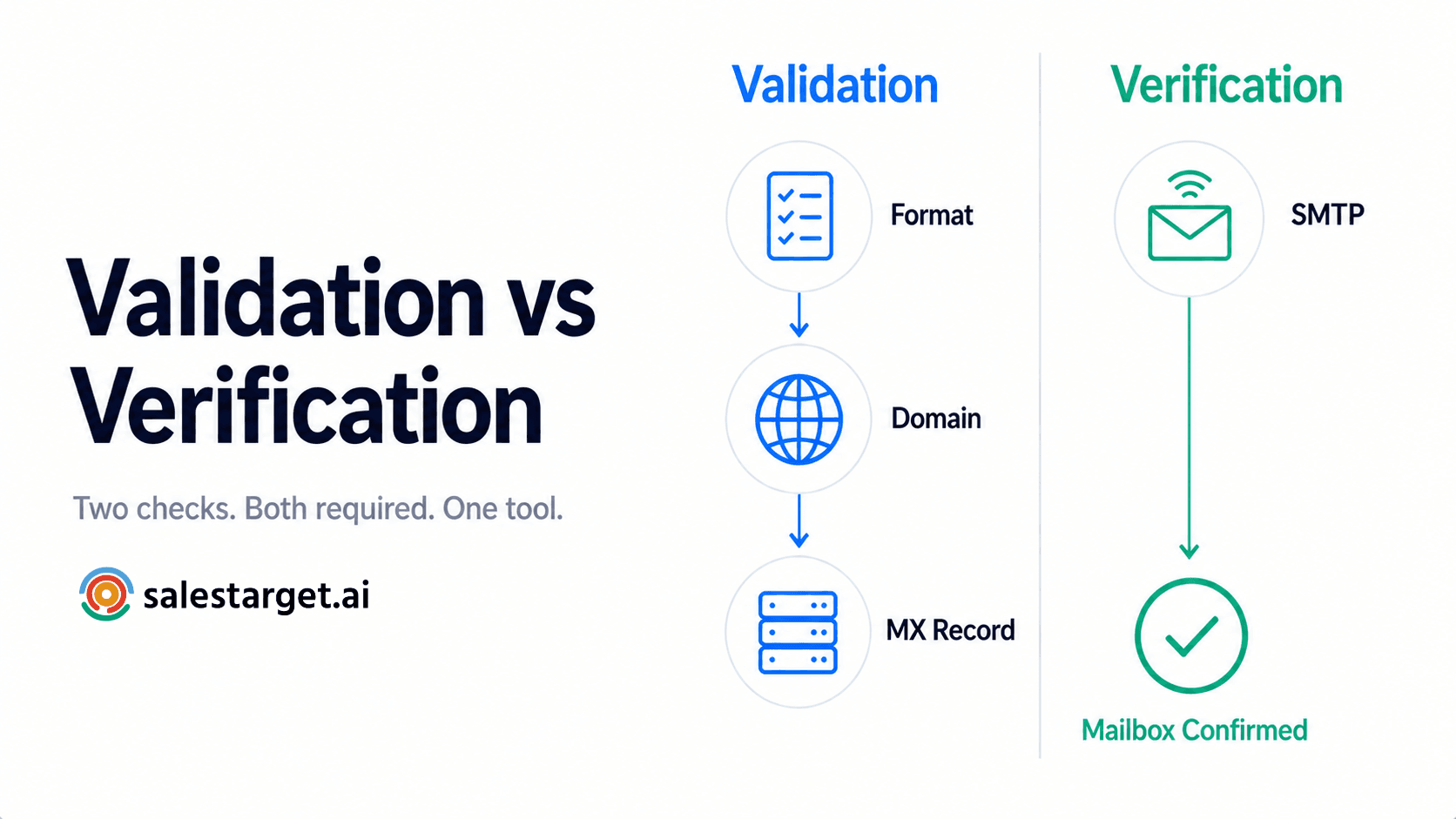
It confirms the domain has mail servers and that the server accepted or rejected the address at that moment. It does not confirm a human reads that inbox, or that your message will clear filters.
Why catch-all domains make mailbox verification difficult
A catch-all server says yes to everything. The best any tool can do is flag the domain as catch-all and score the risk.
How greylisting and security gateways affect verification results
Both give vague or temporary answers. Two tools can read the same reply differently, which is why their results do not match.
What causes false-positive and false-negative verification results?
A false positive passes an address that later bounces, usually after a catch-all or a gateway hid the truth. A false negative rejects a good address after a temporary error looked permanent.
How to measure verifier accuracy against actual campaign bounce data
Compare each verification status to what happened on send. If addresses marked valid bounce at a visible rate, tighten your rules or recheck the data age.
What Should B2B Teams Look for in Email Verification Tools?
Pick the tool that reports uncertainty honestly. Our bulk email verifier guide covers the full checklist.
Real-time SMTP and MX record validation capabilities
Look for live checks on both. A tool that only checks syntax misses nearly everything that causes a bounce.
Detection of invalid, disposable, risky, and catch-all addresses
You need more than valid and invalid. Separate statuses let you set separate sending rules.
Bulk email verification for large prospect databases
Big lists need batch processing that returns clear statuses per row, not a single pass or fail count.
Verification accuracy reporting and confidence indicators
A confidence indicator tells you which valid results to trust at full speed and which to send slowly.
API access and CRM integration for automated validation
An API and CRM sync turn verification into a gate on every import, not a task someone forgets.
Bounce tracking, suppression management, and list-cleaning features
Verification without suppression handling leaves the loop open. You want bounce results to flow back into the list automatically.
How to Use a Bulk Email Verifier Before Launching a B2B Outreach Campaign
The sequence matters as much as the tool. Our step-by-step bulk verifier walkthrough covers the setup in detail.
Prepare and segment prospect lists by source and data age
Split the file by where each contact came from and how old the record is. Old and unknown-source rows get stricter treatment.
Upload contact lists and run bulk email verification
Upload each segment and run the check. Keep segments separate so results stay traceable to a source.
Review verification results and separate contacts by risk level
Sort results into valid, risky, catch-all, unknown, and invalid. Each group gets its own sending rule.
Remove invalid addresses and quarantine uncertain contacts
Delete the invalid rows. Park uncertain ones in a holding segment instead of mixing them back into clean sends.
Export verified contacts and sync results with your CRM
Export the clean file, or sync it straight to the CRM, with the status and verification date attached to every record.
Monitor bounce reports and update your email suppression list
After sending, feed every bounce back into the suppression list the same day. The next campaign starts cleaner.
Why Choose SalesTarget.ai for B2B Email Verification and Outreach?
SalesTarget.ai is an all-in-one AI sales intelligence and outbound platform. Apollo gives you data and engagement, but you bolt on deliverability and a CRM. Instantly, Smartlead, and Lemlist focus on cold email and deliverability, with no native B2B database, no LinkedIn automation, and no real CRM. SalesTarget.ai keeps all of it in one workspace.
Find B2B prospects with Lead Explorer's verified professional profiles and enrichment capabilities
Lead Explorer searches in plain English or through stacked business and people filters, then enriches each lead with verified professional email, personal email, phone, and mobile in the same click.
Verify business email addresses with Email Validator's MX and SMTP checks
The Email Validator runs MX and SMTP checks, disposable-email detection, and risk scoring, through a real-time API or bulk list cleaning, so bad addresses are caught before they bounce.
Run email and LinkedIn sequences together through integrated outreach workflows
Email Outreach and LinkedIn Outreach run in one coordinated flow, so context carries across both channels and a bounce on email can shift the next touch to LinkedIn.
Manage campaign activity and follow-ups through the built-in CRM and AI Dialer
Every email and call is logged to the lead timeline. Follow-up tasks are created automatically when a lead replies or a meeting ends, and the built-in dialer auto-logs calls.
Use the free AI Copilot for lead discovery and sales campaign preparation
The AI Copilot is free inside the platform. It finds leads across the full profile database, drafts personalized email sequences, and answers questions about CRM deals, meetings, and tasks in plain language.
Manage prospecting, verification, outreach, and CRM activities under one platform and one bill
Prospecting, verification, outreach, and CRM live in one workspace. That removes the handoffs between tools where stale data slips through and bounces start.
What Email Verification Mistakes Should B2B Sales Teams Avoid?
Most bounce problems come from habits, not tools.
Assuming a verified email address will remain valid indefinitely
Verification has a shelf life. Treat every result as a snapshot with a date on it.
Treating catch-all and unknown addresses as confirmed valid contacts
These are unconfirmed. Mailing them at full speed is how clean domains pick up bad reputations.
Confusing email verification with inbox placement
A valid mailbox can still send your message to spam. Verification tells you the door exists, not that the message gets through it.
Repeatedly sending to addresses that have already hard bounced
Each repeat tells providers you ignore feedback. One confirmed hard bounce is enough.
Ignoring domain authentication and sender reputation
Teams polish lists and skip the records that decide whether mail is accepted. Both halves matter.
Verifying contacts without recording verification dates and results
Without a date, you cannot tell fresh data from stale. Store status and date on every record.
Cleaning individual campaign lists without updating the central CRM database
A clean campaign file and a dirty CRM means the bad contacts return in the next import. Update the source record every time.
How Can Sales Teams Build a Repeatable Email Bounce Prevention Workflow?
A workflow beats a one-time cleanup. Build the same checkpoints into every campaign.
Create a verification checkpoint before every outbound campaign
No list launches until it passes a fresh check. Make it a gate in the launch process, owned by one person.
Establish sending rules for each email verification status
Write down what happens to valid, risky, catch-all, unknown, and invalid contacts. Reps follow the rule instead of guessing.
Connect lead enrichment, email validation, and CRM suppression
When enrichment, validation, and suppression share one platform, a bounce updates the record without anyone exporting a file.
Track verification results against actual campaign bounce rates
Compare status to outcome after every send. The gap between them is your measure of how much to trust each status.
Review list quality and delivery performance after every campaign
Close each campaign with a short review of bounce causes, sources, and domains. The next list improves because of it.
Stop Verified Emails From Turning Into Bounced B2B Outreach
A green verification badge is where the work starts, not where it ends. Bounces after verification come from decay, hidden mailbox behavior, and sender-side faults, and each one has a fix once you read the code and split the problem by cause.
SalesTarget.ai closes the gaps that cause these bounces. Lead Explorer verifies at enrichment, the Email Validator checks addresses again before sending, Email Outreach protects your domains, and the built-in CRM keeps a single suppression record. Salestarget.ai gives you a practical way to send to contacts you can actually reach.