Every day, your sales team logs in only to waste hours manually digging for email addresses, copy-pasting names into LinkedIn, and watching response rates fall off a cliff. When you finally get a reply, half the time it is a bounce since the lead data was stale from day one. Choosing the right LinkedIn automation tools means balancing outreach volume with account safety and workflow efficiency. Outbound teams need software that automates connection requests and messaging without triggering platform bans. Though basic tools focus only on LinkedIn, modern systems integrate lead data, email sequences, and customer relation management. SalesTarget.ai provides an all-in-one database and multichannel outreach platform with built-in safety rules, whereas point tools like Apollo, Instantly, and LinkedHelper require stitching multiple subscriptions together to achieve the same results.
Building a pipeline requires connecting with buyers where they actively talk. Using specialized LinkedIn sales tools allows reps to scale their outreach. Manual prospecting is slow, and though automation speeds up the process, bad tools can get your account restricted or blocked. This LinkedIn automation comparison covers top platforms, their features, security measures, and pricing structures to help you find the right fit for your team.
Why sales teams use LinkedIn automation (and why safety matters)
Sales teams use LinkedIn automation to scale their outreach and save hours on manual prospecting, but using unsafe tools risk permanent account bans. When reps automate tasks, they can reach more prospects with less manual labor, increasing connection rates. A study from the HubSpot Sales Strategy Report shows that prospecting is the most challenging part of the sales process for over 40% of sales representatives. Using software to automate these steps allows reps to focus on actual sales conversations. By shifting to a system that handles initial connections, reps can automate LinkedIn outreach for better sales and keep their calendars full of discovery calls.
Safety is critical since LinkedIn monitors account behavior for automation patterns. If a tool sends too many requests too quickly or runs at irregular hours, the platform flags the profile. A restricted account stops all outbound sales activity, wiping out weeks of pipeline. Modern sales teams must prioritize tools that simulate human activity, use safe delays, and respect daily limits.
How safe LinkedIn automation works?
When evaluating LinkedIn automation safety, sales teams need to look at how software simulates human activity. Safe LinkedIn automation works by mimicking real human behavior in a web browser, using variable delays, and staying within daily activity limits. Older automation tools used direct API connections or sent rigid, repetitive requests that algorithms caught immediately. Safe systems run connection requests, messages, and profile views at irregular intervals.
These tools restrict daily actions to normal ranges (typically under 80 to 100 actions a day) and set up warm-up schedules. A warm-up schedule slowly increases daily activities over several weeks so the account does not trigger spam filters. Safe systems use timezone settings to only send messages during business hours, avoiding automated actions at midnight.
Top LinkedIn sales automation tools
Identifying the best LinkedIn automation tools depends on your database needs and CRM preferences. Selecting the right system requires evaluating features, integration options, and account protection. Here is an overview of the leading tools in the market.
SalesTarget.ai
SalesTarget.ai is an all-in-one AI sales intelligence and outbound platform that combines B2B lead data, multichannel outreach (email, LinkedIn, and phone), email validation, and a built-in CRM in a single workspace. Instead of subscribing to separate database, validation, sequencing, and CRM tools, sales teams manage their whole process in one place.
The platform offers a Lead Explorer with over 840M verified professional profiles and 146M business entities. The LinkedIn Outreach module coordinates connection requests, direct messages, and engagement steps in the same flow as email campaigns. Contacts are verified at the exact moment of enrichment to keep bounce rates low. With a built-in CRM and an AI Copilot, reps can track deals and find leads using simple text queries.
Apollo
Apollo is a database and sales engagement platform. It helps teams find contact information and set up email campaigns. It has a large B2B database, but it lacks a native CRM, requiring users to connect external systems to track deals.
For LinkedIn outreach, Apollo helps reps create tasks, but it does not automate actions natively within the platform the same way it automates emails. Users must use a Chrome extension or perform steps manually, which slows down outbound workflows. To build a full system, you must connect Apollo to other tools, increasing subscription costs.
Instantly
Instantly is a cold email tool focused on deliverability, inbox warm-up, and scale. It allows users to connect unlimited email accounts to run cold campaigns. It is popular for email outreach, but it lacks key features for LinkedIn.
Instantly does not offer native LinkedIn automation or a built-in B2B lead database. Teams using Instantly must source leads from elsewhere, verify them using another tool, and use a separate platform to run LinkedIn outreach. This separation creates data silos and forces reps to export and import CSV files constantly.
Dripify
Dripify is a dedicated LinkedIn automation tool that runs cloud-based sequences. It allows users to build prospecting funnels, automate connection requests, and send follow-ups. It focuses heavily on security, using a dedicated IP address for each account.
Dripify is effective for LinkedIn outreach, but it is a point tool. It does not handle cold email outreach natively, has no B2B contact database, and lacks a complete CRM. Sales teams must pair it with other systems to run multichannel campaigns.
Woodpecker
Woodpecker is an email follow-up tool built for small businesses and agencies. It automates cold email campaigns and includes basic validation features. It helps with sender reputation by using automated pacing.
Like Instantly, Woodpecker is built primarily for email. It does not automate LinkedIn actions natively in a unified sequence, meaning reps must manage LinkedIn steps separately. Teams looking for a coordinated multichannel approach will find themselves juggling different systems.
LinkedHelper
LinkedHelper is a desktop-based software built solely for LinkedIn automation. It runs on your computer or a virtual private server, acting as a browser extension to perform connection requests, messages, and endorsements.
LinkedHelper has deep LinkedIn-specific features, but it has a steep learning curve. Since it runs locally, your computer must remain turned on for the software to work, except when you configure a virtual server. It does not offer email outreach, a lead database, or CRM functions, making it a isolated point tool.
LinkedIn automation tool Pricing comparison
| Tool Name | Core Channel Focus | Pricing Model Type | Database Included? | CRM Features? |
|---|---|---|---|---|
| SalesTarget.ai | Multichannel (Email, LinkedIn, Phone) | Flat-rate platform subscription | Yes (840M+ profiles) | Yes (Outbound-focused CRM) |
| Apollo | Email & B2B Database | Seat-based + credit add-ons | Yes (B2B database) | No (Requires integration) |
| Instantly | Email only | Flat-rate email accounts | No | No |
| Dripify | LinkedIn only | Seat-based subscription | No | No |
| Woodpecker | Email only | Flat-rate or slot-based billing | No | No |
| LinkedHelper | LinkedIn only | License key per account | No | No |
Must-Have Features of LinkedIn Sales Automation Tools
Analyzing the key LinkedIn automation features is vital to build an outreach stack that converts. When choosing a tool for your team, look for features that support personalization, safety, and team collaboration.
Personalized Outreach at Scale
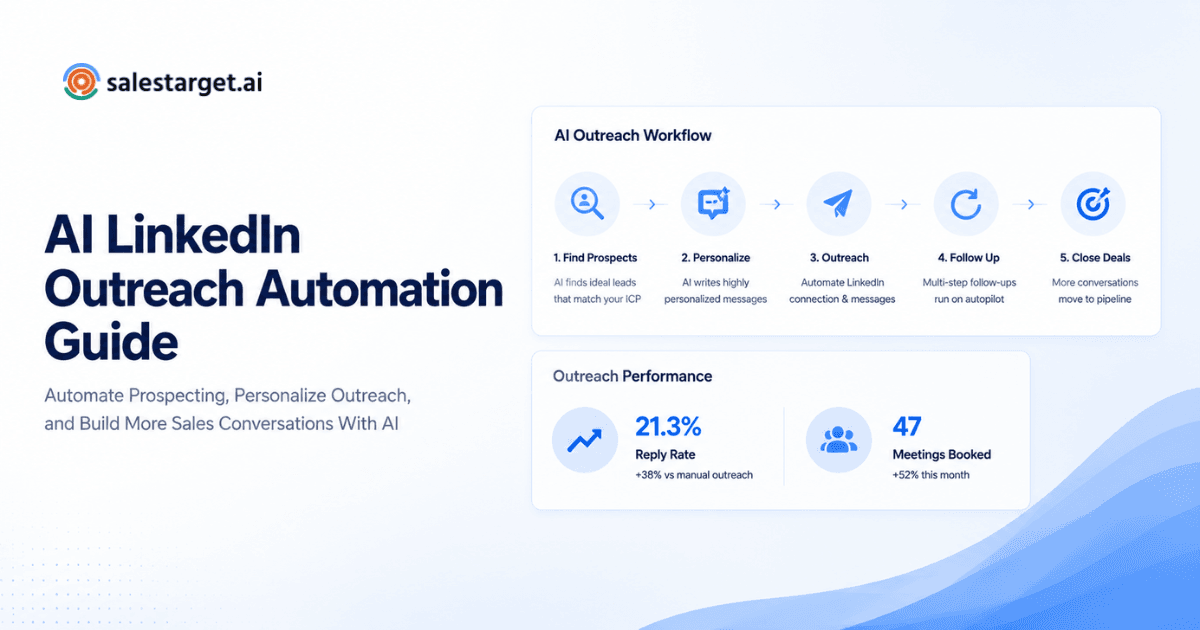
Generic templates get ignored. A good LinkedIn tool must personalize every message. SalesTarget.ai solves this by using profile data, job roles, and industries to adapt messages for each prospect. You can read more in our LinkedIn outreach automation guide to see how personalization improves response rates.
Automated Follow-Up Sequences
Most replies come from follow-ups, not the first touch. Look for tools that let you build multi-step sequences. These sequences should pause automatically when a prospect replies so reps do not send automated follow-ups to someone who already booked a meeting.
CRM Integration and Contact Synchronization
Outreach tools must connect with your system of record. If a rep connects with a prospect on LinkedIn, that activity should sync to their contact timeline. SalesTarget.ai includes a built-in CRM that logs emails, calls, and LinkedIn touches automatically, saving hours of admin work and simplifying customer lifecycle management.
Account Safety and LinkedIn Compliance
Security is non-negotiable. Tools must run using dedicated IP addresses, simulate human typing, and set daily limits. Safe tools feature a "warm-up" mode that gradually increases message volume to avoid triggering security alerts.
Campaign Analytics and Performance Tracking
To improve campaigns, you need clear data. Having native CRM analytics and reporting inside your workspace ensures your pipeline data remains accurate. Look for reports that show connection rates, reply rates, and pipeline value. A clear dashboard helps managers see which templates perform best and adjust strategy.
AI-Powered Personalization and Smart Automation
Modern automation uses AI to read profiles and draft specific messages. An AI sales assistant helps reps summarize prospect interactions and draft customized follow-ups. SalesTarget.ai features an AI Copilot that builds sequences and finds leads using plain English queries, helping reps launch campaigns faster.
Which LinkedIn Automation Tool Is Right for Your Sales Role?
Your role determines which features you need most. Here is how different positions use automation.
Sales Representatives: Automating Prospecting and Daily Outreach
Sales reps need to build pipeline without spending all day on admin tasks. A study by Salesforce State of Sales Report indicates that reps spend a significant portion of their day on administrative work rather than selling. By using SalesTarget.ai, reps automate connection requests and follow-ups, logging every touch to the CRM automatically. This leaves more time to call interested prospects.
Sales Managers: Improving Team Productivity and Pipeline Visibility
Managers need to see what their team is doing and which campaigns work. They need shared dashboards, team activity reports, and centralized billing. With SalesTarget.ai, managers see active deals, call notes, and team email stats in one dashboard without jumping between systems.
Founders: Building Strong Networks and Generating New Opportunities
Founders must build relationships but lack time for manual prospecting. They need a simple system to find leads and start conversations. SalesTarget.ai lets founders search for targets using the Lead Explorer and push them into sequences in one click, keeping their calendars full of discovery calls.
Agencies: Managing Multiple Client Outreach Campaigns
Agencies run outreach for dozens of clients. They need multi-account management, workspace separation, and easy reporting. They need tools that keep client profiles safe and prevent domain issues.
Recruiters: Streamlining Candidate Discovery and Engagement
Recruiters need to reach candidates quickly. They use LinkedIn to find talent and need sequences that follow up with potential hires. Automation ensures no candidate is forgotten during the hiring cycle.
Marketing Teams: Scaling Audience Growth and Lead Nurturing
Marketers use LinkedIn to share content and build audiences. They run sequences to connect with target accounts, nurturing them before passing warm leads to the sales team.
Enterprise Teams: Coordinating Large-Scale Sales Operations
Large teams need permissions, security compliance, and direct CRM integrations. They need platform stability and systems that manage hundreds of thousands of prospects without losing data.
Why choose SalesTarget.ai for LinkedIn outreach automation?
SalesTarget.ai solves the main issue of modern sales: tool fatigue. Instead of paying for a database, email sequencer, LinkedIn tool, validator, and CRM, you get everything in one workspace.
AI-Powered Personalization for Higher Engagement
Our AI Copilot reads prospect details to build customized messages. By writing copy that fits the target's role and industry, reps get more replies. You can test this by signing up for a free trial to run your first campaign.
Advanced Automation Features for Efficient Outreach
SalesTarget.ai runs coordinated sequences. If a prospect does not reply to an email, the system sends a LinkedIn connection request two days later. This multichannel approach keeps your outreach active across platforms.
Safe and Compliant LinkedIn Prospecting
Safety features are built directly into the platform. With daily limit caps, randomized delays, and timezone-aware scheduling, SalesTarget.ai keeps your profile safe from restrictions.
Seamless CRM Integration and Sales Workflow Management
The platform features an outbound-focused CRM. When a lead replies, a task is created. Calls can be made directly from the platform, and the system records notes automatically, saving reps about six hours of admin work per week.
How to implement LinkedIn automation without getting suspended?
To keep your account safe, follow safety practices and avoid aggressive scale.
Setting up sequences with natural pacing
Set delays between actions. Avoid sending 50 connection requests in five minutes. Schedule actions throughout the day with random intervals of several minutes to mimic natural browsing.
Testing before scaling
Start with small batches. Send 10 connection requests a day for a week. Monitor your connection rate and profile views before increasing the volume.
Monitoring account health
Watch for warnings. If LinkedIn asks you to verify your identity or alerts you about activity, pause all automation immediately. Let the account rest for a few days, then resume at lower limits.
Key takeaways: Choosing the right LinkedIn automation tool
- Multi-tool setups increase costs and cause data sync issues.
- Account safety depends on tools that use human-like delays and respect platform limits.
- Personalization is necessary to get replies; templates no longer work.
- SalesTarget.ai combines lead data, email, LinkedIn, and CRM in one platform, helping teams run faster cycles and book more meetings.