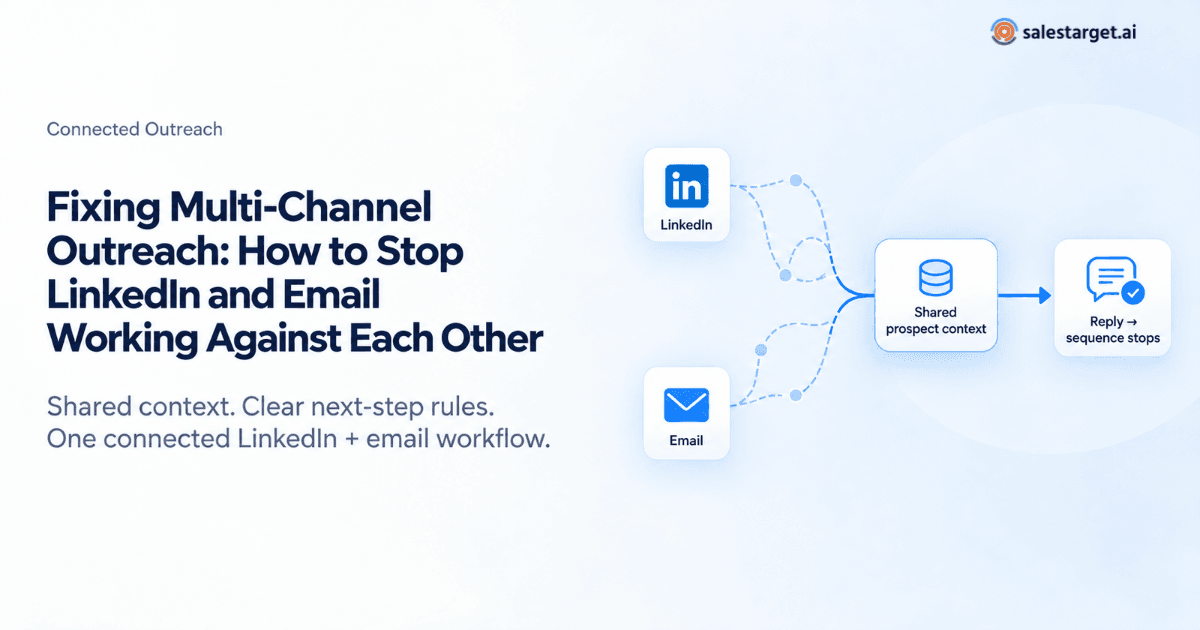
Multi-Channel Outreach usually fails for an operational reason, not a messaging one: LinkedIn and email run as separate campaigns with separate data. Prospects get the same pitch twice, follow-ups continue after a reply, and nobody sees the full conversation. The fix is to run both channels as one workflow, with a shared prospect record, clear rules for which channel acts next, and an automatic stop the moment a prospect responds anywhere.
A familiar scene: a prospect writes back, "I already answered your colleague on LinkedIn. Please stop emailing." Nobody meant to annoy them. The two campaigns simply didn't know about each other.
Why Multi-Channel Outreach Breaks Down
Multi-channel outreach is the practice of engaging one prospect across several channels, usually LinkedIn and email, as a single continuous conversation. The key word is single. Most broken setups fail in one of six ways:
- Separate lists. LinkedIn runs from one export and email from another. Within weeks, nobody knows which list is current.
- The same pitch, twice. The connection note and first email say the same thing in different words. It reads like a template.
- Timing collisions. A connection request and a cold email land the same morning. It feels like being chased.
- Follow-ups after a reply. The prospect answers on LinkedIn, and the email tool sends follow-up number three anyway.
- Manual handoffs. Reps pause sequences by hand. That works for 30 prospects. It fails at 300.
- One path for everyone. A CFO who rarely opens LinkedIn gets the same LinkedIn-first sequence as a founder who posts daily.
Original analysis: the cost of two disconnected sequences
Run a five-step LinkedIn sequence and a five-step email sequence side by side, each detecting only its own replies. The prospect replies to LinkedIn message two. Email has sent two of five steps, so three more emails reach someone already talking to you. In one shared workflow, that number is zero.
For the broader case on combining the two channels, see our guide to AI-powered multichannel sales outreach. This piece focuses on fixing the side effects.
Stop Running Two Campaigns at One Prospect
SalesTarget.ai keeps LinkedIn and email in one connected flow, so follow-ups build on each other instead of colliding. See how Multi-Channel Outreach keeps context intact from first touch to reply.
Cold Email vs LinkedIn: Deciding Which Channel Leads
The cold email vs LinkedIn debate is usually framed as a contest. It shouldn't be. Cold email and LinkedIn serve different purposes: LinkedIn suits light, conversational openings, while email suits messages that need detail and a clear request.
The better question is which channel should perform the next useful action for this prospect, right now. Base it on what you know:
| Situation | Lead with | Why |
|---|---|---|
| Active on LinkedIn, no prior contact | A low-pressure first touch | |
| Verified email, dormant LinkedIn profile | Reach them where they work | |
| Message needs a use case or proof point | Room for context and one ask | |
| Connected, but LinkedIn messages unanswered | New channel, new angle | |
| Prospect replied anywhere | That channel, by a person | Automation steps back |
None of these are universal rules. Let past engagement override defaults.
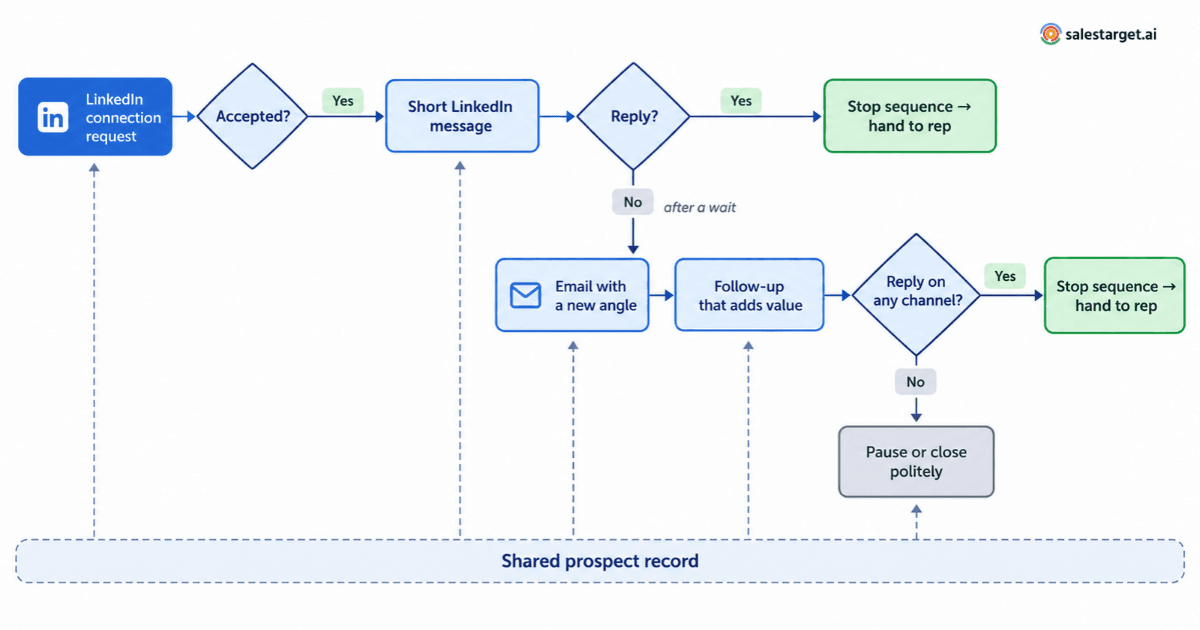
Build a Connected Outreach Workflow
A connected workflow runs on conditions, not just a calendar. What happened last should decide what happens next.
Start From One Prospect Record
Both channels should share one contact record: what you sent, what the prospect did, and where they replied. If a rep needs two tools to answer "where are we with this person?", the workflow is already split.
Write Rules for the Next Step
Connection accepted? Send a short LinkedIn message. LinkedIn quiet after a reasonable wait? Move to email with a different angle. Prospect replied? Stop and route the thread to a person.

Make Each Touch Build on the Last
Every step should add something new: an example, a sharper question, a resource. Restating the pitch on a new channel is repetition, not follow-up.
Define Stopping Conditions
A reply, an unsubscribe, a "not now," or a bounce should end or pause the sequence. Over-sending has a technical cost too. Google's email sender guidelines ask senders to keep reported spam rates below 0.1% and never reach 0.3%.
For a timing structure, our LinkedIn and email multichannel playbook lays one out. Layer these rules on top of it.
Where LinkedIn Outreach Automation Helps
LinkedIn Outreach Automation helps teams handle repetitive LinkedIn work: sending connection requests and follow-ups, and tracking who accepted or replied. Its value is consistency: steps happen on time and feed the next decision. It still needs guardrails:
- Sensible limits. Keep activity close to what a diligent person could do, and know LinkedIn's User Agreement.
- Real personalization. A first-name field doesn't count.
- Human review for messages to strategic accounts.
- Fast reply handling, so responses reach a rep quickly.
- Relevant targeting. Automating a bad list just makes mistakes faster.
Use AI to Coordinate the Next Action
Multi-channel AI sales automation uses AI to choose and carry out the next outreach step across channels, based on prospect data and engagement. It can help prioritize interested prospects, personalize openers, adapt follow-ups that get no response, and keep history visible across LinkedIn and email.
The key point: AI should coordinate outreach, not simply increase it. Double the volume without fixing coordination, and you double the collisions. The goal is fewer, better-timed messages.
Measure Coordination, Not Just Volume
Messages sent shows activity, not health. Track positive reply rate, replies by channel, opt-outs per sequence, meetings booked, and messages sent after a reply. That last one should be zero.
A Practical Troubleshooting Checklist
Run your setup through these questions. Every "no" points to a fix.
| Question | If the answer is no |
|---|---|
| Do both channels use the same prospect data? | Merge into one source before the next launch |
| Does a reply on either channel stop all steps? | Fix this first; it does the most damage |
| Is the next channel chosen by a rule? | Add conditions for acceptance, replies, and silence |
| Does each follow-up add something new? | Rewrite steps that repeat the opening pitch |
| Can a rep see full prospect history in one place? | Centralize history before scaling volume |
| Are channels spaced to avoid same-day stacking? | Alternate channels instead |
| Do engagement signals change the next step? | Tie acceptance and replies to sequence logic |
How SalesTarget.ai Solves the Coordination Problem
SalesTarget.ai is a B2B outbound sales platform, and its Multi-Channel Outreach feature targets the problems above. Conversations start on LinkedIn with automated, personalized outreach. When LinkedIn responses stall, email follow-ups trigger automatically, so a quiet thread doesn't become a dead end.
Both channels run in one connected flow, which keeps messages aligned and prevents duplicate outreach. Follow-ups don't restart the conversation or repeat the same message. Reps don't switch tools, and lead history stays intact.
Multi-Channel Outreach breaks when LinkedIn and email run as strangers. The goal of multi-channel outreach is not to contact prospects in more places. It is to coordinate the next useful interaction across channels without losing context.
SalesTarget.ai keeps LinkedIn and email in one connected flow so your team can do exactly that. See Multi-Channel Outreach in SalesTarget.ai →