TL;DR
- Multichannel outreach means reaching the same B2B prospect across LinkedIn and email in a coordinated sequence — and it generates up to 287% more responses than single-channel outreach
- Cold email reply rates average 3.43% in 2026 (Instantly Benchmark Report). LinkedIn direct messages outperform cold email by 101% — averaging 10–15% reply rates vs. 5.1% for email alone
- The sequence architecture matters more than the copy: LinkedIn first builds recognition, email delivers context and CTAs, follow-ups on both channels close the loop
- SalesTarget.ai runs LinkedIn and email steps inside a single coordinated sequence — one workflow, one Unibox for all replies, one CRM for all activity
- Safe daily limits: 20–40 LinkedIn connection requests per day with human-like delays and timezone-aware scheduling — account safety is built into the platform
- Tools like Smartlead, La Growth Machine, and Lemlist run LinkedIn and email as separate workflows. SalesTarget.ai coordinates both in one sequence from one dashboard
Why Single-Channel Outreach Is Losing the Reply Rate War
Cold email reply rates have dropped to an average of 3.43% in 2026 — a structural decline driven by inbox saturation, stricter filtering from Gmail and Microsoft, and increasingly noise-immune buyers who receive 120+ emails per day. The issue is not the copy. It is the channel becoming saturated at the same time that inbox providers are enforcing stricter filtering than at any previous point in email history.
LinkedIn direct messages now outperform cold email by 101% — averaging 10–15% reply rates versus 5.1% for cold email. But LinkedIn alone has a ceiling too. Connection acceptance rates average 27–30%, and without email backing up the sequence, a single non-reply on LinkedIn leaves the conversation dead with no clear next move.
The answer is not to abandon email or pivot entirely to LinkedIn. It is to run both in a coordinated sequence where each channel does what it does best — and neither operates in isolation.
📊 Channel performance benchmarks — 2026
- Cold email average reply rate: 3.43% — Instantly Benchmark Report 2026, analysing billions of cold email interactions
- LinkedIn DM reply rate (post-connection): 10–15% average; 20–30%+ with strong personalisation — EngageKit / Closely benchmarks 2025
- Multichannel sequences (LinkedIn + email): up to 287% more responses than single-channel — Outreaches.ai Cold Outreach Benchmarks 2025
- Personalised LinkedIn messages vs. generic templates: 3x higher response rates — HubSpot data via SendIQ 2025
The Psychology Behind Multichannel: Why Two Touchpoints Beat One
When a B2B buyer sees your name in two separate professional contexts — a LinkedIn notification and an email inbox — they are statistically more likely to respond than if they saw you in only one. This is the recognition effect: familiarity increases trust, and trust is the prerequisite for a reply in any outbound channel.
Research on B2B buying committees shows buyers now require 6–8 touchpoints across multiple channels before engaging with a vendor conversation. A 2025 Expandi study across over 20 million LinkedIn outreach attempts found that buying committees average 6.3 stakeholders per B2B deal — and that single-channel sequences consistently fail to create the cross-stakeholder visibility needed to move a deal forward.
The mechanism: LinkedIn builds recognition and social proof. Email delivers substance and a clear ask. When both run in a coordinated sequence with shared timing logic and contextual consistency, you are not doubling your outreach volume. You are building cumulative visibility that compounds with each touchpoint.
What Each Channel Does Best
Multichannel outreach fails when both channels are used for the same purpose. LinkedIn and email have different norms, different audience expectations, and different optimal use cases. Matching the channel to its job is the foundation of an effective sequence.
| Dimension | ||
|---|---|---|
| Primary job | Build recognition and social credibility before the ask | Deliver value, context, and a clear call to action |
| Trust signal | Profile view, mutual connections — social proof before a word is read | Professional tone, personalised context, trackable engagement |
| Message length | Short — 50–150 words maximum. Long LinkedIn messages get ignored | 50–125 words optimal per 2025–2026 benchmark data for highest reply rates |
| CTA style | Conversational, low pressure — "Worth connecting?" not "Book a demo" | Specific, one clear next step — "15 minutes Thursday?" not "Let me know when works" |
| Timing sweet spot | Tuesday–Thursday, mid-morning in prospect's timezone (9–11am local) | Monday launch, Wednesday follow-up — Martal 2026 benchmark analysis |
| Deliverability risk | Account restriction if daily limits exceeded — cap at 20–40 requests/day | Domain flagging if bounce rate exceeds 5% — verified contacts essential |
| Reply rate benchmark | 10–15% DM average; 20–30%+ with strong personalisation | 3–5% cold email average; 10%+ with strong targeting and personalisation |
The sequencing implication: LinkedIn should almost always come first — never after. A prospect who has already received two cold emails before seeing a LinkedIn connection request will read that request as follow-up pressure, not genuine outreach. Reverse the order and the same request feels like organic connection.
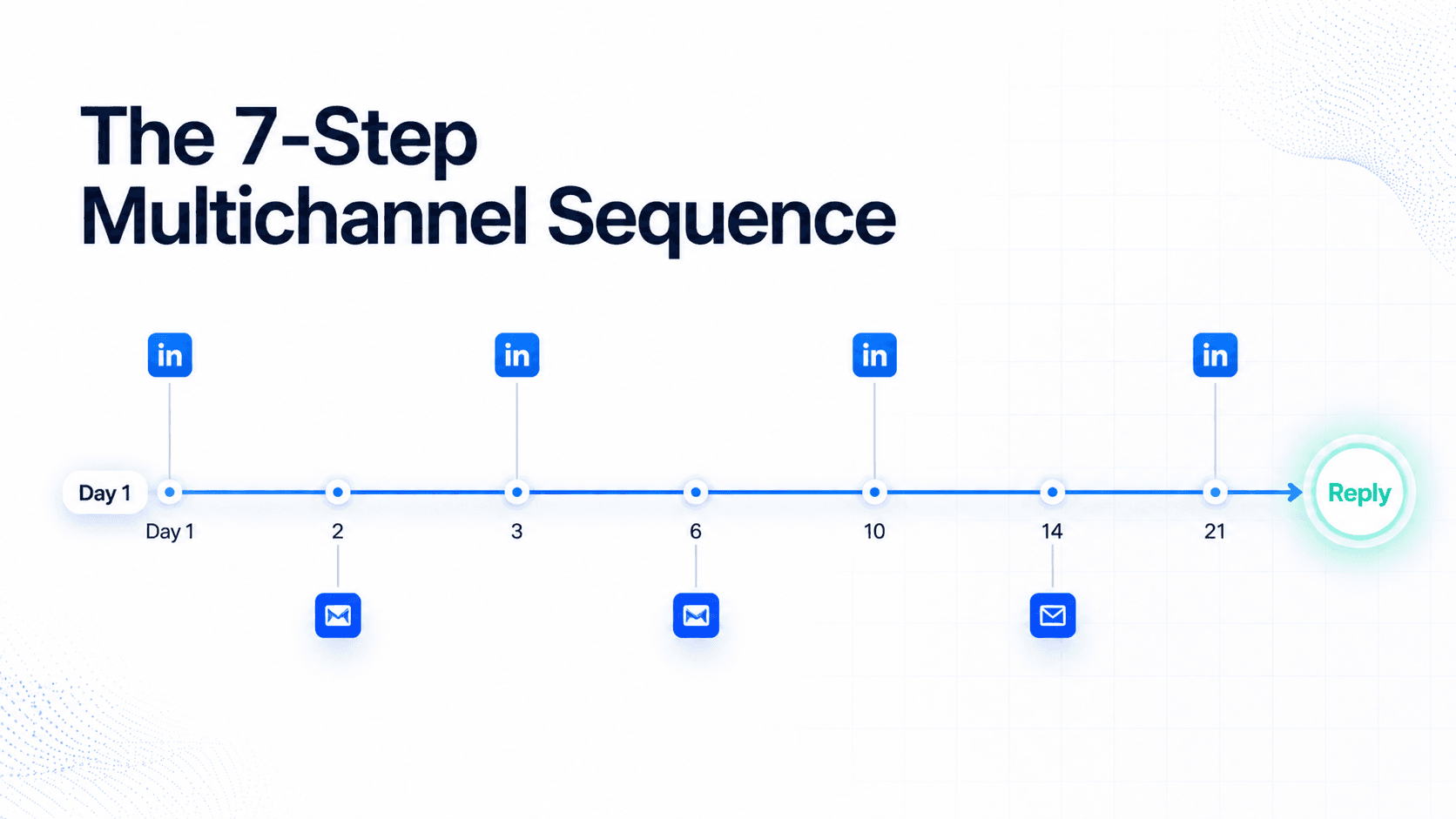
The 7-Step LinkedIn + Email Sequence (Day by Day)
The sequence below is built on SalesTarget.ai's recommended multichannel structure, confirmed from the platform's scheduling logic and spacing guidelines. Every step has a specific purpose. Spacing is not filler — it is what makes the sequence feel natural rather than automated.
Day 1 — LinkedIn: Profile View
Visit the prospect's LinkedIn profile. No message. This creates a notification they will see — your name appears before you've said a word. It is a passive recognition touchpoint that costs nothing and sets up everything that follows.
Day 2 — LinkedIn: Connection Request
Send a connection request with a short, specific note under 300 characters. Reference something real — their role, a recent post, or a shared industry context. The goal is acceptance, not a pitch. Example: "Hi [Name] — I work with [role type] at [industry] companies on outbound prospecting. Thought it made sense to connect."
Day 3 — Email: First Cold Email
Launch the first cold email. Do not reference the LinkedIn connection request — that reads as surveillance. Lead with a relevant insight or question specific to their company, industry, or role. Keep it to 75–100 words. One CTA only.
Day 6 — LinkedIn Message (if connected) or Email Follow-up (if not)
If connected: Send a short conversational message — not a pitch. "Thanks for connecting — quick question about how your team handles [specific pain point]." If not connected yet: Send email follow-up #1 with a new angle, not a resend of the original.
Day 10 — Email: Value-Add
A value-add email with no CTA — a relevant case study, an industry-specific stat, or a practical insight the prospect can use immediately. This is the trust-building step most sequences skip. It is also the step most sequences credit when they analyse what actually drove the reply.
Day 14 — LinkedIn: Soft CTA Message
A specific, low-commitment ask: "Would a 15-minute call make sense to compare approaches? Happy to share what we're seeing in your space." If not yet connected on LinkedIn, send the email equivalent at this step.
Day 21 — Email: Break-up or Re-engage
Short, direct, respectful: "Totally understand if the timing's off — I'll leave the door open. If [specific trigger] ever becomes a priority, feel free to reach out." Break-up messages generate some of the highest reply rates in the full sequence — because removing pressure gives the prospect permission to respond on their own terms.
How to Write LinkedIn Messages That Don't Feel Like Cold Email
The most common LinkedIn outreach failure is treating it like email — formal structure, long paragraphs, aggressive CTAs. LinkedIn is a professional social platform. The writing style that works on email actively damages reply rates on LinkedIn.
What works on LinkedIn:
- Short, conversational sentences — no more than 2–3 lines per paragraph
- Reference something observable and specific — a recent post, a company announcement, a role change
- One question, not one pitch — "Is [X] something your team is working on?" consistently outperforms "I'd love to show you our platform"
- Plain text only — no bullet points, no bold, no numbered lists. Formatted text reads like a template
- No links in the first message — links signal automation and measurably reduce reply rates
What kills LinkedIn reply rates:
- Opening with "I" — "I noticed", "I came across", "I wanted to reach out"
- Pitching the product in the connection request note
- Messages longer than 150 words
- Generic openers that could have been sent to anyone in any industry
- Asking for a call in the first message after connecting
How SalesTarget.ai handles LinkedIn personalisation at scale
SalesTarget.ai's AI Copilot generates personalised opening lines for each LinkedIn message by pulling from the prospect's profile, job title, company description, and recent activity. Every connection request note and first message is tailored to that specific person — not a template with a name swap. According to SalesTarget.ai's own platform data, campaigns using AI-personalised openers see reply rates of 12–18%, compared to 3–6% for template-based approaches. The personalisation happens at scale — you review and approve, the AI handles the per-contact tailoring.
How to Write Cold Emails That Reference LinkedIn Without Being Creepy
Explicitly citing cross-channel activity in your messages is the fastest way to make a prospect uncomfortable. "I tried connecting with you on LinkedIn but didn't hear back, so I'm trying email" reads as tracking, not outreach. The result is negative replies and opt-outs, not conversations.
The correct approach: use the LinkedIn context to inform your relevance — not to cite it as proof of persistence.
| Situation | Wrong approach | Right approach |
|---|---|---|
| After LinkedIn connection accepted | "Since we connected on LinkedIn, I wanted to follow up by email…" | Write the email as if it stands alone. Use their profile context to personalise — not the channel activity itself |
| After LinkedIn message with no reply | "I messaged you on LinkedIn but didn't hear back, so trying email…" | New angle, new opener — a different insight or question. The sequence is invisible to the prospect. Keep it that way |
| After seeing their LinkedIn post | "I saw your LinkedIn post about X and thought I'd reach out by email…" | "Your point about X resonates — [specific connection to their insight]. Is [relevant topic] something you're actively working on?" |
The multichannel advantage is cumulative recognition — not cited persistence. Every touchpoint should feel independently relevant. The fact that you are running a coordinated sequence is invisible to the prospect. Keep it that way.
How SalesTarget.ai Runs LinkedIn + Email in One Coordinated Sequence
SalesTarget.ai is built to run LinkedIn and email as a single coordinated workflow — not two separate tools that require manual synchronisation. This is the core architectural difference between SalesTarget.ai and tools like Smartlead, La Growth Machine, and Lemlist, which handle each channel in its own campaign interface.
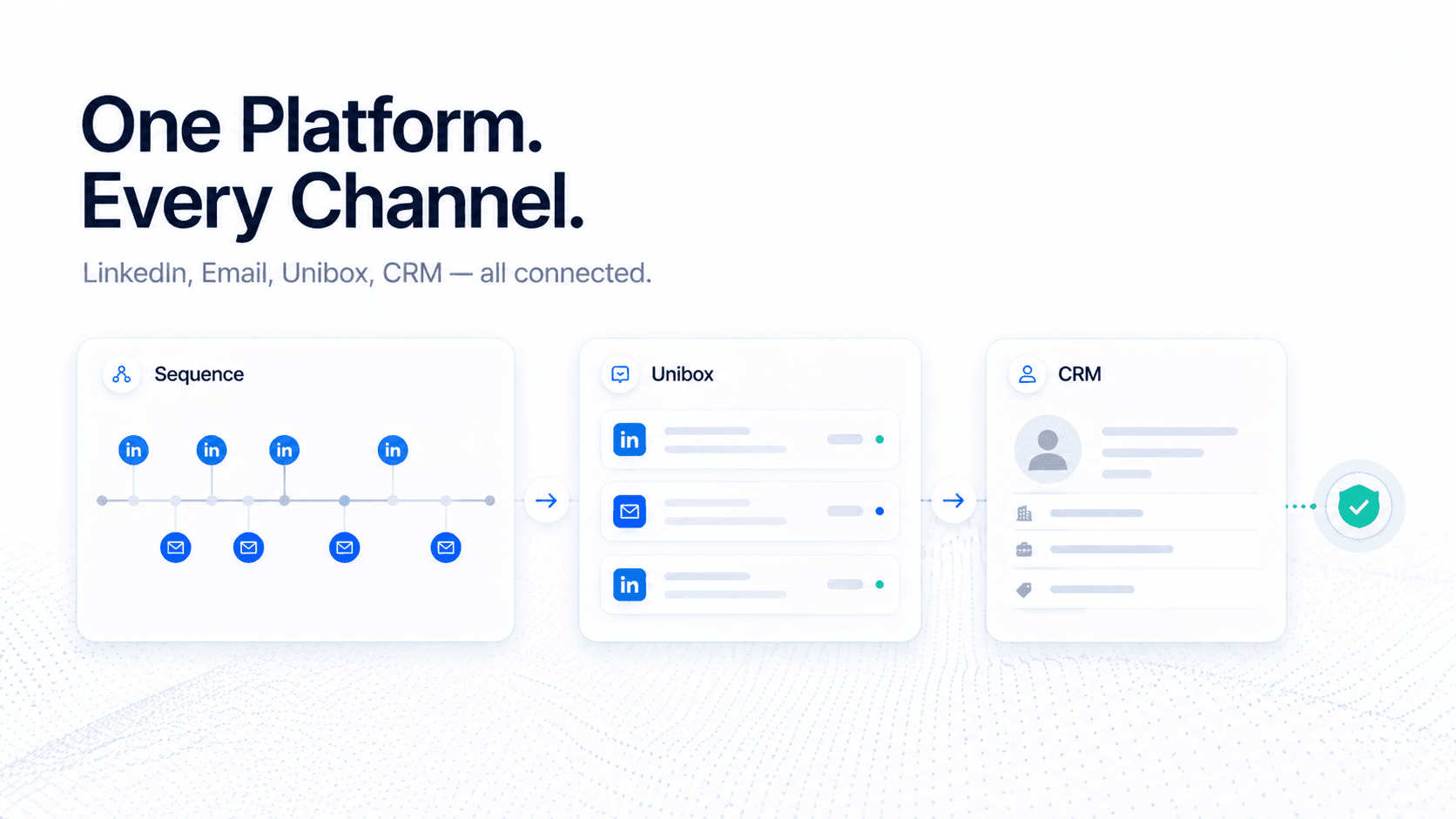
- One sequence builder — LinkedIn steps (profile view, connection request, message) and email steps (initial, follow-up, value-add, break-up) sit on the same timeline. The platform handles orchestration and timing
- Behaviour-based branching — if a prospect replies to the LinkedIn message at step 3, the sequence pauses email steps automatically and surfaces the reply in your Unibox. No duplicate outreach, no awkward overlap
- Timezone-aware scheduling — both LinkedIn and email sends are queued within the prospect's local working hours (Monday–Friday, 9am–5pm in their timezone). Your SDR launches once. Every lead gets their touchpoint at the right time regardless of where they are located
- Human-like send delays — sends are randomised within windows, not sent at fixed intervals. This avoids the regularity that triggers LinkedIn's detection systems and email spam filters simultaneously
- Unibox — all LinkedIn replies and email replies appear in one unified inbox. No switching between platforms to track what a prospect said on which channel
- CRM sync — every LinkedIn interaction and email touch logs to the built-in CRM automatically. The full conversation history across both channels is visible in one contact record
LinkedIn account setup in SalesTarget.ai
Connect your own LinkedIn account directly — SalesTarget.ai runs through your native account, not an API or third-party proxy. This keeps outreach native to LinkedIn's environment, which is the safest long-term approach for account health. Teams running multiple SDRs can connect and manage multiple LinkedIn accounts from one dashboard — each account runs independently with its own safe daily limits, timezone scheduling, and reply tracking.
Pricing: LinkedIn Automation $29/account/month. All-in-One plans include LinkedIn as part of the full outbound stack — Growth $149/mo · Scale $279/mo · Ultimate $619/mo.
SalesTarget.ai vs. the Tools Currently Ranking for Multichannel Outreach
The tools that rank for multichannel outreach keywords today each handle LinkedIn and email differently. Here is an honest comparison across the dimensions that matter for a B2B outbound team in 2026. Competitor features noted as of April 2026.
| Feature | Smartlead | La Growth Machine | Lemlist | SalesTarget.ai |
|---|---|---|---|---|
| LinkedIn + email in one sequence | Email primary — LinkedIn via integration | Yes — core strength | Yes — LinkedIn + email steps | Yes — native, one workflow |
| Built-in lead database | ❌ External import required | ❌ External import required | Limited — basic search only | ✓ 840M+ profiles, Bombora intent, ICP Builder |
| Bombora intent data | ❌ | ❌ | ❌ | ✓ Included every plan |
| Unified reply inbox | Email only | Multi-channel inbox | Limited | ✓ Unibox — email + LinkedIn combined |
| Built-in CRM | ❌ | ❌ | ❌ | ✓ Included |
| Timezone-aware scheduling | Email only | Yes | Limited | ✓ Both LinkedIn and email |
| Entry price | $39/mo (email only) | €50/mo (LinkedIn focus) | $39/mo | $149/mo All-in-One (leads + email + LinkedIn + CRM) |
The key structural difference: Smartlead, La Growth Machine, and Lemlist require a separate prospecting database before you can build any sequence. SalesTarget.ai includes the lead database, enrichment, intent filtering, email outreach, LinkedIn automation, Unibox, and CRM in one platform. The full workflow from finding a prospect to managing the reply does not require switching tools.
Measuring Multichannel: The Metrics That Actually Matter
Track LinkedIn and email performance separately before combining them. Merging both into a single "multichannel reply rate" before diagnosing individual channels hides exactly where the friction is.
| Metric | What it diagnoses | 2026 benchmark |
|---|---|---|
| LinkedIn connection acceptance rate | ICP targeting quality + connection note relevance | 27–30% average; 40%+ is strong |
| LinkedIn DM reply rate | Message relevance + personalisation quality | 10–15% average; 20%+ is strong |
| Cold email reply rate | Subject line, opening line, CTA, contact data quality | 3–5% average; 10%+ is excellent |
| Combined sequence reply rate | Overall multichannel sequence effectiveness | 8–15%; top performers 20%+ |
| Meeting booking rate | ICP fit + sequence quality + CTA effectiveness | 0.8–2% from cold; 3–5% from intent-filtered lists |
| Email bounce rate | Contact data quality + verification architecture | Under 2% healthy; 5%+ risks domain flagging |
If LinkedIn acceptance rate is low, the problem is targeting or the connection note copy — not the email. If email reply rate is independently low, the problem is the email copy or contact data quality — not the LinkedIn steps. Diagnose channels separately, then measure the combined uplift.
Common Multichannel Mistakes (and How to Avoid Them)
- Starting with email and adding LinkedIn as an afterthought. LinkedIn should come first or simultaneously — it builds the recognition that changes how the email lands. Retrofitting LinkedIn onto an existing email sequence does not produce multichannel results.
- Compressing LinkedIn steps too close together. SalesTarget.ai's recommended minimum between LinkedIn steps is 3–4 days. Compressing steps into 24-hour intervals looks automated to LinkedIn's detection systems and overwhelming to the prospect.
- Cross-referencing channels in message copy. Do not cite LinkedIn activity in your email or email activity in your LinkedIn message. Each touchpoint must feel standalone and independently relevant.
- Using the same message on both channels. LinkedIn requires short, conversational, plain text. Email can carry more context and a specific CTA. Copy-pasting between channels is repetition on two platforms — not multichannel outreach.
- Not using a unified inbox. When LinkedIn and email run in separate tools, replies get missed. A prospect who replied on LinkedIn while an email follow-up sent anyway receives a mixed signal. SalesTarget.ai's Unibox surfaces all replies in one place across both channels.
- Skipping intent filtering before the sequence launches. A multichannel sequence on an unfiltered list still underperforms. Applying Bombora intent topic filters before building the sequence means the same sequence reaches companies that are actively researching your category — which compounds the multichannel uplift significantly.
Conclusion: Build the Sequence Once. Let Both Channels Run It.
The argument for multichannel outreach is not about sending more messages. It is about building enough recognition across enough contexts that when your prospect is ready to engage, your name is the one they respond to first. That recognition advantage is real, it is measurable, and it does not require twice the work when both channels operate inside the same sequence.
Smartlead, La Growth Machine, and Lemlist all require you to manage LinkedIn and email as separate workflows. That fragmentation is the operational problem — and it is why most multichannel implementations underperform relative to the benchmark data. SalesTarget.ai's LinkedIn automation and email outreach run in one coordinated sequence — timezone-aware scheduling for both channels, Bombora intent data to target the right accounts before the sequence launches, and one Unibox where every reply surfaces regardless of which channel it came from.
The playbook is here. The platform runs it. The only thing left is to start.
Run LinkedIn and email from one sequence. Replies in one inbox.
Find, enrich, and launch your first multichannel sequence — all inside SalesTarget.ai.
50 credits · 7-day free trial · No credit card required





