Your SDR uploads 5,000 contacts on Monday. By Wednesday the bounce rate is in double digits, the sending domain is flagged, and replies have dried up. Nobody wrote a bad email. The list was bad.
Bulk email address lookup is the process of finding business emails for many prospects at once, using names and company domains, then verifying every address before you send. Discovery, enrichment, and verification should run as one workflow, so only confirmed addresses reach a sequence. Salestarget.ai runs all three in one platform: find the lead, enrich it, verify it in the same click, and push it into outreach.
This guide walks through the full process, from the data problems that wreck campaigns to a repeatable workflow your team can run every week. You will see how each step works, what to check, and where most teams lose quality without noticing.
The Growing Data Quality Problem in B2B Prospecting
Outbound volume keeps rising, and list quality has not kept up. Reps send more emails than ever, but the contact data behind those emails is thinner, older, and messier than most teams admit. Four gaps cause most of the damage.
Incomplete Business Contact Records and Missing Decision-Maker Emails
Most lists have names and titles but no working email. Senior buyers are the biggest gap, since they hide behind info@ inboxes or publish nothing at all. A VP of Sales rarely lists a direct address anywhere public.
Reps fill the hole by guessing patterns like first.last@. Guessed addresses are where bounces begin, and the damage grows with every batch you send.
The Cost of Outdated Contacts, Invalid Addresses, and Duplicate Records
Every invalid address becomes a hard bounce, and hard bounces mark your domain as careless. Contacts go stale the moment someone changes jobs, so a list that was clean in spring can be half dead by autumn.
Duplicates add a second leak. One buyer gets three emails from three reps, and reply rates fall on all three campaigns. The buyer also remembers the experience, which makes the next outreach harder.
Low Email Deliverability Across Large-Scale Outbound Campaigns
Google and Yahoo both set a spam complaint ceiling of 0.3% for bulk senders. A high bounce rate signals a poorly sourced list, and mailbox providers respond by filtering you.
At volume, a small share of bad addresses is enough to push a whole campaign into spam. The good emails in that campaign suffer too, since reputation is judged at the domain level, not the message level.
The Gap Between Building a Prospect List and Building a Usable Sales Database
A prospect list is names and titles. A usable sales database is verified, deduplicated, segmented, and tied to an account, with a status on every contact that tells reps what to do next.
Most teams own the first and call it the second. The gap shows up as wasted rep hours, unpredictable bounce rates, and campaigns that look fine on paper but never reach a real inbox.
Bulk Email Address Lookup as a B2B Prospecting Workflow
Bulk lookup takes a file or a filtered search and returns a business email for each person, with a status attached. For single-contact basics, see the email address lookup complete guide. Here the focus is on running the process at volume.
Individual Email Lookup vs. Bulk Email Discovery
Individual lookup finds one address at a time, which suits a single high-value account where a rep wants to research the person by hand. It breaks down the moment your target list reaches a few hundred names.
Bulk discovery processes hundreds or thousands in one run with the same matching logic. That consistency matters, since the same rules apply to every record and you can measure results across the full batch.
Contact Sourcing, Email Enrichment, and Verification in One Workflow
Sourcing finds the person, enrichment adds the email and phone data, and verification confirms the mailbox. Run separately across three tools, each handoff adds a CSV and a chance for stale data to creep in.
Salestarget.ai enriches at the moment you find the lead and verifies at the same point. The data is checked when you use it, not when it was first scraped, which removes the gap where addresses go bad.
Business Email Data Sources and Company-Domain Matching
Good results come from many sources cross-checked against each other. Salestarget.ai's Lead Explorer pulls from a large set of data sources and joins professional profiles to business records, so each person is tied to the company they work at today.
Matching on company domain, not company name, is what keeps "Acme" from resolving to the wrong business. Domain matching also makes the later verification steps faster, since the MX lookup runs against the right mail server from the start.
Email Discovery Methods for Targeted B2B Contact Lists
Three methods cover most needs. Database lookup works when the person already exists in the data. File-based enrichment works when you upload names and domains. Filter-based discovery works when you describe the audience by role, industry, and size and let the platform build the list.
Pattern guessing is a fallback, never the primary method. If you must guess, verify every guessed address before it goes near a sequence.
Business Impact of Accurate Bulk Email Data
Accurate data changes four things you can see in your weekly numbers: list quality, research time, targeting depth, and wasted spend.
Higher-Quality Prospect Lists for SDR and BDR Teams
When every address is verified, reps judge the pitch instead of debugging the data. A low reply rate then points at messaging, which you can fix, not at dead mailboxes, which you cannot.
SDR and BDR managers also get cleaner coaching conversations. You can compare reps on copy and timing without wondering whether one of them drew a worse list.
Less Manual Research Across Sales and RevOps Operations
Manual lookup means one contact at a time across several tabs: LinkedIn, company site, a pattern guesser, a verifier. Bulk processing replaces that with one run.
RevOps stops cleaning exports by hand, and reps get hours back each week for conversations. The saved time compounds across a team, which is why bulk workflows pay off faster than most process changes.
Better Targeting for Account-Based Marketing Campaigns
ABM needs several verified contacts per account: the economic buyer, the champion, the daily user. One lucky name per account leaves you with a single point of failure when that person ignores you or leaves.
Bulk lookup by company domain fills the whole buying group in one pass. Marketing and sales then work the same account with the same verified data.
Lower Prospecting Costs and Fewer Wasted Outreach Credits
Credits and sending capacity are finite, and every bounced or risky send burns both. Verifying first protects them for addresses that can convert.
In Salestarget.ai, Email Outreach validates addresses before they send, so risky ones are caught before they touch your sender reputation. Your inboxes spend their daily sending limits on contacts who can actually reply.
The Complete Bulk Email Address Lookup and Verification Process
Six steps, in this order. Skipping one usually shows up later as a bounce spike or a stalled campaign.
Step 1: Prepare a Structured Prospect File With Names and Company Domains
Build columns for first name, last name, and company domain. Domain beats company name every time: "Acme" matches fifty businesses, acme.com matches one.
Remove duplicates and stray spaces before upload, and fix obvious typos in domains. Ten minutes here prevents weak matches and wasted credits in the next steps.
Step 2: Identify Business Contacts Using Company and Job-Title Filters
No file yet? Search instead. In Lead Explorer you can describe your audience in plain English or stack filters for industry, seniority, department, company size, and location.
Run discovery on the result, and you skip the spreadsheet stage entirely. The ICP you defined becomes the list, and the list is already tied to company domains.
Step 3: Run Bulk Email Discovery and Contact Enrichment
Run the whole set in one pass so every record gets the same matching logic. Each person is tied to a company domain and returned with a business email, plus phone data where it exists.
Review the match rate when the run finishes. If one segment returns far fewer emails than the rest, the problem is usually the input file for that segment, not the tool.
Step 4: Validate Email Addresses Through MX and SMTP Checks
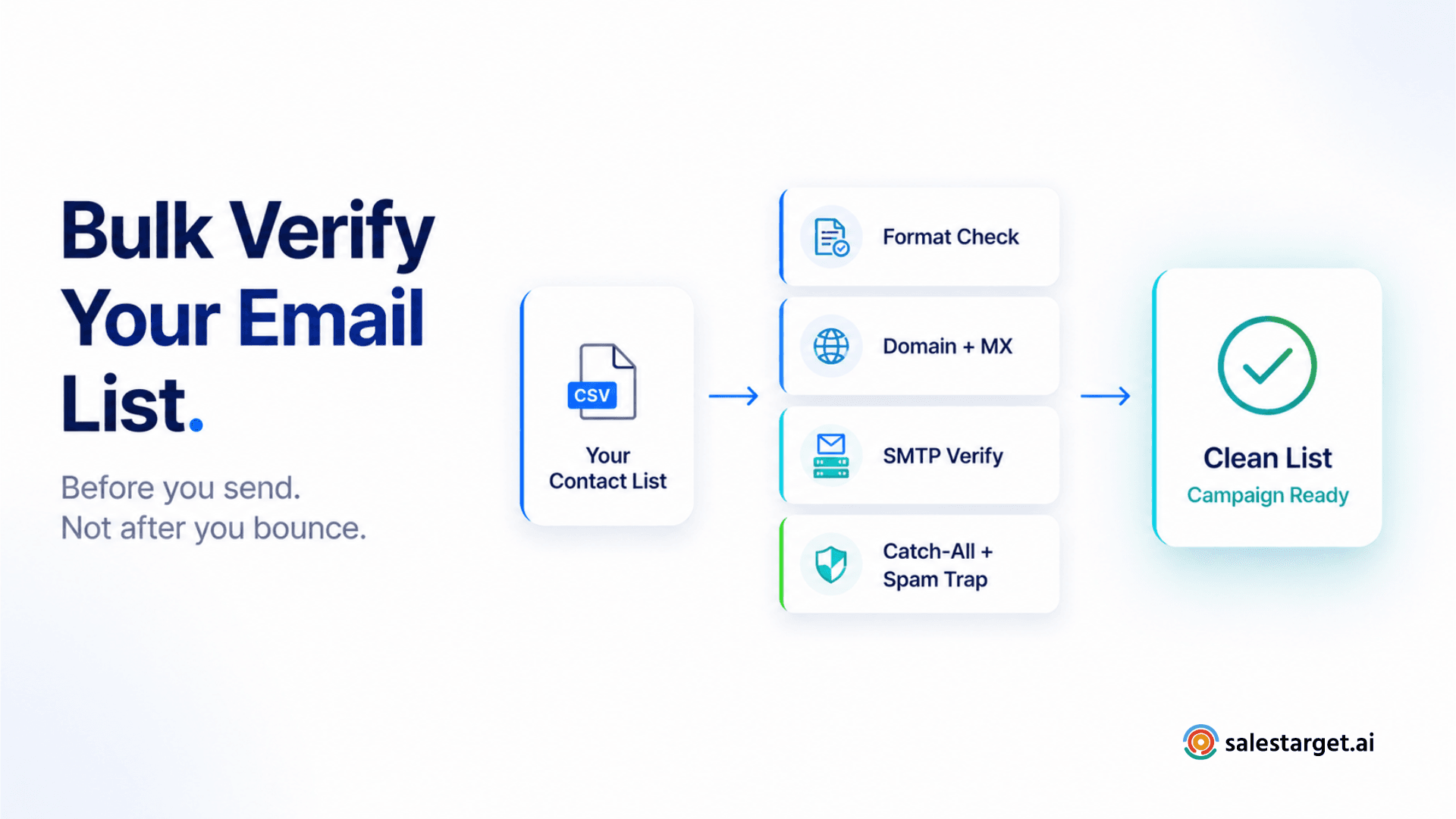
Syntax and disposable-domain checks run first to drop obvious junk cheaply. Then an MX check asks whether the domain accepts mail, and an SMTP check asks whether the server recognizes the mailbox.
Together these checks separate real, reachable mailboxes from guesses. Validation at this stage is far cheaper than finding out through bounces after launch.
Step 5: Classify Valid, Invalid, Catch-All, and Unknown Addresses
Sort results into four buckets. Send to valid. Drop invalid. Handle catch-all and unknown as a separate decision, covered in the verification section below.
Keeping the four buckets visible in your data is what makes later decisions easy. A single "verified" checkbox hides the difference between a confirmed mailbox and a risky guess.
Step 6: Export Verified Contacts for Segmentation and Outreach
Keep the status column in your export so you can segment by account, persona, and risk level. In Salestarget.ai you can skip the CSV and push verified contacts straight into a sequence or the CRM.
Skipping the export also removes a common failure point: files that get edited, re-uploaded, and quietly go out of date.
Got a list waiting? Start free and run a small batch through discovery and verification before committing the full file.
Bulk Email Verification Methods for Better Contact Accuracy
Bulk email verification stacks several checks, and each one catches a different failure. No single check is enough alone, so the order and combination matter.
Syntax Validation and Domain-Level Checks
Syntax checks catch typos, missing @ signs, and illegal characters. Domain checks confirm the domain exists and is not parked or expired.
Both are fast and cheap, so they run first. They clear out a surprising share of bad rows before the slower SMTP checks begin.
MX Record Validation and Mail Server Detection
An MX record tells the internet which server receives mail for a domain. No MX record means no delivery, no matter how clean the address looks.
The lookup also reveals the mail provider, such as Google Workspace, Microsoft 365, or a security gateway. That detail informs how you pace sends, since gateways often react differently to bursts of cold email.
SMTP Verification and Mailbox Response Checks
The verifier opens a conversation with the receiving server and asks whether a mailbox exists, without sending a message. Accept, reject, and defer responses feed the status.
Some servers refuse to answer at all, which is why "unknown" exists as a status. Treat unknown as a hold, not a pass.
Catch-All Domain Detection and Risky Address Classification
A catch-all domain accepts mail for any address, real or fake, so SMTP cannot confirm a person is there. The address might work, or it might vanish into an unwatched inbox.
Label these risky and keep them out of your main send. If the account is high value, send to them in a small, separate batch and watch the results.
Disposable, Role-Based, and Inactive Email Identification
Disposable addresses expire within hours or days. Role-based ones (info@, sales@) reach a shared inbox, not a decision-maker. Inactive mailboxes accept mail now and bounce later.
Flag all three and exclude them from named-contact sequences. Role-based addresses can still work for account-level outreach, but they should never be counted as a verified decision-maker.
Email Verification Status and Confidence Scoring
A status says what the check found. A score says how far to trust it. Use both together to decide who gets mailed and when.
Send to high-confidence valid contacts first. Test mid-range addresses in small batches, and hold the rest until you can re-verify them.
Bulk Email Finder Features That Matter for Sales Teams
Judge a finder by what happens after the lookup, not by the size of the database alone. The features below decide whether a tool saves time or adds another step.
CSV and Spreadsheet-Based Bulk Contact Processing
You need clean file upload with column mapping, so names and domains land in the right fields. The tool should handle large files without timing out and should show row-level results.
A tool that chokes on a 10,000-row file will not survive a real campaign. Test with your biggest realistic batch before you commit.
Company, Industry, Location, and Job-Title Filtering
Filters turn a lookup into targeting. Lead Explorer combines Business and People filters (industry, role, seniority, department, company size, revenue, location, tech stack) with Intent Topics.
You build the list and find the emails in the same search. That removes the extra pass where you export a list, then upload it elsewhere for enrichment.
Business Email Discovery With Contact Enrichment
An email alone is thin. Enrichment adds title, company data, and phone details, which gives reps context for personalization and gives RevOps fields to segment on.
Rich records also make sequences better. A rep can reference the role, the company size, or a recent business event without opening five other tabs.
Real-Time Email Validation and Verification Status
Verification at the moment of lookup beats verification on a schedule. Salestarget.ai verifies at the point of enrichment, so the status you see reflects today, not last quarter's scrape.
Real-time status also lets reps trust what they see in the CRM. If a contact shows as verified, it was checked recently, not months ago.
CRM Integrations, API Access, and Automated Data Exports
Verified data that sits in a CSV decays. Salestarget.ai pushes enriched leads into sequences or the built-in CRM with no export step.
The Email Validator offers a real-time API and connects with CRMs, email platforms, and website builders. That lets you verify sign-ups and imports automatically, not just campaign lists.
Credit Usage, Processing Limits, and Cost Per Verified Contact
Measure credit use against verified, sendable contacts, not raw rows returned. A tool that returns 10,000 addresses and 3,000 usable ones is spending your credits on the other 7,000.
Also check processing limits, such as daily caps and file size, so your biggest campaigns do not stall halfway through.
Bulk Email Lookup Tool Comparison and Evaluation Criteria
Use the same six questions on every tool you test, and run them against your own accounts, not a vendor demo list.
Bulk Email Discovery vs. Standalone Email Verification Platforms
Standalone verifiers like ZeroBounce and NeverBounce check addresses you already have. They do not find the contact, so you still need a data source and a way to move files between tools.
Discovery tools find the address but may leave verification weak. Salestarget.ai covers both, so you do not stitch two bills together.
Data Coverage, Accuracy, and Verified Contact Availability
Ask how many of your target accounts return a verified decision-maker, not how many profiles the vendor claims. Raw database size says little about your specific market.
Test with 200 of your own accounts and count verified, sendable results. That number is the one that predicts campaign performance.
Bulk Upload Capacity and Processing Speed
Check file size limits and turnaround on your largest realistic batch. Slow processing delays campaigns, and hard row caps force you to split files by hand.
Speed matters most when you run weekly or daily batches. A tool that takes hours per file will slow your whole outbound calendar.
Verification Methods and Catch-All Detection Capabilities
Confirm the tool runs MX and SMTP checks, flags disposable and role-based addresses, and labels catch-all domains instead of passing them as valid.
A tool that marks every catch-all "valid" inflates its own accuracy numbers. You find out only when the bounces and spam placements arrive.
Integration Options for Sales Engagement and CRM Workflows
Apollo gives data and engagement but you still bolt on deliverability and a CRM. Instantly, Smartlead, and Lemlist focus on sending, with no native B2B database or real CRM.
Count the handoffs between tools. Each one is a place where data goes stale, and each one needs someone to maintain it.
Pricing Models and Cost Per Usable Business Email
Compare plans by what you get per verified, sendable contact. A cheap plan that returns many unusable rows costs more per reply than a stricter one.
Look at how credits are used for discovery versus verification, and whether re-verification counts against you. These details decide your real cost at scale.
Maintaining Email List Quality Across Large Prospect Databases
Verification is a habit, not a one-time cleanup. Lists decay every week, so the maintenance routine matters as much as the first run.
Contact Deduplication and Outdated Record Removal
Deduplicate on domain plus normalized name, not email alone. "Bob" and "Robert" at the same company are one person, and two people with similar names may share a parent company domain.
Remove records tied to people who left. A contact who changed jobs is a lost lead at the old company and a new lead at the new one, so route the record accordingly.
Email List Segmentation by Account, Industry, and Buyer Role
Segment by account first, then buyer role, then industry. That order keeps multi-contact outreach coordinated, so two reps do not pitch the same account with different messages.
Add a risk segment for catch-all and unknown addresses so they never mix into your clean sends.
Verification Frequency and Contact Data Refresh Cycles
Re-verify any list older than a few weeks before a new campaign. Prioritize accounts showing job changes, funding, or hiring spikes, since those are the records most likely to have moved.
Build a refresh cycle into your calendar, so verification happens before every major send and not only after a bounce problem.
Bounce-Rate Monitoring and Sender Reputation Protection
Watch bounces per campaign and per inbox. A sudden rise points to a bad batch, and you can pause before it damages the domain.
Email Outreach adds SPF, DKIM, and DMARC checks and automatic AI warm-up to protect reputation. Those safeguards work best when the list feeding them is already clean.
Data Privacy, Consent, and Responsible B2B Prospecting
Contact only business addresses tied to a person's professional role, state who you are, and honor opt-outs fast. Keep records of where each contact came from.
Follow the rules in each region you send to, including GDPR and CAN-SPAM. Responsible prospecting also protects deliverability, since fewer complaints means better inbox placement.
Why Choose Salestarget.ai for B2B Contact Discovery and Email Verification
Salestarget.ai keeps discovery, verification, outreach, and CRM in one workspace on one bill. Instead of moving files between tools, you move leads between stages of one workflow.
Lead Explorer for B2B Prospect Discovery and Contact Enrichment
Lead Explorer is the AI prospecting engine. Search a large database of professional profiles in plain English or with stacked filters, and one-click enrichment unlocks verified professional email, personal email, phone, and mobile.
Buying signals like funding rounds and hiring spikes help you pick who to contact first. You start with accounts that are more likely to respond.
Email Validator for MX and SMTP-Based Email Checks
The Email Validator runs MX and SMTP checks, disposable-email detection, and risk scoring. It cleans lists in bulk and offers a real-time API, so you can verify lists you bring from other tools before they reach a sequence.
That makes it useful even for data you did not source in Salestarget.ai, such as event lists or older CRM exports.
Email Outreach for Personalized Campaigns and Automated Follow-Ups
Email Outreach builds multi-step sequences from a plain-English audience description, so campaigns go live faster. It supports unlimited inboxes with inbox rotation, and a Unibox that sorts replies by intent (Interested, Follow-Up, Not a Fit) and syncs deals to the CRM.
AI content and spintax tools keep copy varied, which helps avoid repetitive patterns across large sends.
LinkedIn Outreach for Coordinated Multichannel Prospecting
LinkedIn Outreach automates connection requests, DMs, and follow-ups with safety limits and human-like delays. It runs in one flow with email, so context carries across both channels.
Conditional sequences branch on replies, actions, or silence, so a prospect who answers on LinkedIn does not get the next cold email.
Built-In CRM for Contact Management and Deal Tracking
The CRM receives campaign leads automatically, logs every email and call to the lead timeline, and creates follow-up tasks when a lead replies or a meeting ends.
Deals move faster since follow-ups are not missed, and reps spend less time on logging and admin. A built-in dialer keeps calls in the same timeline.
AI Copilot for Sales Research and Prospecting Support
The AI Copilot finds leads, drafts personalized sequences, and answers CRM questions in plain language. It is free inside the platform, and strategy stays with your team.
Use it to speed up research and drafting, then review the output before anything is sent.
Common Bulk Email Lookup Mistakes That Reduce Prospecting Results
Each of these mistakes shows up in bounce reports within days, and each one is easy to prevent once you know to look for it.
Confusing Email Discovery With Email Verification
Finding an address is not the same as confirming it works. A discovered email is a candidate until it passes MX and SMTP checks.
Teams that skip the second step trust the first, then spend weeks wondering why deliverability keeps dropping.
Treating Catch-All Addresses as Confirmed Valid Contacts
Catch-all means "the server accepts everything," not "this person exists." Sort your domains by catch-all rate before spending credits, so you know which accounts carry the most risk.
Then send to those contacts in small, staggered batches from a separate inbox, so a bad result cannot hurt your main sending.
Uploading Uncleaned Prospect Files for Bulk Processing
Duplicates, typos, and missing domains burn credits and produce weak matches. A file with mixed formats or merged cells can also fail silently, returning fewer results than you expect.
Ten minutes of cleanup saves a full re-run.
Ignoring Contact Freshness and Company Job Changes
A verified address on Monday can bounce by the next quarter when the person moves on. Job changes are the biggest source of decay in B2B lists.
Check freshness before every new campaign, not once a year, and watch for leadership changes at your target accounts.
Sending Campaigns Immediately After Email Discovery
Discovery output is raw. Run verification, review the statuses, and warm up inboxes before you launch.
A one-day delay is cheaper than a burned domain, and the review step often catches segments that need a second look.
Measuring List Size Instead of Verified Contact Coverage
A 20,000-row list means nothing if 8,000 are sendable. Size makes a good slide and a bad strategy.
Track the share of target accounts with at least one verified decision-maker. That number tells you how much of your market you can actually reach.
Building a Scalable B2B Prospecting Workflow With Verified Business Emails
Put the pieces into one repeatable loop that any rep or RevOps lead can run without rebuilding it each time.
Connect Prospect Discovery, Enrichment, and Verification
Run all three at the same point. Enrichment and verification at the moment of discovery means no gap where data can age.
In Salestarget.ai this happens inside Lead Explorer, so a lead is already verified by the time it reaches a sequence.
Organize Verified Contacts by Target Account and Buyer Persona
Group by account, then persona, so each buying group gets a sequence written for its role. A CFO and a head of sales care about different outcomes, and the message should reflect that.
Keep risky and unknown contacts in their own group, away from the clean sends.
Activate Email and LinkedIn Sequences for Qualified Prospects
Start with email to verified contacts and add LinkedIn touches for the same prospects. Conditional branching on replies or silence keeps the two channels from repeating each other.
Timing matters here: space the touches so the prospect sees a coordinated approach, not a flood.
Track Replies, Follow-Ups, and Pipeline Activity in One CRM
When replies, tasks, and deals live in the same place as the contact data, nothing is lost between tools. Reps see follow-ups due without hunting for them, and managers see pipeline movement as it happens.
The Unibox and CRM together keep every reply attached to the right lead and owner.
Measure Prospecting Performance Through Data Quality and Conversion Metrics
Track four numbers: verified coverage per target account, bounce rate, reply rate, and meetings booked per 100 verified contacts.
When reply rate drops, check data quality before you rewrite copy. Most dips trace back to list problems, not messaging problems.
Conclusion: Turn Bulk Email Lookup Into a Repeatable Sales Workflow
Bad lists cost you replies, reputation, and rep hours. The fix is a workflow where every address is found, enriched, and verified before it enters a sequence, and where the data stays fresh after that.
Stitching that together from separate finders, verifiers, senders, and CRMs adds handoffs, and every handoff is where quality leaks. Each extra tool also adds a login, a file format, and a failure point your team has to manage.
Salestarget.ai keeps the whole chain in one place: Lead Explorer finds the contact, verification confirms the mailbox, email and LinkedIn sequences reach the prospect, and the CRM tracks the deal. Run your next bulk lookup there and send only to addresses you can trust.