Running a small business means wearing multiple hats, and sales is often the one that gets squeezed between everything else. Leads slip through the cracks, follow-ups get delayed, and spreadsheets become unwieldy as the contact list grows. That is exactly why sales software for small businesses has become an essential part of how growing companies organize and scale their revenue efforts. The right platform brings lead generation, outreach, pipeline tracking, and customer management into a single workspace so that small teams can sell smarter rather than harder.
This guide covers what sales software actually does for small businesses, which features matter most, how automation and AI can multiply the efforts of a lean sales team, and what to look for when choosing a platform. Whether you are a startup founder managing your first pipeline or a sales manager trying to make a five-person team perform like fifteen, the goal is the same: build a sales process that is repeatable, organized, and scalable.
What Is Sales Software for Small Businesses?
Sales software for small businesses is a category of digital tools designed to help companies manage the entire sales cycle, from finding potential customers to closing deals and maintaining relationships. Unlike enterprise-grade platforms built for large organizations with dedicated operations teams, small business sales software focuses on simplicity, speed, and all-in-one functionality.
At its core, sales management software for small businesses typically includes features for lead generation, contact management, outreach automation, pipeline tracking, and reporting. The best platforms combine these capabilities into a single interface, eliminating the need to switch between multiple disconnected tools. For a small sales team, that consolidation is not just a convenience—it is the difference between an organized process and a chaotic one.
Why Do Small Businesses Need Sales Software?
Small businesses face a unique challenge: they need to compete for the same customers as larger companies but with a fraction of the resources. Sales tools for small businesses level the playing field by automating repetitive work, improving data accuracy, and giving every team member visibility into the pipeline.
Here are the main reasons why investing in a dedicated sales platform matters:
- Time savings: Manual data entry, spreadsheet management, and repetitive follow-ups consume hours that could be spent on actual selling. Automation handles the routine work so reps can focus on conversations that move deals forward.
- Consistent follow-ups: Without a system, follow-up timing depends on memory and sticky notes. Sales software ensures every lead receives timely, scheduled touchpoints regardless of how busy the week gets.
- Better lead organization: When contacts live in scattered spreadsheets, email threads, and sticky notes, important prospects get lost. A centralized lead management system keeps every contact, interaction, and deal stage in one place.
- Data-driven decisions: Sales productivity tools provide dashboards and reports that show what is working and what is not, from open rates on outreach campaigns to conversion rates at each pipeline stage.
- Scalability: A well-implemented sales process built on proper software scales with the business. Adding new team members or expanding into new markets becomes a matter of replication rather than reinvention.
Common Sales Challenges Faced by Small Businesses
Understanding the obstacles is the first step toward solving them. Here are the most common sales challenges small businesses encounter:
Disorganized Lead Tracking
Without a proper system, leads arrive from multiple sources—website forms, LinkedIn messages, email inquiries, referrals—and there is no single place to see all of them. Important prospects slip through the cracks simply because no one knew they existed or forgot to follow up.
Inconsistent Outreach
When outreach depends entirely on individual effort, some prospects receive five touchpoints while others get one. This inconsistency leads to missed opportunities and an unpredictable pipeline. Sales automation software solves this by standardizing the cadence.
Limited Visibility into the Pipeline
Many small business owners rely on gut feeling to forecast revenue because they lack a clear view of how many deals are open, which stage each deal is in, and where the bottlenecks are. A sales CRM for small business provides that visibility through visual pipelines and dashboards.
Difficulty Finding Qualified Leads
Prospecting is one of the most time-consuming activities for small sales teams. Without access to a reliable B2B contact database and lead generation tools, reps spend hours searching for the right people to contact, often relying on outdated or inaccurate data.
Manual and Repetitive Tasks
Copying data between tools, manually logging calls, formatting outreach emails one by one—these tasks add up quickly. For a small team where every hour counts, the cumulative cost of manual work is a direct drag on revenue.
Essential Features to Look for in Small Business Sales Software
Not every feature marketed by sales platforms is equally important for a small business. Here are the capabilities that deliver the most value for lean teams:
Lead Generation and Contact Discovery
Look for a platform that includes built-in lead generation tools rather than requiring a separate subscription. The ability to search a large B2B database by industry, job title, company size, location, and other criteria helps small teams find the right prospects quickly. Contact enrichment that provides verified email addresses and phone numbers saves additional time and reduces bounce rates.
Email Outreach and Automation
Email remains one of the most effective channels for B2B sales. Effective sales automation software should support multi-step email sequences with automatic follow-ups, inbox rotation for sending from multiple accounts, and email warm-up features that protect sender reputation and deliverability.
LinkedIn Outreach Automation
For B2B sales, LinkedIn is often where decision-makers are most accessible. Sales software that automates connection requests, personalized messages, and follow-ups on LinkedIn—while maintaining safe activity limits—extends the reach of a small team significantly.
CRM and Pipeline Management
A built-in CRM that captures leads from campaigns, logs every interaction automatically, and provides a visual pipeline makes it possible to manage deals without manual data entry. For small businesses, the CRM should be lightweight and fast, not a separate project to implement.
Email Verification
Sending emails to invalid addresses damages domain reputation and wastes campaign resources. Built-in email verification that checks addresses before sending helps maintain high deliverability and keeps outreach efforts effective.
Analytics and Reporting
Dashboards that show campaign performance, reply rates, pipeline movement, and individual rep activity enable data-driven decisions. Good reporting should be a by-product of using the tool, not a manual reporting exercise.
AI-Powered Assistance
Modern AI sales software can draft personalized outreach sequences, suggest optimal send times, identify at-risk deals, and even help reps find the right prospects through conversational search. These capabilities are particularly valuable for small teams that do not have the bandwidth for extensive manual research and writing.
How Sales Software Helps Small Teams Manage Leads and Prospects
For small sales teams, the biggest bottleneck is usually not a lack of leads but a lack of organization around those leads. Lead management software provides a structured system for capturing, qualifying, and nurturing every prospect.
Here is what effective lead management looks like when supported by the right software:
- Centralized contact database: Every lead, regardless of source, enters a single system. No more searching through email inboxes or spreadsheet tabs to find a prospect's details.
- Automatic lead capture: Leads from outreach campaigns, website forms, and manual entry all flow into the same pipeline without extra steps.
- Activity timeline: Every email sent, call made, and reply received is logged to the contact record. Any team member can pick up a conversation without asking colleagues for context.
- Pipeline stages: Visual deal stages make it clear where each prospect stands. Reps know exactly which leads need attention and what the next step should be.
- Task reminders: Automated follow-up tasks ensure no lead goes cold because someone forgot to check back in.
How Sales Software Improves Lead Generation and Prospecting
Prospecting has traditionally been one of the most labor-intensive parts of the sales process. Reps would spend hours scouring LinkedIn, company websites, and industry directories to build a list of potential contacts, only to find that half the email addresses bounced or the job titles were outdated.
Modern lead generation tools for small businesses change this process fundamentally. Instead of building lists manually, reps can search a verified B2B database using filters for job title, industry, company size, location, technology stack, and even intent signals that indicate a prospect might be actively looking for solutions.
For example, SalesTarget.ai's Lead Explorer provides access to over 840 million verified professional profiles and 146 million business entities. Reps can search using natural language or apply granular filters, enrich leads with verified contact details in one click, and push them directly into outreach sequences—all without leaving the platform. This kind of integrated prospecting eliminates the fragmented workflow of exporting CSVs from one tool and importing them into another.
When lead generation and outreach live in the same system, the entire cycle from discovery to first contact shrinks from days to minutes.
How Automation Helps Reduce Repetitive Sales Tasks
Sales automation is not about replacing human interaction. It is about removing the mechanical steps that sit between a rep and a meaningful conversation. Here is where automation delivers the greatest impact for small businesses:
- Sequenced email campaigns: Set up multi-step outreach sequences that send initial messages and follow-ups on a schedule. Reps only step in when a prospect replies.
- Inbox rotation: Automatically distribute outgoing emails across multiple sending accounts to maintain healthy deliverability and avoid spam triggers.
- Email warm-up: Gradually build sender reputation for new email accounts by automatically sending and receiving engagement emails before launching campaigns.
- LinkedIn automation: Automate connection requests, messaging sequences, and follow-ups on LinkedIn with built-in safety limits to protect accounts.
- Automatic activity logging: Every email, call, and LinkedIn interaction is recorded to the lead's timeline without reps needing to log anything manually.
- Task creation: When a lead takes an action—replies to an email, accepts a connection—the system automatically creates a follow-up task for the assigned rep.
The result is a team that spends its energy on high-value activities—qualifying leads, handling objections, and closing deals—while the software handles the rest.
Managing Customer Relationships and Sales Pipelines
A sales pipeline is only useful if it reflects reality. For many small businesses, the pipeline exists as a mental model in the founder's head or a spreadsheet that gets updated sporadically. Neither approach works as the business grows.
Customer relationship management for small businesses means having a system that tracks every interaction with a prospect or customer, from the first outreach email to the closed deal and beyond. A proper sales CRM for small business should provide:
- Visual pipeline view: Drag-and-drop stages that show open deals, their value, and how long each has been in its current stage.
- Complete interaction history: Every touchpoint—emails, calls, LinkedIn messages, notes—logged to the contact record automatically.
- Deal tracking: Assign deals to team members, set expected close dates, and track progress against targets.
- Built-in communication: Call prospects directly from the CRM, send emails, or trigger sequences without switching to a separate tool.
SalesTarget.ai's built-in CRM illustrates this approach. Leads from outreach campaigns flow into the CRM automatically. Every email and call is logged to the lead's timeline. When a lead replies, follow-up tasks are created for the assigned rep. An AI-powered dialer can even take call notes automatically and save them to the contact record. This level of integration means the CRM stays current without requiring reps to manually update records.
How AI-Powered Sales Tools Support Small Business Growth
Artificial intelligence in sales software is no longer a novelty reserved for enterprise organizations. AI sales software for small businesses now provides practical, day-to-day assistance that makes lean teams more effective.
Here are the most impactful ways AI supports small business sales:
Intelligent Lead Discovery
AI-powered prospecting tools analyze buyer signals, firmographic data, and intent indicators to surface the most relevant prospects. Instead of scrolling through endless lists, reps receive recommendations tailored to their ideal customer profile.
Personalized Outreach at Scale
AI content generators and sequence builders draft personalized emails and follow-up messages based on each prospect's profile, industry, and role. This allows small teams to send outreach that feels personal without spending hours writing individual messages. Tools like spintax generators further help by creating message variations that improve deliverability by avoiding repetitive content.
Conversational Sales Assistance
AI copilot features act as on-demand sales assistants. Reps can ask the AI to find leads matching specific criteria, draft a campaign, summarize pipeline status, or recommend the next action for a stalled deal. SalesTarget.ai's Sales Copilot, for instance, works within the platform to help reps with tasks ranging from lead discovery across 840 million profiles to drafting complete outreach sequences—freeing up time for strategic work and relationship building.
Predictive Insights
AI-driven analytics can flag deals at risk of stalling, identify patterns in successful outreach, and suggest adjustments to campaign timing or messaging. These insights help small sales teams course-correct quickly rather than discovering problems at the end of a quarter.
How to Choose the Right Sales Software for Your Business
Selecting the right platform is one of the most consequential decisions a small business can make for its sales operations. Here is a practical framework for evaluating options:
Define Your Sales Workflow
Before evaluating any tool, map out your current sales process from lead generation to deal close. Identify where the bottlenecks and manual handoffs occur. The right software should address those specific gaps rather than adding features you do not need.
Prioritize All-in-One Over Best-of-Breed
For small teams, managing four or five separate tools—one for lead data, one for email sequences, one for LinkedIn, one for CRM—creates more problems than it solves. Look for platforms that consolidate the core functions into a single workspace. This reduces data fragmentation, eliminates manual imports and exports, and simplifies onboarding.
Test with Your Real Data
Sign up for a trial and run your actual workflow: find prospects that match your ideal customer profile, set up a sequence, simulate a reply, and create a deal. The tool that completes this loop with the fewest steps and the least friction is usually the right choice.
Evaluate Ease of Adoption
The most feature-rich platform in the world is worthless if your team does not use it. Choose software that a new rep can start using productively within a day, not a tool that requires weeks of configuration and training.
Check for Scalability
Your business will grow, and your sales software should grow with it. Evaluate whether the platform supports adding team members, expanding outreach volume, and accessing advanced features without requiring a complete migration to a different system.
For a deeper dive into the evaluation process, including specific criteria and step-by-step guidance, read this guide on how to choose the right sales software.
Common Mistakes Small Businesses Should Avoid When Selecting Sales Software
Making the wrong choice can cost months of lost productivity and revenue. Here are the most frequent mistakes to avoid:
- Choosing based on features rather than workflow fit: A long feature list means nothing if the tool does not match how your team actually sells. Start with your process, then find the software that supports it.
- Buying overlapping tools: Subscribing to a separate sequencer, a separate CRM, a separate lead database, and a separate LinkedIn tool creates data silos and multiplied costs. Audit for overlap before adding anything new.
- Automating before fixing data quality: Automation amplifies whatever you feed it. Sending automated sequences to unverified email addresses damages domain reputation faster than manual sending ever could. Always verify contact data before launching campaigns.
- Ignoring adoption: A tool that nobody on the team uses produces no value. Assign an owner, set a rollout date, and monitor usage during the first two weeks. Low adoption is a workflow problem, not a people problem.
- Overlooking hidden limits: Read the fine print on inbox caps, contact limits, and which features are gated behind higher tiers. Surprise limitations in month three, when your team depends on the tool, can derail your process.
- Skipping the baseline measurement: Without recording your current metrics—response time, meetings booked per 100 leads, deal cycle length—before implementing new software, you cannot measure improvement. Every result becomes a guess.
Building a Scalable Sales Process with the Right Tools
The goal of sales software for small business is not just to make today's tasks easier. It is to build a sales process that works reliably as the business grows—one where adding a new rep means replicating a proven workflow rather than improvising from scratch.
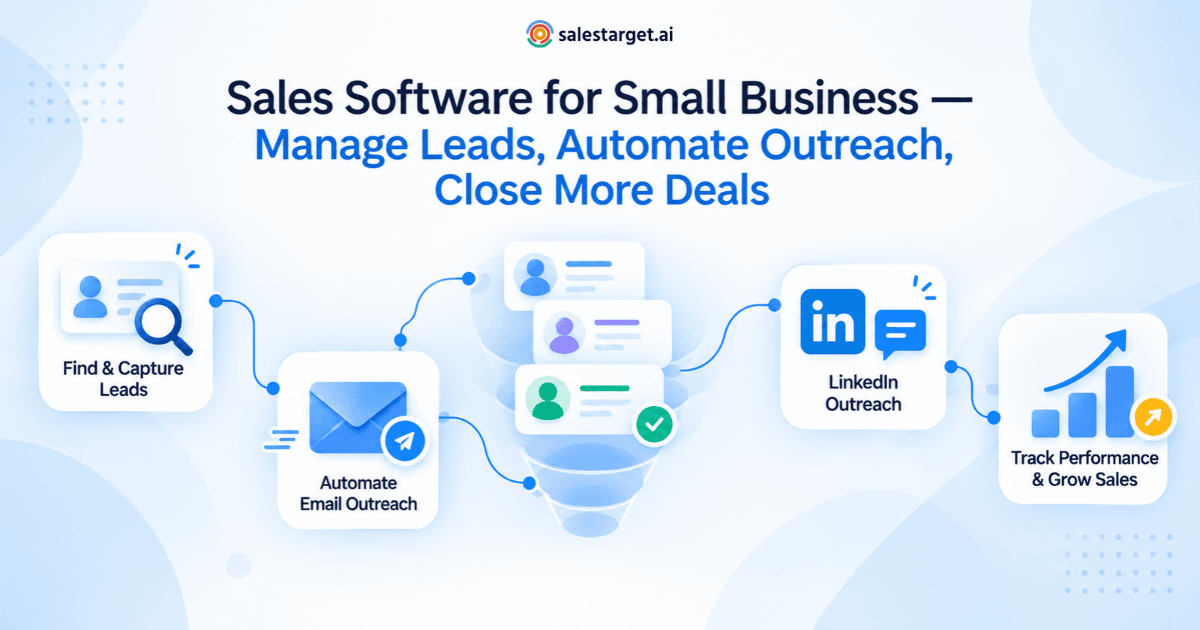
That process starts with reliable prospect data, moves through consistent multi-channel outreach, flows into an organized pipeline, and ends with clear reporting on what is working. When these elements live in a single platform, the system reinforces itself: better data produces better outreach, better outreach fills the pipeline, and pipeline visibility drives smarter decisions.
Platforms like SalesTarget.ai are designed around this principle. By combining Lead Explorer for prospecting, automated email and LinkedIn outreach, built-in email verification, a CRM for deal management, and an AI Copilot for everyday sales assistance, small businesses can run their entire sales operation from one workspace. The result is fewer manual handoffs, more consistent follow-ups, and a clear view of the pipeline at every stage.
The businesses that grow fastest are not the ones with the most tools. They are the ones with the most organized processes. Investing in the right sales software is the first step toward building that organization.