Your warmup dashboard says 98%. You launch the campaign, and the replies never show up. Reps blame the copy, the founder blames the list, and nobody checks whether the emails reached an inbox at all.
Your email warmup tool is working when your real campaign emails land in the inbox, not just the warmup emails. Check five things: inbox placement on Gmail and Outlook, passing SPF, DKIM, and DMARC, bounces under 2%, spam complaints under 0.1%, and genuine replies from prospects. A high warmup score only proves that warmup traffic is flowing. SalesTarget.ai pairs automatic AI warm-up with authentication checks and email validation, so you can test the full path from list to inbox.
How to Know If Your Email Warmup Tool Is Working: 7 Signs to Check
Seven signals separate a tool that works from one that only looks busy.
Your Warmup Emails Are Reaching the Inbox Instead of Spam
Seed tests should show warmup emails in the primary inbox on both Gmail and Outlook, with spam placement near zero. If warmup mail keeps needing rescue from the spam folder, the mailbox is not building anything useful.
Your Warmup Tool Shows Consistent Sending and Receiving Activity
A working tool sends and receives on a steady schedule and raises volume in small steps. Gaps, sudden jumps, or a flat line mean the mailbox is not building a clean sending history.
Your Email Sender Reputation Is Stable or Improving
Google Postmaster Tools rates domain reputation as High, Medium, Low, or Bad. You want High or Medium, holding or rising. A falling rating after warmup starts is a warning, not a delay.
Your Domain Is Passing Email Authentication Checks
SPF, DKIM, and DMARC must pass on every sending domain. Google and Yahoo began requiring them for bulk senders in 2024, and Microsoft announced similar rules for Outlook.com in 2025. Warmup cannot repair a broken DNS record.
Your Email Bounce and Spam Complaint Rates Are Under Control
Keep bounces under 2% and complaints under 0.1%. Google's sender guidelines treat 0.3% complaints as the ceiling. Past that line, no warmup score protects you.
Your Cold Email Campaigns Are Reaching More Prospect Inboxes
Run placement tests on real campaign sends and compare week over week. A rising inbox share on cold emails is the strongest proof the tool is doing its job.
Your B2B Outreach Is Generating Genuine Replies
Prospect replies are the final test. Warmup replies come from a scripted network, and prospect replies do not. Split your replies by Gmail and Outlook recipients to see where you are weak.
Email Warmup Performance vs. Actual Email Deliverability: What Is the Difference?
Warmup builds history. Deliverability is the outcome of history, authentication, list quality, and content together. A good email warmup tool handles only the first part.
How Email Warmup Activity Builds Sending History
Warmup tools trade emails between mailboxes in a network, with opens and replies. Mailbox providers then see steady two-way activity before your cold volume begins.
What a Warmup Health Score Actually Measures
A health score is the tool's own summary of warmup traffic: volume, replies, and spam rescues. It describes the tool's network, not your campaign mail.
Why a High Warmup Score Does Not Guarantee Inbox Placement
Warmup mail goes to friendly mailboxes that open and reply. Cold email goes to strangers, with different copy, new links, and a list that may hold dead addresses. A perfect score can sit next to a spam folder full of campaign emails.
How Mailbox Reputation and Domain Reputation Affect Cold Emails
Providers score the mailbox and the domain separately. A fresh mailbox on a damaged domain inherits the damage, and one badly behaved mailbox can pull the others down.
Which Email Warmup Metrics Should You Monitor to Measure Effectiveness?
Track six numbers in one place and review them weekly.
Inbox Placement Rate: Measuring Inbox and Spam Folder Delivery
This is the share of test emails that reach the inbox versus spam or promotions. Most teams aim above 90%. Measure Gmail and Outlook separately, and treat a gap between them as a diagnosis, not noise.
Email Bounce Rate: Identifying Invalid Addresses and Delivery Failures
Hard bounces point to bad addresses. Above 2%, you have a list problem, not a warmup problem. Verify contacts before sending.
Spam Complaint Rate: Identifying Negative Recipient Signals
Keep it under 0.1%. Complaints come from people who did not want the email, so they point to targeting or copy.
Sender Reputation: Tracking Domain and Mailbox Health
Watch domain and mailbox separately. Google Postmaster Tools and Microsoft's Smart Network Data Services show provider-side views you cannot get from a warmup dashboard.
Email Engagement: Interpreting Opens, Replies, and Clicks
Open rates are unreliable since Apple Mail Privacy Protection preloads tracking pixels. Treat replies as the real signal and opens as a rough guide.
Email Sending Volume: Monitoring Daily Sending Patterns
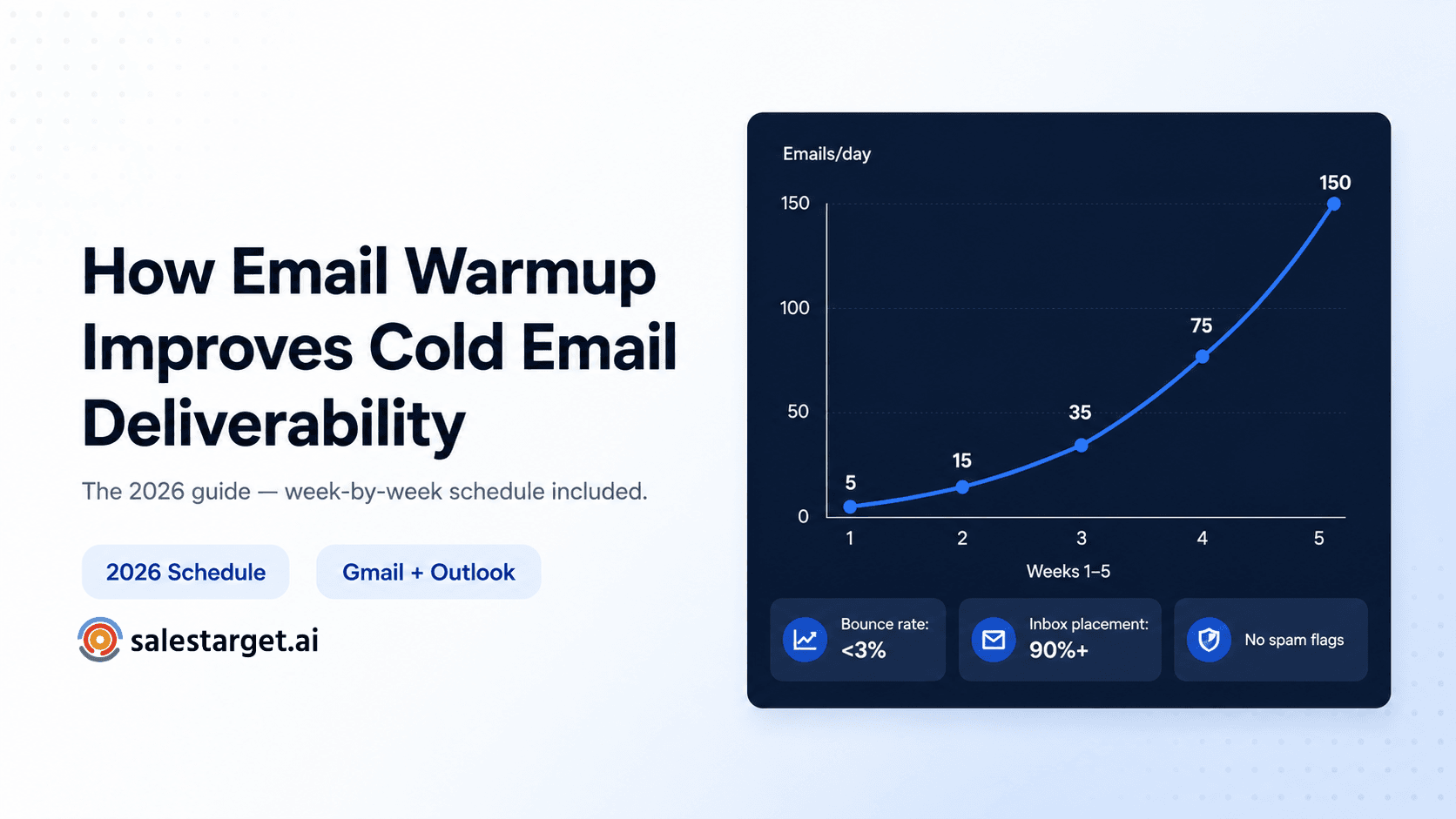
Sharp jumps in daily volume are a common trigger for reputation drops. Raise limits in small steps and hold steady if bounces rise.
How to Measure Email Warmup Effectiveness Using Real Inbox Placement Tests
Run this sequence before warmup and again after it.
Step 1: Establish a Baseline Before Starting Email Warmup
Send a seed test before warmup begins and record inbox, spam, and promotions placement per provider. Without a baseline, later numbers have nothing to be compared against.
Step 2: Test Inbox Placement Across Gmail and Outlook
Test Google Workspace and Microsoft 365 seed mailboxes separately, since most B2B prospects sit on one of the two. A pass on one says little about the other.
Step 3: Check SPF, DKIM, and DMARC Authentication
Open the headers of a received test email and look for spf=pass, dkim=pass, and dmarc=pass. Fix any failure before judging the warmup tool.
Step 4: Compare Warmup Emails With Actual Campaign Emails
Here is a test most guides skip. Send your real first-touch email, with its links and tracking, to seed inboxes. Then send a plain-text version with no links or tracking. If the plain version lands in the inbox and the real one does not, the fault sits in your content or link domain, not in warmup.
Step 5: Review Spam Placement, Bounce Rates, and Sender Reputation
After each test batch, log spam placement, bounces, and reputation readings together. One metric alone can mislead.
Step 6: Repeat Tests Using Consistent Sending Conditions
Hold volume, send time, copy, and mailbox constant between tests. Change one variable at a time, or you will not know what moved the result.
Step 7: Record Results and Compare Performance Over Time
Keep a weekly sheet with placement by provider, bounces, complaints, reputation, and reply rate. Trends beat single readings.
How to Identify Email Deliverability Problems After Warmup
When results disappoint, work through the likely causes in order.
Why Warmup Emails Reach the Inbox but Cold Emails Land in Spam
The warmup network is friendly and your cold audience is not. Copy, links, list quality, and recipient engagement all differ. The Step 4 test tells you which one is at fault.
How to Identify Gmail-Specific and Outlook-Specific Placement Problems
Providers weigh signals differently. If Gmail passes and Outlook fails, check provider tools first: Postmaster Tools for Gmail, Smart Network Data Services for Outlook.
How Poor Email Authentication Affects Inbox Placement
Missing or misaligned SPF, DKIM, or DMARC sends mail to spam or gets it rejected. A common miss is a second sending tool left out of the SPF record.
How Invalid B2B Contacts Increase Bounce Rates
B2B data decays fast as people change jobs. Dead addresses bounce, and bounces mark you as a careless sender. Verify before you send.
How Sending Volume and Campaign Content Affect Sender Reputation
Volume spikes, identical copy across hundreds of sends, and link-heavy emails each hurt reputation. Vary your copy and cap daily volume per mailbox.
How to Diagnose a Sudden Drop in Email Deliverability
Check in this order: authentication, bounce spike, new list, new copy, new link domain, volume change. Pause the campaign, not the warmup, while you test.
How to Improve Inbox Placement After Identifying Warmup Problems
Fix the cause the tests exposed, then retest.
Fix SPF, DKIM, and DMARC Configuration Issues
Publish one SPF record that covers every sender, turn on DKIM for each domain, and start DMARC at p=none with reporting. Tighten the policy once reports look clean.
Remove Invalid, Risky, and Outdated Email Addresses
Clean every list before every send. The Email Validator checks MX and SMTP records, flags disposable addresses, and scores risk, in bulk or through a real-time API. Run your next list through it before the campaign goes live.
Adjust Daily Sending Volume and Campaign Frequency
Cut daily volume per mailbox, spread sends across more mailboxes, and widen the gaps between follow-ups. Add mailboxes before you add volume.
Review Email Content, Links, and Tracking Settings
Keep first touches to one link, skip heavy images, and consider turning off open tracking on the first email. Use a custom tracking domain rather than a shared one.
Separate Warmup Testing From Actual Campaign Performance
Judge campaigns on campaign data. Keep warmup running at a low, steady level, but never use its score to approve a bigger send.
Monitor Domain Health Before Increasing B2B Outreach Volume
Scale only after two clean weeks in a row: stable placement, bounces under 2%, complaints under 0.1%.
What Features Should You Look for in an Email Warmup Tool?
Look for tools that report on outcomes, not just activity.
Automated Email Warmup With Controlled Sending Volume
You want a gradual ramp and daily caps per mailbox. Email Outreach from SalesTarget.ai runs automatic AI warm-up on unlimited inboxes, with intelligent inbox rotation.
Warmup Health Scores With Transparent Metric Breakdowns
A score should show its parts: volume, replies, and spam rescues. A single number with no breakdown cannot be audited.
Inbox Placement Testing Across Multiple Email Providers
Look for separate Gmail and Outlook results. An activity log is not a placement test.
Sender Reputation and Domain Health Monitoring
Domain-level trends and blocklist checks let you catch damage before a campaign does.
Historical Email Warmup Analytics and Performance Reports
Week-by-week history lets you tie a drop to a specific change, such as a new list or a new sequence.
Multi-Mailbox Monitoring for Sales Teams and Agencies
Agencies running client domains need one view across every mailbox, not a tab per inbox.
Integration With B2B Email Outreach and Deliverability Workflows
Warmup should connect to your sequences and checks. SalesTarget.ai keeps SPF, DKIM, and DMARC checks next to warm-up and sequencing, so a failure shows up where you build the campaign.
How to Choose the Right Email Warmup Tool for B2B Outreach
Use these six checks when comparing vendors.
Compare Warmup Activity Tracking With Actual Inbox Placement Testing
Ask whether the tool shows only warmup traffic or also tests real placement. Activity tracking answers "is it running." Placement testing answers "does it work."
Evaluate Email Deliverability Reports and Testing Accuracy
Ask how many seed accounts are used and how they are chosen. Small seed lists give noisy results.
Check Support for Google Workspace and Microsoft 365
Most B2B prospects sit on one of these two. Confirm the tool warms and tests both.
Compare Multi-Domain and Multi-Mailbox Management
Check how many domains and mailboxes it handles and whether you can see them in a single dashboard.
Evaluate Integration With Cold Email and LinkedIn Outreach
A warmed mailbox is only useful if it feeds a live sequence. SalesTarget.ai runs LinkedIn Outreach in one coordinated flow with email, so context carries across both channels.
Choose a Tool That Supports Your Sales Team's Outreach Volume
Match mailbox limits to your daily send plan. Plan for growth, since moving mailboxes later resets their history.
Why Choose SalesTarget.ai for a More Complete B2B Outreach Workflow?
Warmup is one input. SalesTarget.ai covers the rest of the path, from finding the contact to closing the deal, in one workspace. You can start free and see how it fits your sending setup.
Find and Enrich B2B Prospects With Lead Explorer's 840M+ Professional Profiles
Lead Explorer searches 840M+ professional profiles and 146M+ businesses. One-click enrichment unlocks verified work email, personal email, phone, and mobile, and 4,000+ intent signals help you pick who to contact first.
Run AI-Personalized Email Campaigns With Email Outreach
Describe your audience in plain English and Email Outreach builds the multi-step sequence. The AI Content Generator and AI Spintax Generator vary your copy, which protects reputation at volume.
Coordinate Email and LinkedIn Prospecting in One Workflow
Conditional sequences branch on replies, actions, or silence. LinkedIn runs with rate limits, warm-up logic, and auto-pause safeguards, so a slowdown on one channel does not stall the other.
Reduce Invalid Contact Risks With Email Validator's MX and SMTP Checks
Contacts are verified when they are enriched, not when the data was first scraped. Email Outreach validates 90% of emails before sending, which keeps bounces low.
Track Prospect Conversations and Follow-Ups With the Built-In CRM
Campaign leads land in the CRM without imports. Every email and call is logged, and follow-up tasks appear when a lead replies. Teams report 91% follow-up completion.
Use the Free AI Copilot for Prospecting and Sales Workflows
The AI Copilot is free inside the platform. Ask it to find leads, draft a full sequence, or pull deals and tasks from the CRM in plain language.
Common Email Warmup Mistakes That Sales Teams Should Avoid
These six mistakes cost teams the most inbox placement.
Assuming Warmup Activity Means Campaign Emails Reach the Inbox
Warmup traffic and campaign traffic are different mail. Test the campaign itself.
Increasing Sending Volume Based Only on Warmup Scores
Scores describe warmup traffic. Raise volume only when real placement, bounces, and complaints support it.
Ignoring Inbox Placement Differences Between Email Providers
A Gmail pass hides an Outlook failure. Always read the two results separately.
Using Open Rates as the Only Measure of Deliverability
Privacy features inflate opens. Pair opens with replies and placement tests.
Continuing Outreach Despite Rising Bounce and Spam Complaint Rates
Rising bounces or complaints are a stop sign. Pause, clean the list, fix the copy, and then resume.
Failing to Retest Deliverability After Changing Domains or Sending Infrastructure
A new domain, mailbox, or sending tool starts a new reputation. Rerun the full test sequence each time.
Measure Real Inbox Placement Before Scaling B2B Email Outreach
The pain at the start was a green warmup score with a silent campaign. The fix is to measure what prospects see: placement by provider, passing authentication, clean lists, and real replies.
Salestarget.ai puts those pieces in one platform: Lead Explorer for verified contacts, Email Outreach with automatic AI warm-up and authentication checks, Email Validator for clean lists, LinkedIn for a second channel, and a CRM to track every reply. Test your setup, fix what the numbers show, and scale only when they hold. Start with a free trial and run your first placement check this week.