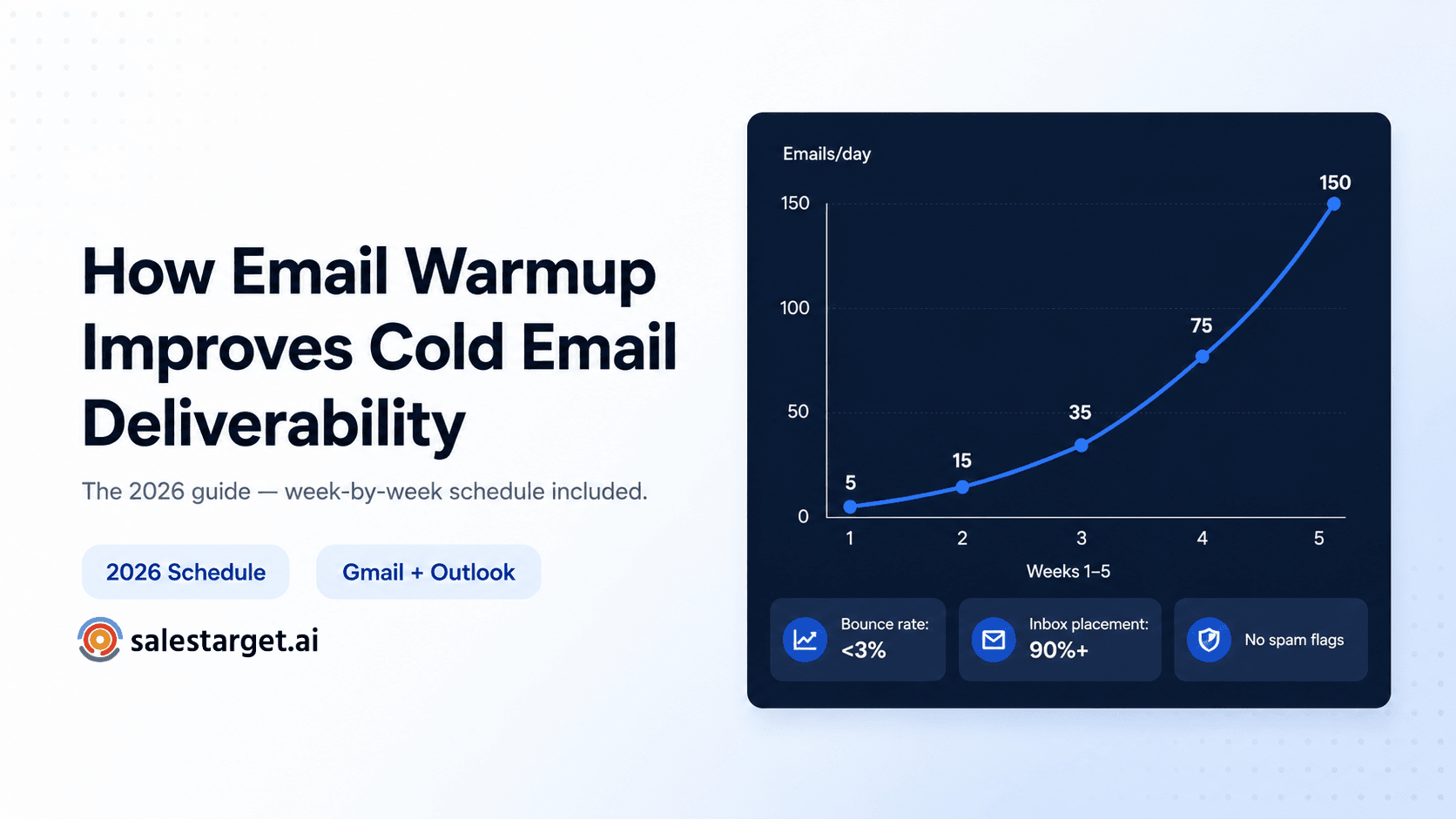
TL;DR
- Without warmup: inbox placement 40–70%, open rates 5–15%, domains flagged within weeks.
- With proper warmup: inbox placement 90–95%, open rates 35–55%, campaigns run for months.
- Minimum 3 weeks before your first campaign. Keep warmup running indefinitely alongside sends.
- Gmail and Outlook behave differently — your warmup strategy needs to account for both.
- Warmup alone is not enough — list quality and authentication must be correct first.
You launch a cold email campaign. The copy is solid. The offer makes sense. You're using an AI-powered outreach tool. But days go by and nothing happens. Open rates hover around 5%. Replies are almost non-existent.
In most cases the problem is not your copy or your tool. It's email deliverability — and more specifically, a missing or poorly executed email warmup strategy. If your emails do not reach the inbox, nothing else matters.
01 Why email deliverability matters in cold outreach
Cold email outreach operates in a more hostile environment than any other type of email. You are reaching people who have no prior relationship with you. Inbox providers — Gmail, Outlook, Yahoo — apply stricter filters accordingly.
Every cold email is evaluated on sender reputation, domain and IP history, engagement signals, and sending behaviour consistency. The Validity 2025 Email Deliverability Benchmark Report shows the global average inbox placement rate is approximately 84%. One in six legitimate emails never reaches the inbox.
| Signal inbox providers evaluate | What they look for | Risk if wrong |
|---|---|---|
| Sending volume ramp | Gradual increase over time | Sudden spikes trigger spam classification |
| Bounce rate | Below 2% consistently | Above 5% damages domain reputation |
| Spam complaint rate | Below 0.10% (Google threshold) | Above 0.10% triggers enforcement action |
| Engagement rate | Opens, replies, inbox rescues | Low engagement = low trust = spam routing |
| Authentication (SPF/DKIM/DMARC) | All three configured correctly | Missing = emails rejected or spam-routed |
| Domain age | Consistent sending history | New domain with no history = high suspicion |
Email warmup directly addresses the first three signals in this table. For the full technical breakdown, see our email inbox placement and deliverability guide.
02 What is email warmup?
Email warmup is the process of gradually building trust and sender reputation for a new or inactive email account, domain, or IP address — before launching cold email campaigns at full volume.
When you start sending from a new domain, inbox providers have no historical data to determine whether you are a legitimate sender or a spammer. Warmup solves this by starting with very low sending volumes, generating natural engagement signals, and increasing volume slowly over 3–5 weeks.
The process works by connecting your inbox to a network of real business inboxes that send each other emails and interact positively — opens, replies, inbox rescues from spam. Inbox providers see your domain consistently sending and receiving engaged email, and assign it a growing trust score.
What warmup is not
Warmup is not a one-time setup phase. Sender reputation decays without consistent positive signals. Keep warmup running continuously alongside active campaigns — not just during the ramp-up period. SalesTarget.ai's unlimited inbox warm-up runs automatically on all plans, permanently.
03 When is email warmup necessary?
Warmup applies to more situations than most teams realise — not just brand-new domains.
| Situation | Warmup required? | Notes |
|---|---|---|
| Brand-new domain | Yes — always | No sending history = maximum scrutiny |
| New inbox on existing domain | Yes | New mailboxes need their own reputation |
| Inbox inactive for 30+ days | Yes — re-warm | Microsoft flags domains dormant for 60+ days |
| Switching email service provider | Yes | Moving to Outlook or Google Workspace resets trust |
| Scaling volume aggressively (3x+) | Yes — ramp gradually | 3x spikes within 48 hours trigger Microsoft filters |
| After a deliverability incident | Yes — recovery warmup | Bounce spike or complaint surge requires rebuilding |
| Running AI-automated outbound | Yes | Automation scales risk without warmup infrastructure |
04 What happens when you skip warmup
The consequences of skipping warmup are not immediately visible — which is why teams often don't connect the cause to the effect until significant damage is already done.
| What happens | Timeline | How bad |
|---|---|---|
| Emails land in spam on new domains | Day 1–3 | 30–60% spam placement from launch |
| Open rates stay below 10% | Days 1–14 | Teams blame copy — it's actually placement |
| Inbox provider throttles sending | Week 2–3 | Volume restricted without warning |
| Domain gets flagged or burned | Week 3–6 | Recovery takes months, sometimes impossible |
| Blacklist entry | Week 4–8 | Removal is slow — check via MXToolbox |
Data from the Instantly 2026 Cold Email Benchmark Report: without proper warmup, inbox placement on new domains sits at 40–70%. With warmup and ongoing maintenance it reaches 90–95%.
The mistake teams make
Open rates drop. The team rewrites the subject lines. New copy launches. Rates stay low. The conclusion is that cold email doesn't work. The actual problem is that 40–60% of emails never reached the inbox — there was nothing wrong with the copy.
05 How email warmup improves deliverability — the 4 mechanisms
1. Builds a positive sender reputation over time
Sender reputation is a trust score assigned to your sending domain and IP based on historical behaviour. Warmup builds it by generating consistent, engaged sending behaviour before your cold campaigns start. By the time your first real email goes out, your domain looks like a known, trusted sender.
2. Generates authentic engagement signals
During warmup, emails sent within the warmup network receive genuine interactions — opens, replies, inbox rescues from spam. These are the signals inbox providers use to decide whether your emails belong in the inbox. Data from MailDeck across 833,000+ managed inboxes shows: reply rate below 20% during warmup correlates with 17% lower inbox placement during the first 30 days of cold sending. The optimal warmup reply rate is 30–35%.
3. Validates and supports authentication
SPF, DKIM, and DMARC must be configured before warmup begins. Google and Yahoo have required all three for bulk senders since February 2024. Microsoft updated its anti-spam systems in late 2025 to flag sending patterns that match warmup tool signatures and volume increases greater than 3x within 48 hours. Set up authentication first, then run warmup. See our domain reputation guide for the exact DNS setup.
4. Conditions inbox providers to expect your sending pattern
A domain that has sent 20–30 emails per day for 4 weeks with consistent engagement has established a behavioural baseline. When you scale to campaign volume, the increase is predictable — not a spike from zero. See how inbox rotation extends this baseline to campaign scale.
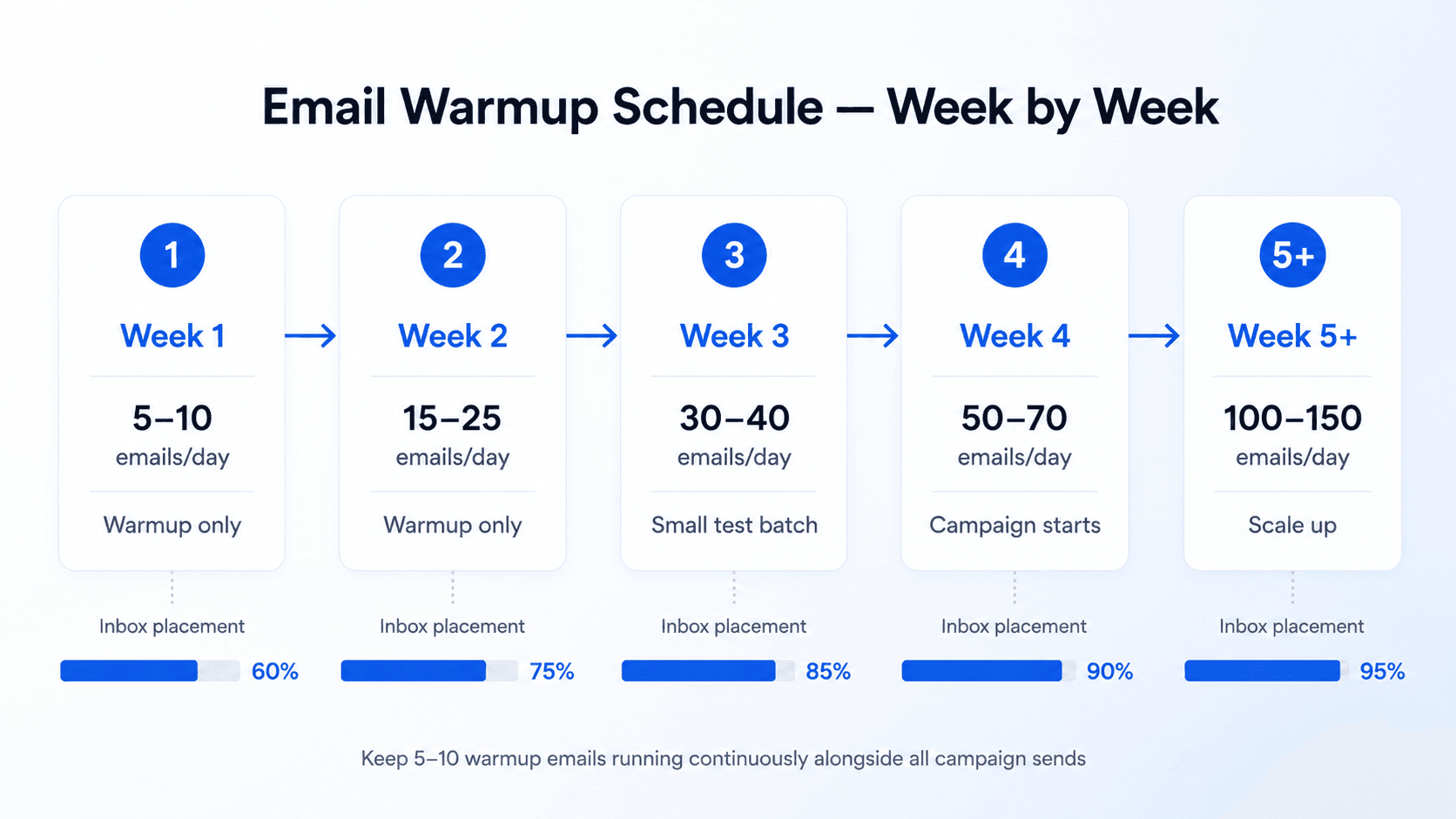
06 The week-by-week email warmup schedule (2026)
This is the schedule that consistently produces 90%+ inbox placement when combined with correct authentication and a clean, verified list.
| Week | Emails per inbox per day | Reply rate target | Cold sends? |
|---|---|---|---|
| Week 1 (Days 1–7) | 5–10 | 30–35% | No — warmup only |
| Week 2 (Days 8–14) | 15–25 | 30–35% | No — warmup only |
| Week 3 (Days 15–21) | 30–40 | 30–35% | Small test batch only (max 20) |
| Week 4 (Days 22–28) | 50–70 | 25–35% | Yes — start at low volume |
| Week 5+ (Ongoing) | Up to 100–150 | 25–30% | Yes — scale gradually |
| Always (ongoing) | 5–10 warmup alongside campaigns | 25–30% | Yes — never stop warmup |
Critical rule
Warmup emails count toward your total daily sending volume — do not stack them on top of campaign sends. If your inbox sends 40 emails per day total during week 4, that's 30 campaign emails and 10 warmup emails. Going above your total daily limit triggers throttling. SalesTarget.ai's unlimited inbox warm-up handles the ramp automatically on all plans.
07 Gmail vs Outlook — why warmup works differently
Most warmup guides treat all inbox providers the same. They are not. Gmail and Outlook use different filtering systems, weight signals differently, and respond to warmup at different speeds.
| Gmail (Google Workspace) | Outlook (Microsoft 365) | |
|---|---|---|
| Spam complaint threshold | 0.10% — tracked in real time via Postmaster Tools | No published threshold — higher sensitivity to cold sending patterns |
| Warmup speed | 14–21 days basic trust. 3–4 weeks for strong reputation | 3–5 days minimum. 10–14 days recommended |
| Authentication | SPF + DKIM + DMARC mandatory since Feb 2024 | SPF + DKIM required. DMARC strongly recommended |
| Main risk signal | Sudden volume spikes, high bounce rate, spam complaints | Sending patterns matching warmup tool signatures (updated late 2025) |
| Monitoring tool | Gmail Postmaster Tools (free) | Microsoft SNDS |
| Avg inbox placement (2025) | 87–90% | 75.6% — lower even for well-warmed domains |
08 What to do if warmup stops working
Deliverability problems during or after warmup are usually diagnosable. The recovery steps depend on which signal has degraded.
Step 1 — Identify the drop date
Open Gmail Postmaster Tools and Microsoft SNDS and identify the exact date when domain reputation or inbox placement dropped. Work backwards: Did you increase volume? Did you add a new list? Did a DNS record change? The cause is almost always found within 48 hours of the drop date.
Step 2 — Check blacklists
Run your sending domain through MXToolbox Blacklist Check — it checks against 100+ blacklists simultaneously. If you are listed, follow the delisting process on the specific blacklist's site.
Step 3 — Pause campaigns, not warmup
Pause all cold campaigns immediately. Do not pause warmup — you need the positive engagement signals to keep running. If warmup also stops, reputation degrades faster.
Step 4 — Verify your list
Run your entire contact list through SalesTarget.ai's Email Validator. Remove all Invalid, Spam, Abuse, and Disposable addresses. High bounce rates from stale data are the most common cause of deliverability damage.
Step 5 — Restart at week 1 volume
Restart sending at 5–10 emails per day and follow the ramp schedule again. Recovery typically takes 4–6 weeks if caught early, up to 90 days if the domain was significantly burned.
If recovery doesn't work after 90 days
The domain may be permanently impaired. Buy a new secondary sending domain, configure authentication correctly, run the full warmup schedule, and keep the original domain for transactional email only. Never use your primary company domain for cold outreach.
09 Best practices to maintain deliverability after warmup
Always verify your list before sending
Warmup builds reputation. Stale data destroys it. B2B email addresses change at 2% per month. Run every list through Email Validator before every major campaign — not just the first time.
Never stop warmup — run it continuously
The most common mistake after completing warmup is turning it off. Keep unlimited inbox warm-up running at 5–10 emails per day per inbox alongside all active campaigns.
Use inbox rotation to protect individual inboxes
Inbox rotation distributes your campaign sends across multiple warmed inboxes automatically. No single inbox exceeds its safe daily limit. This is how teams scale from 200 to 2,000 emails per day — add more inboxes, keep each one within safe limits.
Monitor metrics weekly
- Gmail Postmaster Tools — domain reputation and spam rate (free, check weekly)
- MXToolbox — blacklist monitoring (run after any volume increase)
- Bounce rate — keep below 2% at all times
- Spam complaint rate — keep below 0.08% (Google threshold is 0.10%)
Avoid sudden volume spikes
Microsoft's updated anti-spam system (late 2025) specifically flags volume increases greater than 3x within 48 hours. Scale in increments of 1.5–2x, with at least 3 days between each increase.