A rep books a strong discovery call on Monday. By Thursday the notes live in a notebook, the lead still reads "new" in the sheet, and nobody scheduled the follow-up. The buyer cools off.
An automated sales pipeline tracks leads, deals, and follow-ups by logging every email, call, reply, and meeting on one record, moving that record through set stages, and creating the next task the moment something happens. Reps stop updating spreadsheets, and the team always sees who to contact next.
This post covers where manual tracking breaks, how the automation works for leads, deals, and follow-ups, and how SalesTarget.ai keeps prospecting, outreach, and CRM in one workflow.
Why Manual Pipeline Tracking Causes Missed Leads, Stalled Deals, and Late Follow-Ups
Manual tracking depends on reps remembering to log, update, and schedule, and busy reps skip all three. The damage stays hidden, since a stale pipeline still looks full.
Salesforce's State of Sales report (5th edition, 2023) found that reps spend about 28% of their week selling, with deal management and data entry taking much of the rest. Two-thirds of reps said they felt overwhelmed by the number of tools they use.
Speed makes it worse. Harvard Business Review's study The Short Life of Online Sales Leads (2011) found that firms contacting a web lead within an hour were nearly seven times as likely to qualify it as firms that waited one more hour.
Three patterns show up on almost every team that tracks by hand:
- Leads sit unassigned.
- Deals stay in a stage long after the buyer went quiet.
- Follow-ups live in a rep's head.
Each one is a small leak, and none of them fires an alert. A better spreadsheet will not fix that. Removing the manual step will.
How an Automated Sales Pipeline Works Across the Sales Process
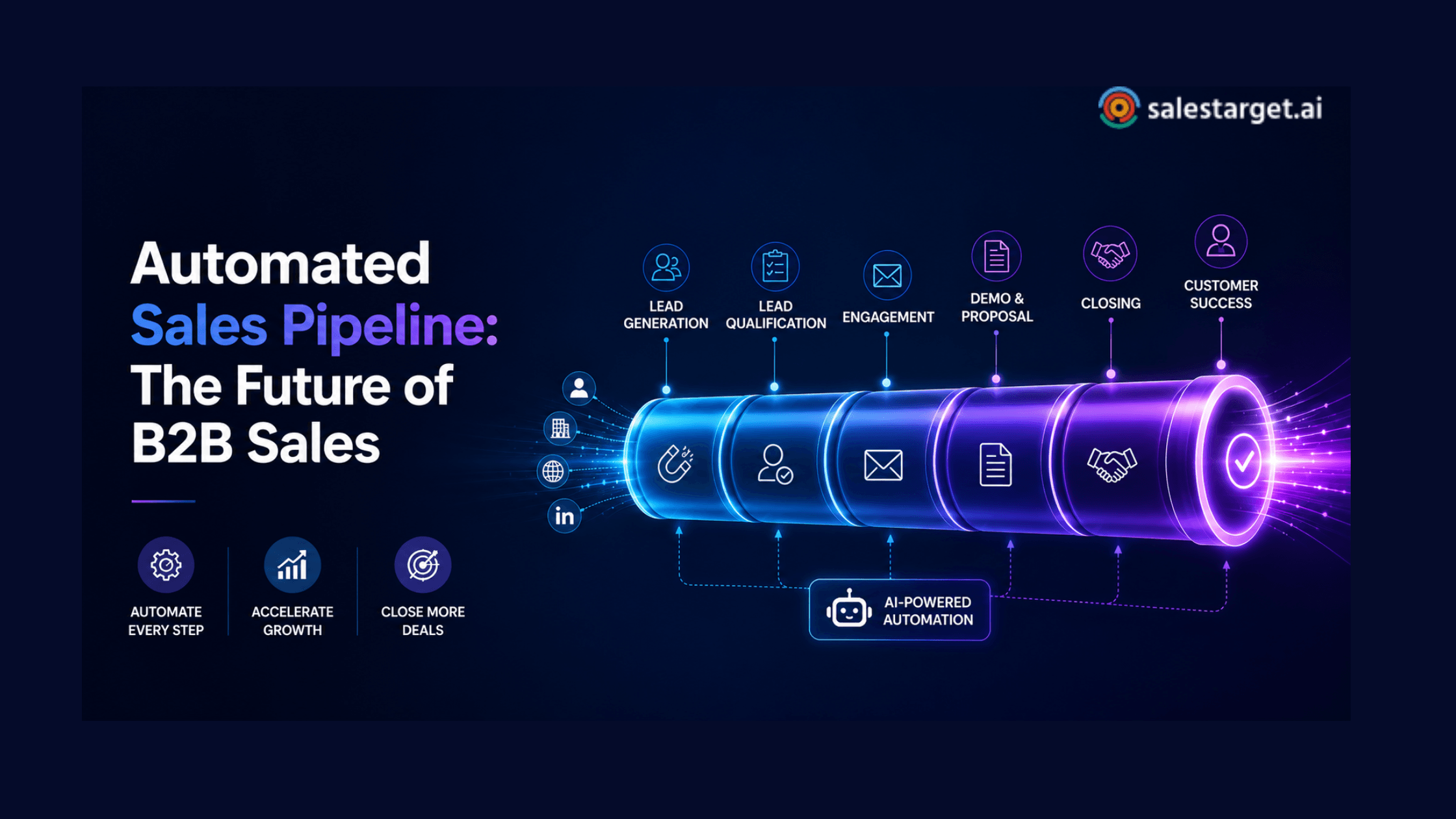
An automated sales pipeline joins four jobs that most teams run in separate tools: capturing leads, watching prospect activity, moving qualified leads into deals, and recording what happens next. When all four sit on one record, nothing depends on memory.
Capturing and organizing new leads
New leads enter automatically from a search or a campaign, with owner, source, and contact data attached. In SalesTarget.ai, campaign leads land in the CRM with no import step, so the list never passes through a spreadsheet.
Tracking prospect activity across outreach channels
Every send, reply, connection request, and call is written to the lead's timeline. When email and LinkedIn run from one workflow, the rep sees the whole conversation instead of half of it.
Moving qualified leads into deal stages
A lead becomes a deal when it shows buying intent: a positive reply, a booked meeting, a call that went well. The record moves into the deal pipeline with its history intact, so the AE never has to ask the SDR what happened.
Recording sales activities and next steps
Emails and calls log themselves. A follow-up task appears when a lead replies or a meeting ends, so the next step is written down while it is still fresh.
How Automated Sales Pipeline Management Tracks Leads
Automated sales pipeline management tracks leads by tying one contact record to every action taken on it, from first search to first meeting. Four layers do the work.
Lead capture and contact enrichment
Lead Explorer searches 840M+ professional profiles and 146M+ business entities (SalesTarget.ai figures). One-click enrichment unlocks verified work email, personal email, phone, and mobile at the moment you find the lead. Records start complete instead of half-filled.
Lead qualification and pipeline entry
Filters decide who earns a sequence: role, seniority, company size, tech stack, and Intent Topics. Lead Explorer carries 4,000+ intent and buyer signals, including funding rounds, hiring spikes, and leadership changes on a 30 to 90 day lookback. A lead with a live signal should enter the pipeline ahead of one without.
Lead activity and engagement tracking
Unibox pulls every email reply into one view and sorts it by intent: Interested, Follow-Up, Not a Fit. That sort tells the pipeline how to treat each lead.
One tip most guides skip: do not advance leads on opens. Mail privacy features preload messages and inflate open counts. Replies and booked meetings are the cleaner trigger.
Lead-to-deal tracking
Lead-to-deal tracking follows a contact from first touch to opportunity, so you can see which source, sequence, and channel produced the deal. When a reply is marked Interested, the deal syncs to the CRM with its campaign history attached.
How Sales Pipeline Automation Tracks Deals From Opportunity to Close
Sales pipeline automation tracks deals by placing each opportunity in a stage, logging every activity against it, and flagging deals that stop moving.
Creating and managing deal stages
Write stages from what the buyer has done, not what the rep hopes: replied, meeting held, proposal sent, negotiation. SalesTarget.ai's Deal Pipeline gives the team one live, shared view of those stages.
Tracking deal movement and sales activity
Each deal collects its emails, calls, and meetings on one timeline. The dashboard shows open deals, meetings, and pending tasks, so a manager can read the pipeline without asking anyone for an update.
Identifying stalled and inactive opportunities
A stalled deal is one with no buyer activity past the normal time for its stage. Set that clock per stage, not once for the whole pipeline. Three silent days after a booked meeting is a warning sign. Ten silent days during procurement may be normal. AI Copilot flags at-risk deals and recommends the next move.
Maintaining accurate pipeline visibility
Visibility stays accurate when logging is automatic, since the record shows what happened instead of what a rep remembered. Reports & Analytics then give leaders pipeline numbers they can trust in a review.
How Sales Follow-Up Automation Keeps Opportunities Moving
Sales follow-up automation creates, schedules, and tracks the next action after every touch, so no opportunity waits on a rep's memory. The goal is simple: no reply sits unanswered and no meeting ends without a next step.
Assigning follow-up tasks after sales activities
When a lead replies or a meeting ends, the CRM creates a follow-up task and assigns an owner. The task carries the lead's full history, so the rep opens it ready to act.
Triggering follow-ups based on prospect actions
Prospect actions should set the timing. A reply starts a task. Silence moves the sequence to its next step. Email sequences pace follow-ups after the first touch, and LinkedIn sequences branch on replies, actions, or no response.
Tracking emails, calls, replies, and meetings
Emails, replies, and calls log to the timeline without rep effort. The built-in AI dialer takes notes during the call and saves them to the lead record, so nobody writes call summaries by hand. Meetings sync through Google Calendar, Google Meet, and Calendly.
Preventing overdue and missed follow-ups
Pending tasks show on the dashboard, and the CRM creates the next one as soon as a reply or meeting happens. SalesTarget.ai reports 91% follow-up completion for its CRM (SalesTarget.ai figure), which matters given the one-hour qualification gap in the HBR study above.
If your follow-ups still live in sticky notes, see how the SalesTarget.ai CRM creates them automatically.
How to Build an Automated Sales Pipeline for B2B Sales Teams
Build it in five moves: define stages, connect data, set movement rules, automate repeat tasks, and watch conversion.
Define pipeline stages around the actual sales process
Write each stage from a buyer action and give it an entry condition. Five or six stages are enough. If two stages feel the same to a rep, merge them.
Connect lead data with outreach and CRM activity
Keep one record per contact across email, LinkedIn, and calls. Our step-by-step CRM workflow guide walks through the setup in detail.
Create rules for lead and deal movement
Write rules as plain if-then statements. If a reply is marked Interested, create a deal. If a deal has no activity past its stage limit, flag it. Move records on replies and meetings, not opens.
Automate repetitive follow-up tasks
Hand over the tasks that never change: creating a task after a reply, pacing sequence steps, logging calls. Keep the judgment calls, like pricing talks and multi-threading, with the rep.
Monitor pipeline activity and conversion points
Track lead-to-meeting, meeting-to-deal, and deal-to-close rates weekly, plus follow-up completion. The weakest rate shows where to fix the process first.
Sales Pipeline Software Features That Support Automated Tracking
Good sales pipeline software covers five jobs. Check each one before you commit to a tool.
Lead tracking software for prospect activity
Lead tracking software should record every touch, reply status, and owner on one timeline per lead.
Deal tracking software for opportunity management
Deal tracking software should show stage, activity history, next step, and a flag for deals that went quiet.
CRM pipeline management for stage visibility
CRM pipeline management should give the whole team one live view of every stage. Shared views end the "which sheet is current" argument.
Sales workflow automation for repetitive tasks
Sales workflow automation should create tasks, pace sequences, and log activity without a rep clicking anything. For a wider view of where this is heading, read our take on the future of B2B pipeline automation.
Sales activity tracking for accurate pipeline records
Sales activity tracking should capture emails, calls, replies, meetings, and call notes automatically. Records that depend on manual entry go stale within a week.
Why Choose SalesTarget.ai
SalesTarget.ai keeps lead data, outreach, CRM, and AI help in one workspace, so the pipeline records itself. Apollo supplies data and engagement, but you still bolt on deliverability and a CRM. Instantly, Smartlead, and Lemlist focus on cold email and deliverability, with no native B2B database, no LinkedIn automation, and no real CRM. SalesTarget.ai covers all of it in one platform.
Find and enrich B2B leads with Lead Explorer
Lead Explorer searches in plain English or through stacked Business and People filters. Enrichment happens at the moment you find the lead, and enriched leads go straight into sequences or the CRM with no CSV.
Run email and LinkedIn outreach from one workflow
Email Outreach supports unlimited inboxes with automatic AI warm-up, inbox rotation, and SPF, DKIM, and DMARC checks. LinkedIn Outreach automates connection requests, DMs, and follow-ups with rate limits and auto-pause safeguards. Both run in one flow, so context carries across channels.
Validate contacts before they enter active outreach
The Email Validator runs MX and SMTP checks, flags disposable addresses, and scores risk before you send. SalesTarget.ai reports that 90% of emails in Email Outreach are validated before sending (SalesTarget.ai figure). Clean contacts mean pipeline records that point to real people.
Manage leads, deals, calls, and follow-ups in the built-in CRM
The CRM has five modules: Lead Management, Deal Pipeline, Tasks & Follow-Ups, Activity Tracking, and Reports & Analytics. It connects with Google Calendar, Google Meet, Calendly, Slack, Zapier, HubSpot, Salesforce, and Zoho, and setup takes under a day.
SalesTarget.ai reports 3.2X faster deal cycles, about 6 hours saved per rep per week, and 2.4X more meetings from the same leads (SalesTarget.ai figures). Set against Salesforce's 28% selling-time finding, those six hours are the part worth chasing.
Use AI Copilot for pipeline and CRM tasks
AI Copilot is free inside the platform. Ask it in plain language about CRM deals, meetings, and tasks, create or assign tasks, or generate a full email sequence in seconds. It flags at-risk deals and recommends the next move. Strategy stays with your team.
Want to see this on your own lead list? Start free with SalesTarget.ai and run one campaign through the full workflow.
Common Automated Sales Pipeline Problems That Reduce Pipeline Accuracy
Most accuracy problems start with bad input or disconnected tools, not bad software. These five show up most.
Poor lead data creating inaccurate pipeline records
Bounced emails and outdated titles create ghost leads that inflate the pipeline. Verify contacts at enrichment, not months after the data was first collected.
Duplicate contacts splitting sales activity
When one person sits in two records, one holds the replies and the other keeps receiving sequence steps. Match on name and company domain before records merge. Campaign leads that land in the CRM automatically remove the CSV import step where many duplicates begin.
Incorrect deal stages hiding stalled opportunities
Reps move deals forward on hope. Tie each stage to a buyer action, and a deal cannot sit in "proposal sent" when no proposal went out.
Follow-up automation continuing after prospect responses
A "just checking in" email after the buyer already replied damages trust fast. Confirm that a reply stops the sequence for that contact, and use Unibox intent sorting to route the reply to the right owner.
Disconnected outreach and CRM systems creating activity gaps
If the email tool syncs to the CRM overnight, reps work from yesterday's facts. One workspace removes that gap.
How to Keep an Automated Sales Pipeline Accurate as the Team Grows
Accuracy at scale comes from shared definitions, a weekly cleanup habit, connected activity, and two or three tracked numbers.
Keep lead and deal stages consistent across reps
Write one page that defines each stage and its entry condition. Then a new rep's "interested" means the same thing as everyone else's.
Review inactive opportunities and overdue tasks
Run a 20-minute weekly pass sorted by days since last activity. You can also ask AI Copilot which deals have gone quiet and which tasks are overdue.
Connect outreach activity with CRM records
Unibox assigns owners to replies and syncs deals to the CRM, so outreach and pipeline records stay on one thread. For more on choosing the right setup, see our guide to the best CRM for sales teams.
Measure lead-to-deal movement and follow-up completion
Reports & Analytics show how leads move toward deals and how many follow-ups get done. If lead-to-deal movement drops as headcount rises, the stage definitions have drifted.
Turn Lead, Deal, and Follow-Up Tracking Into One Sales Workflow
Go back to that Monday call. In a connected workflow, the lead was found and enriched in Lead Explorer, verified before the first send, and reached across email and LinkedIn. The reply was sorted as Interested, the deal landed in the pipeline, and the AI dialer saved the call notes. The follow-up task was waiting when the meeting ended.
That is the practical fix for a pipeline nobody trusts: fewer tools, fewer manual steps, and one record per buyer. SalesTarget.ai puts every step in one place, built for outbound teams and not enterprise bloat.
Ready to stop chasing updates? Build your automated sales pipeline with SalesTarget.ai.