Most sales problems that look like execution problems are actually data problems. A rep sending 300 emails a week to the wrong titles will not out-hustle bad targeting. A campaign built on outdated company records will underperform, no matter how sharp the copy is. When the underlying data is stale, incomplete, or too broad, every downstream activity — outreach, follow-up, personalization, forecasting — pays the tax.
This is where a lead generation database becomes central to the way modern B2B teams work. It is not a shiny marketing layer; it is the foundation reps rely on to figure out who to talk to, why to talk to them now, and what to say when they reach out. A well-organized lead database can shrink prospecting time from hours to minutes and turn scattered guesses into a repeatable pipeline motion.
This guide walks through what a lead generation database actually is, what quality data looks like, how sales and marketing teams put it to work, and how to evaluate whether the database you rely on is genuinely built for your ideal customer profile.
What Is a Lead Generation Database?
A lead generation database is a structured, searchable collection of company and contact information used by sales and marketing teams to identify, qualify, and reach potential buyers. It brings together firmographic data (industry, size, revenue, location), technographic data (tools and platforms in use), and contact-level details (name, title, verified email, phone, LinkedIn) into a single place where teams can filter, segment, and export prospects that match a defined ideal customer profile.
Think of it as the difference between searching the open web for prospects one at a time and pulling a targeted list in a few clicks. Instead of stitching together LinkedIn searches, scraped contact lists, and outdated CRM exports, a lead database consolidates that work into structured records you can act on.
Some teams call it a B2B contact database. Others refer to it as a sales prospecting database or a B2B prospect database. The terminology varies, but the intent is the same: a reliable source of prospect data that reduces the manual research burden on reps and gives marketing a dependable pool to work with.
What Information Does a Good Lead Generation Database Contain?
The value of any lead database comes down to the depth and accuracy of its records. A useful B2B lead database typically holds several layers of data, each supporting a different part of the sales motion.
Company (Firmographic) Information
These are the details that describe the account itself: legal name, industry classification, employee count, revenue band, headquarters and office locations, funding stage, ownership type, and website. This layer helps teams identify which accounts fit their ICP before ever touching a contact record.
Contact-Level Information
This is where the database earns its keep. Names, current job titles, seniority level, department, work email, direct dial or mobile number when available, and LinkedIn profile link. Ideally each record is time-stamped so you can see when it was last verified.
Technographic Signals
The software and platforms a company uses often reveal buying context. Knowing that a target account runs on a specific CRM, marketing automation tool, or analytics stack lets reps tailor their opening line around a real workflow the buyer recognizes.
Intent and Activity Signals
Some lead databases surface behavioral signals — recent hiring for a role, funding announcements, new leadership, expansion into a new region, or research activity around specific topics. These signals help reps decide who to prioritize this week versus who to nurture.
Verification Metadata
Every record should carry a verification status: when the email was last checked, whether it bounced, and how the number was sourced. Without this, teams end up learning about bad data the hard way — through their sending reputation.
How a Lead Generation Database Actually Works
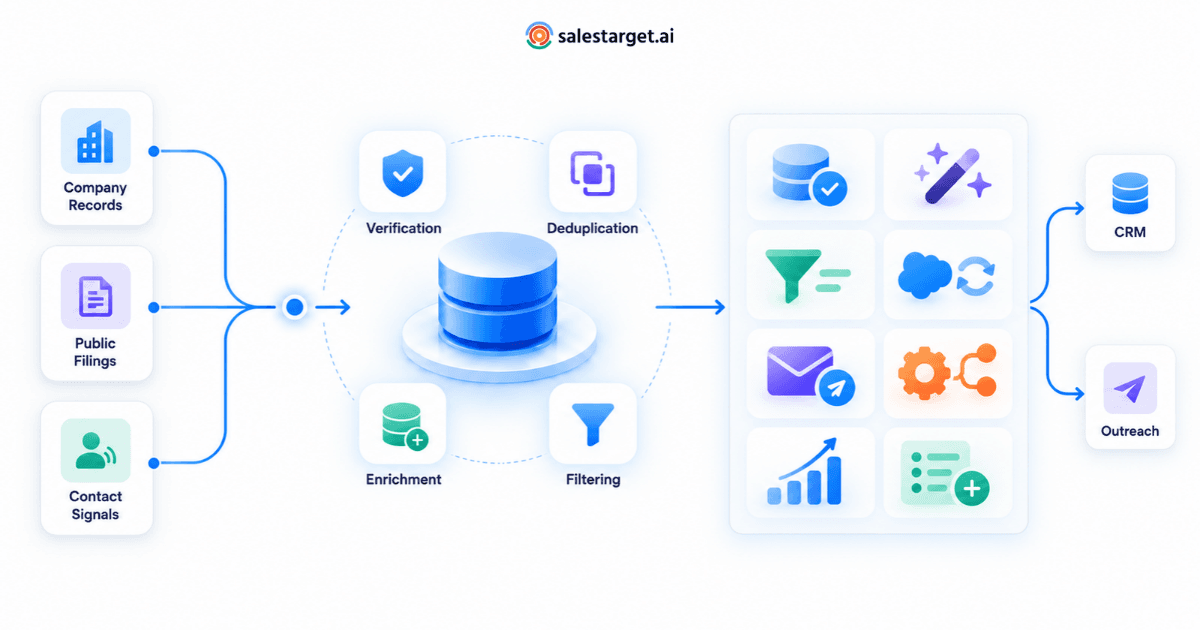
Behind the search bar, a lead database is a pipeline. Data is collected from a mix of public sources, partner feeds, business filings, and technographic detection. It then passes through cleaning, deduplication, and verification before it appears as a searchable record.
On the user side, the workflow is straightforward. A rep or marketer opens the database, applies filters that match the ideal customer profile — say, SaaS companies between 50 and 500 employees in North America, with a VP of Sales in seat — and previews the resulting list. Filters can be layered: industry plus role plus tech stack plus recent funding, for example. Once the list looks right, contacts are exported into a CRM, sequenced into outreach, or handed off to a marketing workflow.
The stronger the filters and the fresher the underlying data, the less time reps spend cleaning lists and the more time they spend selling. This is also where good B2B lead generation services and internal prospecting workflows start to converge — the tools and the process rely on the same underlying record quality.
Why Database Quality Affects Every Stage of the Funnel
Data quality is not a back-office concern. It shows up in the numbers reps hit each quarter. Here's how quality — or the lack of it — flows through the pipeline.
Prospecting
If 30% of the emails in your list are invalid, a third of your outreach effort disappears before it starts. Bounces damage sending reputation, which quietly reduces the deliverability of everything else you send that week.
Qualification
Inaccurate firmographic data leads reps to spend time on accounts that were never a fit. A company tagged as 200 employees when it actually has 15 is a wasted call. Reliable firmographics keep qualification consistent across the team.
Personalization
Personalization only works when the underlying detail is correct. Referencing the wrong role, the wrong tool, or the wrong location is worse than sending a generic message — it signals that the sender didn't do the homework.
Outreach at Scale
Sequences amplify whatever data goes into them. Clean, verified B2B contacts amplify results; stale records amplify noise and unsubscribes.
Key Capabilities to Look For in a Lead Generation Database
Not every lead database software is built for the same use case. When you evaluate one, focus on the capabilities that map to how your team actually prospects.
Depth of Contact and Company Coverage
Coverage matters more than raw record counts. A database with 500 million records is not helpful if the segment you sell into is thin. Test it against your ICP before making assumptions.
Advanced Filtering and Search
Look for filters that combine firmographic, technographic, role-based, and geographic criteria. The more precise the filter set, the fewer manual passes you need to build a usable list.
Verification and Freshness
Ask how often records are refreshed and how emails are verified. A database that verifies at the point of export tends to outperform one that relies on batch checks from months ago.
Enrichment
Enrichment fills in the gaps for records you already have. If a CRM record is missing a job title, direct dial, or company size, a good database can complete it in place.
Segmentation and Saved Views
Sales teams work in territories, verticals, and campaigns. Saved segments let a rep return to the same view — say, marketing directors at mid-market retail companies in the Midwest — without rebuilding filters every time.
Intent and Signal Layers
Signals turn a static list into a prioritized one. Knowing which accounts are hiring for a certain role, recently funded, or expanding gives reps a real reason to reach out this week.
Export and Workflow Fit
The database should slot into how your team already works — CSV export, CRM sync, or direct handoff to sequencing tools. If exporting is clunky, the database will get used less over time.
How Sales Teams Put a Lead Generation Database to Work
The real test of a lead database is how it fits into daily practice. A few common patterns show up across high-performing teams.
Building Weekly Prospecting Lists
Reps use the database at the start of each week to pull a fresh list aligned with their territory or vertical. Filters are saved so the process takes minutes, not hours.
Account-Based Plays
For named-account motions, reps use the database to map the buying committee — identifying the economic buyer, technical evaluator, and end user inside each target account. A single account might yield six to twelve relevant contacts.
Enriching Inbound Leads
When a form fill comes in with limited detail, the database fills in the missing firmographic and role information so the routing logic and follow-up can run correctly.
Refreshing Stale CRM Records
CRMs decay quickly. Reps and RevOps use the database to re-verify contacts, replace people who have changed jobs, and add new stakeholders at existing accounts.
Supporting Marketing Campaigns
Marketing pulls segmented audiences for email, ads, and events. A well-filtered pull is the difference between a targeted campaign and a generic blast.
How to Evaluate a Lead Generation Database for Your ICP
A database that works for one company can be the wrong fit for another. The evaluation should be practical, not theoretical.
Start by writing down your ICP in concrete terms: industry, size band, geography, role titles, and any technographic markers that matter. Then run three tests.
The Coverage Test
Search the database for your exact ICP and count the qualified results. Compare that number against your realistic addressable market. If the database returns very few matches for your core segment, no other feature will fix that.
The Accuracy Test
Export a sample of 50 records and verify them manually — check emails against a validator, confirm job titles on LinkedIn, and spot-check phone numbers. This is a small effort that surfaces the truth quickly.
The Workflow Test
Have a rep run their normal prospecting flow using the database for a week. Track how long it takes to build a list, how many contacts land in a sequence, and how the reply rate compares to their previous source of lead generation data.
Common Mistakes Teams Make When Using Lead Generation Databases
Even a strong database can produce weak results when the way it's used goes sideways. A few patterns show up repeatedly.
Filtering Too Broadly
Pulling every marketing manager in North America is not targeting. Overly broad lists dilute personalization and lead to poor sequence performance.
Ignoring Verification Dates
A contact record from two years ago is not the same as one verified last month. Reps who skip the verification metadata pay for it in bounces.
Treating the Database as a Static List
Companies grow, split, and reorganize. People change jobs. A database used once and then forgotten becomes stale within months. Refreshes should be part of the workflow, not a special project.
Skipping the Signal Layer
Reps who pull lists without looking at intent or activity signals miss the most obvious priority — accounts that are showing buying behavior right now.
Over-Automating Personalization
Just because you can pull 20 data points per contact does not mean you should stuff all of them into one email. Personalization needs to feel human, not templated.
Best Practices for Getting Better Results From Your Lead Database
A few habits consistently separate teams that get results from teams that don't.
- Define your ICP in writing before you open the database. Filters should reflect that document, not the rep's mood that morning.
- Pull smaller, sharper lists more often, instead of one giant list per month. Fresh, focused lists convert better.
- Layer signals on top of firmographics. Fit tells you who could buy; signals tell you who might buy soon.
- Route enrichment into your CRM automatically so records stay current without manual clean-up sprints.
- Build a feedback loop between reps and RevOps. When a segment is producing bad meetings, adjust the filters — don't just add more volume.
- Verify at export. Even the cleanest database has stale rows; a last-mile check protects deliverability.
How SalesTarget.ai Lead Explorer Fits Into Modern Prospecting
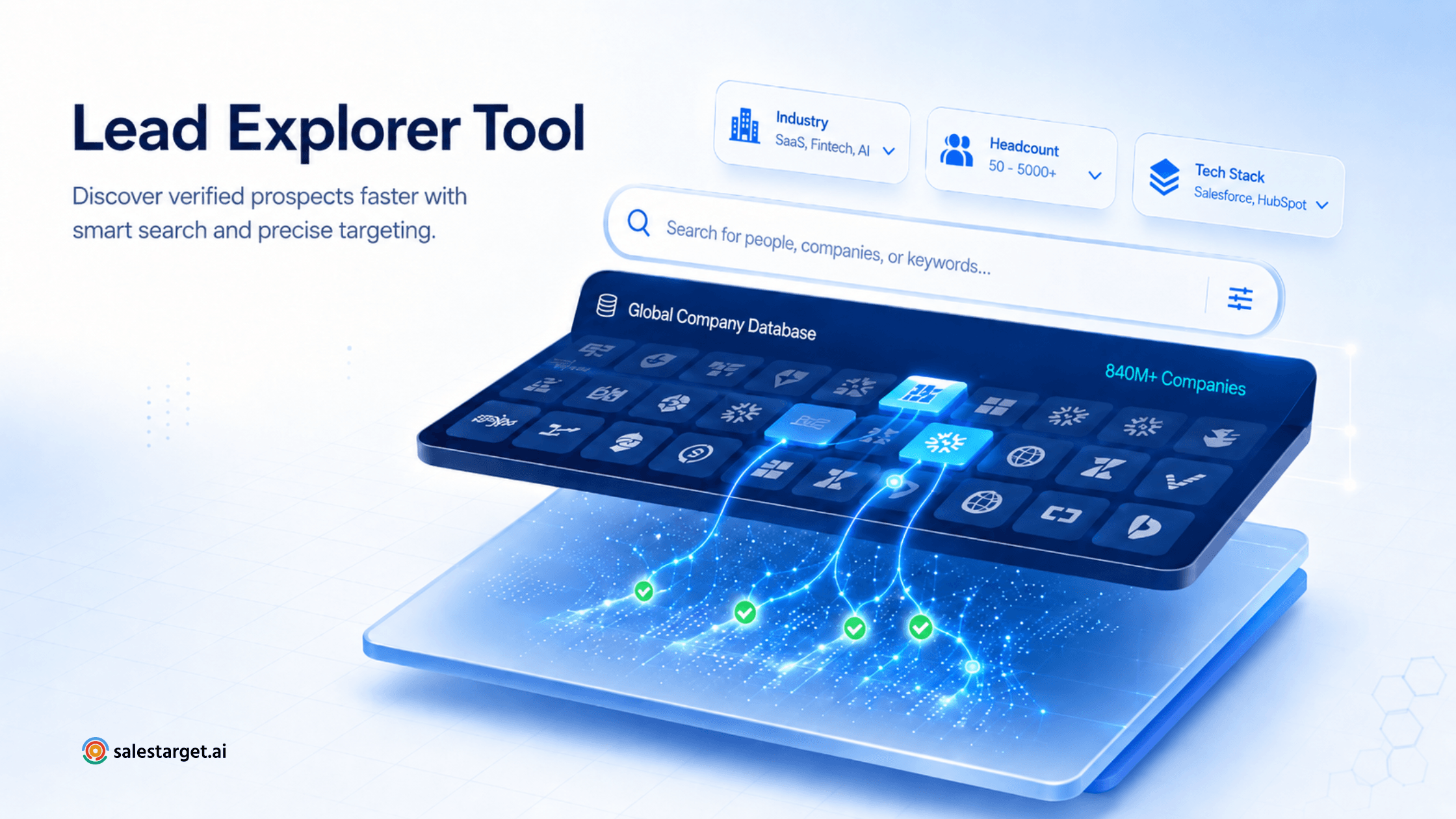
For teams that want to spend less time hunting for contacts and more time working real conversations, SalesTarget.ai Lead Explorer is designed as a searchable B2B prospect database built around ICP-based discovery. It brings company and contact data into a single workspace, so reps can filter by the attributes that matter — industry, role, geography, and company profile — and move directly from search to outreach without stitching multiple tools together.
The idea behind Lead Explorer is simple: fewer clicks between a defined ICP and a usable list. That focus on structured, filter-first discovery is what most sales teams actually need from a lead generation database — the ability to answer the question "who should we talk to this week?" in a way that is repeatable across every rep on the team.
When paired with a disciplined ICP and a habit of pulling smaller, signal-informed lists, a well-built lead database becomes less of a static asset and more of a working surface reps return to every day.
A lead generation database is not a shortcut, and it is not a magic list. It is a working foundation. The teams that get the most out of one treat it like a product they use every day — refining filters, checking data freshness, layering in signals, and feeding what they learn back into their ICP.
Get that habit right, and the database quietly becomes one of the highest-leverage tools in your sales stack. The reps stop guessing, the lists stop rotting, and the pipeline stops depending on hustle alone.