Sales teams send thousands of cold emails every week. Most land in spam, get ignored, or bounce before reaching anyone. The problem is rarely the message itself. It is almost always the infrastructure behind it — disconnected tools, unverified contact lists, manual follow-ups, and zero visibility into what is working.
A cold email outreach platform solves that by putting list management, personalization, automation, deliverability protection, and campaign analytics into a single system. But not every platform handles these jobs equally well. Choosing the wrong one means spending months switching tools, rebuilding workflows, and losing momentum in your pipeline.
This guide breaks down what a cold email outreach platform actually does, which features separate a useful tool from a mediocre one, and how to evaluate your options so you pick a platform that fits the way your team already sells.
What Is a Cold Email Outreach Platform?
A cold email outreach platform is software built specifically for sending personalized emails to prospects who have not interacted with your business before. Unlike email marketing tools designed for newsletters and subscriber lists, cold email platforms focus on one-to-one outbound sales communication at scale.
These platforms typically combine several capabilities into one workspace:
- Building and managing prospect lists with verified contact data
- Writing and personalizing email sequences for different buyer segments
- Automating send schedules, follow-ups, and reply detection
- Warming up new sending domains to establish sender reputation
- Validating email addresses before sending to reduce bounces
- Tracking opens, replies, and conversions across active campaigns
The goal is straightforward: help sales teams reach more of the right people with relevant messages, without burning their domains or drowning in manual work. A strong cold email platform replaces the patchwork of spreadsheets, separate warmup tools, and basic email clients that most teams start with.
How Cold Email Outreach Platforms Work
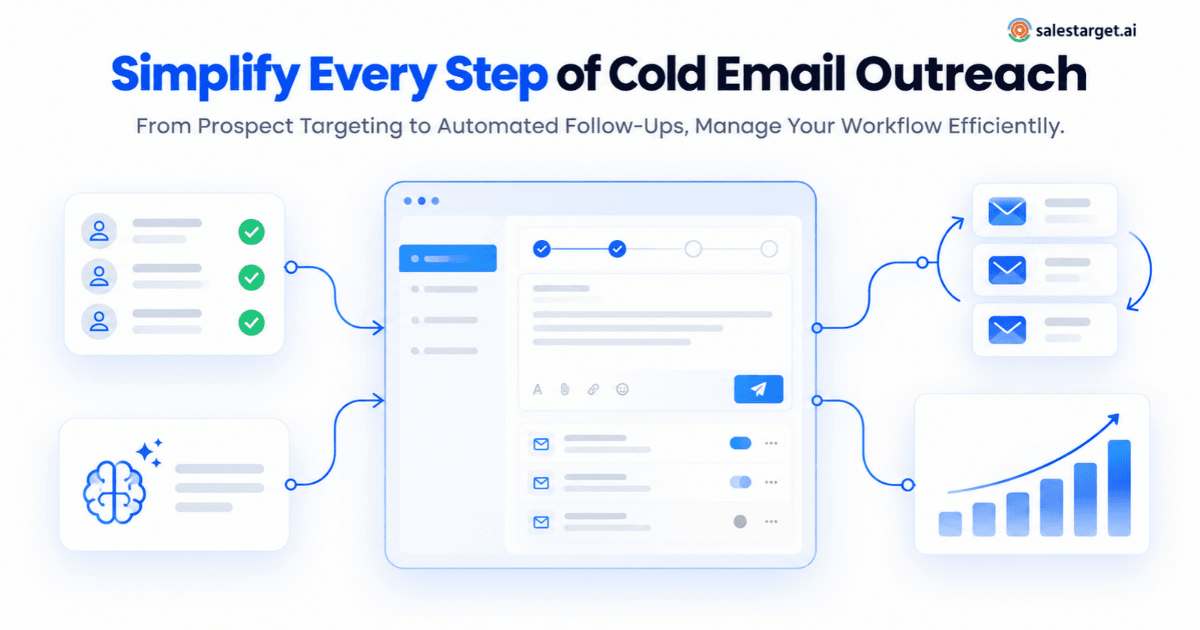
At a high level, cold email software manages the full lifecycle of an outbound email campaign — from building the prospect list to tracking which messages generate replies.
Step 1: Import or Build Your Prospect List
You start by importing a list of contacts or building one inside the platform using filters such as job title, industry, company size, and location. Some platforms include built-in prospecting databases, while others rely on integrations with external data providers.
Step 2: Create Personalized Email Sequences
Rather than sending a single email blast, you build a multi-step sequence. Each step — the first touch, follow-up one, follow-up two, and so on — is written with its own messaging and timed to send automatically. Personalization variables pull in details like the prospect's name, company, role, or industry to make each email feel individual.
Step 3: Set Sending Rules and Deliverability Protections
You configure daily sending limits, time zones, sending windows, and inbox rotation rules. The platform handles throttling, spacing between emails, and domain warmup to protect sender reputation. Authentication protocols like SPF, DKIM, and DMARC are validated before campaigns go live.
Step 4: Launch, Monitor, and Adjust
Once the campaign is live, the platform tracks delivery rates, bounces, opens, replies, and unsubscribes. When a prospect replies, the platform can pause the sequence for that contact automatically. You review performance data, adjust messaging or targeting, and iterate.
Key Features to Look for in a Cold Email Outreach Platform
Not every cold email platform covers the same ground. Here are the features that matter most for teams running outbound campaigns seriously.
Email Personalization at Scale
Basic merge tags — first name, company name — are table stakes. Look for a platform that supports deeper personalization: dynamic content blocks based on industry or role, AI-generated opening lines referencing company-specific details, and spintax variations that keep your messaging fresh across large sends. Personalization is the single biggest lever for reply rates in cold outreach.
Multi-Step Sequence Automation
A cold email campaign is not one message. It is a sequence of three to five touches, each with different messaging, spaced across days or weeks. Your platform should let you build these sequences visually, set custom delays between steps, and automatically stop the sequence when a prospect replies or opts out.
Email Warmup and Sender Reputation Management
New sending domains start with zero reputation. Without warmup, your first high-volume send will land in spam. The platform should warm up each inbox automatically — sending and receiving realistic email traffic to build trust with email service providers. Inbox rotation, which distributes your sends across multiple accounts, further protects each individual domain.
Email Verification and List Cleaning
Every unverified address you send to is a potential bounce, and bounces damage your sender reputation. A strong cold email platform includes built-in verification — MX record checks, SMTP validation, disposable email detection, and risk scoring — so your list is clean before a single email goes out.
Deliverability Monitoring and Authentication
Beyond warmup and verification, the platform should validate your SPF, DKIM, and DMARC records automatically. It should also let you monitor bounce rates, spam complaint rates, and inbox placement in real time. If deliverability drops, you need to know immediately — not at the end of the campaign.
Unified Reply Management
When you run campaigns from ten or twenty sending accounts, replies scatter across inboxes. A unified inbox pulls every reply into one view, so your team can respond quickly, categorize intent, and move qualified leads into the pipeline without switching between accounts.
Campaign Analytics and Reporting
You need clear reporting on delivery rates, open rates, reply rates, positive reply rates, and meetings booked — at the campaign, sequence, and segment level. Without segment-level data, you are optimizing blind. If you want a broader perspective on evaluating sales tools, this guide on choosing the right sales software covers the evaluation framework in detail.
How a Cold Email Platform Helps Sales Teams
Replace Manual Workflows With Automation
Without a platform, reps spend hours each day copying contacts into spreadsheets, writing individual emails, setting calendar reminders for follow-ups, and logging activity in a CRM. Cold email automation handles the repetitive parts — sending on schedule, following up when there is no reply, and pausing when someone responds — so reps focus on conversations that move deals forward.
Send More Relevant Emails, Faster
AI-assisted content generation helps reps draft personalized emails in seconds instead of minutes. When an AI engine can pull in prospect-specific context — their role, company size, industry pain points — and generate a natural-sounding opening line, the result is better personalization at higher volume.
Protect Your Sending Domains
A single bad campaign can tank a domain's reputation for months. Platforms that manage warmup, rotation, verification, and authentication as built-in functions — rather than afterthoughts — prevent that damage before it happens. For smaller teams with limited backup domains, this is especially critical.
Shorten the Feedback Loop
Real-time campaign analytics let you spot a weak subject line or poor targeting within days, not weeks. The faster you identify what is not working, the faster you fix it and reallocate effort to campaigns that convert.
Cold Email Personalization: Going Beyond Merge Tags
Merge tags got cold email personalization started. But inserting a first name and company into a template is no longer enough to earn a reply. Prospects have seen that trick thousands of times.
Effective personalization in cold outreach means the email reflects something real about the recipient's situation:
- Reference a specific business challenge common to their role or industry
- Mention a recent company event — a funding round, a product launch, a leadership change
- Tailor the call to action based on the prospect's seniority level
- Adjust the tone and length based on buyer persona
AI-powered cold email platforms automate much of this. For example, SalesTarget's email outreach platform uses an AI content generator that writes unique subject lines, openers, and calls to action based on each prospect's role, company context, and pain points. Combined with a spintax engine that creates natural-sounding message variations, personalization scales without sounding robotic.
For a deeper walkthrough on building effective cold email messaging and sequences, see this guide on improving cold email outreach for lead generation.
Email Warmup and Deliverability: The Foundation of Cold Outreach
Deliverability is not a nice-to-have. It is the foundation that everything else sits on. If your emails do not reach the inbox, nothing else about your campaign matters — not the copy, not the targeting, not the follow-up sequence.
Why Warmup Matters
Email service providers like Google and Microsoft track sending patterns closely. A new domain that suddenly sends hundreds of emails per day gets flagged. Warmup gradually increases sending volume over several weeks, establishing your domain as a legitimate sender with consistent engagement.
Inbox Rotation and Volume Management
Rather than sending all emails from a single account, inbox rotation distributes your campaign volume across multiple sending accounts. This reduces the load on each individual inbox, lowers the risk of hitting rate limits, and keeps each domain's reputation healthier over time.
Authentication Protocols
SPF, DKIM, and DMARC are non-negotiable for cold email senders. SPF tells receiving servers which IP addresses are authorized to send on behalf of your domain. DKIM adds a digital signature that verifies the email has not been tampered with. DMARC ties the two together and tells servers what to do with messages that fail authentication. Without all three, your emails are significantly more likely to be filtered or rejected.
SalesTarget handles this automatically — its cold email platform validates SPF, DKIM, and DMARC before campaigns launch, warms each inbox with AI-driven engagement, and rotates sends across unlimited connected accounts to protect each domain.
Email Verification: Why Clean Lists Are Non-Negotiable
Sending to an unverified list is one of the fastest ways to damage your sender reputation. Hard bounces — emails sent to addresses that do not exist — signal to inbox providers that your list quality is poor, and they respond by filtering more of your future emails to spam.
A reliable email verification process should include:
- MX record checks to confirm the recipient's domain can receive email
- SMTP validation to test whether the specific address exists
- Disposable email detection to filter out temporary or throwaway addresses
- Risk scoring to flag addresses that are technically valid but likely to cause problems
SalesTarget's built-in email validator runs these checks before contacts enter your sequences. The platform reports that 90% of emails are validated before sending, which helps keep bounce rates low and protects domain reputation across high-volume campaigns.
Verification is not a one-time task, either. B2B contact data degrades as people change roles, companies, and email providers. Re-verifying your active lists on a regular schedule prevents the gradual decay that slowly tanks deliverability.
Campaign Management and Follow-Ups
The difference between a productive cold email operation and a chaotic one usually comes down to how campaigns and follow-ups are managed.
Building Sequences That Earn Replies
Most replies come from follow-ups, not from the first email. A well-structured sequence typically includes three to five touchpoints:
- Email 1: Short, direct, focused on one relevant business problem
- Email 2 (Day 3-4): Adds a new angle — a stat, a brief case reference, a question
- Email 3 (Day 7-8): Shares something useful — an insight or piece of content
- Email 4 (Day 14-18): Final message — direct, low-pressure, gives the prospect an easy out
Each step should stand on its own as a reason to reply. Repeating the first email with a "just checking in" header signals that you have nothing new to offer.
Automated Follow-Ups and Contact Stop Rules
Your cold email platform should automate follow-ups based on the schedule you set and automatically stop the sequence when a prospect replies, bounces, or unsubscribes. Without stop rules, you risk sending follow-ups to someone who already responded — which is a fast path to spam reports.
SalesTarget's AI Copilot can build a complete sequence — first touch, follow-ups, timing, and pacing — from a plain-English description of your target audience. This cuts campaign setup time significantly and ensures consistent structure across campaigns.
Managing Replies Across Multiple Accounts
When campaigns run from dozens of inboxes, replies end up scattered. SalesTarget's Unibox feature pulls every reply into a single view, categorized by intent — interested, needs follow-up, or not a fit — so your team can respond quickly and move qualified leads into the pipeline without switching between accounts.
Tracking and Reporting: Measuring What Matters
Vanity metrics — open rates, total sends — feel like progress but tell you very little about whether your outreach is generating revenue. Focus on the metrics that connect activity to pipeline.
Metrics That Actually Matter
- Delivery rate: Are your emails actually reaching the inbox? Aim for 95% or higher.
- Reply rate: What percentage of recipients responded? Segment this by campaign and persona.
- Positive reply rate: How many replies expressed genuine interest? This is your real conversion metric at the top of the funnel.
- Bounce rate: Keep hard bounces below 2%. Anything higher means your list needs attention.
- Meetings booked: The output that directly connects cold email to pipeline.
Segment-Level Reporting
Aggregate campaign data hides the signal. If your VP-level segment is generating meetings at twice the rate of your manager-level segment, you need to see that clearly so you can reallocate effort. Any serious cold email outreach platform should let you break performance down by segment, sequence step, and sending account.
How to Evaluate a Cold Email Outreach Platform
Features lists look impressive on product pages. The real test is whether the platform works the way your team actually sells. Here is a practical evaluation framework.
Map Your Current Workflow First
Before looking at any tool, document your existing process. How do prospects get into your system? Who writes the emails? How are follow-ups tracked? Where do replies go? Counting every manual step and tool-to-tool handoff gives you a requirements list grounded in reality, not aspiration.
Test With a Real Campaign
Give each shortlisted platform the same task: import 50 contacts, verify them, build a three-step sequence, configure sending rules, and launch. Time how long it takes and count how many clicks it requires. A platform that needs two hours of setup for a simple campaign will be painful at scale.
Check Deliverability Infrastructure
Ask specific questions. Is warmup included or an add-on? How many sending accounts can you connect? Does the platform validate authentication records automatically? Can you monitor inbox placement in real time? Deliverability failures are expensive and slow to recover from. Cutting corners here costs more later.
Evaluate the Reporting Depth
Can you see performance by segment, by sequence step, and by sending account? Can you export the data? If reporting is limited to campaign-level totals, you will struggle to optimize anything beyond subject lines.
Consider Total Cost of Ownership
Check for inbox limits, contact caps, and features locked behind higher tiers. Add up every tool you would still need alongside the platform — a separate warmup service, a verification tool, a CRM — to get the true cost. A platform that consolidates these into one system, like SalesTarget, often reduces total spend even if the headline number looks similar.
Common Mistakes When Choosing or Using a Cold Email Platform
Prioritizing Volume Over Targeting
Sending ten thousand generic emails from a new domain is the fastest way to land in spam. Start with a smaller, well-targeted list and scale volume as you validate messaging and maintain strong deliverability metrics.
Skipping Warmup or Verification
Teams that skip warmup because they want to start immediately, or skip verification because the list "looks fine," consistently damage their domains within the first few weeks. Both are foundational steps, not optional extras.
Automating Bad Messaging
Automation amplifies whatever you feed into it. If your email copy is generic, self-focused, or asks for too much too soon, sending it faster and to more people only accelerates failure. Fix the messaging before you automate the sending.
Ignoring Reply Management
Generating replies is only half the job. If those replies sit unread across scattered inboxes for 48 hours, the window closes. A unified reply management system is not a luxury feature — it is how you convert cold email activity into pipeline.
Buying Overlapping Tools
Many teams end up paying for a sending tool, a separate warmup tool, a separate verification tool, and a separate CRM — each with its own login, its own data format, and its own learning curve. Consolidating into a single cold email outreach platform reduces cost, complexity, and the data fragmentation that kills follow-through.
Best Practices for Successful Cold Email Outreach
- Verify every address before sending. One bad campaign can set your domain back months.
- Warm up new inboxes for at least two to four weeks before ramping volume.
- Personalize beyond first name and company. Reference something specific to the prospect's situation.
- Keep emails short. Three short paragraphs. One problem, one connection to what you do, one clear ask.
- Write follow-ups that add value. Each subsequent email should bring a new angle, not a reminder.
- Set strict contact stop rules. Stop the sequence the moment a prospect replies or bounces.
- Monitor deliverability daily during active campaigns. Pause and audit if bounces climb above 2%.
- Segment campaigns by buyer persona. VP-level messaging is not SDR-level messaging.
- Optimize for replies and meetings, not opens. Opens are an input. Pipeline is the output.
- Consolidate your stack. Fewer tools mean less data fragmentation and faster handoffs.
Choosing the Right Cold Email Outreach Platform
A cold email outreach platform is not just a sending tool. It is the operational backbone of your outbound sales process. The right one connects prospecting, personalization, automation, deliverability, reply management, and analytics in a single workflow. The wrong one adds complexity without solving the problems that actually block pipeline growth.
Evaluate platforms by testing them with a real campaign, not by comparing feature checklists. Focus on deliverability infrastructure, personalization depth, sequence automation, unified reply management, and segment-level reporting. And watch for hidden costs — inbox limits, verification add-ons, and separate warmup subscriptions add up quickly.
SalesTarget's cold email outreach software brings unlimited inboxes, AI-powered warmup, built-in email verification, AI content generation, spintax variations, sequence automation, unified reply management via Unibox, and campaign analytics into one platform — built specifically for sales teams running outbound at scale.
The teams that fill pipeline consistently are not the ones sending the most emails. They are the ones sending the right emails, to verified contacts, with protected deliverability, and following up with a system that does not let qualified replies slip through the cracks.