Most B2B sales teams do not struggle with effort. They struggle with direction. SDRs spend hours scrolling through LinkedIn, copying names into spreadsheets, guessing at email formats, and building lists that look full but convert poorly. The problem is not a lack of hustle. It is the absence of a system that separates real buyers from random contacts.
That is exactly the gap a B2B lead finder is built to close.
This guide walks through what a B2B lead finder actually does, how the underlying technology works, and how to use one to build prospecting lists that reflect your ideal customer profile rather than just a keyword search. Whether you are an SDR trying to fill pipeline, a founder running outbound for the first time, or a revenue leader looking to standardize how your team sources prospects, the goal is the same: spend less time searching and more time selling.
What Is a B2B Lead Finder?
A B2B lead finder is a software tool that helps sales and marketing teams locate companies and contacts that match specific criteria. Instead of relying on manual web searches, purchased lists, or referrals, teams use a B2B lead finder tool to search structured databases using filters like industry, company size, revenue, job title, seniority, location, and technology stack.
The output is a targeted list of accounts and decision-makers, typically with verified contact details such as professional email addresses and direct phone numbers. A good B2B lead finder goes beyond simple name-and-email lookups. It combines firmographic, technographic, and behavioral data so that every record you export has context, not just contact information.
Think of it as the difference between a phone book and a research brief. A phone book gives you names. A B2B lead finder gives you names, roles, company details, technology signals, and, in some tools, real-time intent data that tells you whether a prospect is actively researching solutions like yours.
How Does a B2B Lead Finder Work?
B2B lead finder software sits on top of a large and continuously updated contact database. When you run a search, the tool queries that database against the filters you have set and returns matching companies and people. What happens behind the scenes is more involved than a simple keyword lookup.
Data Aggregation and Indexing
B2B lead finders aggregate data from a variety of sources: public business registrations, corporate websites, professional networking platforms, news feeds, job postings, patent filings, technology detection crawlers, and third-party data partnerships. This raw data is cleaned, normalized, and indexed so that a single search can pull results across millions of records in seconds.
The scope of these databases varies. Some tools cover a few million contacts; others index hundreds of millions of professional profiles and tens of millions of business entities. Larger is not always better if the data is stale, but coverage does matter when you are prospecting in niche industries or specific geographies.
Search, Filtering, and Segmentation
Once data is indexed, users access it through a search interface. Most B2B lead finder tools offer two modes:
- Filter-based search: You select criteria from dropdown menus or structured panels. This is the standard approach for building segmented lists. Common filters include industry, headcount range, annual revenue, headquarters location, job title, seniority level, department, and technology stack.
- AI-powered or natural language search: Some newer tools let you describe your ideal prospect in plain English. The system interprets the query, maps it to structured filters, and returns results. This can be faster for exploratory searches when you are still defining your ICP.
The real value comes from stacking multiple filters together. Searching for "SaaS companies with 50 to 200 employees in North America that use HubSpot" is far more useful than searching for "SaaS companies" alone.
Verification and Enrichment
Raw data is only useful if it is accurate. Leading B2B lead finder tools verify contact information at or near the point of delivery rather than relying on data that was confirmed months ago. Verification typically covers professional email validity, phone number status, and role confirmation.
Enrichment adds layers of context to a basic contact record. This might include company firmographics (revenue, headcount, funding history), the technologies a company uses, recent hiring activity, or intent signals that suggest the company is actively evaluating a product category. Enrichment turns a name and email into a qualified prospect.
Why Do Sales Teams Need a B2B Lead Finder Tool?
The short answer is efficiency. An SDR who spends half the day building lists has half a day left for outreach, follow-ups, and conversations. A B2B lead finder compresses list-building from hours to minutes, and the resulting list is typically higher quality because it is built on structured data rather than guesswork.
Here are the specific reasons teams adopt B2B lead finder software:
- Faster pipeline creation. Searching a database and exporting a list of fifty qualified contacts takes a fraction of the time it takes to manually research each company on the web.
- Sharper targeting. Filters aligned to your ideal customer profile keep low-fit accounts out of the pipeline before outreach even starts.
- Consistent prospecting standards. When every rep builds lists from the same tool using shared ICP criteria, the quality of pipeline is more predictable across the team.
- Lower bounce rates. Verified contact data means fewer emails bouncing and less risk to your sender reputation.
- Multi-use application. The same tool that feeds outbound SDR campaigns can support account-based marketing, event targeting, market research, and revenue operations segmentation.
Manual Prospecting vs. Using a B2B Lead Finder
To understand where B2B lead finders add the most value, it helps to compare the manual approach to the tool-assisted one.
| Prospecting Step | Manual Approach | B2B Lead Finder |
|---|---|---|
| Identifying target companies | Web searches, industry directories, LinkedIn browsing | Filter by industry, size, revenue, geography, and tech stack in seconds |
| Finding contacts | Searching LinkedIn, guessing email formats, using free verification tools | Access verified emails and direct phone numbers from the database |
| Qualifying accounts | Visiting company websites, reading press releases, checking funding databases | Use firmographic, technographic, and intent data built into each record |
| Building a list | Copy-pasting into a spreadsheet, deduplicating manually | Export to CRM or outreach tool with one click |
| Verifying data accuracy | Sending test emails, calling and getting voicemails | Contact details verified at or near point of enrichment |
| Time per list of 50 contacts | 4 to 8 hours | 15 to 30 minutes |
Manual prospecting still has its place, especially for high-value accounts that deserve deep research. But for building volume at consistent quality, a B2B lead finder is significantly more efficient.
How to Find the Right B2B Leads (Not Just More Contacts)
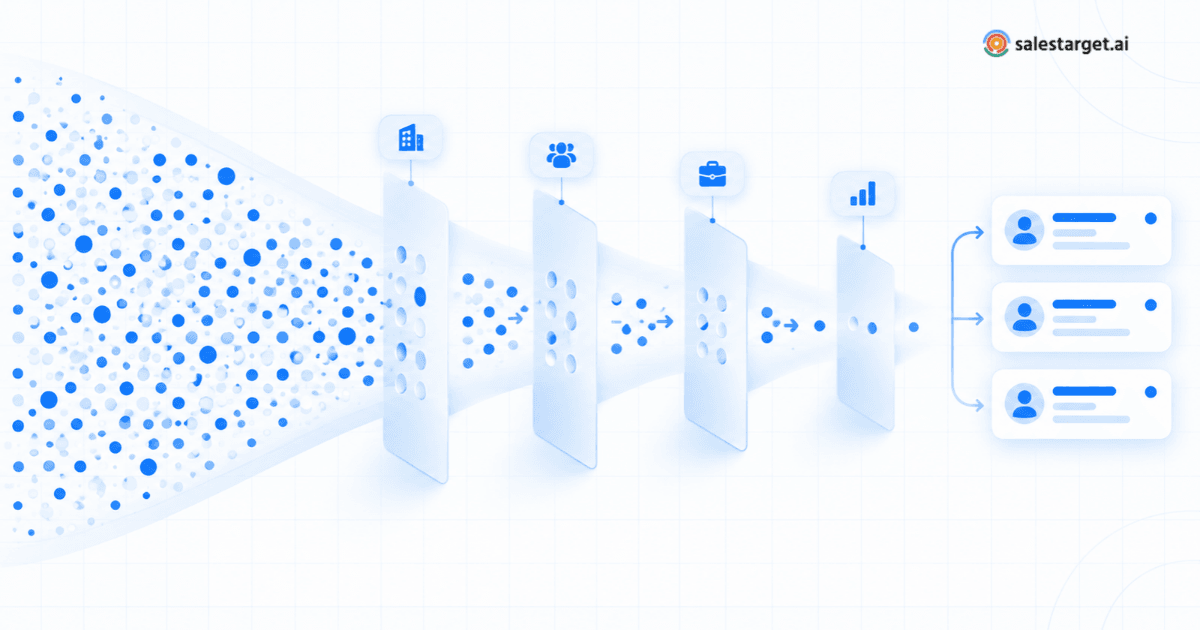
The biggest mistake teams make with a B2B lead finder is treating it like a search engine for names. Volume is easy. Relevance is the hard part. A list of ten thousand contacts that do not match your buyer profile is worth less than a list of two hundred that do.
Here is how to use a B2B lead finder to produce lists that actually convert:
Start with Your Ideal Customer Profile
Before you open the tool, write down the characteristics of the companies and people most likely to buy from you. Your ICP should include:
- Company attributes: Industry, sub-industry, employee count range, annual revenue range, headquarters geography, and funding stage.
- Contact attributes: Job titles, seniority levels, departments, and the role the person plays in a typical buying decision.
- Disqualifiers: Company sizes that are too small or too large, industries you do not serve, geographies where you cannot deliver.
Every filter you apply in the B2B lead finder should map directly back to a characteristic in your ICP. If a filter does not serve your profile, leave it open.
Layer Filters That Matter
Start broad, then narrow. Run your first search with your core firmographic filters: industry, company size, and geography. Review the results. If the list is too large, add another dimension: technology stack, seniority, or a specific department. If the list is too narrow, widen one constraint.
The goal is to find the overlap between fit (do they match your ICP?) and reachability (can you actually contact the right person?). A B2B prospect finder that lets you combine firmographic, technographic, and contact-level filters in a single search makes this process significantly faster.
Use Intent Signals to Gauge Timing
Not every company that fits your ICP is ready to buy right now. Intent signals help you separate accounts that are actively researching your category from those that simply match the demographic profile.
Common intent signals include:
- Topic-level intent: Companies researching keywords related to your product category, often tracked through third-party intent data providers.
- Hiring activity: A company adding headcount in a relevant department may be scaling a function your product supports.
- Funding rounds: Recently funded companies often invest in new tools and infrastructure.
- Leadership changes: A new VP of Sales or CTO often re-evaluates the existing tech stack.
When you combine ICP fit with intent signals, you stop treating every prospect the same and start prioritizing the ones most likely to engage.
Lead Discovery vs. Lead Qualification vs. Lead Enrichment
These three terms get used interchangeably in sales conversations, but they describe distinct steps in the prospecting process. Understanding the difference helps you evaluate what a B2B lead finder tool actually handles and where you might need supplementary processes.
- Lead discovery is the act of identifying companies and contacts that could be potential buyers. This is the core function of a B2B lead finder: searching a database and surfacing records that match your criteria.
- Lead qualification is the process of evaluating whether a discovered lead is actually worth pursuing. Qualification considers factors like company fit, budget authority, timing, and whether the contact holds the right role. Some B2B lead finder tools support qualification through intent data, ICP scoring, and firmographic filtering. Others leave qualification entirely to the sales team.
- Lead enrichment adds data to an existing contact record. If you already have a name and a company, enrichment fills in the verified email, phone number, company revenue, technology stack, and other contextual data. Many B2B lead finders include built-in enrichment, eliminating the need for a separate tool.
A strong prospecting workflow handles all three steps. If you want to see how these concepts play out in practice, this guide on discovering and qualifying B2B prospects walks through a detailed framework.
What to Look for When Choosing a B2B Lead Finder
The B2B lead finder market has grown quickly, and most tools look similar on their feature pages. Here are the factors that actually differentiate them in daily use:
Database size and coverage. How many companies and contacts does the tool index? More importantly, does the coverage extend to your target industries and geographies? A database of hundreds of millions of profiles is less useful if your buyers are in a region or vertical that is underrepresented.
Data freshness and verification. Contact data decays rapidly. People change jobs, companies restructure, and email addresses go stale. The best B2B lead finder software verifies contact details at or near the point of use rather than relying on records that were last confirmed months or years earlier.
Filter depth. Basic filters like industry and location are table stakes. The difference between a good tool and a great one is whether you can also filter by technology stack, intent topics, hiring signals, revenue bands, and seniority levels in a single search.
Enrichment capability. Some tools require you to export records and run them through a separate enrichment provider. Others handle enrichment natively. Integrated enrichment saves time and reduces the risk of data mismatches between systems.
CRM and workflow integration. A B2B lead finder that exports to CSV and nothing else creates extra work. Look for native integrations with your CRM (HubSpot, Salesforce, Pipedrive, Zoho) and your outreach tools so that discovered leads move into active workflows without manual transfer.
Usability. A powerful tool that requires a week of training is a tool that reps will not use. Clean interfaces, intuitive filter panels, and clear data presentation matter more than the length of the feature list.
How a B2B Lead Finder Fits Into Your Sales Workflow
A B2B lead finder is not a standalone solution. It is the discovery and qualification layer at the top of your prospecting stack. Here is how it typically connects to the rest of your workflow:
Step 1: Define the segment. Start each prospecting session with a clear segment: a specific industry, company size range, geography, and buyer persona. The tighter your segment, the more relevant your outreach will be.
Step 2: Search and filter. Use your B2B lead finder to run a search against your defined segment. Apply filters progressively. Review the results and adjust until the list reflects your ICP accurately.
Step 3: Enrich and verify. Before exporting, ensure contact details are verified and records include enough context (company size, tech stack, recent signals) to personalize your outreach.
Step 4: Export to your outreach system. Push the list directly into your CRM or sequencing tool. Avoid manual CSV transfers where possible, as they introduce formatting errors and delay time-to-outreach.
Step 5: Execute outreach. Run multi-channel sequences: email, phone, LinkedIn. Use the data from the lead finder to personalize each touchpoint. Reference a prospect's technology stack, recent hiring, or a relevant industry trend.
Step 6: Measure and refine. Track which segments, filters, and data points correlate with higher reply rates and booked meetings. Feed those insights back into your next search to continuously sharpen your targeting.
When each step connects to the next, prospecting becomes a repeatable system rather than a collection of ad hoc tasks.
How SalesTarget AI Lead Explorer Supports B2B Lead Finding
SalesTarget AI's Lead Explorer is designed to handle the discovery, filtering, and enrichment steps described above within a single platform. Rather than stitching together separate tools for search, data verification, and CRM transfer, Lead Explorer consolidates these functions so that sales teams can move from a blank search to a qualified, enriched list in minutes.
Here is how it addresses the core requirements of B2B lead finding:
- Extensive database coverage. Lead Explorer provides access to over 840 million professional profiles and 96 million business entities. Searches can be run using the structured filter panels (industry, role, company size, revenue, location, tech stack, and intent topics) or through AI-powered natural language queries.
- ICP-driven filtering. The tool includes an ICP Builder that lets you define your ideal customer profile directly within the platform. Once set, your ICP parameters inform every search, so the results are aligned to your target segment by default.
- Built-in enrichment. Rather than exporting raw records and enriching them elsewhere, Lead Explorer handles enrichment natively. Select the contacts you want, click to enrich, and the platform adds verified professional emails, phone numbers, company firmographics, and technology stack details.
- Verified contact data. Contact information is verified at the point of enrichment, not at the time the data was originally collected. This reduces email bounce rates and improves the accuracy of outbound outreach.
- Intent and signal discovery. Lead Explorer integrates intent topic data and business event signals, including funding rounds, hiring spikes, leadership changes, and company awards. These signals help teams prioritize accounts that show signs of active buying interest.
- CRM integration. Lead Explorer connects with HubSpot, Salesforce, Pipedrive, and Zoho, and includes a built-in CRM. Enriched leads can be pushed directly to the connected system without exporting CSV files or manually mapping fields.
The practical benefit is that Lead Explorer removes the gaps between finding a prospect, learning enough about them to qualify the account, and getting their verified contact details into your outreach workflow. It is built to handle the full top-of-funnel process in one place.