A rep pulls 200 names on Monday. By Tuesday afternoon, 40 emails have bounced, a chunk of contacts have left their companies, and a dozen records have no phone number. That is a data problem, and it eats the first week of every campaign.
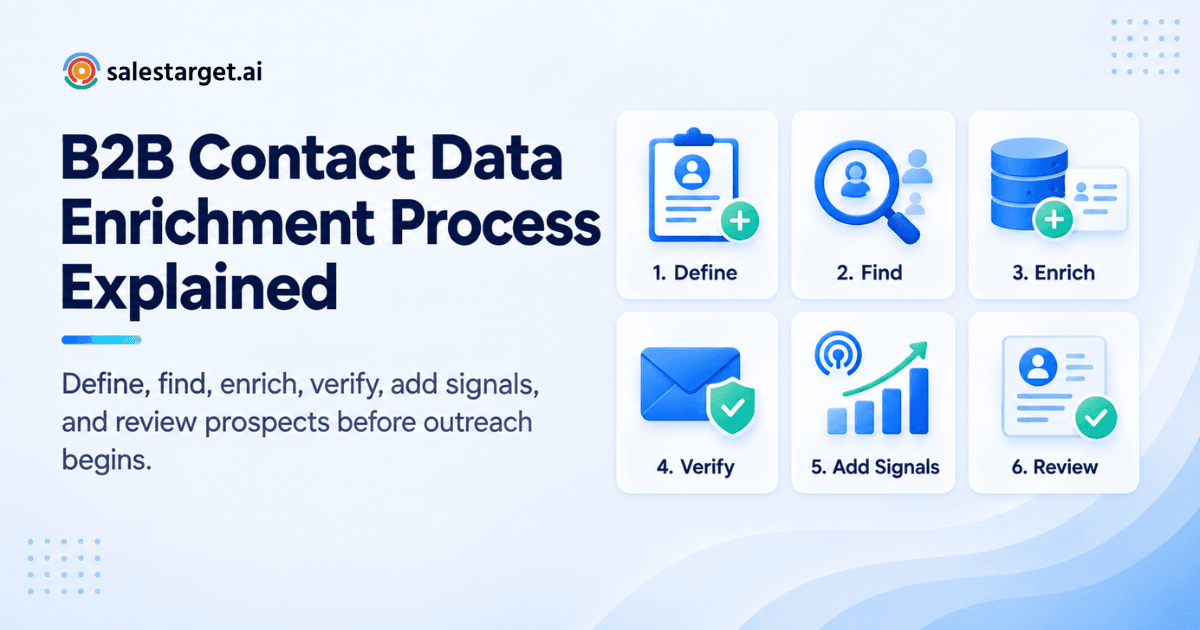
B2B contact data enrichment takes a thin record (a name, a domain, a LinkedIn URL) and fills it with verified contact details, company facts, and buying signals before a rep touches it. It runs in six steps: define your ICP and fields, find records, fill gaps, verify, add firmographic and intent data, and review before outreach.
SalesTarget.ai runs all six steps in one workspace, so a lead is found, enriched, verified, and sequenced without a CSV in between.
Why Incomplete Contact Data Slows Down B2B Sales
Incomplete contact data slows sales because reps spend selling time on research, bounces, and wrong-person calls. Gartner estimates that poor data quality costs organizations an average of $12.9 million a year. A survey by Experian, as reported by Boomi, found that 85% of respondents said poor contact data hurts operational processes and efficiency.
Incomplete records fail in quiet ways. A record with no phone number gets skipped. A record with an old title gets the wrong pitch. A record with no company data can't be scored, so it sits mid-list and absorbs time that should go to better-fit accounts.
Understanding the B2B Contact Data Enrichment Process
The process moves each record through four checkpoints: start, match, fill, verify. Skip one and the next step works on weak input.
Starting with existing prospect and company records
Enrichment starts with whatever you already hold: CRM exports, event lists, form fills, or a bare list of target domains. Each record needs one reliable anchor, typically a full name plus company domain, or a LinkedIn profile URL.
Matching contacts with the right business entities
Matching ties each person to the correct company record. This is where quiet errors start. A contact at a regional subsidiary matched to the parent brand inherits the wrong headcount, revenue, and tech stack, and lands in the wrong segment. SalesTarget.ai matches against 146M+ business entities, so the person and the company facts come from the same entity.
Adding missing contact and company information
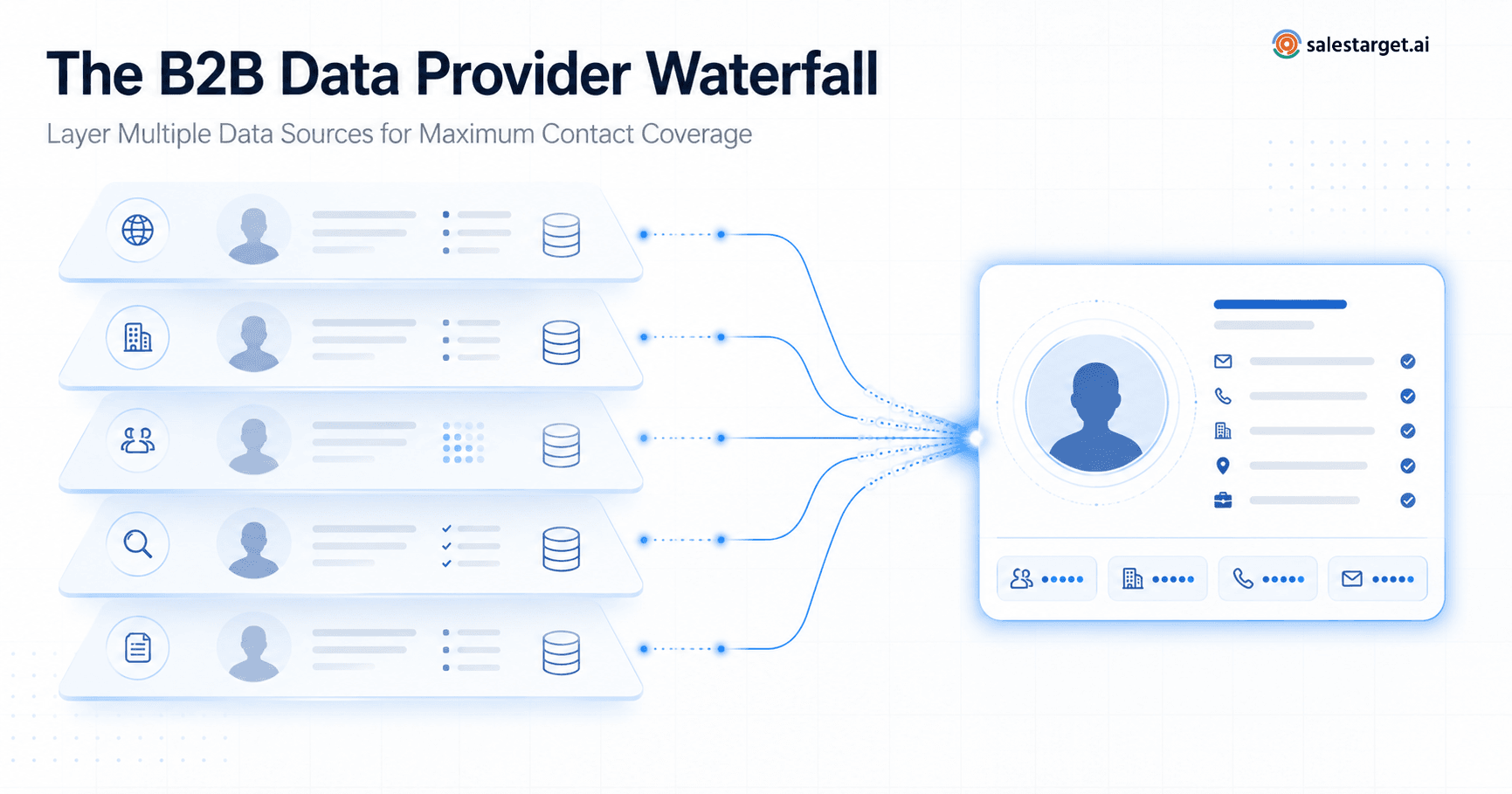
Gaps get filled from multiple data sources. SalesTarget.ai draws on 50+ sources, which matters when one source has the email and another has the mobile number. The fill happens at the moment you find the lead, not weeks later in a cleanup sprint.
Verifying data before it reaches the sales workflow
Verification is the gate. Emails get checked, phone numbers get confirmed, and anything risky gets flagged before a sequence can use it. A record that skips this gate costs more downstream than the check would have cost upfront.
The Key Data Added During Contact Enrichment
Enrichment adds five groups of data: contact channels, person details, company facts, tech stack, and buying signals. Each group answers a different sales question.
Professional email addresses and phone numbers
This group answers "how do I reach them?" It covers professional email, personal email, phone, and mobile. In Lead Explorer, one-click enrichment returns all four where they exist. One edge case worth knowing: role-based inboxes such as info@ or sales@ pass a syntax check and still reach nobody useful, so treat them as a weak record, not a finished one.
Job titles, seniority, and professional profiles
This group answers "who are they in the buying decision?" Title, seniority, department, and profile link let you separate a decision-maker from an influencer. Titles drift quietly, so a record can look complete and still be wrong.
Company size, industry, revenue, and location
This group answers "is this account in our ICP?" Firmographics decide segment, territory, and priority. A 40-person agency and a 4,000-person enterprise need different messages even when the job title is the same.
Technology stack and business information
This group answers "what do they already run?" Tech stack data lets you pitch around a tool they use, replace, or integrate with. Filtering on tech stack in Lead Explorer turns a broad market into a list of accounts with a specific reason to talk.
Buyer intent and other sales signals
This group answers "why now?" SalesTarget.ai tracks 4,000+ intent signals through Bombora Intent Topics, plus business events: funding rounds, hiring spikes, leadership changes, and awards, on a 30 to 90 day lookback. A new VP of Sales plus a hiring spike tells a rep more than any static field.
The 6 Steps of B2B Contact Data Enrichment
Contact data enrichment follows six steps: define, find, enrich, verify, add signals, review. Run them in this order, because each one narrows the work for the next.
Step 1: Define the ICP and data fields sales teams need
Start with the ICP: industry, role, seniority, company size, revenue, location, tech stack. Then pick the fields to enrich. Every field needs a job. If a field does not change who you target, what you say, or which channel you use, leave it out. The ICP Builder in Lead Explorer turns these criteria into a reusable search.
Step 2: Find relevant contacts and company records
Filter first, enrich second. Search in plain English with AI, or stack Business and People filters across industry, department, company size, and Intent Topics. Enriching a filtered list of 300 fits beats enriching a raw list of 3,000.
Step 3: Enrich missing prospect information
Run enrichment on the filtered list. SalesTarget.ai enriches at the moment of discovery, so the email, phone, and company facts arrive attached to the lead record. Reps stop copying data between tabs.
Step 4: Verify emails, phone numbers, and contact details
Verify after enrichment, as close to the send date as you can. The Email Validator runs MX and SMTP checks, flags disposable addresses, and assigns a risk score. SalesTarget.ai reports 99% verified contact data and 90% of emails validated before sending in Email Outreach. A check run at the point of enrichment beats one run when the data was first scraped.
Step 5: Add firmographic and intent signals
Layer company facts and buying signals on top of verified contacts. Firmographics place the account in your ICP. Intent topics and business events rank accounts by timing. This step turns a clean list into an ordered list.
Step 6: Review enriched records before outreach
Pull a sample of 20 to 30 records and read them like a rep would. Check that titles match the company, that the phone format fits the region, and that no two sources disagree. Keep a "last verified" date on each record so nobody has to guess its age.
How Enriched Contact Data Improves B2B Sales Prospecting
Enriched data improves prospecting by making lists more accurate, targeting sharper, and outreach more relevant. The gain shows up in rep hours first and reply rates second. For a wider view of the effect on team results, see how B2B data enrichment helps sales teams.
Build more accurate prospect lists
Accuracy comes from matched and verified records. A list built on enriched data has fewer dead emails, fewer duplicate companies, and fewer contacts who changed jobs last quarter.
Find decision-makers faster
Seniority and department fields let you filter straight to the buyer. A rep searching "VP Sales, SaaS, 50 to 200 employees" gets a list of buyers, not a list of everyone at those companies.
Improve ICP targeting and lead qualification
Firmographics and tech stack let you score leads before the first touch. Reps spend time on accounts that fit, and weak fits get filtered out at the list stage, not after three follow-ups.
Give sales reps better data for personalized outreach
A funding round, a new hire, or a tool the account runs gives a rep a real first line. Personalization without a data point behind it reads as a mail-merge tag, and buyers spot it fast.
Reduce wasted outreach from inaccurate records
Verified records protect sender reputation. Fewer bounces keep domains off blacklists and improve inbox placement, which lifts every later campaign from the same domain.
Contact Data Enrichment for a Sales-Ready Prospecting Workflow
A sales-ready workflow moves data from discovery to CRM without manual handoffs. Each handoff is where data goes stale, so the fewer you have, the better.
Move from lead discovery to verified contact data
Discovery and verification should happen in the same session. In SalesTarget.ai, a rep finds a lead, enriches it, and sees verified contact data on the same screen. No export, no re-import.
Connect enriched contacts with email and LinkedIn outreach
Enriched leads push straight into sequences. Email Outreach builds multi-step sequences from a plain-English audience description, and LinkedIn Outreach runs connection requests and follow-ups in the same coordinated flow, so context carries across both channels. If you want to see the handoff from enrichment to sequence on your own list, start a free run of Lead Explorer.
Keep prospect information connected to CRM records
Campaign leads land in the built-in CRM automatically, with every email and call logged to the lead timeline. No import step means no mismatched fields and no duplicate records.
Refresh contact data as prospect information changes
Contact data decays. People change roles, companies change size, and domains get retired. Treat enrichment as a recurring step: re-verify before each new campaign and re-check any record that has sat idle for a few months.
What to Look for in B2B Contact Enrichment Software
Good enrichment software has broad coverage, built-in verification, three data types (firmographic, technographic, intent), ICP-based search, and live links to outreach and CRM. Use these five checks when you compare options, and read how to choose the right data enrichment providers before you shortlist.
Broad contact and company data coverage
Ask how many profiles and business entities the tool holds, and how many sources feed them. Coverage in your region and industry matters more than the headline number.
Email and phone verification
Check whether verification runs inside the tool or needs a separate product. Look for MX and SMTP checks, disposable-address detection, and risk scoring on emails, plus a clear source for phone data.
Firmographic, technographic, and intent data
Tools that offer only contact data leave your reps guessing on timing and fit. Confirm the platform covers company facts, tech stack, and live buying signals.
ICP-based search and filtering
You should be able to describe your ICP once and reuse it. Plain-English search and stackable Business and People filters save setup time on every new campaign.
Connections between enrichment, outreach, and CRM
The strongest feature is often the one you only notice when it is missing: a direct path from enriched lead to sequence to CRM. Without it, your team exports and imports, and the data goes stale on the way.
Why Choose SalesTarget.ai
SalesTarget.ai is an all-in-one AI sales intelligence and outbound platform that combines B2B lead data, enrichment, email and LinkedIn outreach, validation, a CRM, and an AI Copilot on one bill.
Apollo offers data and engagement, but you still bolt on deliverability and a CRM. Instantly, Smartlead, and lemlist focus on cold email and deliverability, but none has a native B2B database, LinkedIn automation, and a real CRM together. SalesTarget.ai keeps all of it in one place.
Find and enrich B2B prospects with Lead Explorer
Lead Explorer searches 840M+ verified professional profiles and 146M+ business entities, with 4,000+ intent signals across 50+ data sources. Enrichment is built in, so the lead arrives with verified professional email, personal email, phone, and mobile.
Verify contact data before sending outreach
Verification runs at the point of enrichment, not whenever the data was first scraped. The Email Validator adds MX and SMTP checks, disposable-email detection, and risk scoring, with a real-time API and bulk list cleaning.
Connect enriched prospects with email and LinkedIn sequences
Push enriched leads straight to a sequence. Email Outreach adds unlimited inboxes with automatic AI warm-up, inbox rotation, and SPF, DKIM, and DMARC checks. LinkedIn Outreach adds conditional sequences and built-in account safety limits.
Keep sales data connected to the built-in CRM
Leads, replies, calls, and meetings sync to the CRM with no import. SalesTarget.ai reports 3.2X faster deal cycles and 91% follow-up completion for CRM users. These are the platform's own figures, so treat them as a benchmark to test, not a guarantee.
Use AI Copilot to work with prospect and CRM data
The AI Copilot lets reps ask in plain language for leads, sequences, deals, and tasks. It personalizes by role, industry, and company size, and flags at-risk deals. Strategy stays with the rep. To see it on your own data, start free and ask it for your next 50 prospects.
Common Contact Data Enrichment Mistakes to Avoid
Most enrichment failures come from process, not tools. Five mistakes show up again and again.
Enriching contacts without a defined ICP
Without an ICP, you enrich everyone and qualify no one. Define the fit first, or you pay for data on accounts you would never call.
Using unverified contact information
Enriched is not the same as verified. A record can be full of fields and still bounce. Verify every email before it enters a sequence.
Ignoring company-level data when qualifying prospects
A perfect contact at a bad-fit company is a wasted touch. Check size, industry, and tech stack before you spend a sequence on the person.
Treating enrichment as a one-time data cleanup task
One cleanup fixes today's list. It does nothing for next quarter's job changes. Put re-verification on a schedule tied to campaign launches.
Sending outreach before checking data quality
Spot-check a sample before every launch. Ten minutes of review costs less than a damaged sender reputation.
Building Better B2B Prospect Lists With Enriched Contact Data
Better lists come from combining contact accuracy, company fit, and timing. Build in that order.
Combine accurate contact and company information
Pair each verified contact with matched company facts. When both sit on one record, reps can segment, score, and personalize without opening a second tool.
Prioritize prospects using qualification and intent signals
Rank by fit first, then timing. Accounts that match your ICP and show a recent funding round, hiring spike, or relevant Intent Topic go to the top of the queue.
Keep enriched data ready for sales engagement
Store enriched records where outreach and CRM can use them, with a last-verified date. A list that needs reformatting before use will not get used.
Turn Better Contact Data Into Better Sales Execution
The opening problem was a list that cost a week: bounces, stale titles, missing phones. Enrichment fixes it in six steps, and the fix holds only when those steps run in one flow from discovery to CRM.
SalesTarget.ai is built for that flow. Lead Explorer finds and enriches, the Email Validator verifies, Email and LinkedIn Outreach engage, and the CRM tracks the deal. One platform replaces the patchwork.
Ready to run your next list through it? Start with SalesTarget.ai and send your first campaign on verified data.