Most sales teams have felt this frustration. You pull a target list from your favorite database, filter down to 1,000 named accounts, and by the time the file is scrubbed only about 400 contacts have both a working email and a phone number that actually connects. The single-source model is the quiet reason so many outbound programs stall. No matter how well-known the vendor, no one data set owns the whole picture, and that is why the best revenue teams now stack b2b data providers instead of shopping for one.
Quick Answer. The most reliable way to get near-complete coverage is to run a prospecting waterfall: use one primary database, layer a secondary source to fill missing contacts, apply an enrichment tool for firmographic and role detail, add intent signals for prioritization, and verify everything before outreach. No single vendor gets you there alone.
Why One B2B Data Provider Is Never Enough
Every database is built by a different collection engine. Some scrape public web sources, some rely on user-contributed data from their own product, some license from event registrations, and some run partner networks that share opt-in profiles. Those methods produce very different footprints: strong in one industry and weak in another, deep in North America and thin in APAC, excellent for VP-level titles and patchy for individual contributors.
Then there is the shelf-life problem. B2B contact data decays fast. People change roles, get promoted, move companies, or drop off email systems entirely when they leave. A record that was accurate in March may be wrong by September. Newly founded companies take months to appear in some databases. Definitions of "verified" also differ. One provider verifies emails through SMTP pings, another through user activity, another through match rates against a customer list.
The result is predictable. Two databases covering the same 1,000 accounts will overlap on perhaps 55 to 70 percent of contacts, disagree on job titles for a slice of them, and each will hold roughly 10 to 20 percent of contacts the other simply does not have. That overlap gap is the entire reason the waterfall exists. If you want a closer look at how coverage differs across sources, this piece on verified, intent-based lead data explains where the gaps usually appear.
What Is a B2B Prospecting Waterfall?
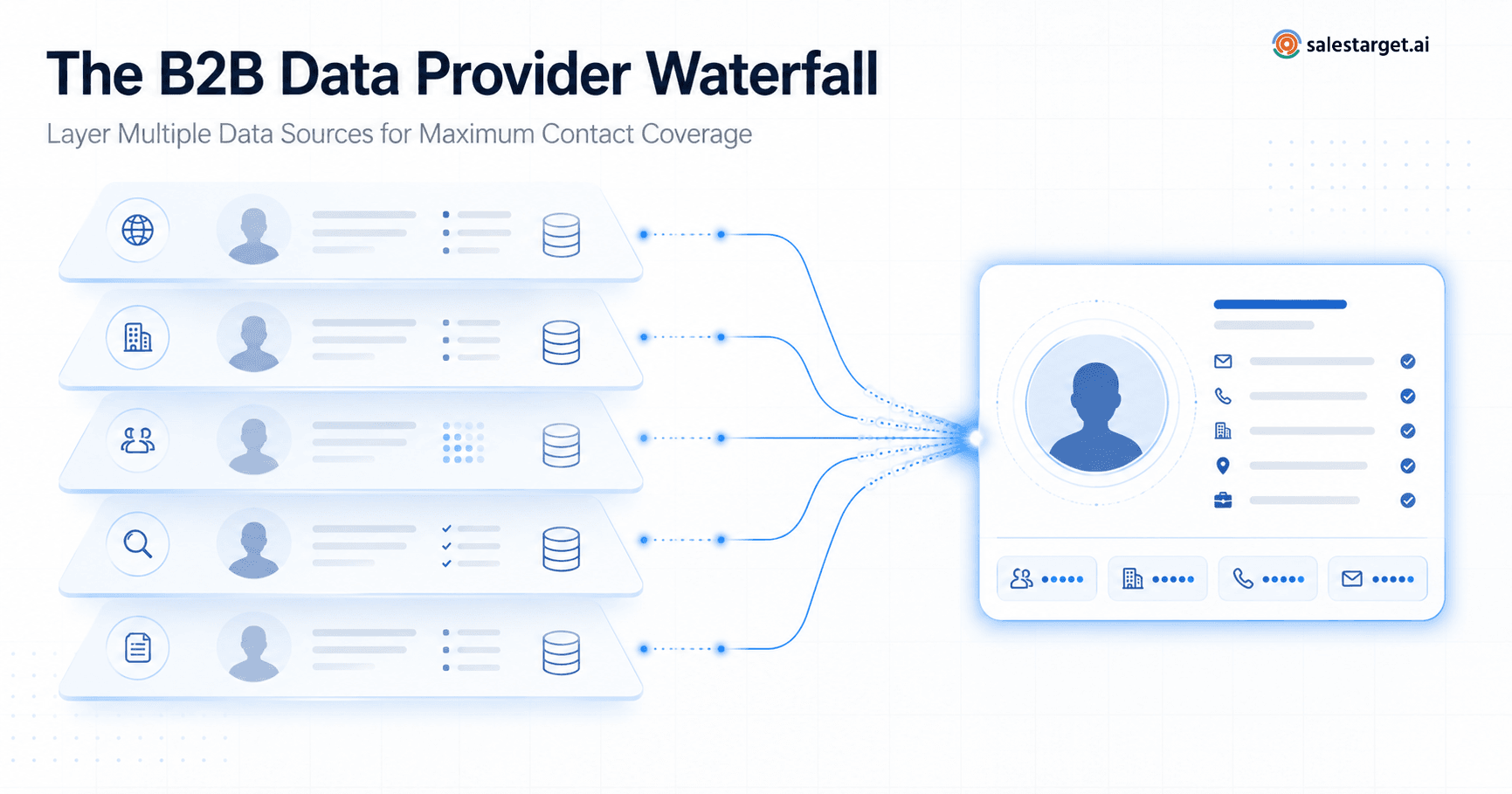
A prospecting waterfall is a sequenced process where each data source has a specific job instead of trying to be everything at once.
Source 1 → Source 2 → Source 3 → Enrichment → Verification → Final prospect list
The goal is not to buy every database on the market. It is to assign each layer a role and pass the leftovers down the chain. If your primary source returns email addresses for 62 percent of a target contact list, the second source is used only for the 38 percent that are missing, not for the whole set. That keeps costs sane and prevents duplicate credits from being spent on records you already have.
Teams that get this right treat the waterfall as a repeatable operation, not a one-off cleanup project. It becomes part of the list-building workflow every week.
The 5-Layer B2B Data Provider Waterfall
Layer 1 — Start With Your Primary Prospect Database
The first layer is your workhorse b2b database platform, the source you use to define the account universe and pull the initial contact list. Choose it based on the strengths that matter most for your ICP: industry depth, geographic coverage, firmographic filters, or title accuracy. This is the business contact database you will run against every week, so filter quality and export flexibility matter more than raw record counts.
At this stage, expect to fill 50 to 70 percent of your target fields. Treat that as a starting point, not the finish line.
Layer 2 — Add a Secondary Contact Data Source
The second layer exists to fill the gaps left by the first. Pick a source with a different collection method than your primary. If your primary leans on user-contributed profiles, choose a secondary with strong web-scraped or licensed data, and vice versa. This is where the best b2b data providers earn their keep, because their b2b contact data is complementary to what you already have rather than duplicative.
Send only the records with missing emails, direct dials, or updated job titles to the second source. Depending on the mix, you can typically recover another 10 to 20 percent of contacts here.
Layer 3 — Use a Lead Enrichment Tool
Once you have the widest possible contact base, run it through a lead enrichment tool to complete the fields your outreach and scoring depend on. Enrichment is different from discovery. You are not looking for new contacts, you are completing the ones you already have.
Fields that usually need enrichment:
- Company size and revenue band
- Industry and sub-industry
- Location and time zone
- Technology stack signals
- Job title normalization and seniority
- Website and primary domain
Startups often underestimate this layer because their volumes are lower. In practice, it is where most of their manual research time disappears. A grounded overview of practical setups is in this piece on lead generation solutions for startups.
Layer 4 — Add Intent and Buying Signals
Once the list is enriched, layer in intent. B2b intent data providers watch for patterns such as content consumption, keyword surges, review-site activity, and hiring signals that suggest an account may be in a buying cycle. Use these signals to sort your list, not to declare that a company is ready to buy. Intent is a prioritization aid, not a verdict.
A useful rule: intent moves accounts up the queue, but the underlying qualification criteria still need to be met. Accounts with strong intent but poor ICP fit will burn SDR time.
Layer 5 — Verify Before Outreach
The final layer is verification. Before any email or dialer touches these records, run:
- Email verification (syntax, domain, SMTP)
- Duplicate removal across sources
- Job title sanity checks
- Domain and company name reconciliation
- Freshness thresholds (drop anything older than 90 days on titles)
- Suppression list matching
Skipping this layer is how you burn a sending domain. For a deeper comparison of vendors that specialize in this step, this rundown of B2B verified contact data platforms is worth reading.
Illustrative Example: 1,000 Target Contacts Through the Waterfall
Take a target list of 1,000 contacts inside your ICP.
- Source A (primary): returns valid emails for 620 contacts. Coverage: 62 percent.
- Source B (secondary): processes the 380 misses and recovers 190. Coverage: 81 percent.
- Source C (tertiary or research fallback): finds another 90 from the remaining 190. Coverage: 90 percent.
- Enrichment: completes firmographic and title fields for the full 900, and normalizes 60 job titles that were too generic to segment.
- Verification: removes 30 invalid or duplicate records, leaving 870 usable, verified contacts.
That is 87 percent clean, deliverable coverage. Pushing toward the 95 percent mark usually requires one more targeted research pass on the last 100 to 130 records, often manual, sometimes outsourced. The 95 percent number is a strategic target for how the waterfall is designed, not a guarantee that every list will get there.
Illustrative calculation: in this scenario, layering three discovery sources before enrichment lifted usable contact coverage from 62 percent (single source) to 87 percent (waterfall). That 25-point delta is where most of the pipeline math lives.
Industry surveys such as the Salesforce State of Sales report have consistently shown that reps spend a majority of their week on non-selling activities, and manual data hunting is a big share of that time. A working waterfall is one of the cleanest ways to give that time back.
Stop Losing Prospects to Missing Data
Running a waterfall by hand across three tools, an enrichment vendor, and a verification service takes hours per list. SalesTarget.ai's Lead Explorer was built to compress that work into a single flow: discovery, enrichment, and verification in one place, so SDRs spend their time on outreach instead of spreadsheets.
Explore Lead Explorer's built-in lead enrichment →
Bringing It All Together
The waterfall is not really a purchasing strategy, it is an operational one. You are not trying to own more databases, you are trying to sequence them so each one does what it is best at. Teams that adopt this approach usually see coverage climb from the 60 percent range typical of a single vendor into the mid-80s and above, with cleaner records reaching the SDR seat. Reaching 95 percent is a target that rewards discipline at the verification layer more than any single vendor choice.
Start small. Pick your primary, add one secondary, and build the verification step first. The rest of the waterfall extends naturally from there.