Your SDRs are spending 10 to 15 hours a week on manual LinkedIn tasks: searching profiles, copying data into spreadsheets, sending connection requests one by one, and writing follow-up messages that never get a reply. That time doesn't show up in pipeline. It shows up in burnout and missed quota.
LinkedIn automation for SDR teams fixes this by letting reps build targeted prospect lists, send personalized connection requests, and run multi-step follow-up sequences on autopilot. Instead of toggling between LinkedIn, a CRM, and an email tool, reps work inside one system that finds, contacts, and tracks every prospect. The result: more conversations per rep, consistent follow-up, and a pipeline you can actually forecast.
This guide covers how SDR teams can set up LinkedIn outreach automation the right way, which workflows produce replies, how to stay personal at scale, and what to track so your team keeps improving week over week.
Why SDR Teams Struggle to Scale LinkedIn Outreach
The math is simple. One SDR can send maybe 25 to 30 connection requests per day manually. Add in profile research, note-writing, and CRM updates, and that rep might get through 15 meaningful touches before lunch. Multiply by five reps. You're still not covering your total addressable market.
Three problems keep showing up across SDR teams trying to scale on LinkedIn:
Manual research eats selling time
SDRs spend roughly 37% to 45% of their work week on research, data entry, and admin tasks, according to recent sales productivity benchmarks. That leaves barely 28% to 40% of the day for actual selling activity.
No system for follow-up
Most reps send a connection request, maybe one message, and move on. Without a sequence engine, warm leads go cold because nobody tracks who needs a second or third touch.
Disconnected tools create blind spots
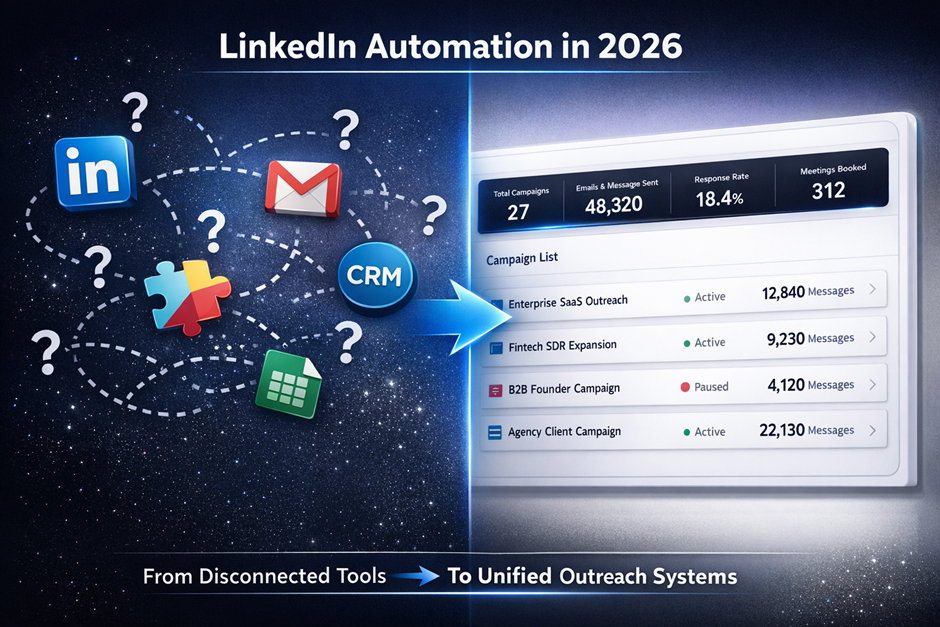
When LinkedIn activity lives in one tab, email outreach lives in another, and the CRM sits in a third, managers can't see which channel is driving meetings. Reps duplicate effort. Prospects get conflicting messages.
SalesTarget.ai was built to close these gaps. Its LinkedIn Outreach module runs automated connection requests, DMs, and follow-ups inside the same platform where email sequences and CRM records live. One workspace, one view of the prospect.
How LinkedIn Automation for SDR Teams Works
LinkedIn automation for SDR teams replaces repetitive manual steps with a system that runs outreach in the background while reps focus on live conversations and closing.
Prospect identification and list building
Automation starts before the first message. SDR teams need a focused list of prospects who match the ideal customer profile. SalesTarget.ai's Lead Explorer lets reps search 840M+ professional profiles using filters like role, seniority, industry, company size, tech stack, and real-time buying signals. Type a plain-English description of your target buyer, and the AI returns a filtered list with verified emails and phone numbers attached. No CSV exports, no switching to a separate enrichment tool.
Connection request automation
Once the list is ready, SalesTarget.ai queues connection requests with personalized notes pulled from each prospect's profile data: their role, industry, recent company events. Requests are sent within LinkedIn's safe daily limits, spaced with human-like delays so the activity looks natural.
Personalized message sequences
After a connection accepts, the system triggers a multi-step message sequence. Each message can reference the prospect's job title, company, or a specific intent signal (like a recent funding round or hiring spike). Conditional logic branches the sequence based on whether the prospect replies, clicks, or stays silent.
Automated LinkedIn follow-ups
Most replies come on the second or third touch, not the first. SalesTarget.ai sends follow-up messages automatically based on timing rules and prospect behavior. If a prospect views your profile but doesn't respond, the system can trigger a different follow-up than if they go completely dark.
Activity tracking and CRM sync
Every connection request, message sent, reply received, and profile visit gets logged to the prospect's record in SalesTarget.ai's built-in CRM. Managers see rep activity and campaign performance in one dashboard. No manual logging.
What Are the Best LinkedIn Automation Workflows for SDRs?
The best LinkedIn automation workflows match the prospect's situation and buying stage. Here are five that consistently produce conversations.
New connection request workflow
Trigger: Prospect matches ICP filters in Lead Explorer.
Sequence: Connection request with a short, role-specific note → wait 2 days → if accepted, send a value-first message referencing their industry or a pain point → wait 3 days → follow up with a specific resource or question → if no reply after the third touch, pause and re-engage in 30 days.
Event attendee outreach workflow
Trigger: Prospect attended a webinar, conference, or industry event.
Sequence: Connection request mentioning the shared event → message referencing a specific session or topic → follow up with a related resource or case study. This workflow produces above-average acceptance rates because the shared context gives legitimacy to the outreach.
Intent-based prospecting workflow
Trigger: SalesTarget.ai's Lead Explorer flags a company showing buying signals (researching your category, hiring for roles your product supports, or receiving new funding).
Sequence: Connection request → message tied directly to the intent signal ("Noticed your team is expanding the RevOps function…") → follow-up offering a relevant conversation, not a demo.
This is where most competitors fall short. Tools like Instantly, Smartlead, or Lemlist don't have a native B2B database or intent signals, so SDR teams have to buy data elsewhere and stitch it together. SalesTarget.ai surfaces the signal and runs the outreach in one step.
Multi-touch LinkedIn and email workflow
Trigger: Prospect added to a campaign.
Sequence: LinkedIn connection request → email follow-up 2 days later → LinkedIn DM if connection accepted → email with a different angle → LinkedIn voice note or profile engagement. SalesTarget.ai coordinates LinkedIn and email outreach in one sequence, so messaging stays consistent across channels and reps don't accidentally double-tap a prospect on the same day.
Re-engagement workflow for inactive prospects
Trigger: Prospect connected but went cold 30+ days ago.
Sequence: Send a message referencing something new (a company update, a product launch, an industry shift) → wait 4 days → follow up with a question, not a pitch → if no reply, move to a long-term nurture list. Most SDR teams never re-engage old connections. That's a missed opportunity, because the hardest part (getting accepted) is already done.
How Do SDR Teams Automate LinkedIn Outreach Without Losing Personalization?
Automation without personalization is just spam at scale. The real skill is using data to make every message feel written for that one person.
Using prospect data to customize messages
SalesTarget.ai pulls in role, company size, industry, recent company events, and intent topics for each prospect. Your message templates can reference any of these fields dynamically. A VP of Sales at a 200-person SaaS company gets a different opening line than a RevOps lead at a 2,000-person fintech. Same sequence, different message.
Trigger-based messaging based on buyer actions
The strongest personalization isn't about the prospect's title. It's about what they just did. SalesTarget.ai's 4,000+ intent signals and event tracking (funding rounds, leadership changes, hiring spikes) let you build message triggers around real buyer activity. "Your company just raised a Series B" is more relevant than "As a fellow sales leader."
AI-assisted personalization for SDR outreach
SalesTarget.ai's AI Copilot generates personalized message drafts based on each prospect's profile, company context, and industry. Reps review and adjust rather than writing from scratch. The Copilot also creates A/B variations so teams can test which angles get replies.
This saves meaningful time. SalesTarget.ai reports 35% faster campaign creation when reps use the AI Content Generator and AI Spintax Generator to produce human-like, varied copy across message steps.
Personalization mistakes that reduce reply rates
Fake personalization is worse than none. Starting a message with "I saw your profile and was impressed" fools nobody. If you can't reference something specific, keep the note short and direct.
Over-personalizing creeps people out. Mentioning a prospect's recent vacation photo or a personal blog post crosses a line. Stick to professional context: role, company, industry moves.
Using the same personalization field for every prospect. If every message opens with "Congrats on the new role," it stops feeling personal after the prospect's tenth identical DM that week. Rotate your angles.
LinkedIn Prospecting Automation Best Practices
Build focused prospect lists before launching campaigns
A campaign is only as good as the list behind it. Before running any sequence, filter your prospects by role, seniority, company size, and geography. In SalesTarget.ai's Lead Explorer, you can stack filters or type a natural-language description of your ICP. Smaller, sharper lists produce higher acceptance and reply rates every time.
Segment prospects by role, industry, and buying signals
Don't run one generic campaign for everyone. Segment by role (SDR managers vs. VPs of Sales), by vertical (SaaS vs. manufacturing), and by buying signal (actively researching your category vs. cold). Each segment gets its own messaging angle.
Space outreach steps naturally
LinkedIn's algorithm watches for robotic behavior. SalesTarget.ai spaces connection requests and messages with timezone-aware scheduling, working-hour limits, and randomized delays that mimic a real person's activity pattern. Don't override these settings to blast more volume. It's not worth the account risk.
Review campaign performance every week
Pull your acceptance rate, reply rate, and meeting booking rate every Monday. Look for sequences that stall at step two or three. A/B test new opening lines. Kill campaigns with acceptance rates below 25%.
Keep messaging relevant to the prospect's situation
Relevance beats cleverness. A message that names the prospect's specific challenge and offers a specific next step will outperform a witty one-liner. Keep your copy tight: two to three sentences for connection notes, four to five for follow-ups.
How Many LinkedIn Messages Should SDRs Send Per Day?
Sending too many messages gets accounts restricted. Sending too few wastes your automation investment. The right range depends on account age, connection count, and campaign type.
Safe activity ranges for SDR teams
For established LinkedIn accounts (500+ connections, active posting history), a safe range is 20 to 25 connection requests per day and 50 to 75 messages (to existing connections) per day. New or low-activity accounts should start at 10 to 15 connection requests per day and ramp up over 2 to 3 weeks.
SalesTarget.ai enforces these limits with built-in rate limiting, warm-up logic, and auto-pause safeguards. If a rep's activity triggers a risk flag, the system pauses the campaign before LinkedIn takes action.
Connection requests versus follow-up messages
LinkedIn treats connection requests and messages differently. Requests to strangers carry more scrutiny. Follow-up messages to existing connections are lower risk but still capped. Prioritize follow-up messages to accepted connections over blasting new requests.
Managing volume across multiple SDRs
When three or four SDRs are prospecting the same industry, they can accidentally overlap on prospects or flood the same companies. SalesTarget.ai's campaign management prevents duplicate outreach across team members and gives managers a shared view of who's contacting whom.
How Can SDR Teams Automate LinkedIn Follow-Ups?
Follow-ups produce the majority of replies. Gartner research shows that B2B buyers complete 60% or more of their evaluation before speaking with a rep. That means your follow-up message might land at the exact moment a buyer is ready to talk, if it's timed right.
Follow-up timing recommendations
Wait 2 to 3 days after a connection request is accepted before sending the first message. Wait 3 to 4 days between follow-up messages. Avoid following up on Fridays or weekends for most B2B audiences.
Multi-step outreach sequences
A strong follow-up sequence runs 3 to 5 touches over 2 to 3 weeks. Each step should introduce a new angle or piece of value, not repeat the same ask. SalesTarget.ai's conditional sequences branch based on whether the prospect replied, viewed your profile, or took no action.
Follow-up triggers based on prospect engagement
Profile views, post engagement, and message reads are signals. SalesTarget.ai can trigger a follow-up when a prospect views your profile after receiving a message (a strong buying signal) or when they engage with content related to your solution category.
When to stop a sequence
Stop after 4 to 5 unanswered touches. Pushing past that point doesn't increase reply rates; it increases block rates. Move unresponsive prospects to a 60 to 90 day re-engagement list, not a "try harder" list.
What Metrics Should SDR Teams Track in LinkedIn Automation Campaigns?
You can't improve what you don't measure. These five metrics tell you whether your LinkedIn automation is generating pipeline or just generating activity.
Connection acceptance rate
Benchmark: 30% to 40% is healthy for well-targeted B2B outreach. Above 40% signals strong ICP alignment and a well-optimized profile. Below 25% means your targeting or messaging needs work, and your account may be at risk of throttling.
Message reply rate
Benchmark: 8% to 15% reply rate on LinkedIn DMs is solid. Track replies per sequence step to find where prospects drop off. If step one gets views but no replies, your opening line is the problem, not your list.
Meeting booking rate
Benchmark: 1% to 3% of prospects contacted should convert to a booked meeting. If you're getting replies but not meetings, your call-to-action is too vague or too aggressive.
Pipeline generated from LinkedIn outreach
Track the dollar value of deals created from LinkedIn-sourced leads. SalesTarget.ai's CRM ties campaign leads to deal records automatically, so you can see pipeline by campaign, by rep, and by channel without manual attribution.
SDR productivity and activity metrics
Track messages sent, connection requests sent, and response time per rep. SalesTarget.ai surfaces these in a live dashboard so managers can spot reps who are underperforming on activity volume or lagging on follow-up timing.
LinkedIn Automation for Sales Teams vs Manual Outreach
| Dimension | Manual LinkedIn Outreach | Automated with SalesTarget.ai |
|---|---|---|
| Daily connection requests | 15–25 (with manual research) | 20–25 (with built-in safety limits) |
| Daily follow-up messages | 10–20 | 50–75 |
| Personalization | High per message, but slow | High per message, with AI-assisted drafting |
| Follow-up consistency | Depends on rep discipline | 91% follow-up completion rate |
| Reporting | Manual spreadsheet tracking | Real-time dashboard, CRM-synced |
| Time per rep per day | 3–4 hours on LinkedIn tasks | Under 30 minutes managing campaigns |
| Cost per meeting booked | Higher (more rep hours) | Lower (same reps, 2.4X more meetings) |
Activity volume comparison
Automation doesn't mean sending more connection requests. It means sending the same number of requests while running 3X to 4X more follow-up messages. Follow-ups are where deals come from.
Personalization comparison
Manual outreach isn't automatically more personal. A rep typing 50 messages a day will default to templates by message 20. SalesTarget.ai's AI Copilot generates varied, prospect-specific copy faster than a rep can write it, and each message pulls from real profile and company data.
Reporting and visibility comparison
Manual outreach lives in a rep's head or a spreadsheet that's outdated by Thursday. SalesTarget.ai logs every touchpoint to the CRM in real time. Managers see which campaigns drive replies, which reps hit their numbers, and which sequences need adjustment.
Cost and efficiency comparison
A team of five SDRs using SalesTarget.ai can produce pipeline that would require eight or nine SDRs working manually. That's not a hypothetical. SalesTarget.ai reports about 6 hours saved per rep per week on prospecting and admin tasks alone.
Which LinkedIn Outreach Software Is Best for SDR Teams?
The market is full of point tools. Some handle only LinkedIn. Some handle only email. Most make you buy a separate database, a separate CRM, and a separate validation tool. That stack adds cost, creates data gaps, and slows down reps who have to switch between four tabs to send one message.
Features to look for in LinkedIn outreach software
Look for native LinkedIn automation (not a browser plugin that breaks every update), built-in prospect data and enrichment, email and LinkedIn in one sequence builder, and a CRM that captures activity automatically.
Campaign management and team collaboration
Your software should prevent SDRs from contacting the same prospect, allow managers to review and approve sequences before launch, and give the whole team a shared pipeline view.
LinkedIn and email sequence capabilities
The best SDR teams don't run LinkedIn-only campaigns. They run multichannel sequences that combine LinkedIn connection requests, DMs, and engagement actions with email touches. SalesTarget.ai runs both channels in one coordinated flow with shared context, so a prospect who replied on LinkedIn doesn't get an irrelevant cold email the next morning.
Reporting, analytics, and CRM integration
If your LinkedIn tool doesn't feed data into your CRM, you're flying blind on attribution. SalesTarget.ai's built-in CRM captures every LinkedIn and email interaction on the lead timeline. Deals, tasks, and follow-ups are created automatically.
Why Choose SalesTarget.ai for LinkedIn Automation for SDRs?
Most LinkedIn automation tools solve one piece of the problem. SalesTarget.ai handles the full workflow: find the prospect, verify their contact data, reach them on LinkedIn and email, track every interaction, and close the deal in a CRM. All on one platform, one bill.
Find prospects with Lead Explorer and intent signals
Lead Explorer gives SDRs access to 840M+ verified professional profiles and 146M+ business entities. Filter by role, seniority, department, company size, revenue, location, tech stack, or Bombora Intent Topics. Built-in enrichment unlocks verified professional email, personal email, phone, and mobile in one click. No CSV imports, no third-party data vendors.
Run LinkedIn and email outreach in one sequence
Build a single campaign that starts with a LinkedIn connection request, follows up via email, sends a LinkedIn DM if the connection is accepted, and adds another email touch with a different angle. SalesTarget.ai coordinates timing across channels so messages land in a natural rhythm.
Verify contacts before outreach with Email Validator
SalesTarget.ai's Email Validator runs MX/SMTP checks, disposable-email detection, and risk scoring before any message is sent. 90% of emails are validated before sending. This protects sender reputation and keeps bounce rates near zero.
Track conversations and pipeline inside the built-in CRM
Campaign leads land in the CRM automatically. Every email, LinkedIn message, and call is logged to the lead timeline. Follow-up tasks are created when a lead replies or a meeting ends. The built-in AI dialer lets reps call directly from the CRM, and call notes are saved automatically. SalesTarget.ai reports 3.2X faster deal cycles for teams using the built-in CRM versus external tools.
Use AI Copilot to speed up prospect research and messaging
The AI Copilot works like a research assistant that already knows your product. Ask it to find leads matching a specific ICP, generate a personalized email sequence, check which campaigns are driving revenue, or flag at-risk deals. It personalizes by role, industry, and company size, and it creates A/B variations for testing.
Start a free trial of SalesTarget.ai to see how your SDR team can run LinkedIn and email outreach from one platform.
Set Your SDR Team Up for Sustainable Growth
SDR teams that rely on manual LinkedIn outreach will always hit a ceiling. There are only so many hours, so many copy-paste messages, and so many open browser tabs one rep can manage. That ceiling gets lower as your team grows, because manual processes don't scale linearly. They break.
LinkedIn automation for SDR teams removes the bottleneck by turning the most repetitive parts of outreach into a system: list building, connection requests, personalized messaging, follow-up sequences, and CRM tracking. What used to take an SDR half the day now runs in the background while they focus on live conversations and closing.
According to McKinsey, the most effective B2B sales organizations are the ones building seamless omnichannel experiences, not choosing between digital and human interaction, but combining them. That's exactly what SalesTarget.ai does: automate the repetitive outreach so your reps can spend their time on the human interactions that close deals.
SalesTarget.ai brings your prospect data, LinkedIn outreach, email sequences, contact verification, and CRM into one workspace. No more stitching point tools together. No more lost follow-ups. No more pipeline you can't attribute.
If your SDR team is ready to stop burning hours on manual outreach and start building predictable pipeline, SalesTarget.ai is the platform to do it.