Best LinkedIn Automation Tools in 2026: AI-Powered Outreach Systems Compared
LinkedIn outreach has fundamentally changed. What worked in 2022 — bulk connection requests and templated messages — now gets filtered, ignored, or flagged.
Here's what's actually happening in 2026:
Sarah, a solo founder at a seed-stage SaaS company, used to spend nearly 3 hours a day manually sending LinkedIn messages and tracking replies in spreadsheets. After moving to an AI-powered outreach system, she now manages hundreds of personalized conversations each month while focusing on product and growth.
A 3-person SDR team at a Series A company was juggling Sales Navigator for prospecting, a Chrome extension for LinkedIn messaging, an email platform, and HubSpot for tracking. After consolidating their outreach into one unified system, they reduced manual work significantly and increased pipeline velocity within the first quarter.
An agency managing outbound for 5 clients was drowning in tool chaos — different logins, separate dashboards, fragmented data. They moved to a unified outreach system and can now handle 8 clients with the same team.
The difference? They stopped automating actions and started building systems.
In 2026, successful LinkedIn automation combines AI personalization, multi-channel coordination, and safety infrastructure. The difference between tools that generate meetings and tools that generate restrictions comes down to one thing: architecture.
This guide examines how modern LinkedIn automation tools work, what separates basic message automation from complete outreach systems, and which platforms are built for scalable revenue generation rather than just activity.
Why 2026 Is Different for LinkedIn Outreach
Three things happened that changed everything:
LinkedIn got smarter about spam.
The platform now monitors sending patterns, message similarity, and engagement rates. Aggressive automation triggers account restrictions. The old "send 100 requests a day" playbook gets you flagged within a week. LinkedIn's prohibited software and extensions policy
Buyers got pickier.
Industry research shows 78% of decision-makers now ignore generic outreach. They've seen thousands of "Hi [FirstName], I noticed you work at [Company]" messages. The difference between 3% and 15% reply rates comes down to how well you understand their specific context.
Sales teams hit the tool fragmentation wall.
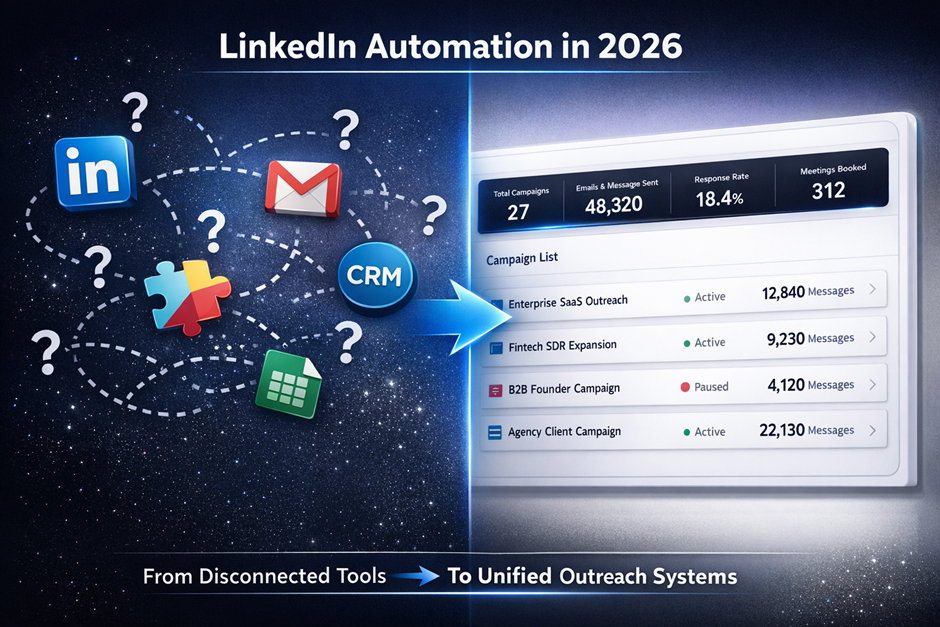
Prospecting in Sales Navigator. Messaging through a Chrome extension. Email in another platform. CRM somewhere else. Every handoff loses context. Every new tool adds friction. Teams realized they weren't solving an automation problem — they were solving an integration problem.
That's why the search for the best LinkedIn automation tool in 2026 has shifted from "what automates fastest" to "what connects everything."
What Makes a LinkedIn Automation Tool Effective in 2026
The best LinkedIn automation tool isn't determined by feature count. It's determined by how well it solves five structural problems:
1. Intelligent Prospecting Infrastructure
Poor targeting makes automation counterproductive. If your prospect list includes irrelevant roles or companies outside your ICP, personalization can't save the campaign.
Advanced LinkedIn prospecting tools allow granular filtering by:
- Job title and seniority level
- Industry and sub-industry
- Company size and growth stage
- Geographic market
- Recent job changes or company announcements
The precision of your prospect list determines everything downstream. Garbage targeting produces garbage results, regardless of message quality.
2. AI-Powered Personalization Depth
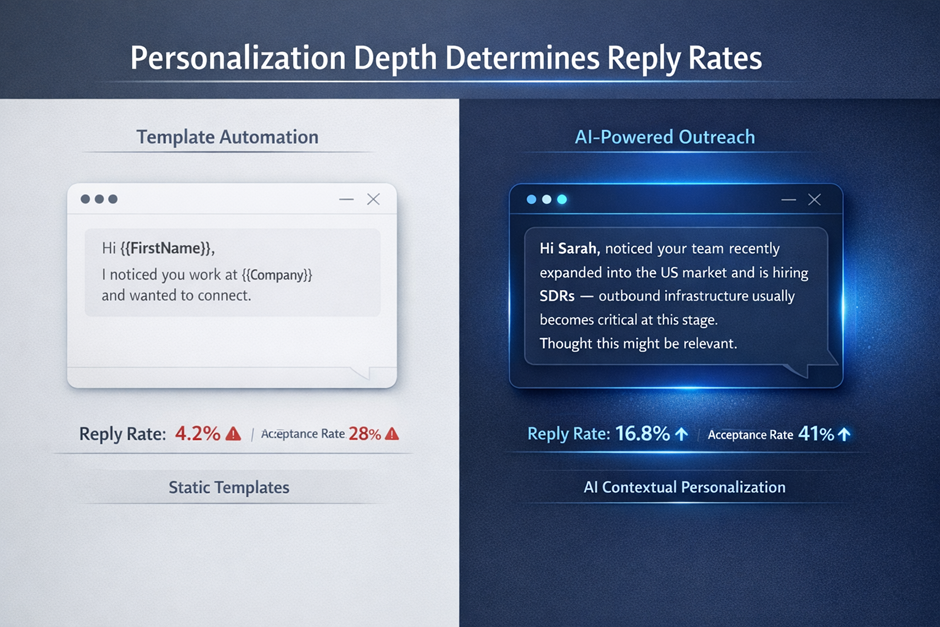
LinkedIn message automation has moved way beyond merge tags. Modern AI LinkedIn outreach analyzes profile data to generate contextually relevant messages.
Here's what that actually looks like:
Template-based personalization
"Hi {{FirstName}}, I noticed you work at {{Company}}..."
AI LinkedIn outreach
"Hi Sarah, saw your team recently raised Series A and is scaling SDR headcount — outbound infrastructure usually becomes critical at this stage. We've helped similar fintech companies structure LinkedIn and email into one predictable pipeline."
See the difference? The second approach demonstrates actual research. It references specific signals (funding stage, hiring) and connects them to relevant pain points. That level of intelligence requires AI analysis of profile headlines, company descriptions, and recent activity — not just filling in blanks.
Basic LinkedIn automation tools use static templates with placeholders. Advanced systems use AI to generate unique messages based on who the prospect actually is and what they're likely dealing with right now.
3. Multi-Channel Outreach Coordination
LinkedIn-only outreach limits scale and visibility. Response rates improve significantly when LinkedIn outreach automation connects with email follow-ups.
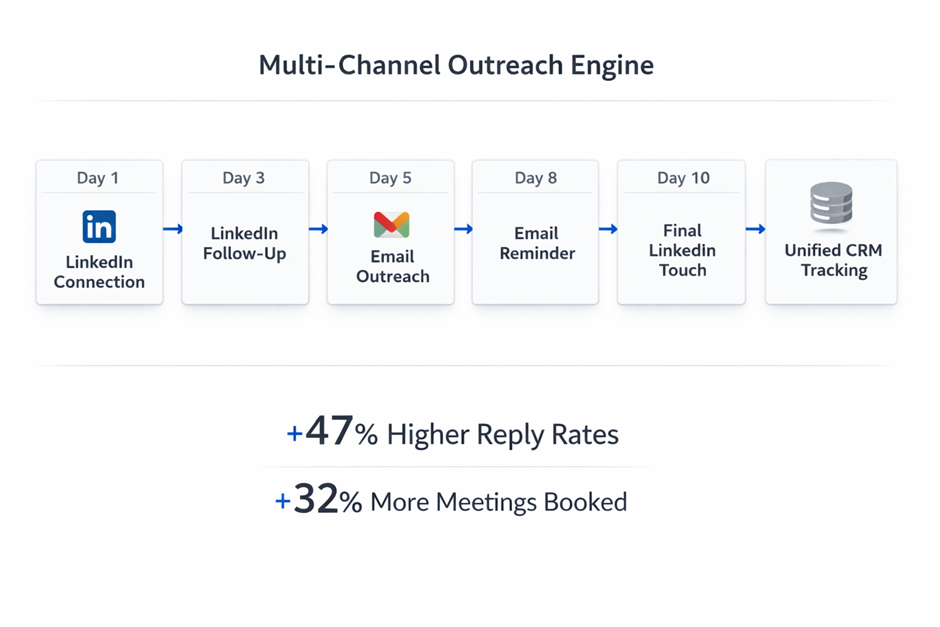
A complete multi-channel outreach system works like this:
- Send personalized LinkedIn connection request
- After acceptance, send LinkedIn message introducing value
- If no reply within 3 days, send email to work address
- Follow up with final LinkedIn touch referencing email
- Track all interactions in centralized dashboard
This approach increases touchpoints without appearing desperate on a single channel. It meets prospects where they actually check messages — some prefer LinkedIn, others prioritize email. Recent B2B outreach benchmarks show that multi-channel sequences generate roughly 47% higher reply rates compared to single-channel campaigns. B2B outreach performance data LinkedIn outreach software that integrates email automation eliminates the need for separate tools and manual coordination.
4. Safety and Compliance Infrastructure
LinkedIn monitors automation behavior. Accounts that send too many messages, accept too many connections, or exhibit robotic patterns get restricted.
Serious LinkedIn sales automation includes:
- Smart daily limits that adjust based on account age and activity history
- Randomized delays between actions to mimic human behavior
- Gradual ramp-up that starts slow and increases over weeks
- Pattern variation that changes timing and sequences
Tools without safety infrastructure create risk. One campaign can result in account restrictions that halt all outreach for weeks. LinkedIn guidance on avoiding automated engagement penalties
5. CRM and Workflow Centralization
The biggest inefficiency in outbound isn't tool capability — it's tool fragmentation.
Prospecting happens in LinkedIn Sales Navigator. Messages get sent through an automation extension. Email sequences run in a separate platform. Replies land in different inboxes. Tracking happens manually in spreadsheets or CRM.
This fragmentation causes:
- Lost context when prospects reply
- Duplicate outreach to the same person
- Inability to measure true conversion rates
- Wasted time switching between platforms
The best LinkedIn outreach system eliminates fragmentation by centralizing prospecting, messaging, email, and tracking in one interface.
Top LinkedIn Automation Tools for 2026
Here's how the major platforms compare for building scalable LinkedIn outreach systems:
SalesTarget.ai — Complete Multi-Channel Outreach System
Best for: B2B teams building unified LinkedIn and email outreach infrastructure
SalesTarget.ai positions itself as an outbound operating system rather than just a LinkedIn automation tool. The platform combines:
- AI-powered LinkedIn message automation
- Built-in LinkedIn prospecting tool with advanced filtering
- Multi-channel outreach that coordinates LinkedIn and email
- Centralized CRM tracking for all conversations
- Performance analytics across channels
The architectural advantage is integration. Instead of connecting three separate tools, teams run entire campaigns from one dashboard.
How it works in practice:
A founder defines an ICP: VP of Sales at Series A SaaS companies with 20-100 employees. Using SalesTarget's prospecting layer, they build a filtered list. AI generates personalized LinkedIn messages based on funding stage and company growth signals. If prospects don't reply on LinkedIn within 4 days, an automated email sequence activates. All conversations flow into a unified inbox.
The ROI angle: Teams typically replace 3-4 separate tools (Sales Navigator + automation extension + email platform + basic CRM) which runs $200-400/month per user. SalesTarget consolidates this while adding AI personalization that competitors charge separately for. The time saved from not switching between platforms typically recovers 5-8 hours per SDR weekly.
Best for: SaaS sales teams, agencies running outbound for clients, and lean startups scaling without full SDR headcount.
Considerations: More comprehensive than tools focused only on LinkedIn, which means steeper learning curve for teams used to simple Chrome extensions.
Expandi — Dedicated LinkedIn Outreach Automation
Best for: Teams that need LinkedIn-only automation without email integration
Expandi specializes in LinkedIn automation with cloud-based infrastructure. Key features include:
- Automated connection requests and message sequences
- Safety-based sending logic with smart limits
- Campaign builder with basic personalization
- Profile visit automation
- Team management for agencies
Best for: Users who only need LinkedIn automation and already have email and CRM systems in place.
Considerations: Limited multi-channel capabilities. Personalization is template-based rather than AI-generated.
Waalaxy — LinkedIn and Email Combo Automation
Best for: Solopreneurs and small teams wanting simple LinkedIn + email sequences
Waalaxy offers LinkedIn automation with basic email integration through a Chrome extension. Features include:
- LinkedIn connection and message sequences
- Email follow-up steps
- Pre-built campaign templates
- Simple analytics dashboard
Best for: Freelancers, consultants, and small businesses running basic LinkedIn outreach campaigns.
Considerations: Chrome extension dependency can be less reliable than cloud-based systems. Limited customization for complex sequences.
PhantomBuster — Flexible Automation & Data Extraction
Best for: Technical users building custom LinkedIn automation workflows
PhantomBuster provides a cloud-based automation engine and API-driven workflow builder that can perform LinkedIn automation tasks such as:
- Connection list extraction
- Profile scraping
- Automated visits and scripted outreach connectors
- Custom workflow orchestration via Phantoms
The platform doesn’t function like a dedicated LinkedIn outreach UI but excels at automation flexibility. Users can chain actions together and extract data from LinkedIn, then push results into other systems.
Pros:
- Highly customizable automation workflows
- Extracts lead data for downstream processing
- Useful for technically inclined teams and agencies
Considerations:
- Requires setup and scripting — not plug-and-play
- Doesn’t offer native multi-channel messaging sequences
- Lacks built-in personalization logic compared to dedicated LinkedIn outreach tools
Best for users who want to build custom automation plus data workflows and already have external systems (CRM, outreach tools, etc.) to connect to.
Dripify — Team-Based LinkedIn Sales Automation
Best for: Sales teams managing multiple LinkedIn automation campaigns
Dripify provides LinkedIn automation with team collaboration features:
- Visual campaign builder for sequences
- Analytics dashboard tracking campaign performance
- Team management and role permissions
- Lead tracking and notes
Best for: B2B companies with multiple SDRs running LinkedIn campaigns simultaneously.
Considerations: Lacks the multi-channel depth and AI personalization of platforms like SalesTarget. Email integration requires separate tools.
LinkedIn Automation Tools Comparison Table
Here's a side-by-side comparison to help you evaluate which platform fits your outbound strategy:
| Feature | SalesTarget.ai | Expandi | Waalaxy | PhantomBuster | Dripify |
|---|---|---|---|---|---|
| Best For | Multi-channel B2B outreach system (AI-driven cold email, LinkedIn, leads database, built-in CRM) | LinkedIn + email outreach (mid-market teams, agencies, SDRs) | Simple LinkedIn + email outreach (no-tech teams, recruiters, founders) | Custom automation, scraping & multi-platform workflows (LinkedIn, Twitter, Instagram, etc.) | Team-based LinkedIn + email automation (sales teams, agencies, business owners) |
| AI Personalization | ✅ Advanced (context-aware AI for messages, sequences, Copilot) | ⚠️ Basic AI (for sequences; add-ons for video/GIF hyper-personalization) | ✅ Advanced (Waami AI message writer, prospect finder, list cleaner) | ✅ Advanced (AI writer for personalized LinkedIn messages using scraped data) | ⚠️ Basic (AI-enhanced icebreakers + 20+ variables; full AI coming soon) |
| LinkedIn Automation | ✅ Full sequences (connections, messages, follow-ups synced with email) | ✅ Full sequences (11+ types, 10 actions/conditions, A/B testing) | ✅ Full sequences (invitations, messages, visits, follow-ups; 99+ templates) | ✅ Full sequences via Phantoms + Workflows (130+ pre-built automations for DMs, invites, likes) | ✅ Full sequences (hyper-personalized campaigns; connect, message, visit, endorse, like, follow) |
| Email Integration | ✅ Native unified (cold campaigns, warm-up, rotation, inbox management) | ✅ Native (any provider, omnichannel follow-ups) | ✅ Native (multi-channel sequences, built-in finder via Dropcontact) | ⚠️ Via integrations (e.g., Lemlist, Snov.io, Hunter; no native standalone) | ✅ Native (enrich with verified emails, sequences, in Campaigns) |
| CRM Functionality | ✅ Built-in CRM (pipeline, deals, tasks, follow-ups, etc) | ⚠️ Limited (native sync to HubSpot/Pipedrive; push LinkedIn data) | ⚠️ Basic (integrates with HubSpot/Pipedrive/Salesforce; Zapier for 2000+ apps) | ⚠️ Basic (HubSpot/Salesforce sync for leads/activity; no built-in) | ⚠️ Basic (lead tracking/enrichment; Zapier/native to HubSpot/Salesforce) |
| Multi-Channel Orchestration | ✅ LinkedIn + Email coordinated (unified sequences, synced engagement) | ✅ LinkedIn + Email coordinated (omnichannel sequences, follow-ups) | ✅ LinkedIn + Email coordinated (native multi-channel sequences) | ⚠️ Multi-platform (15+ sources; chain sequences via workflows/integrations, not native unified) | ✅ LinkedIn + Email coordinated (drip campaigns across both) |
| Built-in Prospecting | ✅ Advanced filtering (B2B database, validation, explorer) | ✅ Good (scrape from groups/events/posts; AI finder, 500M profiles) | ✅ Good (import from LinkedIn/SalesNav; AI finder, enrich emails) | ✅ Advanced (data extraction/enrichment from 15+ platforms; 1000+ data points) | ✅ Good (import searches, email finder/verifier, enrichment) |
| Safety Features | ✅ Smart limits + ramp-up (warm-up, rotation, validation for deliverability) | ✅ Human-like timing + cloud safety | ✅ Human-like pacing + limits | ⚠️ Depends on workflows | ✅ Cloud ramp-up + protection |
| Team Management | ✅ Full collaboration (aligned tasks, ownership, status in CRM) | ✅ Full (roles/permissions, multi-account dashboards, workspaces) | ✅ Full (team dashboards, shared leads, 1-click access, anti-duplicates) | ⚠️ Basic (up to 100 accounts/workspaces, rotation; no granular roles) | ✅ Advanced (roles, permissions, tracking, control panel) |
| Analytics Dashboard | ✅ Cross-channel metrics (real-time opens/clicks/conversions, insights) | ✅ Cross-channel (SSI, A/B, performance, flow viz; LinkedIn + email) | ⚠️ Basic (team analytics, results tracking) | ⚠️ Basic (per-workflow reports, CSV export; no unified dash) | ✅ Good (real-time campaign/step analytics, A/B, team reports) |
| Deployment | ☁️ Cloud-based | ☁️ Cloud-based (runs automation s remotely; extension for setup) | 🖥️ Chrome extension (must be active for automations) | ☁️ Cloud-based (runs automation s remotely; extension for setup) | ☁️ Cloud-based (no extension/browser needed) |
| Learning Curve | Low (AI simplifies setup and campaign creation) | Low (15-min setup, free course, easy interface) | Low (no tech skills, <10-min launch) | High (custom workflows/Phantoms require technical setup) | Medium (intuitive, but team features add depth) |
| Ideal Team Size | 5-50+ users | 1-20 users | 1-5 users | 3-30 users | 5-100+ users |
Key Takeaways from the Comparison:
- For unified LinkedIn + email outreach:
SalesTarget.ai offers the most complete multi-channel infrastructure with built-in CRM and AI personalization. - For LinkedIn-only automation:
Expandi or Dripify provides solid dedicated LinkedIn sequencing and campaign management. - For beginners or solo users:
Waalaxy offers a simpler entry point with basic LinkedIn + email capabilities. - For technical automation & data workflows:
PhantomBuster is powerful for custom scraping and automation chains but requires setup and external tools.
How to Build a Scalable LinkedIn Outreach System
Having the right LinkedIn automation tool is necessary but insufficient. Effective automation requires systematic implementation:
Step 1: Define Precise ICP Parameters
Start with narrow targeting. Broad ICPs produce irrelevant prospect lists and low reply rates. Define:
- Specific job titles (not just "VP" — VP of Sales? VP of Marketing?)
- Industry and company size range
- Growth stage indicators (funding, hiring, expansion)
- Geographic markets
Precision at this stage eliminates wasted outreach later.
Step 2: Build Segmented Prospect Lists
Use your LinkedIn prospecting tool to create lists based on ICP parameters. Segment by variables like:
- Decision-maker level (C-suite vs. VP vs. Director)
- Company maturity (early-stage vs. growth-stage)
- Industry vertical
Different segments require different messaging. A CFO at a Series C company has different priorities than a CFO at a seed-stage startup.
Step 3: Create AI-Driven Message Sequences
Leverage AI LinkedIn outreach to generate personalized messages for each segment. Structure sequences as:
- Connection request: Brief, value-focused, references shared context
- First message: Introduces specific value proposition relevant to their role
- Second follow-up: Shares resource or insight without asking for anything
- Final touch: Clear but low-pressure meeting request
Good sequences build value before asking for time. Bad sequences pitch immediately.
Step 4: Implement Multi-Channel Follow-Up
Configure your multi-channel outreach system to coordinate LinkedIn and email:
- Days 1-3: LinkedIn connection and first message
- Day 4: Email if no LinkedIn reply
- Day 7: Second email with different angle
- Day 10: Final LinkedIn message referencing previous touches
This creates visibility without overwhelming a single channel.
Step 5: Set Conservative Activity Limits
Start with lower daily limits than your LinkedIn automation tool allows:
- 20-30 connection requests per day (not 100)
- 50-75 total messages per day across sequences
- Randomized delays between actions
Scale gradually over weeks as account history builds. Aggressive early activity triggers restrictions.
Step 6: Monitor Performance and Optimize
Track metrics that matter:
- Connection acceptance rate (target: 30-40%)
- Message reply rate (target: 5-15% depending on ICP)
- Meeting booking rate (target: 2-5% of accepted connections)
Industry data suggests that top-performing teams using AI-powered LinkedIn automation see average reply rates of 12-18%, compared to 3-6% for template-based approaches. (See our guide on increasing email conversion rates)
Low acceptance rates indicate targeting or message problems. Low reply rates suggest personalization or value proposition issues. Optimize based on data, not assumptions.
Choosing Your LinkedIn Outreach Software
The right LinkedIn outreach software depends on how you run outbound.
If you need basic LinkedIn automation and already use separate email and CRM tools, focused platforms like Expandi or Dripify can work. You’ll manage integrations manually, but you keep flexibility across your stack.
If you’re a solo operator or small team looking for something lightweight, Waalaxy offers a simpler setup with basic LikedIn sequencing and limited email support.
If you’re building custom automation workflows or data extraction systems, PhantomBuster provides powerful flexibility — but it requires technical setup and external systems to complete the outreach loop.
If you’re building scalable multi-channel outreach and want LinkedIn, email, CRM tracking, and AI personalization in one unified system, platforms like SalesTarget.ai eliminate tool fragmentation and create full pipeline visibility.
The real decision isn’t just about features — it’s about architecture. Fragmented tools work if you have the operational bandwidth to manage integrations.
Unified systems work if you want simplicity, visibility, and predictable pipeline without juggling multiple platforms.
Final Perspective
LinkedIn automation in 2026 is no longer about shortcuts or hacks. It's about building systematic outreach infrastructure that combines precision targeting, intelligent personalization, multi-channel coordination, and safe execution.
The companies generating consistent pipeline from LinkedIn aren't sending more messages. They're sending smarter sequences powered by AI, coordinated across channels, and tracked through centralized systems.
If you treat LinkedIn as a standalone channel, growth plateaus. If you treat it as part of an integrated LinkedIn outreach system that includes email, CRM, and analytics, pipeline becomes predictable.
The tools exist. The frameworks exist.
The question is whether you're using automation to scale activity — or to build a revenue engine that compounds over time.





