TL;DR
- A hard bounce is a permanent failure (SMTP 5xx) — remove the address immediately, never retry.
- A soft bounce is a temporary failure (SMTP 4xx) — most ESPs auto-retry for 24–72 hours.
- A healthy hard bounce rate stays under 0.5%; anything above 2% on a single campaign is a red flag.
- A soft bounce that repeats across 3–5 sends with zero delivery in between should be treated as dead.
- Mixing the two up — retrying hard bounces or purging on one soft bounce — is what actually damages sender reputation.
Every bounce looks the same in your dashboard — a failed send, a red flag, an X next to a name. But treat a hard bounce like a soft bounce, or a soft bounce like a hard one, and you'll either keep hammering a dead address until your domain gets throttled, or purge a perfectly good contact over a full mailbox. The difference isn't cosmetic. It decides what you remove, what you retry, and how fast your sender reputation recovers.
Most teams treat "bounce" as a single category worth reacting to the same way every time — pull the address, move on. That instinct is right for one type of bounce and wrong for the other, and getting it backwards even occasionally is enough to keep your bounce rate elevated indefinitely. The fix isn't more aggressive list cleaning. It's knowing which failure you're actually looking at before you touch anything.
What Is a Hard Bounce?
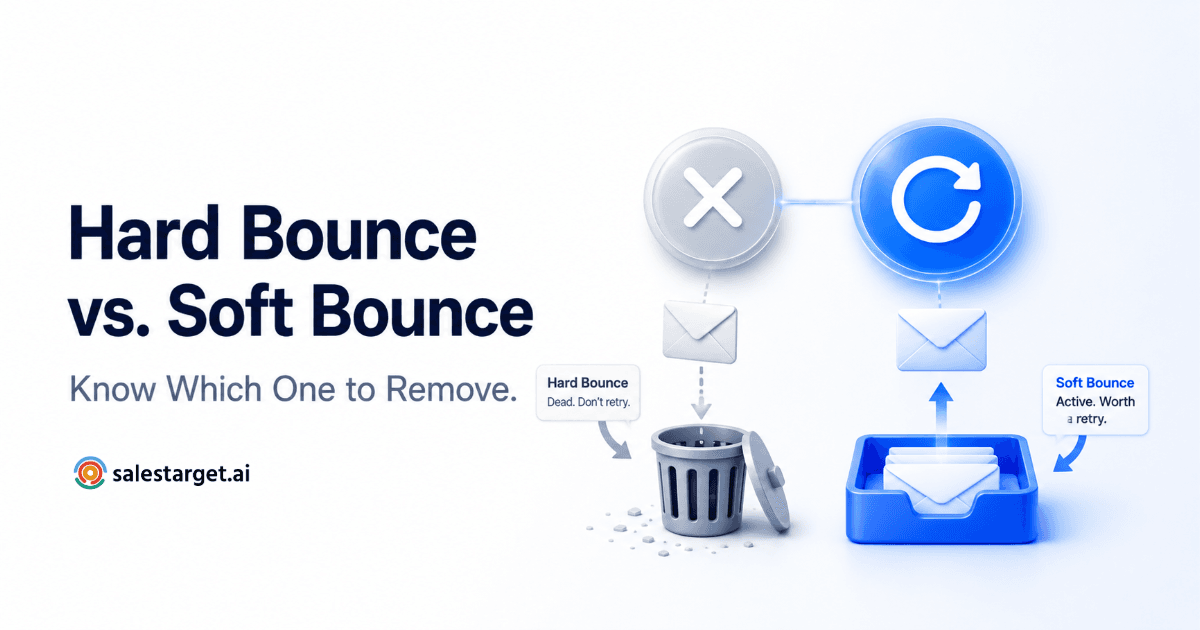
A hard bounce is a permanent delivery failure. The receiving mail server is telling you, definitively, that the message will never arrive — not today, not on the hundredth retry. Hard bounces are identified by SMTP 5xx response codes, and the most common causes are a nonexistent mailbox, an invalid or unregistered domain, or a server that has permanently blocked your sending domain.
There's exactly one correct response to a hard bounce: suppress the address immediately and never send to it again. Retrying doesn't just waste the send — it regenerates the same rejection, and repeated attempts to a dead address are one of the clearest negative signals mailbox providers use to judge your sender reputation. Most major email platforms auto-suppress hard bounces by default. If you're managing sends yourself, this has to be built into your workflow, not left to memory.
Worth noting: an address that was deliverable yesterday can hard bounce today. Mailbox providers periodically purge inactive accounts, so "verified last quarter" isn't the same guarantee it was three months ago. If you see hard bounces clustering from one specific list, import batch, or lead source, that's a signal to investigate the source itself rather than just cleaning up the symptom one address at a time.
What Is a Soft Bounce?
A soft bounce is a temporary failure. The message actually reached the recipient's mail server — the address itself is typically valid — but something short-term got in the way. Soft bounces carry SMTP 4xx codes, and the usual causes are a full mailbox, a recipient server that's temporarily overloaded or down, a message that's too large, or a greylisting policy that intentionally asks senders to try again later.
The correct response here is patience, not removal. Most email service providers automatically retry a soft-bounced message for 24 to 72 hours before giving up. The one exception worth watching: if the same address soft bounces across 3–5 consecutive sends with no successful delivery in between, it's no longer behaving like a temporary issue. At that point, treat it as effectively dead and remove it — a pattern of soft bounces is a soft bounce in name only.
The confusion usually starts here, not with hard bounces. A hard bounce is unambiguous — the server flatly says the address doesn't exist. A soft bounce is more of a judgment call, since the same 4xx response could mean "try again in an hour" or "this address hasn't been checked in six months and is quietly dying." Watching the trend across multiple sends, not just the single event, is what separates the two.

Why Mixing Them Up Damages Your Sender Reputation
Getting bounce types backwards costs you in two different directions. Retry a hard bounce, and you're repeatedly hitting a dead address — inbox providers like Gmail and Outlook track hard bounce rate as one of their primary signals for sender trust, and a healthy program keeps that rate under 0.5%. Any single campaign that clears 2% hard bounces is a sign your list has a real data-quality problem, not bad luck.
Go the other direction — purge an address the moment it soft bounces once — and you're needlessly shrinking a list that was never actually broken. A full mailbox today doesn't mean a full mailbox next week. The discipline that protects sender reputation isn't being aggressive or lenient across the board; it's applying the correct action to the correct bounce type, every time.
This is also where combined bounce rate becomes a useful early-warning number, separate from tracking each type individually. If your total bounce rate — hard and soft combined — climbs past 2% on a given send, that's worth investigating before your next campaign, regardless of which type is driving it. A rising trend usually points to list age, a bad import, or a source that needs re-verifying, not a run of bad luck.
The Bounce-Type Decision Tree
When a bounce lands in your reports, run it through this sequence before you decide anything:
| Signal | Bounce Type | Action |
|---|---|---|
| SMTP 5xx code | Hard bounce | Suppress immediately, no retry |
| SMTP 4xx code, first occurrence | Soft bounce | Let your ESP auto-retry (24–72 hrs) |
| SMTP 4xx code, 3–5 sends running | Effectively dead | Remove — stop retrying |
| Hard bounces cluster from one source | Data quality issue | Investigate the import batch or list source |
- Check the SMTP response code first. 5xx means hard, 4xx means soft — this single digit decides everything downstream.
- If it's a hard bounce, suppress the address the same day. Don't wait for a batch cleanup to catch it later.
- If it's a soft bounce, let the retry window run its course before touching the record.
- If the same address soft bounces again on your next 2–4 sends with no delivery between them, reclassify it as dead and remove it.
- If your last campaign's combined bounce rate exceeded 2%, re-verify your entire list before the next send rather than sending into the same problem again.
Where SalesTarget's Validation Fits
SalesTarget's Email Validator runs a pre-send, 4-layer check — format, domain, MX record, and SMTP — scoring every address before it ever leaves your outbox. That's specifically the piece a pre-send check can solve: catching the dead mailboxes, invalid domains, and disposable addresses that would otherwise come back as hard bounces after you've already sent.
Soft bounces are a different problem by nature. They're a live, in-the-moment response from a server that's only temporarily unavailable — no pre-send check, however thorough, can predict a mailbox that happens to be full today. That part of the decision tree still has to be handled at send time: let the retry window play out, and watch for the pattern that turns a soft bounce into a dead address. We cover the full 4-layer method in more detail in how to validate a B2B email list before sending.
The two work together, not in place of each other: validation shrinks the number of hard bounces you'll ever see, and a clear retry-and-monitor policy handles whatever soft bounces show up once you've actually sent. Skipping either half leaves a gap the other can't cover.
Mistakes to Avoid
Manually retrying a hard bounce
Mistake
Resending "just in case it was a fluke" doesn't give a dead address a second chance — it regenerates the exact same 5xx rejection and adds another negative data point to your sending reputation.
Removing an address after one soft bounce
Mistake
A single full mailbox or a temporarily down server isn't a verdict on the address. Let the standard 24–72 hour retry window run before you decide it's dead.
Sending to an old or purchased list without validating first
Mistake
This is the single most common way teams rack up hard bounces in the first place. A list that's sat untouched for months, or one you didn't build yourself, needs a pre-send check before it goes anywhere near a live campaign — the same discipline that applies to safe sending volume applies here too.
Get the bounce type right and the rest of the decision makes itself: suppress what's dead, retry what isn't, and re-verify before every send that matters.
Stop hard bounces before they happen.
Validate your list with SalesTarget's 4-layer check before your next send.
✓ 50 credits ✓ 7-day trial ✓ No credit card required