Most sales teams do not fail because they lack ambition or effort. They fail because the day-to-day work of prospecting, follow-ups, meetings and deal tracking sits scattered across spreadsheets, inboxes, sticky notes and half-updated CRM records. Sales CRM tools exist to fix exactly that - but the phrase covers a lot of ground, and not every CRM markets itself with a sales team in mind.
This guide focuses on the practical side: what sales CRM tools actually do, which capabilities matter at each stage of the sales workflow, and how to evaluate them against how your reps really sell. It is written for sales leaders, revenue operations professionals and founders who are trying to make CRM decisions that stick beyond the first quarter.
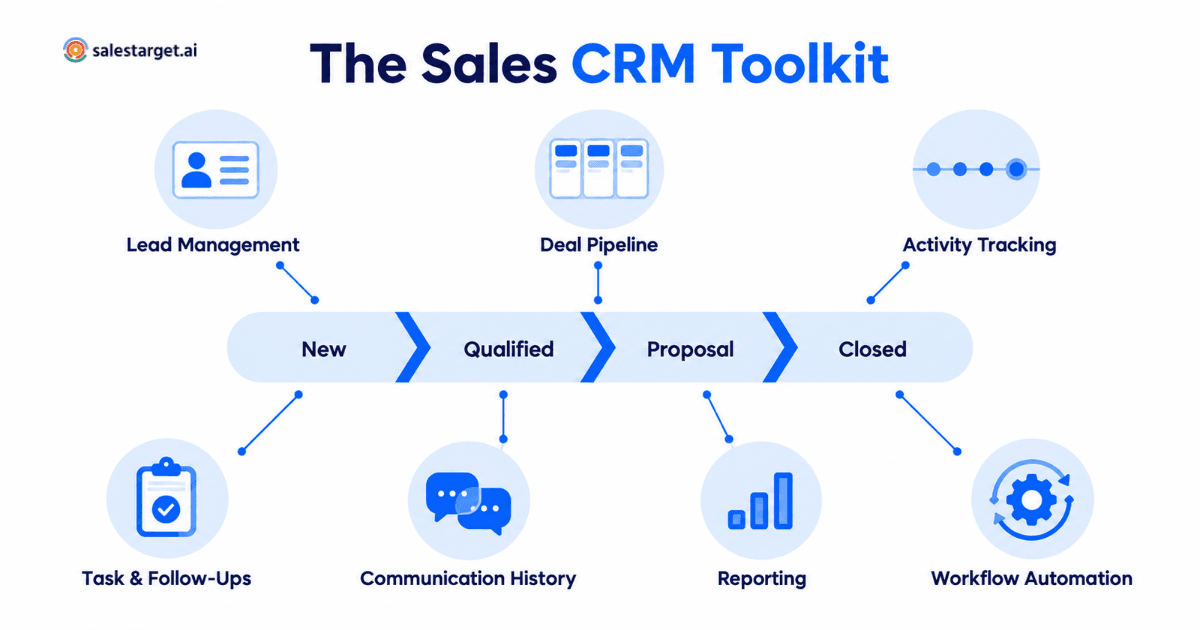
Sales CRM tools are the software capabilities inside a sales-focused CRM - lead management, pipeline tracking, activity logging, follow-up automation, communication history, reporting and workflow automation - that help sales teams move leads from first contact to closed-won. The right sales CRM tools are the ones that map to your actual sales motion and remove manual work reps would otherwise skip.
What Are Sales CRM Tools?
A sales CRM tool is any capability inside a customer relationship management system that supports the day-to-day work of a sales team. Some people use the phrase to mean CRM products in general. In practical usage inside sales teams, it usually refers to the specific modules and features that reps and managers open every day - the ones that make selling easier, not just record-keeping easier.
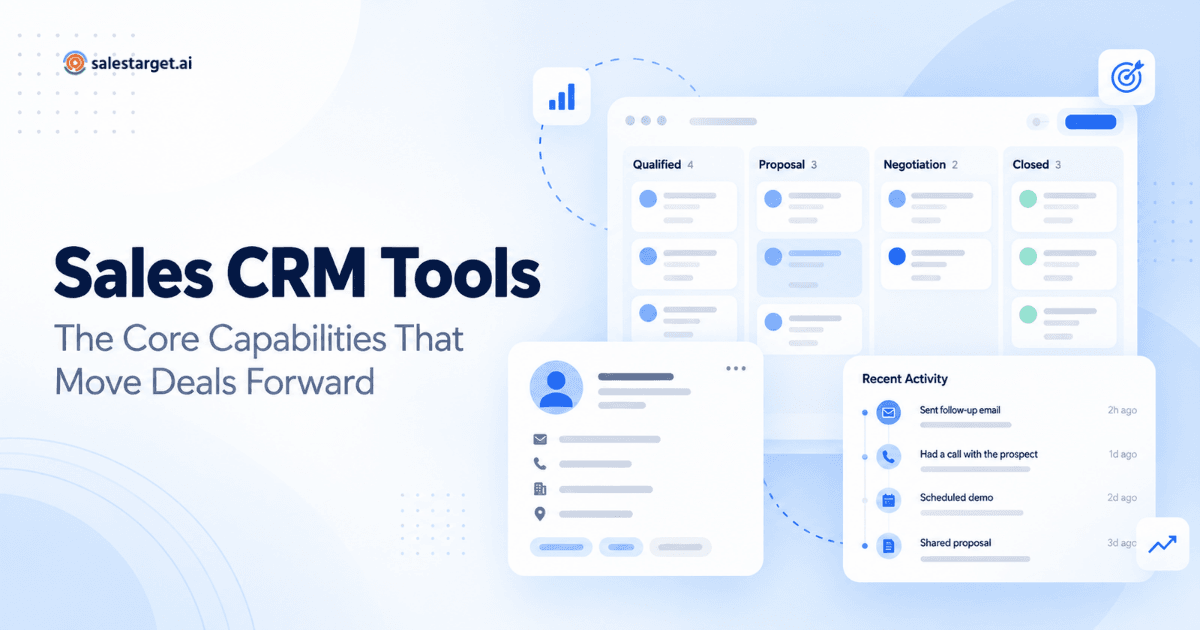
Think of a sales CRM as a stack of tools rather than a single tool. A lead management view. A pipeline board. A task list. An activity timeline. Reporting dashboards. Automation rules. Each one does a specific job. Together they form the system reps use to run their book of business.
The distinction matters because buyers often evaluate CRMs at the product level - logo, brand, feature list - when what really determines success is how well each individual tool fits their sales motion. A CRM with excellent contact management and weak pipeline visibility will feel completely different from one where those strengths are reversed.
Why a Sales-Focused CRM Is Different From a General CRM
General-purpose CRMs try to serve everyone: marketing, customer support, operations, account management and sales. That flexibility is appealing on paper, but it usually means the sales layer is a compromise. Reps end up navigating fields they do not need, filling in data that supports other departments, and clicking through screens that were designed for a different job.
A sales-focused CRM strips away the general-purpose baggage and organizes the interface around how sellers work:
- Leads and deals sit at the center, not tickets, cases or campaigns.
- Pipeline visibility is immediate, usually as a drag-and-drop board or forecast view.
- Activity logging happens automatically so reps do not have to type what they already did.
- Follow-ups surface at the right time instead of getting buried under other tasks.
- Reporting is oriented toward pipeline health and rep performance, not vanity metrics.
This distinction is worth understanding before evaluating specific tools. If you pick a general CRM and try to bend it into a sales CRM, you spend the first six months customizing objects and fields - and reps quietly stop updating anything. If you pick a sales-focused CRM, the defaults already point in the right direction.
For a deeper look at how sales-focused CRMs differ from general or legacy CRMs, see this related read on AI CRM for sales teams and why traditional CRMs are killing your pipeline.
The Core Sales CRM Tools Every Sales Team Actually Uses
Here is a practical breakdown of the capabilities that matter, why each one exists, and what to look for when comparing options.
Lead and Contact Management Tools
Lead and contact management is where every sales CRM starts. This is the system of record for who your team is talking to — company details, contact information, source, stage and any relevant context.
Strong lead management tools do more than store fields. They help reps:
- Capture new leads automatically from outreach campaigns, forms or lists.
- See lead source and engagement history at a glance.
- Segment and filter contacts by industry, company size, title or campaign.
- Merge duplicates and keep records clean without manual work.
The single biggest complaint reps have about lead management is manual data entry. A CRM that requires reps to key in every new lead and update every field by hand is a CRM that ends up out of date within weeks.
Deal and Pipeline Management Tools
The pipeline view is where a sales team lives. It shows every open deal, its stage, expected value and next action. Deal and pipeline management tools let reps and managers understand what is real, what is stalled and what is likely to close this quarter.
Look for pipeline tools that:
- Support customizable stages that match your actual sales process.
- Show weighted pipeline value and forecasts based on stage probabilities.
- Let reps update deals with drag-and-drop rather than long forms.
- Flag deals that have gone stale or lack recent activity.
A pipeline tool that only records what already happened is not enough. A useful pipeline highlights where attention is needed next - the deals slipping, the ones ready to close, the ones missing a follow-up.
Activity Tracking Tools
Activity tracking captures every touch a rep makes with a prospect: emails sent and received, calls logged, meetings held, LinkedIn touches, notes recorded. Without it, managers cannot answer basic questions like "when did we last talk to this account?" or "how many outbound emails did the team send last week?"
Modern activity tracking tools generally do most of the work automatically. Email interactions get logged the moment they happen. Meetings sync from the calendar. Calls are recorded from the dialer. Manual activity logging is reserved for the things software cannot infer - a phone conversation on a personal line, a meeting from a conference booth, a comment shared by a champion internally.
The value here is not just record-keeping. Activity data feeds pipeline health checks, coaching conversations and rep-level performance analytics. A pipeline full of deals without recent activity is a pipeline that is quietly dying.
Task and Follow-Up Management Tools
Follow-ups are where most sales get lost. A lead replies, the rep intends to respond "tomorrow," and then a busy week buries the thread until the deal has gone cold.
Task and follow-up tools solve this by:
- Creating a task automatically when a lead replies or a meeting ends.
- Surfacing overdue and today's tasks in a single view.
- Prioritizing follow-ups against pipeline value, so reps focus where it matters.
- Sending reminders through channels reps actually check.
This is one of the most underrated categories of sales CRM tools. A team that follows up on time will out-close a team that follows up eventually, even if the second team writes better cold emails.
Communication and Conversation History Tools
Every interaction with a prospect - every email, every call, every LinkedIn message, every meeting note - should be visible on a single timeline attached to that lead or deal. This is what allows an account executive to pick up a hand-off from an SDR without asking the prospect to repeat themselves, and what lets a manager review a deal in five minutes instead of thirty.
Good communication history tools:
- Show a chronological view of every touch, across channels.
- Attach files, notes and screenshots directly to the record.
- Let reps search across conversations for a specific term or date.
- Preserve context when leads change owner or when reps leave.
A CRM without a real conversation history is a filing cabinet. A CRM with one is an institutional memory.
Sales Reporting and Visibility Tools
Managers need to know where the quarter is heading before it is too late to influence the outcome. Reporting tools inside a sales CRM turn raw activity and pipeline data into answers to real questions: How is each rep pacing against quota? Which deal stages are stalling? What is the reply rate on our current outbound campaigns?
Practical reporting tools focus on:
- Live dashboards rather than reports you have to generate manually.
- Pipeline health metrics such as stage-to-stage conversion, average deal size and cycle length.
- Rep-level performance without turning into a surveillance layer.
- Simple filters so leaders can look at the segment they actually care about.
Overbuilt reporting tools become dashboards nobody opens. Under-built ones leave leaders guessing. The best reporting sits in the middle: a small number of live views that answer the questions asked in every pipeline review.
Workflow Automation Tools
Workflow automation is what separates a CRM that helps reps sell from one that only helps them log what they already did. Automation rules apply logic to routine events: when X happens, do Y.
Useful automation examples inside a sales CRM include:
- Automatically creating a follow-up task when a prospect replies.
- Moving a deal to "Meeting Booked" when a calendar invite is accepted.
- Notifying a rep in Slack when a high-value lead engages.
- Routing new leads to the correct rep based on region or ICP fit.
- Reminding a rep when a deal has been idle for a defined number of days.
Well-scoped automation removes the small, repetitive decisions that drain a rep's day. Overscoped automation creates a system that reps stop trusting because it does things they do not expect. Start narrow and expand only where the rules earn their place.
How Sales CRM Tools Connect Prospecting, Outreach and the Pipeline
A common failure mode in B2B sales is treating prospecting, outreach and CRM as three separate worlds. Prospecting happens in a data provider. Outreach happens in a cold email tool. CRM captures what closes. The seams between them are where information gets lost — and where deals leak out of the funnel.
Modern sales CRM tools increasingly close those seams. A CRM connected to your outbound campaigns will:
- Pull replies straight into the lead record so nothing lives only in an SDR's inbox.
- Turn positive replies into new deals automatically.
- Log every campaign touch on the activity timeline.
- Feed enriched contact data back into CRM records so segmentation stays accurate.
- Let managers see campaign performance and deal outcomes in one place.
That connection between prospecting data quality and CRM record quality is one of the most overlooked levers in outbound sales. See this related guide on lead enrichment tools that turn thin CRM records into ready-to-contact accounts for a deeper look at why incomplete CRM data quietly slows down every downstream stage.
How to Evaluate Sales CRM Tools for Your Team
There is no universal ranking of sales CRM tools that applies to every team. The right answer depends on how your team sells, what your pipeline looks like, and how much complexity your operations layer can absorb. A useful evaluation covers four dimensions.
Match the Tools to Your Actual Sales Motion
Before comparing products, write down your current sales motion in plain language. Outbound-led? Inbound-led? Long enterprise cycles with multiple stakeholders? Fast SMB deals closed inside a week? Each pattern implies different priorities.
An outbound team needs strong campaign integration, reply tracking and task automation. A team selling to enterprise needs deep account structures, multiple contacts per account and pipeline visualizations that show months of runway. A high-velocity team needs a pipeline board reps can update in seconds without opening a form.
Look at How Reps Will Really Use It
Fields and features that look useful in a demo often go unused in production. The best proxy for CRM adoption is how reps behave in the first two weeks: do they log activity without being reminded? Do they update deal stages honestly? Do they open the pipeline view every day?
During evaluation, put a rep in front of the tool with a real scenario - three open deals to update, one lead reply to handle, a follow-up to schedule - and watch what happens. If they struggle for basic actions, no amount of executive enthusiasm will fix it.
Check the Integration Layer
A sales CRM does not live alone. It needs to connect to email, calendar, video meetings, Slack, marketing automation, and often to specific data sources or dialers. Ask which integrations are native, which run through Zapier or a similar layer, and where the seams are.
Weak integrations create silent data loss. If meetings from your calendar do not sync back automatically, they will not be logged. If Slack alerts require manual configuration for every stage, most alerts will not exist. Integration quality is often more important than any individual feature.
Consider Data Flow and Automation
How does data move into and out of the CRM? Are records created automatically, or does someone import CSVs weekly? What triggers a follow-up task? Where do reply notifications go?
A CRM that requires constant manual updating will drift. A CRM where records, activities and tasks flow in automatically becomes trustworthy enough for reps to actually rely on.
Common Mistakes When Choosing or Implementing Sales CRM Tools
Even good CRMs fail when they are chosen or set up badly. A few of the most common mistakes:
- Overbuilding at launch. Teams try to model every edge case in the first month. Reps drown in fields and never fill them in. Start minimal; expand as reality demands.
- Choosing based on features, not workflow. A CRM with the longest feature list can still be the wrong CRM if those features do not sit inside your day-to-day motion.
- Ignoring rep feedback. Sales leaders sometimes pick a CRM that suits them and then push it down. The reps who will actually use it every day should have a real say in the choice.
- Underestimating data hygiene. A CRM full of duplicates, stale titles and missing fields becomes a system nobody trusts. Cleanup and enrichment are ongoing work, not a one-time project.
- Treating CRM as separate from outreach. When prospecting, outreach and CRM live in unconnected tools, information gets lost at every hand-off. Connect them or accept that you are managing the same data twice.
When an All-in-One Sales Platform Makes Sense
For some teams, the right answer is not a stand-alone CRM plus a stack of separate prospecting and outreach tools. It is a single sales platform that combines lead sourcing, outbound outreach and CRM in one interface.
This tends to be the better fit when:
- The team is small and cannot maintain a fragmented tech stack.
- Prospecting, outreach and pipeline management are done by the same people.
- The overhead of syncing between tools outweighs the benefits of best-of-breed choices.
- Speed of setup matters — the team needs to be selling this month, not next quarter.
As one example of a modern sales-focused CRM built for outbound teams, SalesTarget.ai CRM brings lead management, deal pipeline, tasks and follow-ups, activity tracking, and reports and analytics into a single workspace. Leads from email campaigns land in the CRM automatically, email interactions are logged to the lead's timeline, follow-up tasks are created when a lead replies or a meeting ends, and the pipeline updates live for the whole team. It also connects with tools most sales teams already use, including Google Calendar, Google Meet, Calendly, Slack, Zapier, HubSpot and Salesforce.
Whether an all-in-one platform or a dedicated CRM is the right pick depends on your team size, motion and how much stack complexity you want to maintain. The important thing is that the sales CRM tools you choose actually connect to the work upstream of the pipeline, rather than sitting behind a wall from your prospecting and outreach.
Choosing Sales CRM Tools That Reps Actually Use
The best sales CRM tools are not the ones with the most features. They are the ones reps open every day, update honestly, and trust to tell them what to do next. Everything else follows from that.
Before making a decision, revisit the basics: What is your sales motion? Which stages need the most visibility? Where do deals leak today? Which manual steps drain the most rep time? Answer those first, then evaluate sales CRM tools against them - feature by feature, workflow by workflow.
If you want to see how a sales-focused CRM handles this in practice, explore SalesTarget.ai CRM and how it connects lead management, pipeline tracking and follow-ups in one workspace built for outbound sales teams.