Most SDR teams lose hours every week to work that feels productive but doesn't move deals forward. Sorting contact lists, copying data between tools, scheduling follow-ups manually, toggling between browser tabs—it adds up fast. Outbound sales automation exists to reclaim that time by turning repeatable tasks into structured, technology-driven workflows so reps can spend their energy on actual conversations.
Outbound sales automation applies technology and repeatable processes to handle prospecting, outreach scheduling, follow-up sequences, and data management automatically. The goal is to free SDRs from low-value repetitive work so they can focus on personalized conversations and pipeline generation.
The real challenge isn't whether to automate outbound sales—it's deciding which pieces to hand off to software and which to keep human. This playbook walks through the full workflow, stage by stage, so business development teams can build a system that scales without sacrificing the quality of their outreach. If you're already running outbound sequences and struggling with reply rates, you may also want to review proven cold email reply strategies that complement an automated cadence.
What Is Outbound Sales Automation?
Outbound sales automation is the practice of using software tools and predefined workflows to execute repetitive outbound activities—prospect identification, contact enrichment, email sequencing, follow-ups, and reporting—without manual effort at every step.
It doesn't mean removing reps from the process. The best implementations handle the mechanical work (scheduling sends, logging activities, rotating inboxes) while keeping humans responsible for strategic decisions: which accounts to prioritize, how to handle objections, and when a conversation warrants a different approach.
For business development teams running outbound at any real volume, automation is less about doing more and more about doing the right things consistently. A single SDR can only send so many thoughtful emails per day. Structured workflows make sure nothing falls through the cracks between touchpoints.
Why SDR Teams Need Workflow Automation
Manual SDR workflows break down predictably. Reps spend too long hunting for contact data, copy-pasting between spreadsheets, and mentally tracking which prospects are due for a follow-up. The result: inconsistent cadences, missed touches, and a pipeline that depends entirely on individual discipline.
SDR workflow automation addresses these problems directly:
- Prospect research that takes 20 minutes per lead can be trimmed to seconds with data enrichment tools.
- Manually scheduling and sending emails one by one wastes time that should go toward personalization.
- Follow-up gaps are one of the most common pipeline killers—automated sequences close them.
- Spreadsheet-based tracking doesn't scale past a handful of active prospects.
- Switching between five or six disconnected tools fragments the SDR's attention and workflow.
When you add it all up, the operational drag is significant.
Illustrative calculation: Consider an SDR who spends roughly 25 minutes per day on manual prospect list management, 20 minutes scheduling and sending individual emails, and 15 minutes logging activities and updating spreadsheets. That's 60 minutes of repetitive work daily. If automation handles even 70% of those tasks, that recovers about 42 minutes per day—or approximately 14 hours across a 20-business-day month. Over a team of five SDRs, that's 70 hours of recovered selling time monthly. These are illustrative figures based on common workflow patterns, not research data.
According to Salesforce's State of Sales report, sales reps spend only about 28% of their week actually selling. The rest goes to administrative tasks, data entry, and internal meetings. Outbound automation directly attacks the administrative share of that time.
The End-to-End Outbound Sales Automation Workflow
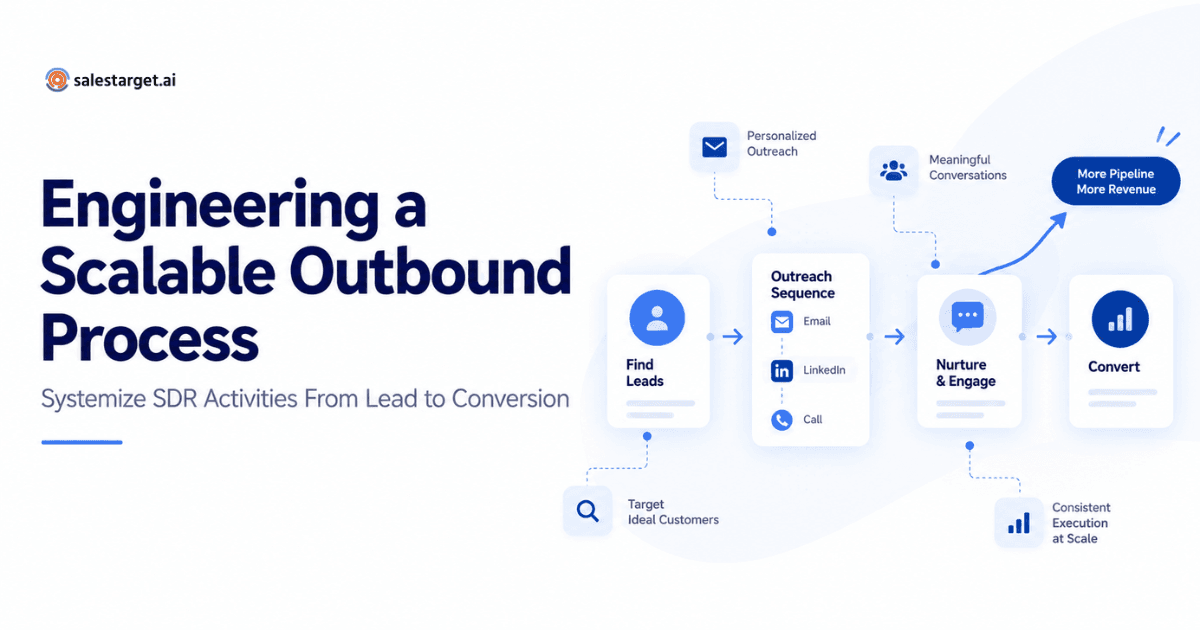
This is where the playbook becomes operational. Below are eight stages that take a prospect from unknown to qualified—each with clear guidance on what to automate and what to keep hands-on.
1. Define the Ideal Prospect
Start by documenting your ideal customer profile (ICP). Nail down company size, industry, geography, tech stack, and buying signals. Identify the specific roles you're targeting—VP of Sales, Head of Revenue Operations, Director of Business Development—and the problems they care about. Automation is only as good as the targeting that feeds it.
2. Automate Prospect Discovery
Automated prospecting tools can surface companies and contacts matching your ICP criteria far faster than manual research. Use database platforms that filter by firmographic and technographic data, then export qualified lists directly into your outreach tool. The time savings here alone can be substantial—especially for teams working large total addressable markets.
3. Enrich and Validate Prospect Data
Bad data tanks outbound performance. Before any emails go out, run contact records through verification and enrichment services. Confirm email addresses are deliverable, fill in missing fields like job title or direct phone number, and flag outdated records. Clean data protects your sender reputation and keeps bounce rates low.
4. Personalize the First Touch
Automation handles the logistics of outreach; personalization makes it effective. Use dynamic fields, AI-generated icebreakers, or research-backed messaging templates that adapt to each prospect's context. The first email should reference something specific—a company announcement, a shared connection, a relevant pain point. Generic "just checking in" emails don't earn replies.
5. Build a Sales Cadence
Sales cadence automation structures the sequence of touchpoints across email, LinkedIn, and phone over a defined timeline. A typical B2B cadence might include 7–10 touches over three weeks, mixing channels to maximize visibility. The strongest outbound motions combine LinkedIn and email in an outbound motion rather than relying on a single channel. Define the timing between steps, the messaging angle for each touch, and the exit criteria for when a prospect should be removed or escalated.
6. Automate Follow-Ups
Follow-ups are where most outbound pipelines leak. Automated sequences ensure that every prospect receives the right number of touches on schedule, regardless of how busy the rep is that week. However, automation should pause when a prospect replies—positive or negative—so a human can respond appropriately.
7. Route Replies and Qualified Prospects
When a prospect responds, the system needs to categorize the reply (interested, objection, not now, unsubscribe) and route it accordingly. Interested replies should trigger an alert and move the prospect into a meeting-booking or AE handoff workflow. Objections should land with the SDR for a tailored response, not sit in an unmonitored inbox.
8. Measure and Optimize
Track open rates, reply rates, bounce rates, positive reply rates, meetings booked, and pipeline generated. Review these metrics weekly. Identify which cadence steps drive the most engagement, which messaging angles resonate, and where prospects drop off. Continuous testing of subject lines, send times, and sequence length separates average outbound from high-performing programs.
Building an Outbound Sales Tech Stack
An effective outbound sales tech stack isn't about collecting the most tools—it's about choosing components that integrate smoothly and eliminate manual handoffs. When evaluating email outreach tools and how to evaluate them, focus on how well they fit into a connected workflow rather than feature checklists in isolation.
The core categories to cover:
- Prospecting and lead database: Sources for discovering and filtering potential buyers matching your ICP.
- Contact verification and enrichment: Validates email addresses and fills gaps in contact records before outreach.
- Email outreach and sequencing: Manages automated sending, follow-up logic, and inbox rotation. Platforms like SalesTarget's email outreach system handle multi-step sequences with deliverability controls built in.
- Personalization layer: AI or template-based tools that adapt messaging to individual prospect context at scale.
- Sales cadence management: Orchestrates multichannel touchpoints across email, LinkedIn, and phone.
- CRM: Central system of record for prospect status, deal stages, and activity history.
- Analytics and reporting: Dashboards that surface performance data to guide optimization.
- AI assistance: Supports content generation, reply classification, and workflow recommendations.
The U.S. Bureau of Labor Statistics Occupational Outlook Handbook projects continued demand for sales representatives through 2032, reinforcing that the role isn't disappearing—tools are evolving to help reps work more efficiently.
What to Automate and What to Keep Human
The dividing line is straightforward: automate the repetitive and mechanical; keep humans on the strategic and relational.
Automate:
- Prospect list building and organization
- Email scheduling and send-time optimization
- Follow-up timing and sequencing
- Task creation and activity logging
- Basic data enrichment and verification
- Outreach cadence execution
- Performance reporting
Keep human:
- Complex, account-specific personalization
- Objection handling and nuanced replies
- Discovery calls and qualification conversations
- Relationship building with key stakeholders
- Strategic account planning
- Negotiation and closing
Automation should remove the friction from an SDR's day, not remove the SDR from the process. The teams that get this balance right are the ones that scale outbound without burning their domain reputation or annoying their prospects.
Build a Scalable Outbound Engine
Stop losing SDR hours to manual tasks. Combine AI-powered personalization, automated sequences, and inbox rotation to run outbound at scale—with consistent execution across every rep.