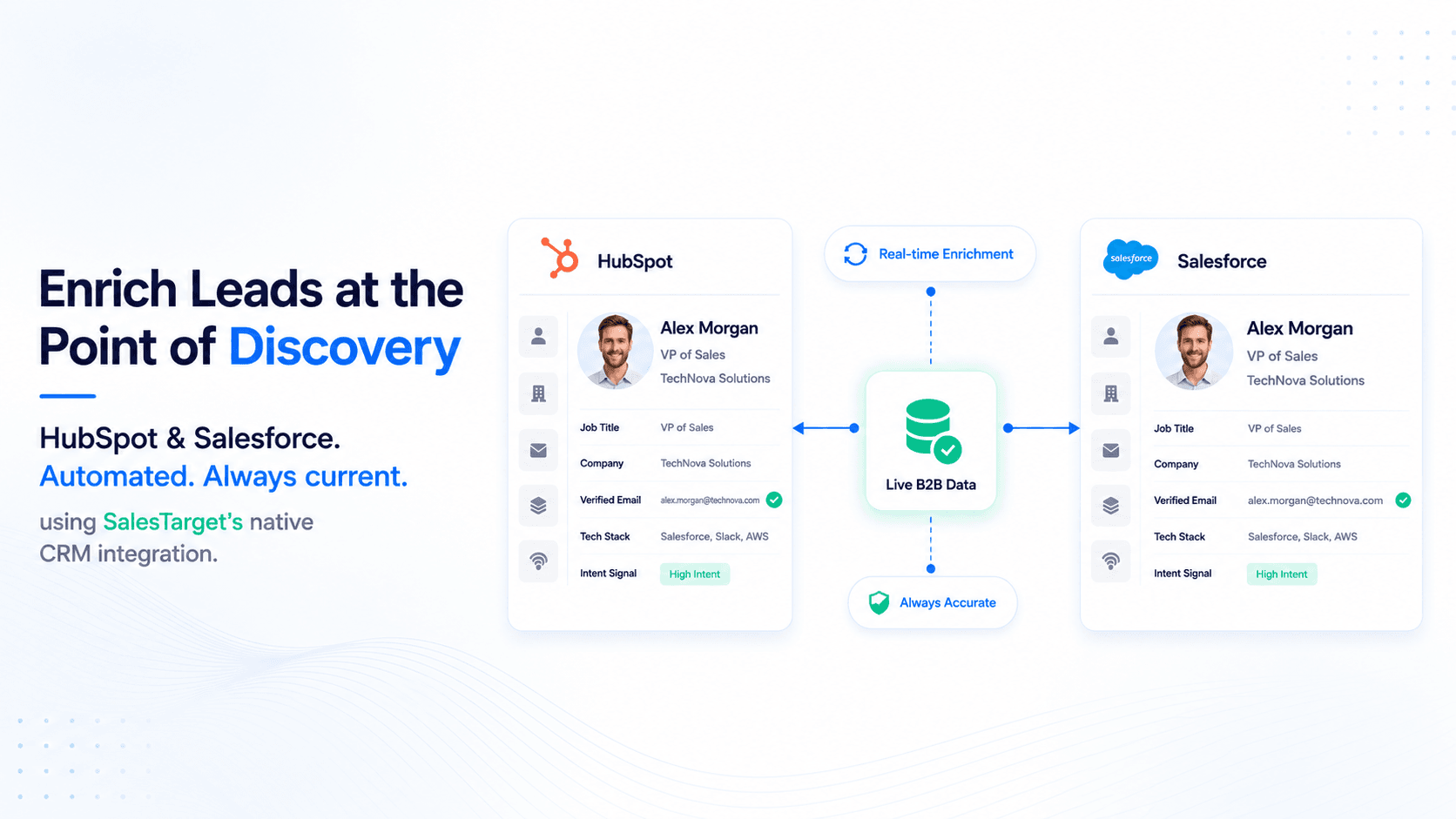
TL;DR
- B2B CRM data decays at 22.5% annually — manual enrichment cannot keep pace.
- Most enrichment tools work after export — SalesTarget enriches at the point of discovery, before data enters your CRM stale.
- This guide covers the full workflow for HubSpot and Salesforce lead enrichment using SalesTarget's native CRM integration.
- Fields enriched automatically: firmographic, technographic, verified contact data, intent signals — no manual data entry required.
- The fix is not a better data cleaning process. It is enriching leads before they hit your CRM.
Your CRM is lying to you. Not maliciously — just quietly, continuously, at a rate of roughly 22.5% per year. Job titles change. Companies get acquired. Decision-makers move on. And every record that goes stale is a rep wasting time on a contact who no longer exists at that company, in that role, with that buying authority.
The standard fix — run an enrichment tool on your exported list every quarter — is the equivalent of mopping the floor while the tap is still running. This guide covers how to stop the leak at the source: enriching HubSpot and Salesforce leads automatically, at the point of discovery, so your CRM is current before a rep ever touches a record.
Why CRM Data Decays Faster Than You Think
According to Experian Data Quality, B2B contact data decays at 22.5% annually. That means in a CRM with 10,000 contacts, roughly 2,250 records become unreliable every year. Titles change. Emails bounce. Phone numbers disconnect. Companies pivot, merge, or disappear entirely.
Gartner puts the cost of poor data quality at $12.9 million per year for the average organisation — a figure that compounds when you factor in wasted outreach, misdirected sequences, and sales reps spending time on contacts who cannot convert because their information is wrong.
HubSpot's State of Sales research found that reps spend 27% of their time on data-related admin — updating records, verifying contact details, chasing information that should already be in the CRM. That is more than one day per working week, per rep, on work that should not exist.
📊 The cost of stale CRM data
- 22.5% annual decay rate — Experian Data Quality
- $12.9M average annual cost of bad data — Gartner
- 27% of rep time spent on data admin — HubSpot State of Sales
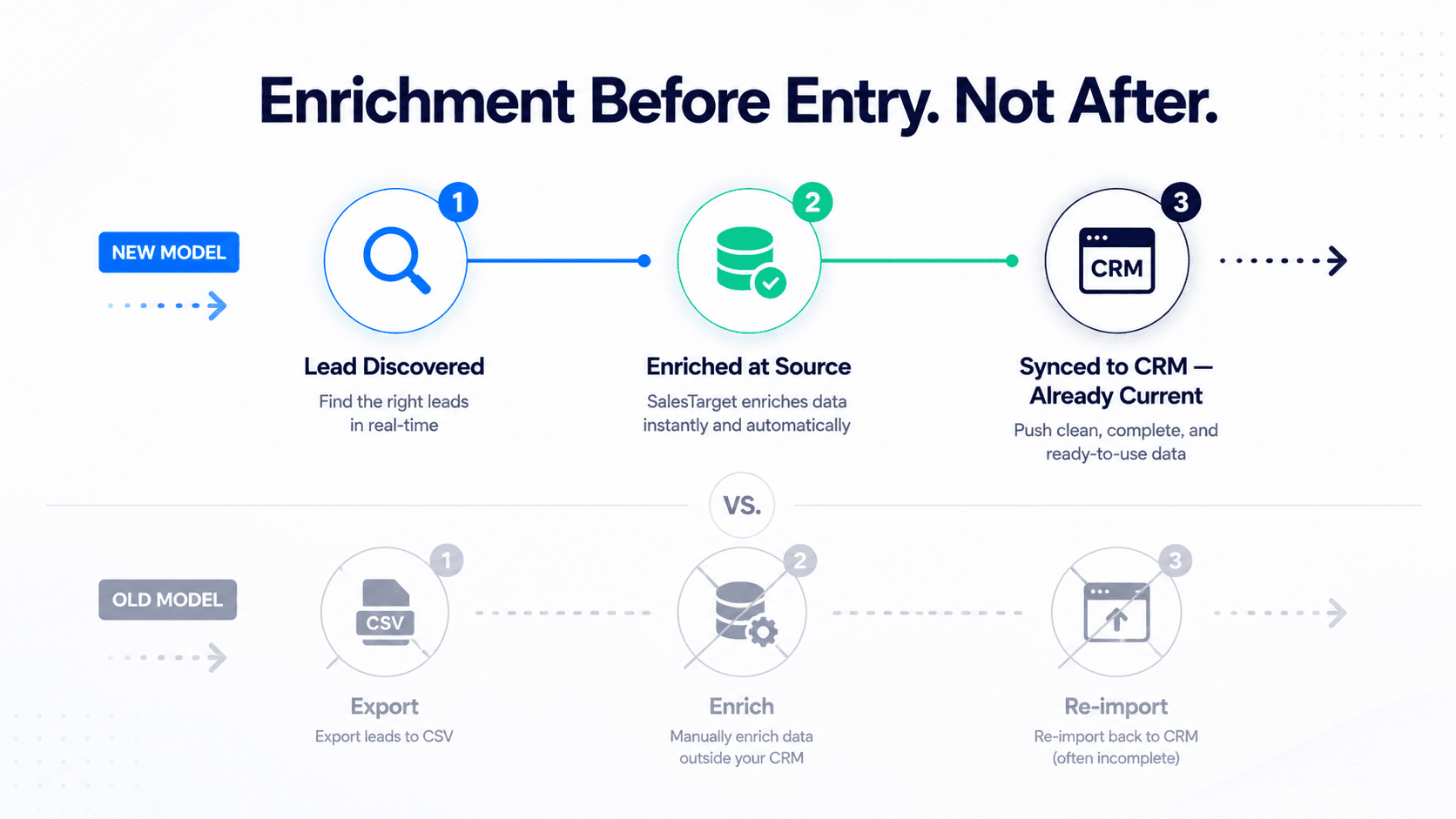
The problem is not that teams do not care about data quality. It is that the standard enrichment workflow is broken by design. Most tools ask you to export a list, upload it to an enrichment platform, wait for results, clean the output, and re-import. By the time that cycle completes, new stale records have already entered the system. You are always behind.
What CRM Lead Enrichment Actually Means (vs. CRM Import)
There is a distinction worth making clearly before we get into the workflow: CRM enrichment and CRM import are not the same thing, and conflating them is the root of most failed enrichment programmes.
| Process | What it does | When data enters CRM | Data quality at entry |
|---|---|---|---|
| CRM Import | Pushes raw contact data from a list or CSV into CRM fields | At upload — often stale immediately | Unverified |
| Post-export Enrichment | Exports existing CRM records, appends data, re-imports | After a manual batch cycle | Better — but already aging |
| Point-of-discovery Enrichment | Enriches leads before they are pushed to CRM — data is current at creation | On sync — enriched at source | Verified and current |
Point-of-discovery enrichment is the model that actually solves the decay problem. When a lead is identified inside SalesTarget's Lead Enrichment engine, it is enriched with verified firmographic, technographic, and contact data before it is ever pushed to HubSpot or Salesforce. The CRM record is born current — it does not need to be cleaned up after the fact.
This is the fundamental difference between using SalesTarget's Lead Explorer for CRM enrichment versus running a standalone enrichment tool on top of an existing database. One prevents decay. The other chases it.
How to Enrich HubSpot Leads Automatically with SalesTarget
The HubSpot enrichment workflow in SalesTarget is built around a single principle: leads should arrive in HubSpot already enriched, not waiting to be enriched. Here is how the end-to-end process works in practice.
Step 1 — Connect SalesTarget to HubSpot
Navigate to your SalesTarget integrations settings and connect your HubSpot account via OAuth. The connection is read-write — SalesTarget can push enriched contact and company records directly into HubSpot without requiring any CSV handling. You set the sync direction, the field mapping, and the deduplication rules once. Everything after that is automatic.
Step 2 — Build your ICP and run Lead Explorer
Use SalesTarget's ICP Builder to define your target profile — industry, company size, tech stack, geography, job function, seniority. Lead Explorer surfaces matching contacts and companies from a live, continuously verified database. Every result is pre-enriched before you ever select it.
Step 3 — Review enrichment fields before sync
Before pushing any record to HubSpot, you see the full enrichment payload: verified email, direct dial, LinkedIn profile, company domain, employee count, industry classification, technology stack, funding stage, and real-time intent signals. You choose which fields map to which HubSpot properties. Nothing hits your CRM without passing SalesTarget's verification layer first.
Step 4 — Push enriched records to HubSpot
Select the leads you want to sync and push them directly to HubSpot as contacts and associated company records. SalesTarget's deduplication logic checks for existing records before creating new ones — so you are enriching, not duplicating. Existing contacts with missing fields get those fields filled. New contacts arrive complete.
Step 5 — Set up ongoing enrichment triggers
For teams running ongoing prospecting, SalesTarget supports saved searches and segment-level sync rules — so as new leads matching your ICP enter the database, they can be automatically enriched and synced to HubSpot on a defined cadence. Your HubSpot pipeline stays current without manual intervention.
HubSpot enrichment: what gets populated automatically
Fields enriched on sync
Verified email address · Direct phone · LinkedIn URL · Job title · Department · Seniority level · Company name · Company domain · Employee count · Industry · HQ location · Technology stack · Funding stage · Recent intent signals. All mapped to native HubSpot contact and company properties — no custom field setup required for standard fields.
How to Enrich Salesforce Leads Automatically with SalesTarget
The Salesforce lead enrichment workflow follows the same point-of-discovery model — the key difference is how SalesTarget maps to Salesforce's object structure, which separates Leads from Contacts and Accounts.
Step 1 — Connect SalesTarget to Salesforce
Connect via the Salesforce integration in SalesTarget settings using your Salesforce credentials. You configure whether enriched records push as Leads or Contacts and Accounts depending on your Salesforce architecture. Field mapping is fully configurable — standard Salesforce fields and custom fields are both supported.
Step 2 — Prospect inside Lead Explorer with Salesforce enrichment in mind
When prospecting for Salesforce, use SalesTarget's Advanced Targeting Filters to build segments that match your Salesforce campaign or territory structure. Filter by industry, company size, tech stack, funding, geography, and buying signals — then review the enrichment payload before any record touches Salesforce.
Step 3 — Deduplicate against existing Salesforce records
Before syncing, SalesTarget checks your Salesforce instance for matching records based on email domain and contact identity. Existing records with incomplete fields get enriched and updated. New records arrive complete. Duplicate lead creation — one of the most common Salesforce data quality issues — is handled at the integration layer, not by a Salesforce admin after the fact.
Step 4 — Push to Salesforce as Leads or Contacts
Select your enriched prospects and push directly to Salesforce. SalesTarget writes to your configured Lead or Contact object, populates the associated Account record with company-level firmographic and technographic data, and logs the sync event in your SalesTarget activity feed. Your Salesforce pipeline gets enriched records — not raw imports that need cleanup.
Step 5 — Use intent signals to prioritise Salesforce pipeline
SalesTarget's Real-Time Signal Discovery layer appends buying intent signals to enriched records before they sync. Job changes, funding events, tech stack shifts, and hiring patterns flow directly into Salesforce fields — giving your reps a prioritised pipeline based on live data, not last quarter's import.
Point-of-Discovery Enrichment: Why Timing Is Everything
The reason most CRM enrichment programmes fail is not the tool. It is the timing. Enriching leads after they have been in your CRM for three months is like applying sunscreen after a sunburn — technically correct, structurally too late.
Point-of-discovery enrichment flips this model. When a lead is identified in SalesTarget's built-in enrichment layer, the enrichment happens at the moment of discovery — not after export, not after import, not in a quarterly batch job. The record that enters your CRM is the most current version of that contact available at that moment.
This matters for three reasons:
| Timing model | When enrichment runs | Data age at first touch | Rep experience |
|---|---|---|---|
| Quarterly batch enrichment | Every 90 days on existing records | Up to 90 days stale | Researching before every call |
| Post-import enrichment | After CSV import, manual trigger | Days to weeks stale | Partial data until batch completes |
| Point-of-discovery enrichment | Before CRM sync — at lead creation | Current at first touch | Full context before first outreach |
When a rep opens a record in HubSpot or Salesforce and finds a complete, current contact — verified email, direct dial, correct title, company context, and intent signals — they move to outreach. When they open a record with four fields populated and the rest blank, they open a browser tab and start researching. That is where the 27% of time goes.
What Gets Enriched Automatically: The Full Field Map
Understanding what data SalesTarget appends — and how it maps to CRM fields — is important for sales ops teams configuring the integration. Here is the complete breakdown.
| Data category | Fields enriched | CRM object | Value for reps |
|---|---|---|---|
| Contact data | Verified email, direct dial, LinkedIn URL, full name, job title, seniority, department | Contact / Lead | Immediate outreach-ready record |
| Firmographic data | Company name, domain, employee count, revenue range, industry, HQ location, founded year | Account / Company | ICP qualification without research |
| Technographic data | Current tech stack, CRM in use, marketing tools, key integrations | Account / Company | Competitive displacement context |
| Intent signals | Hiring activity, funding events, job changes, tech adoption signals, web research patterns | Contact / Lead / Account | Prioritise who to call first |
For more on what distinguishes enrichment from generation in B2B prospecting, the SalesTarget blog on lead enrichment vs lead generation covers the distinction in detail — including when to use each approach in your pipeline.
Five CRM Enrichment Mistakes That Keep Killing Pipeline Quality
Most sales teams know their CRM data is poor. Far fewer know exactly where the process breaks down. These are the five patterns that cause the most damage.
Mistake 1 — Enriching on a quarterly cycle instead of at point of entry
The problem
Batch enrichment creates a window — sometimes 90 days long — where reps are working from stale data. Every bounce, wrong number, and failed outreach in that window is a direct cost of the timing model. Run enrichment at the point of discovery, not after the fact.
Mistake 2 — Treating all enrichment fields equally
The problem
Not all enrichment data ages at the same rate. Job titles change faster than company domains. Phone numbers change faster than industry classifications. Prioritise continuous enrichment for the highest-decay fields — email, title, direct dial — and treat firmographic data as lower-cadence.
Mistake 3 — No deduplication logic at the integration layer
The problem
Pushing enriched records into HubSpot or Salesforce without deduplication creates duplicate contacts, split activity histories, and ownership conflicts. Always configure deduplication rules — matching on email domain and contact identity — before the first sync.
Mistake 4 — Enriching without verifying email deliverability
The problem
A contact can be enriched with technically correct data that still produces a bounce — because the email format is valid but the mailbox is inactive. Enrichment and email verification are not the same process. SalesTarget runs both. For bulk verification workflows on existing lists, the Email Validator handles list-level deliverability checking before any outreach begins.
Mistake 5 — Relying on manual CRM updates to fill enrichment gaps
The problem
Asking reps to manually update CRM records after calls and meetings is a losing model. The records that get updated are the ones reps care about. Everything else stays stale. Automated enrichment at the point of discovery removes the dependency on rep discipline entirely. The data is there before the rep opens the record — not because they added it.
For a deeper look at why B2B contact data goes stale and where most decay originates, the SalesTarget blog on why B2B contact data goes stale covers the mechanics in full.
CRM Enrichment Setup Checklist: Before You Push Your First Enriched Record
Before you connect SalesTarget to HubSpot or Salesforce and start syncing enriched leads, run through this checklist. These are the configuration decisions that determine whether your enrichment programme compounds in quality over time or creates new data problems.
| # | Configuration step | Why it matters |
|---|---|---|
| 1 | Define your field mapping before the first sync | Prevents enriched data landing in wrong CRM properties |
| 2 | Set deduplication rules (email + domain match) | Stops duplicate contact creation on every sync |
| 3 | Decide Lead vs. Contact/Account push for Salesforce | Aligns with your Salesforce pipeline architecture |
| 4 | Configure which enrichment fields are required vs. optional | Prevents incomplete records entering the pipeline |
| 5 | Set overwrite rules for existing fields | Controls whether enrichment updates or preserves existing CRM values |
| 6 | Test with a small batch of 20–50 records before full sync | Validates mapping and deduplication before scaling |
| 7 | Review intent signal field mapping to CRM priority fields | Enables rep prioritisation directly from the CRM view |
The SalesTarget CRM integration layer is designed to make this configuration straightforward — field mapping, deduplication, and sync rules are all set through a single integration setup flow. Once configured, the enrichment-to-CRM workflow runs without manual oversight.
Stop enriching stale data. Start with clean records.
Connect SalesTarget to HubSpot or Salesforce and enrich leads at the point of discovery — before they ever enter your CRM.
✓ 50 credits ✓ 7-day trial ✓ No credit card required





