How AI LinkedIn Outreach Works: A Simple Guide to Safe, Scalable Automation
Picture this: It's Tuesday morning. You open LinkedIn and spend the next 90 minutes copy-pasting the same message to 30 different prospects, tweaking the name and company field each time, hoping nobody notices the typo you left in message #17. Then you build a spreadsheet to track who you've messaged, who opened it, and who ghosted you — which is most of them. By noon you've booked zero meetings and you're already behind on your actual quota.
Sound familiar? You're not alone. Most B2B sales reps and SDRs are still running LinkedIn outreach manually in 2026, leaving serious pipeline on the table. Meanwhile, their competitors who've adopted AI LinkedIn outreach are sending 10x more personalized messages in a fraction of the time — and actually getting responses.
This guide breaks down exactly how AI-powered LinkedIn outreach works, why it's safer than the old spray-and-pray tactics, and how to build a system that scales without getting your account flagged.
The Numbers Don't Lie: Why LinkedIn Automation Is Now Essential
LinkedIn is the world's largest professional network with over 1 billion members — and it drives 80% of B2B social media leads. But the platform is also brutally competitive. Decision-makers are flooded with generic InMails daily, and connection request acceptance rates have dropped as prospect fatigue sets in.
Personalized LinkedIn messages get up to 300% higher response rates than generic templates.
Sales reps spend an average of 21% of their workday on manual data entry and repetitive outreach tasks.
Teams using sales automation see a 14.5% increase in sales productivity and a 12.2% reduction in marketing overhead.
Multi-channel outreach (LinkedIn + email) improves meeting booking rates by 2–3x compared to single-channel approaches.
💡 The question isn't whether to automate LinkedIn outreach — it's how to do it right, at scale, without risking your account.
What Is LinkedIn Automation? (And What It Actually Means in 2026)
LinkedIn automation refers to using software to perform LinkedIn activities automatically — sending connection requests, follow-up messages, profile views, endorsements, and more — without requiring you to manually do each action.
But here's where most people get it wrong: old-school LinkedIn automation was blunt force. Tools would blast hundreds of requests a day, use zero personalization, and get accounts restricted within weeks. LinkedIn cracked down hard — and rightfully so.
Modern AI LinkedIn outreach is fundamentally different. It combines intelligent automation with:
- AI-generated personalization at scale (not just {first_name} tokens)
- Human-like sending behavior with smart rate limits
- Campaign logic that adapts based on prospect behavior
- Multi-channel sequencing that blends LinkedIn with email outreach
- Analytics that tell you what's working and what to cut
How AI LinkedIn Outreach Actually Works: The Step-by-Step Breakdown
A proper AI-powered LinkedIn outreach system operates in several interconnected layers:
Step 1: Intelligent Prospect Discovery
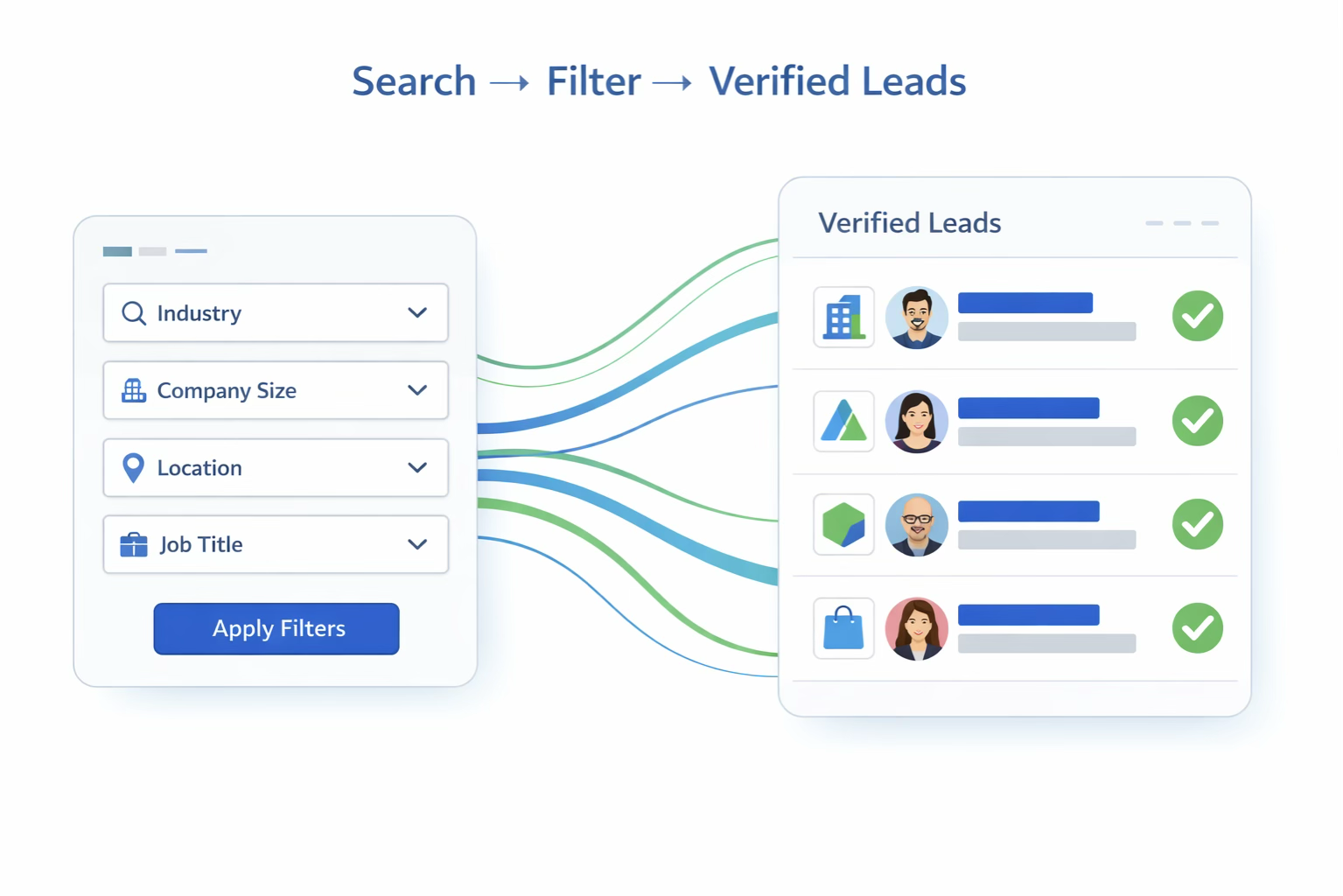
Before a single message is sent, AI helps you find the right people. Using a tool like SalesTarget.ai's Lead Explorer, you can define your ideal customer profile (ICP) by job title, industry, company size, location, tech stack, and more. The AI then surfaces verified, high-intent leads that match your criteria — eliminating hours of manual list-building.
Step 2: AI-Powered Personalization
This is the secret weapon. Generic messages get ignored. AI personalization makes every message feel like you spent 20 minutes researching that person — even when you sent 200 of them today.
Modern AI personalization looks at:
- The prospect's LinkedIn headline, recent posts, and company news
- Their job title, seniority level, and likely pain points
- Industry trends relevant to their business
- Mutual connections or shared interests
Step 3: Smart Sequence Building
A single touch almost never converts. Effective LinkedIn outreach runs in sequences — a carefully timed series of touchpoints:
| Day | Action |
|---|---|
| Day 1 | Connection request (with or without a note, A/B tested) |
| Day 2–3 | Follow-up message after connection accepted |
| Day 5–7 | Value-add message (share a resource, insight, or case study) |
| Day 10–14 | Soft CTA (ask for a 15-min call or feedback) |
| Day 21+ | Break-up message or re-engage with new angle |
AI handles the branching logic: if they respond at step 2, the sequence pauses and notifies you. If they don't open after step 3, the AI might adjust the message format or timing. The system thinks so you don't have to.
Step 4: LinkedIn-Safe Sending & Rate Limit Management
This is where many automation tools fail their users. LinkedIn has strict limits on automated behavior — and violating them can get your account restricted or permanently banned.
Safe LinkedIn automation tools mimic natural human behavior:
- Randomizing send times within your working hours window
- Capping daily connection requests (typically 20–40/day)
- Adding variable delays between actions
- Pausing activity during weekends or holidays
- Operating through your own browser session (not a bot API)
SalesTarget.ai's LinkedIn automation system is built with LinkedIn safety at its core — giving you scale without the risk of account suspension.
Step 5: Reply Tracking & Inbox Management
When responses start coming in, you need to manage them efficiently. A centralized inbox (or Unibox) that aggregates LinkedIn replies alongside email responses means nothing slips through the cracks. AI can even categorize replies as interested, not interested, or needs follow-up — letting your team focus on the warm leads.
Step 6: Analytics & Optimization
The best LinkedIn outreach software doesn't just send messages — it tells you what to do differently. Key metrics to track:
- Connection acceptance rate by message variant
- Reply rate by prospect segment and sequence step
- Meeting booked rate by campaign
- Time-to-reply and drop-off points
AI LinkedIn Outreach vs. Manual Outreach: A Side-by-Side Comparison
| Feature | Manual LinkedIn Outreach | AI LinkedIn Outreach (SalesTarget.ai) |
|---|---|---|
| Personalization | Time-consuming, prone to errors | AI-generated, unique for each prospect |
| Daily Capacity | 20–30 messages/day (human limit) | 200–500+ contacts/week (safely automated) |
| Follow-up Logic | Easy to forget or lose track | Automated multi-step sequences |
| LinkedIn Safety | Human pace = naturally safe | Built-in rate limits mimic human behavior |
| Response Tracking | Spreadsheets, manual logging | Real-time dashboard + CRM sync |
| Multi-channel | Separate tools needed | LinkedIn + email in one platform |
| A/B Testing | Very difficult at scale | Built-in variant testing |
| Cost per Lead | High (SDR time) | Significantly lower at scale |
| Reporting | Manual, often skipped | Automated analytics & insights |
LinkedIn Safety & Compliance: How to Automate Without Getting Banned
This topic deserves its own section because it's the #1 fear holding sales teams back from adopting LinkedIn automation — and rightfully so. Getting your account restricted means losing access to years of connections and pipeline.
What Gets Accounts Flagged
- Sending 100+ connection requests per day
- Messaging people you're not connected with in bulk (unless using InMail credits)
- Using browser-based bots that act too fast
- Automation tools using LinkedIn's API without authorization
- Mass-importing contacts from LinkedIn to external databases
What's Safe With the Right Tool
- Sending 20–40 personalized connection requests per day with varied timing
- Following up with accepted connections via normal messaging
- Operating within your working hours (not 3am sends)
- Using a cloud-based tool that works through your own session
- Respecting LinkedIn's built-in weekly limits for your account tier
💡 SalesTarget.ai's LinkedIn outreach system is designed with account safety as a first principle — not an afterthought. Rate limits, human-behavior simulation, and smart scheduling are baked in.
Why Multi-Channel Outreach Is the Real Multiplier
The highest-performing outbound teams run coordinated multi-channel campaigns that hit the same prospect across multiple touchpoints. A typical high-performing multi-channel sequence:
| Day | Channel | Action | Goal |
|---|---|---|---|
| Day 1 | View profile + connection request | Get on their radar | |
| Day 2 | Personalized cold email | First direct value pitch | |
| Day 4 | Message after connection accepted | Warm follow-up | |
| Day 7 | Follow-up with case study or insight | Build credibility | |
| Day 10 | Engage with their post or content | Relationship signal | |
| Day 14 | Soft CTA — ask for feedback or call | Convert to meeting | |
| Day 21 | Break-up or re-engage message | Final touch |
SalesTarget.ai brings LinkedIn and email outreach into a single orchestrated platform — so your sequences are coordinated, your inbox is unified, and your data is consolidated. No more switching between five tools and hoping they sync.
Scaling LinkedIn Outreach Across a Sales Team
When you're running a team of 5, 10, or 20 reps, the complexity multiplies fast. Who owns which accounts? How do you prevent two reps messaging the same prospect? LinkedIn sales automation at the team level requires:
Multi-Account Management
Each rep runs their own LinkedIn profile from a shared dashboard. Campaign templates are managed centrally but executed from individual accounts — so outreach feels personal, not corporate.
Shared Lead & Campaign Management
Assign prospects to specific reps, track which accounts are being worked, and prevent duplication. Campaign analytics roll up to a team level so managers see performance across the board.
Unified Inbox for Replies
A shared Unibox that aggregates all LinkedIn and email replies in one place means responses get handled fast — even when a rep is out of office.
CRM Integration
Every interaction — connections sent, messages exchanged, replies received — syncs automatically to your CRM. SalesTarget.ai's built-in CRM eliminates the need for a separate tool for early-stage pipeline.
LinkedIn Outreach Best Practices: Quick Reference Guide
| Best Practice | Why It Matters | Quick Tip |
|---|---|---|
| Personalize every opening line | Boosts reply rates by 2–3x | Use AI to pull a detail from their profile or recent post |
| Keep messages short | Busy people don't read essays | Aim for 3–5 sentences max per message |
| Don't lead with your pitch | Kills interest immediately | Open with relevance, not your product |
| Use a 4–6 step sequence | Most conversions happen after touch 3+ | Build in value-adds between ask messages |
| Respect daily limits | Protects your account from restriction | Stay under 30–40 connection requests/day |
| A/B test your openers | Small changes can 2x your acceptance rate | Run 2 variants per campaign, let data decide |
| Follow up on email too | Multi-channel = higher conversion | Sync your LinkedIn and email sequences |
| Track reply intent | Not all replies are equal | Tag responses: interested, not now, wrong fit |
| Review analytics weekly | Continuous improvement is the edge | Kill low performers, scale what works |
What a Real AI LinkedIn Outreach Campaign Looks Like
Here's a sample 5-step LinkedIn outreach campaign targeting VP of Sales at mid-market SaaS companies:
TOUCH 1 — Connection Request (Day 1)
"Hey [First Name] — I've been following [Company] and love what you're building in the [specific market] space. I work with sales leaders on outbound strategy and thought it'd be great to connect."
TOUCH 2 — Message After Connection (Day 3)
"Thanks for connecting, [First Name]! Quick question: is hitting outbound pipeline targets currently a priority for your team at [Company]? We've helped teams like yours cut prospecting time by 60% while improving reply rates. Happy to share what's working if it's relevant."
TOUCH 3 — Value Add (Day 7)
"Saw your comment on [recent post topic] — aligned with a lot of what we're seeing. Just published a case study on how a SaaS team like yours scaled from 50 to 400 qualified leads/month using multi-channel automation. Want me to send it over?"
TOUCH 4 — Soft CTA (Day 12)
"[First Name] — I know you're busy. Would a 15-min call make sense to see if what we're doing is a fit for your team? No pitch, just a quick discovery chat. What does next week look like?"
TOUCH 5 — Break-up (Day 21)
"Totally understand if now's not the right time, [First Name]. I'll leave the door open — if outbound ever becomes a priority, feel free to reach out. Good luck with Q4 targets!"
What to Look for in a LinkedIn Automation Tool
Not all LinkedIn automation software is created equal. Here are the non-negotiables:
- LinkedIn Account Safety — Does it simulate human behavior? Does it respect rate limits?
- AI Personalization — Can it generate unique messages at scale, not just {first_name} tokens?
- Multi-Channel Support — Can you run LinkedIn and email from the same platform?
- Sequence Flexibility — Can you build multi-step, branch-logic campaigns?
- Team Features — Multi-account support, role permissions, shared analytics?
- CRM Integration — Does it sync to your existing stack, or does it have a built-in CRM?
- Analytics & Reporting — Can you measure what matters and optimize in real-time?
SalesTarget.ai checks every one of those boxes. It's purpose-built for B2B sales teams who want LinkedIn outreach automation that's safe, scalable, and deeply integrated with their full outbound stack.
Conclusion: The Future of LinkedIn Outreach Is Already Here
LinkedIn is still one of the most powerful channels in B2B sales. But the way you use it is everything. Manual, generic outreach is a losing strategy — it burns your time, produces mediocre results, and doesn't scale.
AI-powered LinkedIn outreach changes the equation entirely. When you combine intelligent prospect discovery, AI personalization, smart sequencing, safe automation, and multi-channel coordination — you're not just working harder. You're working smarter, at scale, with better results.
💡 The best time to automate your LinkedIn outreach was six months ago. The second-best time is today.
🚀 Ready to Scale Your LinkedIn Outreach?
Start your free trial at SalesTarget.ai and see how AI-powered LinkedIn outreach can transform your pipeline in 30 days. No contracts. No credit card required.





