TL;DR
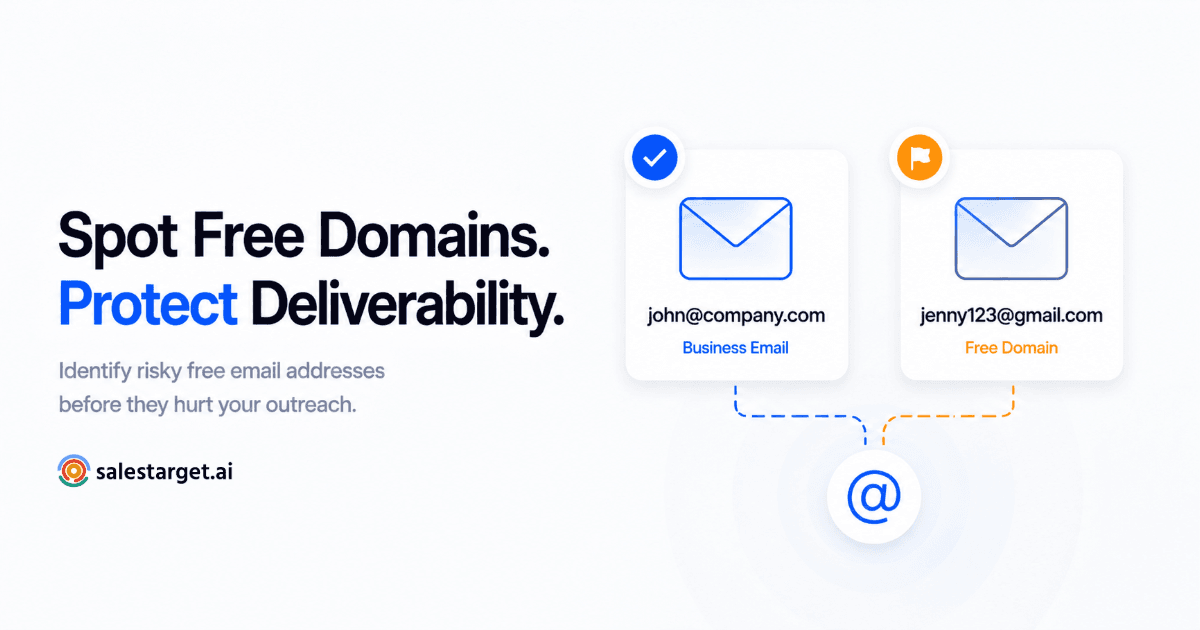
- A Gmail, Yahoo, or Outlook.com address on a B2B contact is a separate red flag from role-based or disposable addresses — it signals intent, not deliverability risk.
- Founders and small-business owners legitimately use free domains — the goal is to flag and score, not blanket-exclude.
- Detection at scale means checking against a maintained free-provider list, not eyeballing addresses one by one.
- SalesTarget's Email Validator flags free domains automatically as part of its verification layer, alongside disposable and role-based detection.
A contact form fills out with sarah@gmail.com. The job title says "VP of Operations." Your CRM logs it as a qualified lead because the email format technically passed validation. Here's the problem: a VP of Operations at a real company almost never emails from a personal Gmail account — and that mismatch is a signal your list-cleaning process is probably ignoring.
Why Personal Domains Signal Low B2B Intent
Most teams running lead validation only check whether an address is deliverable — does it bounce, is the domain real, is the mailbox active. That catches typos and dead addresses, but it misses a different problem entirely: an address that's perfectly deliverable and still a weak signal for B2B intent. Free email domain detection closes that gap — it's not about whether the address works, it's about what kind of address it is.
A personal email domain in a B2B context tells you something specific about the person behind it — they either don't have a corporate email, or they're choosing not to use it for this interaction. Neither is a great sign for a B2B pipeline. If a real company employs them, they almost certainly have a work email; using a personal one for a demo request or content download usually means they're browsing, not buying. If they genuinely have no corporate domain at all, that's worth knowing too — it usually means a very early-stage company, a side project, or no company at all.
This is a different problem from the ones most email verifier tools are built to catch. Role-based addresses (info@, support@) signal a shared inbox with no individual decision-maker. Disposable addresses signal someone actively trying to avoid being contacted. Free domains signal something subtler — low commitment, not necessarily bad intent. That distinction is exactly why it deserves its own detection logic rather than getting lumped into generic "email hygiene."
📊 Scale of the problem
- Gmail alone has over 1.8 billion active accounts globally, which means it's statistically near-certain to appear somewhere in any B2B contact list of meaningful size. Source: Statista.
- Add Yahoo, Outlook.com, Hotmail, and iCloud, and free-provider domains are not a rare edge case in B2B lists — they're a recurring category that needs a standing rule, not a one-off cleanup.
That volume is exactly why this can't be a manual judgment call made contact-by-contact. A category large enough to show up in nearly every list needs a consistent, repeatable rule applied the same way every time — otherwise two reps reviewing the same kind of contact will make two different calls, and your pipeline data stops meaning anything consistent.

The Exception: Founders and Small Businesses Who Use Gmail Legitimately
Here's where blanket rules fall apart. A two-person startup, a freelance consultant, or a local service business often runs entirely on a free domain — not because they're low-quality leads, but because setting up a custom domain inbox wasn't worth the time at their stage. If your ICP includes early-stage companies, solopreneurs, or small local businesses, excluding every free-domain contact means quietly deleting a chunk of your actual addressable market.
The fix isn't to stop flagging free domains — it's to stop treating "flagged" as synonymous with "excluded." A free-domain address paired with a job title that matches your ICP, a company name in the form fill, or firmographic data showing a real, small company is a very different lead than a free-domain address with no other context attached. The signal matters more in combination with everything else you know about the contact than it does on its own.
A few quick checks separate the legitimate cases from the low-intent ones without needing a manual research project on every contact: does the company name in the form or signature match a real, findable business — even a small one with no dedicated domain yet? Does the job title fit a founder, owner, or sole operator rather than a title that implies an established org chart? Is the company recent enough (under 1-2 years, for instance) that a custom domain simply hasn't been set up yet? None of these require deep research individually, but together they're enough to separate a real small-business lead from a form fill with no company behind it at all.
How to Detect Free Domains at Scale
Manually eyeballing a list for "gmail.com" is fine for 20 contacts. It falls apart immediately past a few hundred. Detection at scale needs a systematic check, run as part of email validation, not a separate manual pass. The process looks like this:
Step 1 — Maintain a free-provider domain list. Gmail, Yahoo, Outlook.com, Hotmail, iCloud, and AOL cover most of the volume, but a US-only list misses regional consumer providers common in international lists. The list needs to be maintained, not built once and forgotten — new consumer email services launch regularly.
Step 2 — Match every contact's domain against that list during verification. This should run automatically as part of your bulk email verifier pass, alongside syntax, MX record, and SMTP checks — not as a separate spreadsheet lookup after the fact.
Step 3 — Tag matches distinctly from invalid or disposable results. A free-domain match isn't the same finding as a bounce or a spam trap, and it shouldn't get bundled into the same "remove" bucket. It needs its own category so it can be scored separately.
Step 4 — Cross-reference against any other contact data you have. Job title, company name, and firmographic match all change what a free-domain flag actually means for that specific lead.
Scoring: When to Flag vs. When to Exclude
Once detection is running, the real decision is what to do with the result. Here's a practical scoring framework based on what else you know about the contact:
| Scenario | Free domain + context | Recommended action |
|---|---|---|
| Matches small-business ICP | Job title + named small company present | Flag, keep in outreach |
| Enterprise/mid-market ICP, no other data | No company name, no firmographic match | Flag, deprioritize — don't auto-exclude |
| Job title implies large company | e.g. "VP" or "Director" at a known large employer | Flag for manual review — likely low-intent fill |
| Free domain + disposable pattern | Also fails MX or SMTP checks | Exclude — this is a separate, worse signal |
Notice exclusion only happens in the last row, where the free domain combines with a different, harder failure. On its own, a free domain is a deprioritization signal, not a delete-on-sight one — which is the distinction most generic email verification tool setups miss entirely.
Mistakes to Avoid
Mistake: Auto-deleting every free-domain contact
Why it fails
If any part of your ICP includes founders, freelancers, or small businesses, a blanket delete rule removes real prospects along with the noise.
Mistake: Lumping free domains in with disposable or invalid addresses
Why it fails
These are different problems with different causes. Treating them as one category means you lose the nuance that should drive different actions for each.
Mistake: Using a static, unmaintained free-provider list
Why it fails
A list built once and never updated misses newer or regional consumer providers, especially in international contact lists.
How SalesTarget Flags Free Domains Automatically
SalesTarget's Email Validator checks every address against a maintained free-provider domain list as part of its standard verification pass — alongside syntax, MX record, SMTP, and disposable-domain checks. The result shows up as its own distinct category, not bundled into "invalid," so you can decide flag-versus-exclude per contact instead of losing the signal entirely.
For lists run in bulk before a campaign, the same logic runs through the Email Verifier, so free-domain flags show up alongside every other verification category in one results file — no separate manual pass needed. If you're also dealing with temporary inboxes in the same list, that's a distinct category worth understanding on its own — see what disposable email addresses are and how they affect deliverability for that specific risk.
The underlying point is the same one that runs through every layer of lead validation and B2B list quality work: a deliverable address and a high-intent lead are not the same thing. Free domains are deliverable almost every time — Gmail's infrastructure is rock solid — which is exactly why a deliverability-only check will wave them straight through. Catching the signal that actually predicts whether that contact is worth a rep's time means checking for more than just whether an email can technically receive mail.
Stop guessing which leads are actually worth a rep's time.
Flag free domains, role-based addresses, and disposable inboxes automatically — before they reach your pipeline.
✓ 50 credits ✓ 7-day trial ✓ No credit card required