TL;DR
- Most B2B outbound teams are running 5–7 disconnected point tools and spending $3,000–$8,000/month to do it.
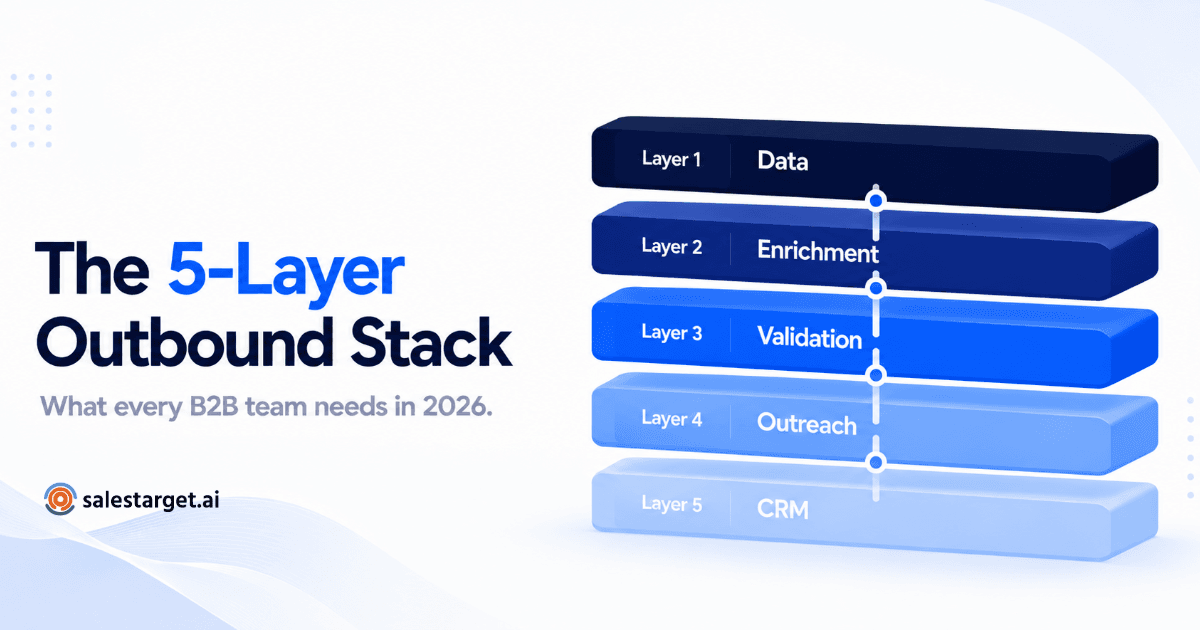
- Every outbound stack has 5 non-negotiable layers: data, enrichment, validation, outreach, and CRM.
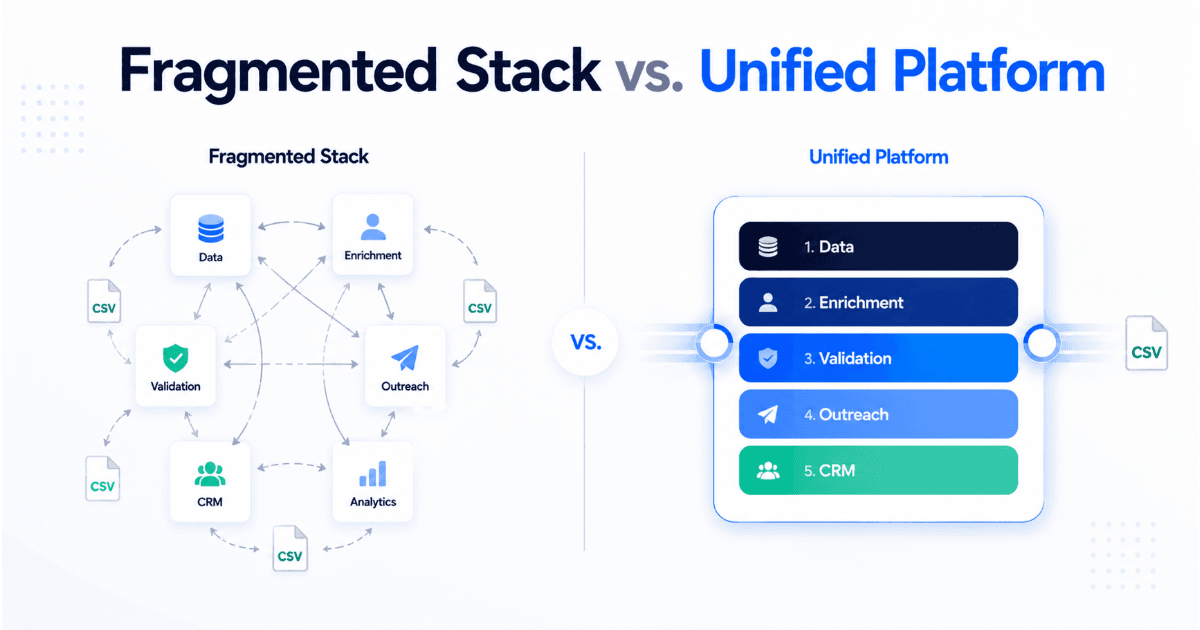
- The fragmented stack kills productivity through constant data exports, sync failures, and tool sprawl.
- You don't need to buy each layer separately — a unified platform covers all five at a fraction of the cost.
- This post breaks down exactly what each layer needs to do, what you can cut, and what the modern consolidated stack looks like in 2026.
I was on a call with a VP of Sales last quarter. Seven-person SDR team, solid ICP, good product. Their outbound numbers were flat. When I asked how many tools they were running, he counted on his fingers — and ran out of fingers. Twelve tools. Twelve. For outbound.
That is not a stack. That is a tax.
According to Salesforce's State of Sales report, the average sales team now uses more than ten tools to manage their pipeline — yet quota attainment has declined year over year. The tools didn't fix the problem. The tools became the problem. This post is a stack audit. By the end, you'll know exactly which layers you need, which tools you can cut, and what an efficient outbound operation actually looks like in 2026.
The 5 Layers Every Outbound Stack Needs
Strip away the noise and every functional B2B outbound stack — regardless of team size, ACV, or motion — operates across five distinct layers. If any one layer is broken, the entire engine misfires.
| Layer | What It Does | Cost Without Consolidation |
|---|---|---|
| 1. Data | Prospect identification, contact discovery, company intelligence | $400–$1,500/mo |
| 2. Enrichment | Real-time signal layering, firmographic depth, buying intent | $300–$900/mo |
| 3. Validation | Email verification, bounce prevention, deliverability protection | $100–$400/mo |
| 4. Outreach | Email sequences, LinkedIn automation, inbox management | $500–$2,000/mo |
| 5. CRM | Pipeline tracking, follow-up automation, deal management | $200–$800/mo |
Run each layer on a separate point tool and you're looking at $1,500–$5,600/month before seat costs, integration overhead, or the time your RevOps team burns keeping it all synced. This is the fragmented stack tax — and most teams pay it without ever auditing the bill.
The Fragmented Stack Problem: Why More Tools Break Your Outbound
Gartner research on sales technology shows that tool sprawl is one of the top three barriers to sales productivity — not lack of data, not poor messaging, not even bad leads. The tools themselves are the drag.
Here is what the fragmented stack actually looks like in practice:
- Your SDR finds a prospect in your data tool. They export a CSV. They upload the CSV to your enrichment tool. They download another CSV. They run it through a separate email validation tool. They upload the clean list to their outreach tool. They manually log the activity in the CRM. That is five tool switches and three CSV exports to send one sequence.
- Data goes stale in transit. A contact enriched on Monday may have changed roles by Friday — and your static CSV will never know.
- When something breaks — a bounce spike, a deliverability drop, a missed follow-up — you have six dashboards to check and no single source of truth.
📊 The Cost of Tool Fragmentation
- 10+ tools — average number of tools used by a modern sales team (Salesforce, State of Sales 2024)
- $3,000–$8,000/mo — estimated monthly cost of a fully fragmented 5-layer outbound stack for a team of 5 SDRs
- 56% cost reduction — documented by companies that consolidated from fragmented stacks to unified outbound platforms (Amplemarket consolidation case studies)
- $100k+/yr savings — reported by teams moving from multi-tool stacks to consolidated platforms (Amplemarket)
The teams winning at outbound in 2026 are not the ones with the most tools. They are the ones who ran a stack audit, cut the redundancy, and consolidated around a sales intelligence platform that covers every layer natively.
Layer 1: Data — What You Actually Need From a B2B Prospecting Tool
The data layer is where your outbound motion starts — and where most teams over-invest. The instinct is to buy the biggest database available. But database size is not the same as database quality, and access to 300 million contacts means nothing if 40% of the emails bounce.
What actually matters in a B2B prospecting tool in 2026:
- ICP-fit filtering at search time — not post-export. You should be able to define your ideal customer profile and surface matching accounts and contacts in a single search, not build a CSV and manually filter it.
- Verified contact data — direct dials and business emails that have been validated, not scraped and resold.
- Advanced targeting filters — technographics, headcount growth, funding signals, job change triggers. Demographic filters alone are not enough in a market where everyone has access to the same base data.
- Real-time signal discovery — accounts showing buying intent right now, not last quarter. Job postings, technology installs, news events, and funding rounds as live triggers.
What you can cut: Any separate intent data subscription that duplicates what a well-built data layer already surfaces. If your data tool has real-time signal discovery built in, you do not need a standalone intent platform layered on top of it.
SalesTarget's Lead Explorer covers the full data layer — ICP Builder, Smart Prospect Search, Advanced Targeting Filters, Real-Time Signal Discovery, and Verified Contact Data — without a separate data tool subscription.
Layer 2: Enrichment — Real-Time vs. Batch, and Why It Matters
Lead enrichment is the layer most teams get wrong — not because they skip it, but because they run it at the wrong time.
Batch enrichment — where you export a list, run it through an enrichment tool, and re-import — creates a window of data decay the moment the job completes. B2B contact data degrades at roughly 2% per month. If your enrichment job runs weekly and your sequences run for 30 days, you are mailing into increasingly stale data from day one.
Real-Time Enrichment vs. Batch Enrichment
Why this distinction matters for outbound
Real-time enrichment appends firmographic, technographic, and signal data at the point of contact creation — not hours or days later. It means every prospect entering your sequence has enriched data attached before the first touch goes out. Batch enrichment is a snapshot. Real-time enrichment is a live feed. For fast-moving outbound, the difference shows in reply rates.
What you can cut: Standalone enrichment tools that operate purely in batch mode and require manual CSV workflows. If your data layer already surfaces enriched, signal-tagged prospects at search time, a separate enrichment subscription is duplication — not depth.
Layer 3: Validation — When to Validate and What to Catch
Email validation is the least glamorous layer in the outbound stack. It is also the one that will end your outbound program fastest if you skip it.
A hard bounce rate above 2% is enough to get your sending domain flagged or blacklisted. One bad campaign to an unvalidated list can take months of deliverability work to recover. This is not a risk worth taking to save $100/month on a validation tool.
What a proper email validation layer must do:
- Format and syntax check — remove malformed addresses before they ever reach an MX lookup
- Domain and MX record verification — confirm the domain exists and can receive mail
- SMTP-level verification — confirm the individual mailbox exists without sending a live email
- Type classification — identify catch-all domains, disposable inboxes, spam traps, and known complaint addresses
- Bulk processing — handle full list uploads, not just one-off checks
When to run validation: Before every campaign launch, no exceptions. Re-validate any list older than 90 days. Validate any purchased or third-party list before first use. If your last campaign exceeded a 2% bounce rate, validate your entire database before sending again.
SalesTarget's Email Validator runs all five verification layers — format, domain, MX, SMTP, and type classification — on individual addresses and bulk lists, natively inside the platform. No separate tool, no CSV export required.
Layer 4: Outreach — Email, LinkedIn, and the Unified Inbox Problem
The outreach layer is where most teams have the most tool sprawl. A separate email sequencing tool. A separate LinkedIn automation tool. A separate inbox for replies. A separate tool to rotate sender accounts. This is four tools doing one job — getting a reply.
Multichannel outreach is no longer optional. Research consistently shows that prospects who receive coordinated outreach across both email and LinkedIn are significantly more likely to respond than those who receive email alone. But coordinated does not mean chaotic — it means sequenced, intelligent, and managed from a single place.
What a complete outreach layer looks like in 2026:
| Outreach Capability | Why It Matters | Priority |
|---|---|---|
| AI-personalized email sequences | Personalization at scale without manual copywriting per contact | Essential |
| Inbox rotation and warmup | Protect sender reputation across high-volume sends | Essential |
| LinkedIn automation | Connection requests, messages, and follow-ups at scale with safety controls | Essential |
| Unified inbox (Unibox) | All replies from all channels in one place — no context switching | Essential |
| Deliverability monitoring | Real-time alerts before a deliverability issue becomes a blacklist | High |
| Smart send scheduling | Timezone-aware delivery windows for maximum open rate | High |
What you can cut: Separate email warmup tools if your sequencing platform includes warmup natively. Separate LinkedIn tools if your outbound email automation platform already covers LinkedIn sequences with safety compliance built in.
SalesTarget's Email Outreach and LinkedIn Outreach cover the full outreach layer — AI sequences, inbox rotation, warmup, multichannel campaigns, Unibox, deliverability boost, and LinkedIn safety compliance — in a single platform.
Layer 5: CRM — Lightweight Outbound CRM vs. Full Enterprise CRM
Let's be honest about CRM for outbound. The full enterprise CRM — the one with territory management, complex pipeline stages, and a dedicated admin — is built for managing existing customers, not for prospecting. Bolting your outbound motion onto a system designed for account management creates friction at every touchpoint.
What outbound SDR teams actually need from a CRM layer:
- Lead and contact management — see every prospect, their status, and their history in one view
- Deal pipeline tracking — move contacts from prospect to conversation to meeting booked without leaving the platform
- Follow-up automation — task creation and reminder triggers based on prospect activity, not manual SDR memory
- Activity tracking — a full log of every email, LinkedIn touch, and reply against each contact, automatically
- Outbound-specific analytics — sequence performance, reply rates, conversion by channel, not revenue forecasting dashboards designed for AEs
What you can cut: An enterprise CRM subscription for your SDR team if it is being used purely as a contact database and activity log. If the only reason you have the big CRM running in parallel is to track outbound activity, a purpose-built outbound CRM does the job at a fraction of the cost — with native integration to your outreach sequences.
The Unified Alternative: What a Consolidated Outbound Stack Actually Looks Like
The shift happening across B2B sales teams in 2026 is not about finding better point tools. It is about recognizing that the fragmented model — one tool per layer, stitched together with integrations and hope — is a structural inefficiency, not a temporary growing pain.
As covered in our deep-dive on why revenue teams are consolidating to unified sales intelligence platforms, the teams making this shift are not doing it because it is theoretically cleaner. They are doing it because the numbers forced them to.
Fragmented Stack vs. Unified Platform — Head to Head
For a 5-person SDR team
A fully fragmented 5-layer outbound stack — separate tools for data, enrichment, validation, email outreach, LinkedIn outreach, and CRM — routinely costs $3,000–$8,000/month in tool subscriptions alone, before headcount, integrations, or admin time. A unified sales intelligence platform that covers all five layers natively compresses that to a single subscription, eliminates integration overhead, and gives every layer a shared data model — so the prospect you find in Layer 1 flows directly into sequences in Layer 4 with no export, no CSV, no sync.
How to Run Your Outbound Stack Audit in 2026
If you are reading this as someone who manages the outbound stack — or pays for it — here is the exact process to audit what you have and cut what you don't need.
List every tool you are paying for and assign it to a layer
Map each subscription to one of the five stack layers. If a tool does not fit cleanly into a layer, it is either a duplicate or it is solving a problem you should not have.
Count how many tools cover the same layer
Two tools doing data enrichment. Two tools handling email sequences. A separate LinkedIn tool and a separate inbox tool. Any layer with more than one tool is a consolidation opportunity — and a cost line you can cut.
Measure the integration overhead per layer
How many hours per week does your team spend exporting, importing, cleaning, and re-syncing data between tools? Put a number on it. At a $60–$100/hr fully-loaded SDR cost, that overhead is a real dollar figure sitting on top of your subscription costs.
Identify which tools your SDRs actually use daily vs. theoretically
Pull login data from your SSO or billing portal. If a $400/month tool had three logins last month, that is not an active part of your stack — it is a zombie subscription with a renewal date.
Evaluate whether a unified platform covers all five layers
Compare the total cost of your current fragmented stack — subscriptions plus integration overhead plus admin time — against a single unified platform. The gap is usually larger than teams expect before they run the numbers.
Stack Mistakes That Kill Outbound Performance
These are the most common outbound stack errors — and the ones that are hardest to see when you are inside them.
Mistake 1: Treating a big database as a substitute for signal data
Data layer error
Access to millions of contacts is not the same as access to the right contacts at the right time. A smaller list of signal-qualified prospects — accounts showing active buying intent — will outperform a massive static database every time. If your data layer does not surface real-time signals, you are cold-calling warm accounts with cold-call messaging.
Mistake 2: Skipping email validation before campaign launches
Validation layer error
A bounce rate above 2% is enough to trigger spam filters and damage your sending domain's reputation — sometimes permanently. Run email validation before every send. It is not optional infrastructure. It is deliverability insurance.
Mistake 3: Running email and LinkedIn outreach as separate, uncoordinated motions
Outreach layer error
When your email sequencing tool and your LinkedIn tool operate independently, prospects receive mixed signals — sometimes getting a cold LinkedIn connection request the same day they receive a warm email reply-thread. Multichannel outreach only works when both channels are coordinated from a single sequence with shared contact history.
Mistake 4: Using an enterprise CRM as your SDR's primary workspace
CRM layer error
Enterprise CRMs are designed for managing existing customer relationships, not for high-velocity prospecting. Forcing SDRs to log activity manually in a system built for AEs introduces friction at every step and creates a CRM that nobody trusts because nobody keeps it current.
Mistake 5: Optimizing individual tools without measuring stack-level performance
Full-stack error
Your outreach open rate can be excellent while your pipeline is empty — because the data layer is surfacing the wrong ICP, the enrichment is stale, and the CRM is not tracking handoffs properly. Stack performance is not the sum of individual tool metrics. It is the output of all five layers working together. If you cannot measure that end-to-end in a single dashboard, you are flying blind.
SalesTarget Covers All 5 Layers — Without the Fragmented Stack Tax
SalesTarget was built specifically to eliminate the fragmented outbound stack. Every layer — data, enrichment, validation, outreach, and CRM — is native to the platform. No integrations to maintain. No CSV workflows. No separate subscriptions for capabilities that should have been in the same product from day one.
| Stack Layer | SalesTarget Feature | Link |
|---|---|---|
| Data | Lead Explorer — ICP Builder, Smart Prospect Search, Verified Contact Data, Real-Time Signal Discovery, Advanced Targeting Filters | Lead Explorer → |
| Enrichment | Built-in Lead Enrichment, Intent-Based Lead Scoring, Real-Time Signal Discovery | Lead Enrichment → |
| Validation | Email Validator — individual and bulk verification, type classification, deliverability protection | Email Validator → |
| Outreach | Email Outreach (AI Sequences, Inbox Rotation, Warmup, Unibox, Deliverability Boost) + LinkedIn Outreach (Automation, Campaigns, Multichannel, Safety Compliance) | Email → LinkedIn → |
| CRM | Built-in outbound CRM — Lead Management, Deal Pipeline, Follow-up Automation, Activity Tracking, Analytics | CRM → |
The question in 2026 is not which tools to add to your stack. It is which tools you can finally cut.
Stop paying the fragmented stack tax.
SalesTarget covers all 5 layers of your outbound stack — data, enrichment, validation, outreach, and CRM — in one platform. Run the audit. Cut the tools. Close more pipeline.
✓ 50 credits ✓ 7-day trial ✓ No credit card required
Frequently Asked Questions

See It In Action: Book Your Free Demo
Get a personalized walkthrough and see how it works for your team.
Book My Demo →



