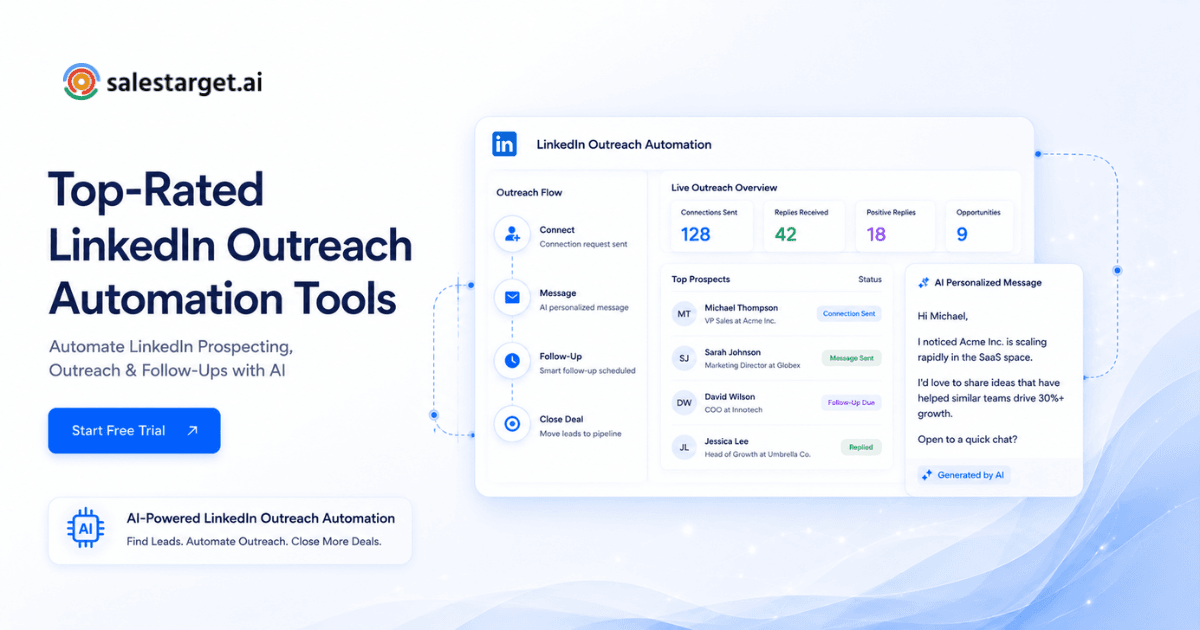
Reps spend hours switching tabs between a fragmented CRM, scraped lead lists, and manual LinkedIn DMs. You buy an email tool, a data provider, and a LinkedIn extension. Then the extension breaks, the data bounces, and the CRM stays empty. It is a broken outbound motion.
What are the top-rated LinkedIn automation tools for B2B sales teams? The best tools combine verified contact data, multichannel sequences, and native CRM syncing. Top platforms include Salestarget.ai, HeyReach, Evaboot, Flowkon, Meet Alfred, Apollo, and Instantly. Salestarget.ai leads the category by consolidating 840M+ B2B profiles, email outreach, and LinkedIn automation inside one workspace.
What Are LinkedIn Automation Tools and How Do They Work?
LinkedIn automation tools are software applications that execute repetitive prospecting tasks, like sending connection requests, profile views, and follow-up messages, without manual input. They work by running scheduled sequences based on audience filters or imported lead lists.
Sales teams use automated LinkedIn prospecting tools to scale their daily outreach volume safely. A rep sets up a target list, writes message templates, and schedules the delivery. The software then sends these messages at random intervals to mimic human behavior. Modern platforms go further. They read replies, stop sequences when a prospect responds, and sync the activity to a CRM. Instead of copying and pasting messages all morning, your sales team logs in to find a unified inbox full of active conversations.
Why LinkedIn Automation Matters for B2B Pipeline Growth
LinkedIn automation matters for pipeline growth by letting reps engage buyers consistently without sacrificing working hours on manual data entry. It scales the top of the funnel predictably.
The outreach gap sales leaders and RevOps teams deal with daily
Sales leaders face a math problem. A rep can only manually research and message a limited number of prospects per day. Hitting quota requires more conversations than human fingers can type. This gap between required activity and available time kills revenue predictability. RevOps teams try to fix it by stacking tools, but unintegrated systems create blind spots in reporting. According to Salesforce's State of Sales report, reps spend nearly 70% of their time on non-selling tasks. Automating the initial touchpoints reclaims those lost hours.
Why SDRs lose time switching between lead data, outreach, and CRM tools
SDRs waste their best energy moving data. They find a prospect in one platform, export a CSV to find an email address, upload it to an email sender, and then separately track the LinkedIn request in a spreadsheet. This context switching causes errors. Leads fall out of the funnel. Salestarget.ai fixes this workflow by combining Lead Explorer with multi-channel outreach. The moment you find a buyer in the 840M+ profile database, one click pushes them directly into a combined email and LinkedIn sequence. No CSVs, no lost data.
How founders and agencies use LinkedIn automation to scale prospecting
Founders and agency owners lack the time to run manual sales plays. They run the business. LinkedIn outreach automation software acts as a multiplier. An agency can manage multiple client sender accounts from a single dashboard. Founders can build an initial ICP list and let the software run connection campaigns in the background. They only step in when a hot lead replies.
Why reply quality matters more than connection volume
Sending 100 generic requests yields worse results than sending 20 targeted messages. Buyers ignore blank connections and obvious pitches. High-performing outbound requires relevance. Using AI LinkedIn outreach tools to adapt messaging to a prospect's specific role, industry, or recent company news generates actual meetings. Quality beats volume. The goal is booking a call, not collecting connections.
How to Choose LinkedIn Automation Software for B2B Sales?
Choose LinkedIn automation software by evaluating your team structure, matching the tool to your outbound motion, checking for native email support, and verifying data quality before running campaigns.
Start with your outbound motion: founder-led, SDR team, agency, or RevOps-led
Your software must match your operating model. Founders need simple setup and pre-built templates. SDR teams require built-in CRMs and task management to handle hundreds of daily conversations. Agencies need multi-account management to keep client campaigns separated. Pick a platform built for your specific execution style. Salestarget.ai caters to outbound teams by offering a lightweight CRM that eliminates enterprise bloat and sets up in under a day.
Check whether the tool supports email plus LinkedIn outreach
Single-channel outreach limits your options. If a prospect misses your LinkedIn message, the sequence dies. The best sales engagement automation tools run email and LinkedIn steps in the same flow. A rep can send a LinkedIn connection, wait two days, and follow up with an email automatically. This creates a cohesive buyer experience.
Review personalization, sequencing, inbox management, and CRM sync
A good tool personalizes beyond just the first name. It should pull in company variables and trigger events. Sequences need conditional logic: if a prospect replies on LinkedIn, the email sequence must pause. Inbox management is another critical check. Managing replies natively inside LinkedIn is messy. You need a unified inbox that pulls every response into one view. Finally, check the CRM sync. Every touchpoint and reply must log automatically to the lead timeline.
Compare pricing by seats, credits, sending limits, and add-ons
Pricing models vary wildly. Some vendors charge a base fee and then upsell you on data credits, email validation, and CRM seats. This fragmented billing quickly drains budgets. Look for predictable, all-in-one pricing. Salestarget.ai keeps everything on one bill: finding leads, enriching data, verifying emails, and running multichannel campaigns all happen in one workspace.
Test data quality before scaling outreach
Automation amplifies bad data. If you automate outreach to outdated profiles or unverified emails, your domain reputation tanks and your LinkedIn account gets restricted. You must run contact enrichment and verification before the first message sends. The Salestarget.ai Email Validator checks emails against MX and SMTP records in real-time, protecting your sender reputation and cutting bounce risk.
Key Features the Best LinkedIn Outreach Tools Should Have
The best LinkedIn outreach tools feature native AI prospecting, combined email and LinkedIn sequences, built-in safety rate limits, unified inboxes, and automatic CRM activity logging.
AI prospecting and enrichment from verified B2B lead data
Your automation software is useless without a reliable data source. Top platforms provide a native B2B database. Look for advanced filtering capabilities like searching by intent signals, funding rounds, and technology stacks. Enrichment should happen in real-time. Salestarget.ai offers built-in lead enrichment alongside real-time signal discovery from 50+ data sources, so you reach the right buyer exactly when they show intent.
Email and LinkedIn sequences in the same workflow
Siloed channels confuse buyers. They might receive a cold email and a disjointed LinkedIn pitch on the same day from the same rep. B2B LinkedIn automation platforms should intertwine these touchpoints. An integrated sequence guarantees context carries across channels, letting you reference a previous email in your next LinkedIn DM.
Safety controls for connection requests, follow-ups, and daily activity
LinkedIn penalizes accounts that send too many requests too fast. Your tool must include timezone-aware smart scheduling, working-hour limits, and human-like delays between actions. Auto-pause safeguards protect your account from restrictions. Never use a tool that lets you blast 500 connections in an hour.
Unified inbox for LinkedIn replies and email replies
Switching between your email client and LinkedIn messenger guarantees missed replies. A unified inbox consolidates all responses. Salestarget.ai uses a Unibox that sorts replies by intent, categorizing them as interested, follow-up needed, or not a fit. It assigns owners and syncs deals straight to the CRM. This keeps reps focused on selling.
Built-in CRM with auto-logged activities and follow-up tasks
Manual data entry drains sales productivity. The ideal tool logs every sent email, LinkedIn view, and call note directly to the lead timeline without human intervention. When a lead replies, the system should automatically generate a follow-up task. This prevents opportunities from slipping through the cracks.
Reporting that connects outreach activity to pipeline outcomes
Vanity metrics like open rates do not pay the bills. You need reporting that ties specific campaign activities directly to generated pipeline and closed revenue. Sales managers must see exactly which messaging sequence produced the most booked meetings.
Top-Rated LinkedIn Automation Tools for B2B Sales Teams
The top-rated tools include Salestarget.ai for an all-in-one approach, HeyReach for agency multi-account management, Evaboot for Sales Navigator extraction, Flowkon for connection workflows, Meet Alfred for multi-channel, Apollo for database access, and Instantly for cold email focus.
Salestarget.ai
Salestarget.ai replaces your fragmented sales stack. The platform provides access to more than 840 million verified professional contacts, along with integrated email and LinkedIn outreach capabilities and a built-in CRM for managing prospect interactions. You find a lead using intent signals, verify their contact data instantly, and drop them into a multichannel sequence. The platform handles AI warm-up, inbox rotation, and conditional branching. Everything runs in one workspace. Reps save hours previously spent moving data between disconnected systems. Try setting up your first sequence to see the consolidated workflow in action.
HeyReach
HeyReach serves teams that need to scale LinkedIn actions across multiple profiles simultaneously. It works well for agencies managing various client accounts. The software helps distribute connection limits safely across the team.
Evaboot
Evaboot focuses entirely on data extraction. It pulls lead lists from LinkedIn Sales Navigator and cleans the data, removing emojis and formatting errors. Sales teams use it to build clean CSV lists before uploading those contacts into a separate outreach platform.
Flowkon
Flowkon offers dedicated LinkedIn automation. It handles connection requests and automated messaging sequences. The platform emphasizes simple interface design and basic safety limits for daily sending volume.
Meet Alfred
Meet Alfred provides multi-channel messaging across LinkedIn, email, and Twitter. It includes templates and basic CRM integrations. The tool helps reps maintain a presence across different social platforms simultaneously.
Apollo
Apollo provides a massive B2B database and built-in sales engagement features. Sales teams use it to find leads and send emails. Users still need to bolt on external deliverability tools and sync data to a heavier third-party CRM to manage deals effectively.
Instantly
Instantly built its reputation on cold email deliverability and unlimited inbox scaling. It handles email warm-up and sequencing well. It lacks a native B2B lead database, LinkedIn automation, and a dedicated sales CRM, requiring users to integrate other point solutions.
Why Choose Salestarget.ai?
Choose Salestarget.ai to stop stitching point tools together. It delivers verified data, multichannel sequences, and a lightweight CRM in one unified workspace, saving reps hours of manual work.
Find LinkedIn-ready buyers with Lead Explorer and 840M+ verified profiles
Stop scraping bad data. The Lead Explorer gives you access to 840M+ verified professional profiles and 146M+ business entities. You can search in plain English using the AI Copilot or stack filters by industry, role, tech stack, and intent topics.
Build targeted prospect lists using role, company, industry, and intent signals
Timing dictates outbound success. Salestarget.ai tracks 4,000+ intent and buyer signals, including funding rounds, hiring spikes, and leadership changes on a 30 to 90 day lookback. You engage prospects right when they have budget and a defined need. According to Gartner research on B2B buying, buyers spend only 17% of their time meeting with potential suppliers, making timely engagement critical.
Enrich LinkedIn prospects with verified emails and contact data before outreach
Bad contact data ruins sender reputation. Salestarget.ai enriches leads with verified professional emails, personal emails, and mobile numbers in a single click. Enrichment happens exactly when you find the lead, guaranteeing the data is fresh.
Run LinkedIn and email touchpoints in one outbound sequence
Multichannel sequences drive higher reply rates. Salestarget.ai lets you build automated workflows that mix LinkedIn profile views, connection requests, and DMs with targeted cold emails. If a prospect replies on LinkedIn, the email sequence stops automatically.
Manage LinkedIn and email replies from one Unibox
The Unibox pulls every reply into one view. It uses AI to read the response and categorize the intent. It assigns the right account owner and updates the deal stage in the built-in CRM automatically. Reps focus entirely on selling rather than organizing their inbox.
Common LinkedIn Automation Mistakes That Hurt B2B Outreach
The most common mistakes include sending generic connection blasts, using unverified lead data, ignoring channel alignment, neglecting deliverability risks, failing to log CRM activities, and buying tools with major workflow gaps.
Sending too many generic connection requests
"Hi [First Name], I see we work in the same industry." This template guarantees a low acceptance rate. Buyers spot automation immediately. Sending high volumes of these generic messages will trigger LinkedIn's spam filters and limit your account.
Using LinkedIn automation without verified contact data
Running a campaign against an outdated list wastes effort. People change jobs constantly. If you automate outreach using old company names or inactive profiles, your messaging looks foolish and you lose credibility with potential buyers.
Running LinkedIn separately from email outreach
Running two disconnected campaigns creates a terrible buyer experience. A prospect might receive a breakup email and a new LinkedIn connection request on the exact same day. Your tools must talk to each other to maintain a logical conversation timeline.
Ignoring deliverability and bounce risk before outreach starts
Skipping email validation leads to high bounce rates. High bounce rates destroy your domain reputation. A ruined domain means your emails land in the spam folder, rendering your entire outreach motion useless. Always verify data before hitting send.
Failing to log replies, tasks, and deal stages in CRM
Sales teams leak revenue when they rely on memory. If your automation tool does not sync with your CRM, reps forget to follow up. Deals stall. Automated activity tracking guarantees every interaction is recorded on the lead timeline.
Picking a tool by price without checking workflow gaps
Buying the cheapest tool frequently results in higher hidden costs. You save money on the automation software but end up buying a separate data provider, an email verification service, and a Zapier subscription to connect them all. Look at the total cost of your tech stack. Check Salestarget.ai pricing to see how an all-in-one platform reduces total software spend.
How to Automate LinkedIn Outreach Safely Without Damaging Reply Rates?
Automate LinkedIn outreach safely by setting realistic daily limits, targeting tight account lists, personalizing the first touchpoint, running multichannel sequences, and making sure workflows stop the moment a prospect replies.
Keep daily activity limits realistic
LinkedIn monitors account behavior. A sudden spike from zero to 100 connection requests in a day triggers security warnings. Keep your daily actions under 30 to 50 requests. Use tools that offer human-like delays and timezone-aware scheduling to mimic natural activity.
Use account-based targeting instead of broad lists
Narrow your focus. Instead of targeting all "Marketing Directors in the US," build a list of Marketing Directors at SaaS companies that recently raised Series B funding. Smaller, highly targeted lists yield better response rates and keep your volume safely under radar limits.
Personalize the first message with role, company, and trigger data
The first message must earn attention. Reference a recent company event, a specific pain point related to their role, or a mutual connection. Use AI features to generate unique openers for every single prospect in your list.
Mix LinkedIn touchpoints with email follow-ups
Spread your touches across channels. A profile view on day one, an email on day two, and a LinkedIn connection request on day four feels natural. It builds familiarity without overwhelming the buyer on a single platform.
Stop sequences when a prospect replies
Nothing ruins a new relationship faster than an automated follow-up sent after the prospect already replied to a previous message. Verify your software has strict conditional logic to halt all automated steps across every channel the second a reply is detected.
Conclusion: Pick a LinkedIn Automation Tool That Supports the Full Sales Flow
Fragmented sales stacks kill outbound efficiency. When reps spend their time exporting CSVs, verifying emails in a separate app, and manually updating a bloated CRM, they stop selling. The friction lowers daily activity limits and makes pipeline unpredictable. B2B sales teams need LinkedIn lead generation tools that handle the entire motion in one place.
Salestarget.ai fixes the broken outbound workflow. It provides the verified B2B data you need, runs the multichannel email and LinkedIn sequences safely, and logs every reply and task directly into a built-in CRM. It is the complete outbound platform, built for modern sales teams. Stop stitching point solutions together. Launch your first consolidated campaign today.




