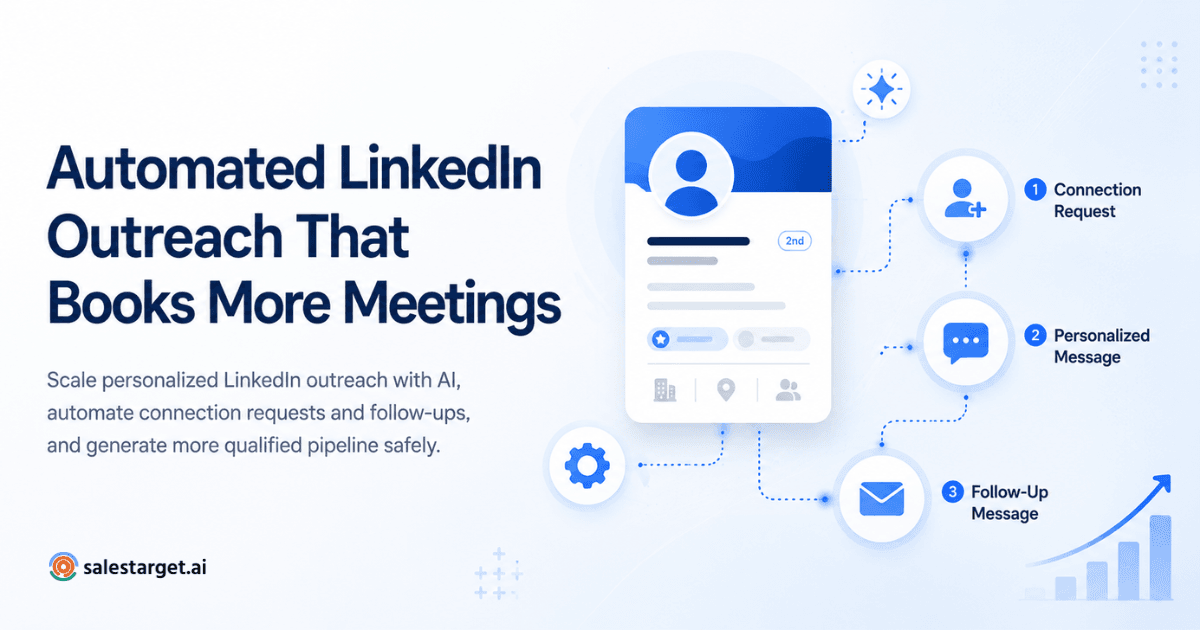
Automated LinkedIn outreach uses software and AI to send connection requests, follow-ups, and multi-step sequences at scale while keeping messaging personalized. The strongest workflows combine intent signals — like website visits, profile views, or event attendance - with tailored templates, so SDRs and founders can consistently book meetings without spending their day copy-pasting notes.
Manual LinkedIn prospecting used to feel like an edge. Today, it is a bottleneck. If your day looks like copy-pasting connection notes, refreshing who accepted what, and losing threads across 200 tabs — you are not scaling, you are grinding.
Modern outbound teams run dozens of touchpoints per prospect across LinkedIn, email, and sometimes voice notes. That volume is impossible to hit by hand. But blasting bots does not work either — automation without personalization gets ignored, flagged, or worse, restricted. The teams winning right now blend smart automation with human-quality messaging, powered by intent data and AI writing help. This guide walks through six workflows to automate LinkedIn outreach without sounding like a robot, plus the guardrails that keep your account safe.
What Is Automated LinkedIn Outreach?
Automated LinkedIn outreach is the use of software to handle the repetitive parts of prospecting — sending connection requests, viewing profiles, delivering follow-ups, and moving leads through multi-step sequences — while the human focuses on strategy, replies, and closing.
The best tools combine three layers:
- Automation handles the mechanics: scheduling messages, throttling send limits, pausing on replies.
- Personalization ensures every message references something specific — a company milestone, a mutual connection, a recent post.
- AI assistance drafts and refines copy based on the prospect's role, industry, and behavior.
Layer LinkedIn workflow automation on top and you get sequences that trigger on real signals — a profile view, a job change, a fresh content post — instead of one-size-fits-all blasts. That shift from "send everyone the same thing" to "send the right person the right thing at the right moment" is what makes automation worth doing at all.
Why SDRs and Founders Are Automating LinkedIn Outreach ?
The math is simple. A rep manually touching 40 prospects a day spends most of their hours on data entry. Automate the busywork and that same rep can meaningfully touch 200+ prospects while writing better first lines. Here is what teams are actually gaining:
- Time savings. Automating research, connection sends, and follow-ups frees 3–5 hours per rep per day.
- Consistency. No more "I forgot to follow up on that thread from last Tuesday." Sequences run themselves.
- Higher reply rates. With personalization tokens and intent triggers, response rates often lift 2–3x versus cold blasts.
- Pipeline predictability. When touchpoints run on schedule, forecast becomes math, not hope.
- Better prospect experience. Follow-ups arrive when they should — not weeks late, not five in one afternoon.
Research from HubSpot on the state of sales shows teams that automate outreach see meaningfully higher conversion rates than those relying purely on manual workflows — and the gap has widened as buyer patience for cold, irrelevant pitches keeps shrinking.
Internal observation: Teams that automate connection requests while keeping human-reviewed follow-ups typically reduce manual prospecting time by roughly 65% while maintaining healthy reply rates. Treat that as an industry estimate based on aggregated SDR usage patterns, not a certified benchmark.
6 Automated LinkedIn Outreach Workflows That Generate Replies on Autopilot
Each workflow below includes a trigger, sequence, timing, and personalization example. Use these as LinkedIn sequence templates — but adapt the copy. Do not paste verbatim.
1. Auto-Connect After Website Intent
- Goal: Turn anonymous site visitors into warm conversations.
- Trigger: A qualified account visits your pricing or product page (surfaced via intent tools).
- Sequence: Auto-connect LinkedIn request → Day 2 personalized note → Day 5 case study share → Day 9 breakup.
- Timing: Send during the prospect's business hours in their timezone.
- Personalization example: "Saw your team has been exploring solutions in [category] — happy to share how [similar company] approached it."
- Expected outcome: 15–25% acceptance from intent-matched accounts, 8–12% reply rate.
2. Follow-Up After Profile Visit
- Goal: Convert curiosity into conversation.
- Trigger: A target prospect views your profile.
- Sequence: Automated view-back → Day 1 connection request referencing shared industry → Day 4 value-first message.
- Timing: View-back within 24 hours while you are top of mind.
- Personalization example: "Noticed the crossover in what you're building at [Company] — thought I'd introduce myself."
- Expected outcome: Higher accept rates because you are already familiar.
3. Event Attendee Outreach
- Goal: Convert conference or webinar attendees into meetings.
- Trigger: Prospect posts about, comments on, or is tagged in a relevant event.
- Sequence: Comment on their post → connect next day → Day 3 message referencing the event → Day 7 relevant asset.
- Timing: Strike within 72 hours while the event is still fresh.
- Personalization example: "Loved your take on [session topic] at [event] — curious how you're applying it internally."
- Expected outcome: Reply rates roughly 3x cold outreach thanks to shared context.
4. Mutual Connection Workflow
- Goal: Leverage warm-intro credibility without asking for the intro.
- Trigger: Prospect shares 2+ mutual connections with a decision-maker on your team.
- Sequence: Connection with mutual reference → Day 3 message → Day 8 nudge.
- Personalization example: "We're both connected to [Name] at [Company] — figured it was worth a hello."
- Expected outcome: Acceptance above 60% on well-matched mutuals.
5. Breakup Sequence
- Goal: Close the loop respectfully and often surface a delayed reply.
- Trigger: No reply after 4–5 touches.
- Sequence: Day 14 short breakup message → Day 21 final "I'll close the loop" note.
Ending a sequence well matters - a well-written LinkedIn breakup message that closes the loop without burning the bridge often generates 5–10% late replies.
- Personalization example: "Sounds like now isn't the right moment — I'll stop pinging. If [pain point] comes up later, my door's open."
- Expected outcome: Recovers pipeline that would otherwise die silently.
6. Multi-Touch LinkedIn + Email Workflow
- Goal: Compound reach across channels using LinkedIn drip campaigns paired with email.
- Trigger: Prospect matches ICP and does not reply to LinkedIn within 5 days.
- Sequence: LinkedIn connection → LinkedIn message → email touch 1 → LinkedIn engagement (like/comment) → email touch 2 → LinkedIn voice note.
- Timing: Space channels 2–3 days apart.
- Expected outcome: Reply rates lift 30–50% versus single-channel drips.
Want to run these six sequences without building the plumbing yourself? Launch Your LinkedIn Campaign with pre-built templates, intent triggers, and safety guardrails already wired in.
Best Practices for Safe LinkedIn Automation
LinkedIn actively monitors for automation abuse. These are the guardrails that keep accounts healthy.
- Respect daily limits. Cap connection requests at 15–20 per day on standard accounts, 25–30 on Sales Navigator seats.
- Warm up new accounts. Ramp send volume gradually across the first 2–3 weeks.
- Personalize every first touch. Generic "Hi {FirstName}" messages get flagged by LinkedIn's anti-spam signals and by prospects.
- Send during business hours. Automation firing at 3 a.m. is a telltale bot pattern.
- Pause on any reply. Even a "not now" should stop the sequence immediately.
- Use AI to draft, not to blast. Human review is still worth it on higher-value accounts.
- Rotate templates. Repeated identical messages across your account are the fastest path to a restriction.
For a deeper look at tooling options, see our roundup of the best LinkedIn prospecting tools for outbound teams.
Common Mistakes That Reduce Reply Rates
- Generic messages. "I'd love to connect and share how we can help you grow" reads as bot copy.
- Too many follow-ups. More than 5–6 touches erodes brand trust.
- Selling in message one. The first message earns permission, not a demo.
- Poor targeting. No workflow saves a bad ICP list.
- Automation without personalization. Speed at the cost of relevance is a losing trade.
How AI Improves Automated LinkedIn Outreach ?
AI has changed what "automation" actually means. It is no longer just scheduling — it is decision-making.
- AI personalization pulls from a prospect's recent posts, job change, or company news to write context-aware first lines.
- LinkedIn sales triggers — funding rounds, hiring signals, tech installs — kick off the right sequence automatically.
- Sequence optimization learns which cadences and copy variants convert per persona.
- Reply prioritization surfaces the hottest inbox threads first, so SDRs spend time on humans, not admin.
- Dynamic workflows reroute a prospect mid-sequence when they engage — moving them from a cold cadence into a warm one.
These are exactly the LinkedIn automation examples that top-performing teams cite when explaining how they hit quota without adding headcount. Guidance from LinkedIn's B2B sales strategy resources points the same direction: the highest-performing sellers combine automation with signal-based selling.
Manual LinkedIn prospecting does not scale, and blasting bots does not work. The winning formula is automation plus personalization plus intent — six well-designed workflows can generate more replies than an entire team running scattershot cold sends. Start with one workflow, measure reply rates, and layer in the rest as you learn what your ICP actually responds to. Successful automated LinkedIn outreach is not about sending more; it is about sending the right thing at the right moment.
Ready to put your outreach on autopilot? Launch Your LinkedIn Campaign and start booking meetings this week.