Your CRM was clean when you built it. Every address was confirmed, every contact was fresh, and your bounce rates were low. Six months later? That same database has quietly started working against you. People leave companies, domains go offline, inboxes fill up and get abandoned. Without regular maintenance using an email verifier tool, your outreach slowly degrades - and most teams don't notice until bounce rates spike during a critical campaign.
The fix doesn't require a weekend project. It takes about 30 minutes a month.
What Is CRM Email Hygiene?
CRM email hygiene is the recurring process of identifying, verifying, and cleaning email contact data inside your CRM to maintain deliverability and protect sender reputation. It goes beyond a one-time data cleanup. Think of it as an operational habit that prevents stale, invalid, or risky email addresses from accumulating silently over time.
Why CRM Email Data Decays Even When Nobody Touches It
B2B contact data has a short shelf life. Industry estimates consistently place annual email-address decay at roughly 25–30 percent. That figure doesn't describe a single event- it reflects ongoing, compounding entropy that affects every CRM.
The drivers are predictable. People change roles and their old work email gets deactivated within weeks. Companies rebrand, merge, or shut down entirely, taking whole domains with them. Some contacts use temporary or disposable addresses that quietly expire. Role-based addresses like info@ or sales@ get restructured during reorgs. And some inboxes simply fill up, stop accepting messages, and never get flagged until you try to send to them.
None of this requires anyone on your team to touch the CRM. The decay happens on the other end. If you're running outreach against a list that hasn't been reviewed in 60 or 90 days, you're almost certainly emailing addresses that no longer work. Each one raises your risk of a hard bounce.
Hard bounces matter more than most teams realize. Google's Sender Guidelines explicitly recommend maintaining bounce rates below a defined threshold to preserve inbox placement. Every invalid address you email chips away at your sender reputation, and once that reputation drops, even your messages to valid contacts start landing in spam. For more context on the relationship between email verification and bounce-rate prevention, it's worth understanding how quickly unverified data compounds this problem.
The 30-Minute Monthly CRM Email Hygiene Workflow
This workflow assumes you already have a CRM with at least a few hundred B2B contacts. It works for teams using HubSpot, Salesforce, Pipedrive, or any platform that supports filtered exports and custom fields.
Minutes 0–5: Identify the Records That Need Attention
Start by filtering your CRM for the highest-risk segments. Pull contacts that haven't been emailed in 60-plus days, contacts that bounced on your last campaign, recently imported leads from third-party sources, and records missing key data fields like company name or job title.
Sort these into a working list. You don't need to review your entire database every month—focus on the records most likely to have gone stale since your last check.
Minutes 5–15: Run Email Validation
This step is where an email verification tool earns its keep. Export the working list and run it through a bulk email verifier. A good email validation tool will classify each address into clear categories: valid, invalid, risky, disposable, role-based, or catch-all.
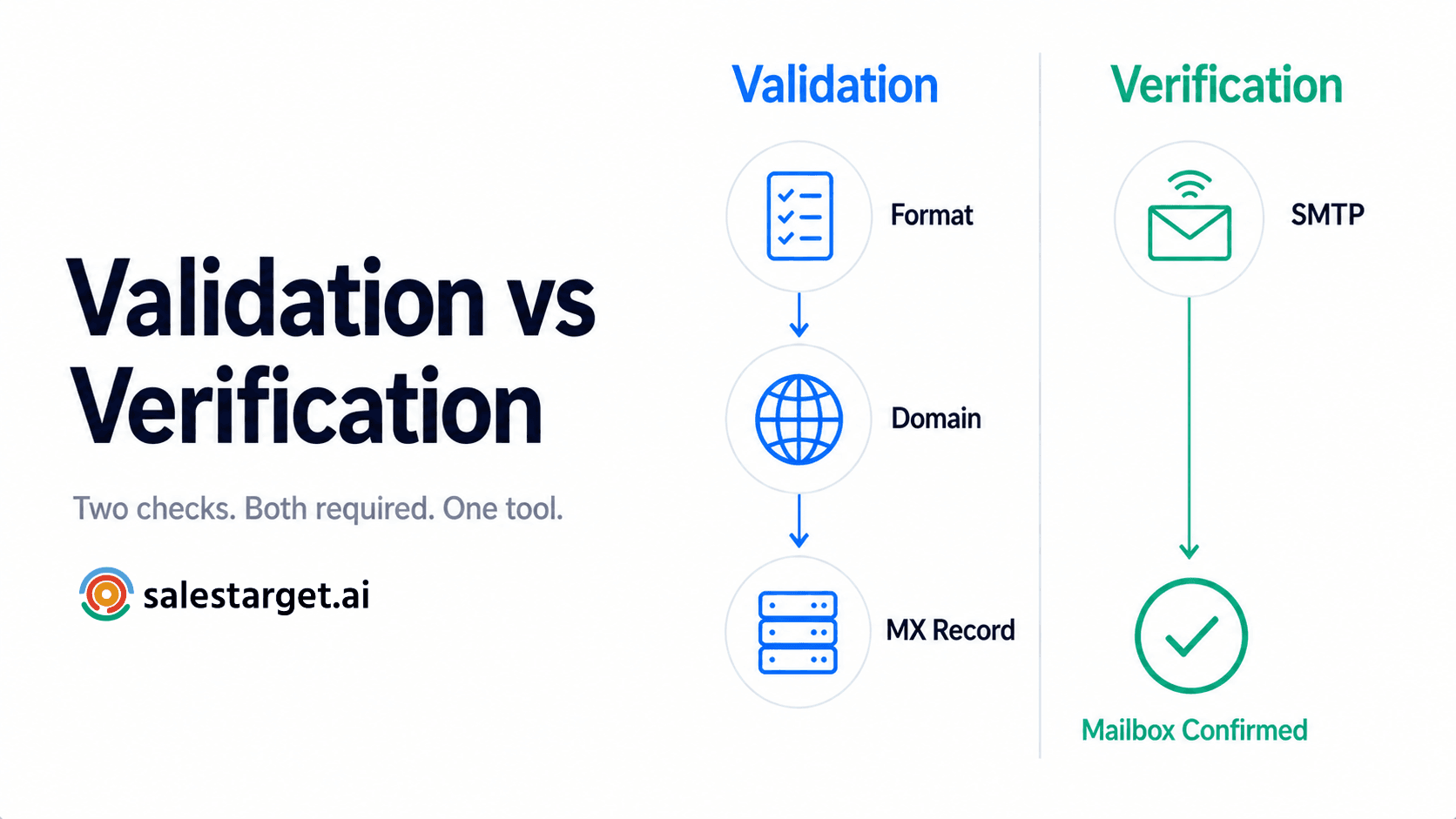
There's an important distinction worth understanding here. Basic syntax checking only confirms that an email follows the correct structural format—name@domain.com. Deeper email verification goes further by checking DNS records, querying mail servers, and evaluating whether the mailbox actually exists and can receive messages. One catches typos. The other catches addresses that look correct but will hard-bounce the moment you hit send.
When evaluating tools for this step, how to evaluate an email verification tool can help you choose one that handles catch-all domains and nuanced risk classifications well—not just binary valid/invalid outputs.
Minutes 15–20: Review and Segment Risky Contacts
Resist the urge to delete everything that isn't marked "valid." That's a common mistake that costs teams good leads.
Instead, segment your results. Invalid addresses—those confirmed as non-existent—should be suppressed immediately. Risky addresses deserve a second look; some may sit on catch-all domains where the server accepts all inbound mail regardless of whether the specific mailbox exists. Disposable addresses from throwaway-email services are usually safe to remove from B2B lists. Role-based addresses like info@ or support@ aren't inherently bad, but they tend to produce lower engagement and higher spam-complaint rates, so segment them for separate treatment.
The goal is a clear decision for each record: keep, suppress, review later, or remove. Create a custom field in your CRM—something like "Email Verification Status"- and tag every contact accordingly.
Minutes 20–25: Clean and Update the CRM
Now apply your decisions. Remove confirmed invalid records or move them to a suppression list. Update the verification status field for every record you reviewed. Record the date of verification so your next monthly pass can target contacts that haven't been checked recently.
While you're in there, remove obvious duplicates and merge records where the same person appears with different email addresses. Preserve the company and prospect data even when the email is dead—someone else at that organization may still be a valid lead.
This step connects directly to lead enrichment. Cleaning isn't just about removing bad data; it's about making the remaining records more useful for prospecting. A smaller, verified contact list outperforms a larger, unverified one in almost every outreach metric.
Practical benchmark (illustrative example): Consider a CRM with 10,000 older B2B contacts. If a monthly review flags 4 percent as invalid or clearly unsafe to email, that's 400 records to remove or suppress before the next campaign. Skip this process for six months, and you could accumulate 2,000-plus risky records—enough to measurably damage sender reputation and deliverability. (This is an illustrative scenario, not proprietary research.)
Minutes 25–30: Check the Results and Set the Next Review
After cleaning, record a few key metrics: the percentage of invalid addresses found, the percentage marked risky, the total number of records cleaned or suppressed, and the current size of your active, verified contact pool.
Tracking these numbers monthly reveals trends. If your invalid-address rate is climbing, that might signal a problem with your lead sources. If it's consistently low, your acquisition process is solid.
Compare your bounce rate from the most recent campaign to previous ones. This is the clearest signal that your hygiene process is working. Set a calendar reminder for next month—same workflow, same 30 minutes. Consistency matters more than thoroughness. A quick monthly pass beats a massive annual cleanup every time.
One additional factor worth watching: if you're repeatedly emailing the same prospect pool without refreshing it, data quality isn't your only concern. Understanding list fatigue in B2B prospecting explains how reusing stale lists compounds both engagement and deliverability problems over time.
Make CRM Hygiene a 30-Minute Habit
Ready to make CRM hygiene a recurring routine instead of a last-minute scramble?
SalesTarget.ai's email verifier lets you validate CRM contacts in bulk before your next campaign—catching invalid, risky, and disposable addresses so you can send with confidence.