TL;DR
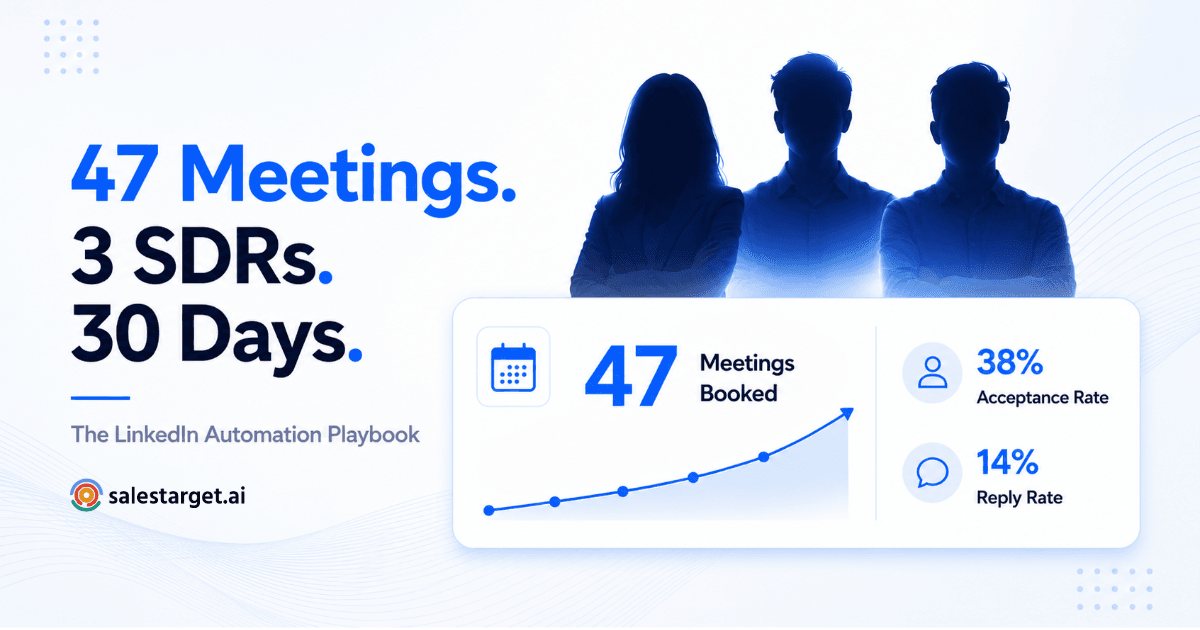
- A 3-person SDR team at a Series A SaaS company booked 47 qualified meetings in 30 days using AI-powered LinkedIn automation — no cold calls, no email blasts.
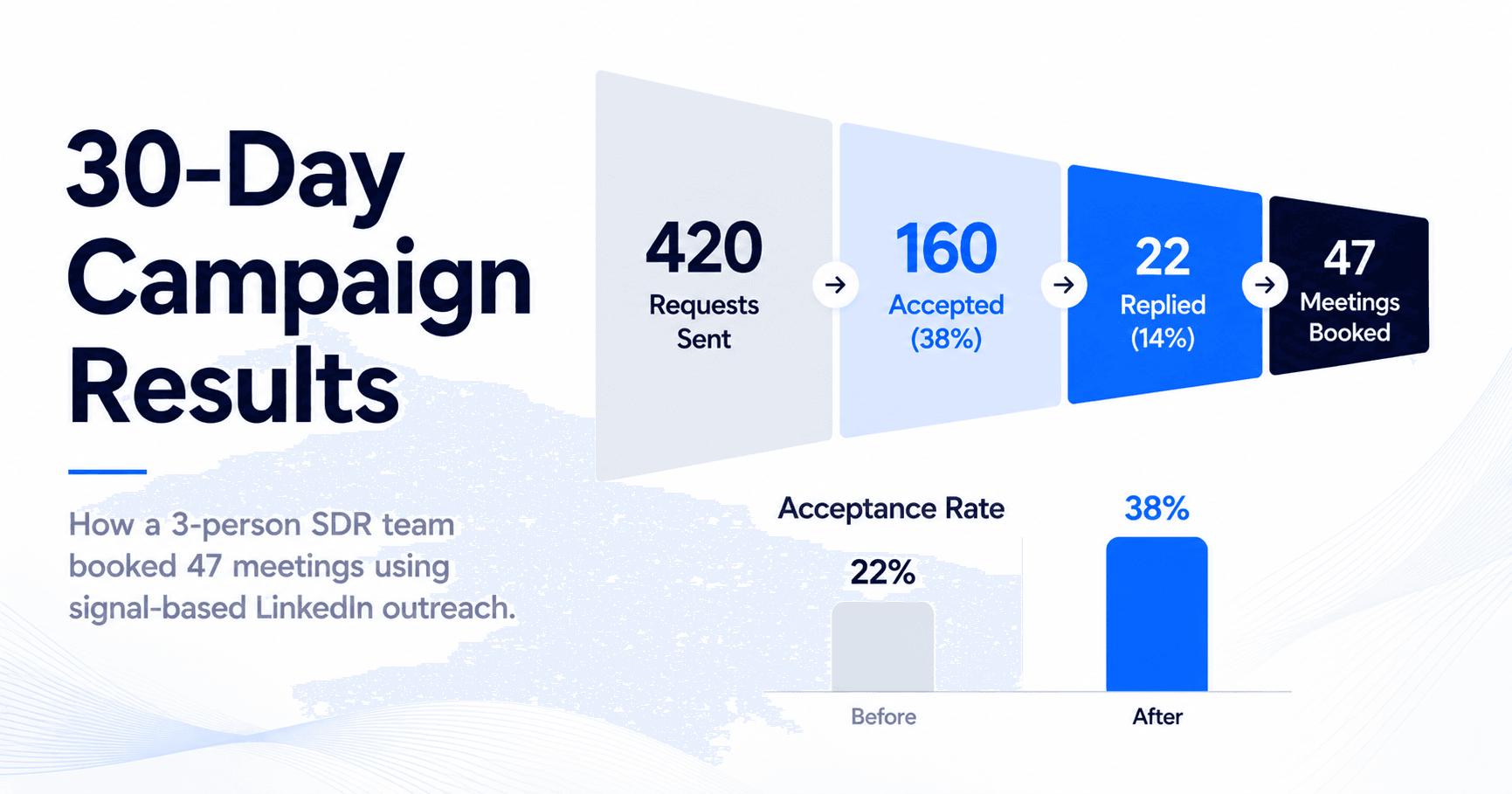
- They sent 420 connection requests, hit a 38% acceptance rate, and converted 14% of replies into booked meetings.
- The engine: signal-triggered targeting (funding + hiring), a 5-step sequence, AI personalization on every touchpoint, and cloud-based safety limits that kept their accounts intact.
- This is the full methodology breakdown — ICP setup, sequence structure, what worked, what didn't, and how to run the same playbook.
Most 3-person SDR teams are lucky to book 15 meetings in a month from LinkedIn. This team booked 47. They didn't have a bigger budget, a famous brand, or a VP of Sales with 30,000 followers. They had a tighter ICP, smarter signals, and a LinkedIn automation system that did the work while they focused on conversations that were already warm.
Here's exactly how they built it — and how to replicate it.
The Situation: Three SDRs, a Thin Pipeline, and a LinkedIn Strategy That Wasn't Working
The team sells a B2B workflow tool targeting RevOps and Sales leaders at Series A–C SaaS companies. Their typical deal size sits in the $15K–$40K ARR range — a segment where LinkedIn is often the highest-intent channel, but also the most abused.
Before this campaign, their LinkedIn outreach was manual and inconsistent. Each SDR was sending 10–15 connection requests a day, copy-pasting a generic connection note, and following up with a pitch in the first message. Sound familiar? Their acceptance rate was hovering around 22%. Reply rate on follow-ups: under 5%.
Their SDR manager had two weeks to fix the pipeline before a board update. So they rebuilt the system from scratch.
The Setup: ICP Definition + Signal Stack Before a Single Message Was Sent
The first thing the SDR manager did was stop sending outreach. For two days, the team did nothing but define who they were actually trying to reach — and what would tell them that person was ready to buy.
ICP Tightening
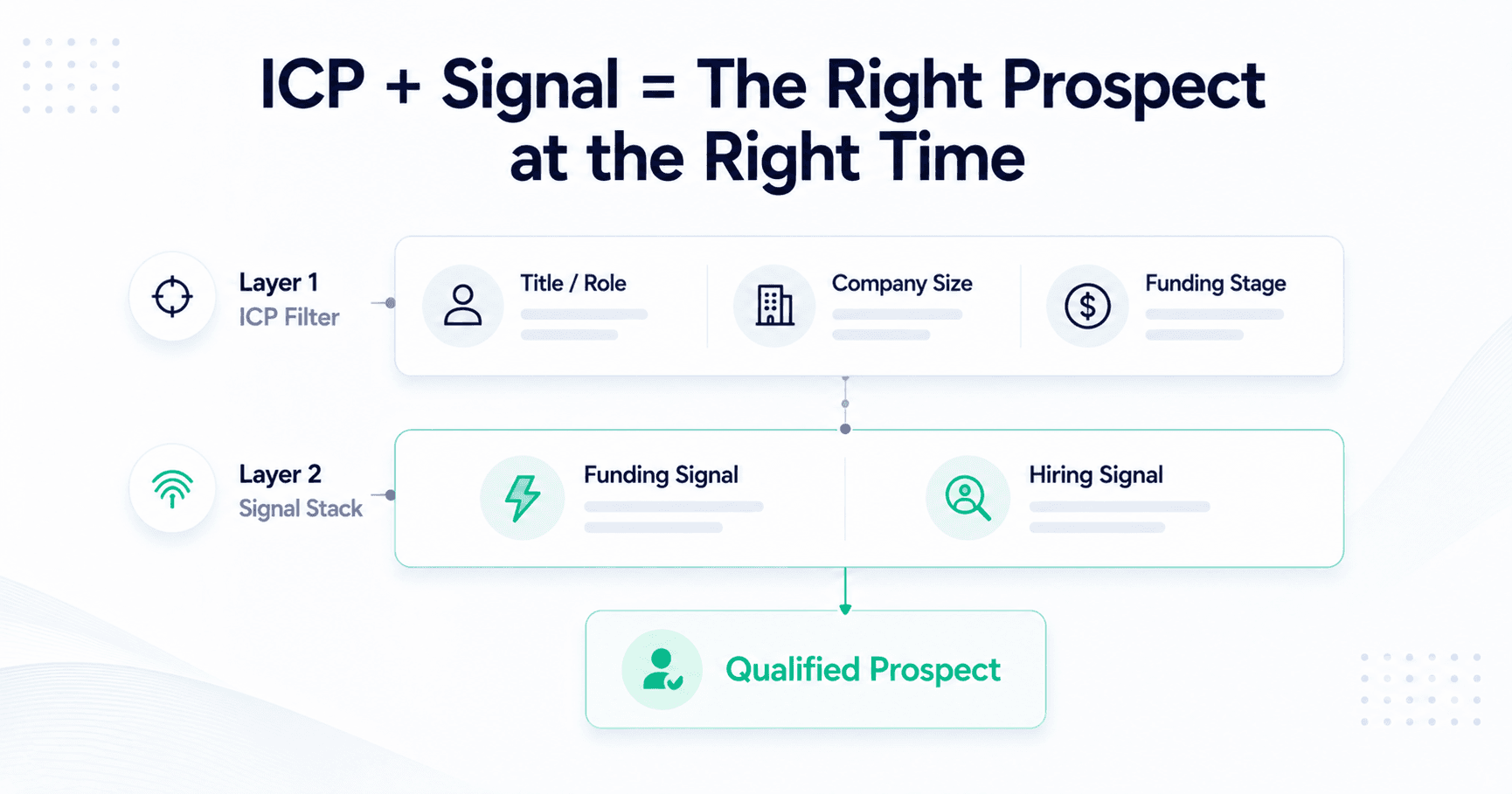
They narrowed their ICP to three job titles across one company stage: VP of Sales, Head of RevOps, and Sales Operations Manager — at SaaS companies with 50–500 employees that had raised a Series A or B in the last 18 months.
That one filter alone cut their addressable universe by 60%. But it also meant every connection request went to someone who had budget authority, a mandate to build pipeline systems, and a reason to care about what they were selling.
Signal Stack: Two Triggers That Did the Filtering
The team layered two real-time buying signals on top of their ICP filters using SalesTarget's Real-Time Signal Discovery:
| Signal | What It Means | Why It Mattered |
|---|---|---|
| Recent funding (Series A/B, last 90 days) | Company just raised capital | New budget, new headcount, new GTM pressure — a window of 60–90 days where buying decisions get made fast |
| Active hiring for Sales or RevOps roles | Open JDs for AEs, SDRs, or RevOps analysts | They're scaling the sales function — tools that support that scaling become a natural conversation |
A prospect only entered the sequence if they matched the ICP and at least one of these signals was active. No signal, no outreach. This is the discipline most teams skip — and it's the single biggest reason their acceptance rate jumped from 22% to 38%.
The Sequence: 5 Steps, 14 Days, Zero Pitching Until Step 4
The team ran every prospect through the same 5-step LinkedIn sequence, built and managed inside SalesTarget's LinkedIn Outreach suite. The sequencing logic was simple: earn the right to pitch before you pitch.
| Step | Action | Timing | Note |
|---|---|---|---|
| 1 | Connection request with a signal-referenced note | Day 1 | AI pulls the funding or hiring trigger into a 1-line personalised note — not generic, not a pitch |
| 2 | Thank-you message after acceptance | Day 2 (post-accept) | Short, human, zero pitch — acknowledges the connection, references their role |
| 3 | Value-led insight message | Day 5 | A specific observation about their company stage or the challenge their hiring signal implies — no product mention |
| 4 | Soft ask — relevance check | Day 9 | First message to mention SalesTarget — framed as "worth a 20-minute look?" not a calendar link dump |
| 5 | Final follow-up with a direct booking link | Day 14 | Short, no pressure — "leaving the door open" framing with a Calendly drop |
Every message in steps 1–4 was AI-personalised using SalesTarget's AI LinkedIn Personalization — pulling from the prospect's job title, company funding stage, and the active hiring signal. No two messages were identical. The SDR manager reviewed message templates once, approved them, and let the system run.
The Safety Layer: How They Ran at Scale Without Getting Flagged
One thing killed their previous attempts at LinkedIn automation: account restrictions. They'd pushed too hard, sent too many requests too fast, and LinkedIn flagged two of their SDR accounts in a single week.
This time, they ran everything through SalesTarget's cloud-based infrastructure using LinkedIn Safety & Compliance controls — with strict limits baked into the campaign from day one.
Their Daily Limit Protocol
Per SDR Account — 30-Day Campaign
Connection requests: max 20/day (LinkedIn's safe ceiling for new campaigns is 15–20; they stayed at 20 for the first two weeks, dropped to 15 in week three as a precaution). Follow-up messages: sent only during business hours, randomised send times via LinkedIn Smart Scheduling to avoid bot-like regularity. All activity ran cloud-based — no browser extension, no local machine dependency.
Zero account restrictions across all three SDRs over 30 days. That's not luck — it's what happens when you respect the platform's limits and use infrastructure that mimics human behaviour patterns.
The Results: 47 Meetings, 38% Acceptance, and a First Meeting on Day 6
📊 30-Day Campaign Results — 3-Person SDR Team
- 420 connection requests sent — ~140 per SDR over 30 days
- 38% connection acceptance rate — 160 accepted connections (vs. 22% pre-campaign)
- 14% reply rate on follow-up messages from accepted connections
- 47 meetings booked — first one landed on Day 6
- Zero LinkedIn account restrictions across all three SDR accounts
The first meeting came from a VP of Sales who had just posted about building out a new SDR function. The signal-triggered connection note referenced that post directly. She accepted within four hours. By Day 6, she was on a call.
The SDR manager's post-campaign note: "We spent less time sending messages and more time in actual conversations. The system handled the top of funnel. We handled everything after the reply."
What Worked, What Didn't, and What They'd Do Differently
What Worked
| What They Did | Why It Worked |
|---|---|
| Signal-gated entry to the sequence | Only signalled prospects entered. Higher relevance = higher acceptance rate. No signal, no contact. |
| No pitch before Step 4 | Built familiarity before asking for anything. Replies came in at Step 3 — before the ask — from prospects who were already warm. |
| AI personalization on every step | Messages referenced real context — funding stage, hiring intent, role. Every prospect felt like the first recipient, not message 420 of 420. |
| Cloud-based daily limits | Kept all three accounts safe for the entire 30 days. No restrictions, no lost momentum. |
What Didn't Work (and What They Fixed)
Mistake: The Value Message at Step 3 Was Too Generic at First
What Happened + The Fix
In Week 1, the Step 3 insight message was company-stage generic — the same framing for every hiring signal regardless of role. Reply rate on Step 3 was 4%. They rewrote the template to split by job title: a different value hook for VP of Sales vs. Head of RevOps vs. Sales Ops Manager. By Week 3, Step 3 reply rate had climbed to 9%.
Mistake: Step 5 Follow-Up Was Too Long
What Happened + The Fix
The original Day 14 message was 4 sentences plus a calendar link. Low open engagement. They cut it to two lines and the booking link. Meetings booked from Step 5 increased in the final two weeks of the campaign.
How to Replicate This in SalesTarget — Step by Step
This isn't a playbook you need to reverse-engineer. SalesTarget's LinkedIn Outreach suite has every component this team used, built to work together. Here's how to stand it up.
| Step | What to Do | Where in SalesTarget |
|---|---|---|
| 1 | Define your ICP with title, company size, and funding stage filters | ICP Builder |
| 2 | Set up funding and hiring signal triggers — only alert on matches that hit both ICP and signal | Real-Time Signal Discovery |
| 3 | Build your 5-step sequence with timing rules and message templates per step | LinkedIn Campaigns & Sequence Builder |
| 4 | Enable AI personalization — map variables (funding stage, hiring role, title) to each step | AI LinkedIn Personalization |
| 5 | Set daily limits (max 20 connection requests/day per account), enable randomised send times | LinkedIn Safety & Compliance + Smart Scheduling |
| 6 | Launch, monitor reply rates by step after Week 1, rewrite any step with under 5% engagement | LinkedIn Analytics & CRM |
If you want to go deeper on the LinkedIn outreach mechanics — particularly the anti-spam framework that keeps accounts safe at scale — this breakdown covers everything: how to 10x LinkedIn sales outreach without spamming inboxes.
Ready to run this playbook for your team?
Build your signal stack, launch your LinkedIn sequence, and book your first meeting this week — all inside SalesTarget.
✓ 50 credits ✓ 7-day trial ✓ No credit card required
Frequently Asked Questions

See It In Action: Book Your Free Demo
Get a personalized walkthrough and see how it works for your team.
Book My Demo →