TL;DR
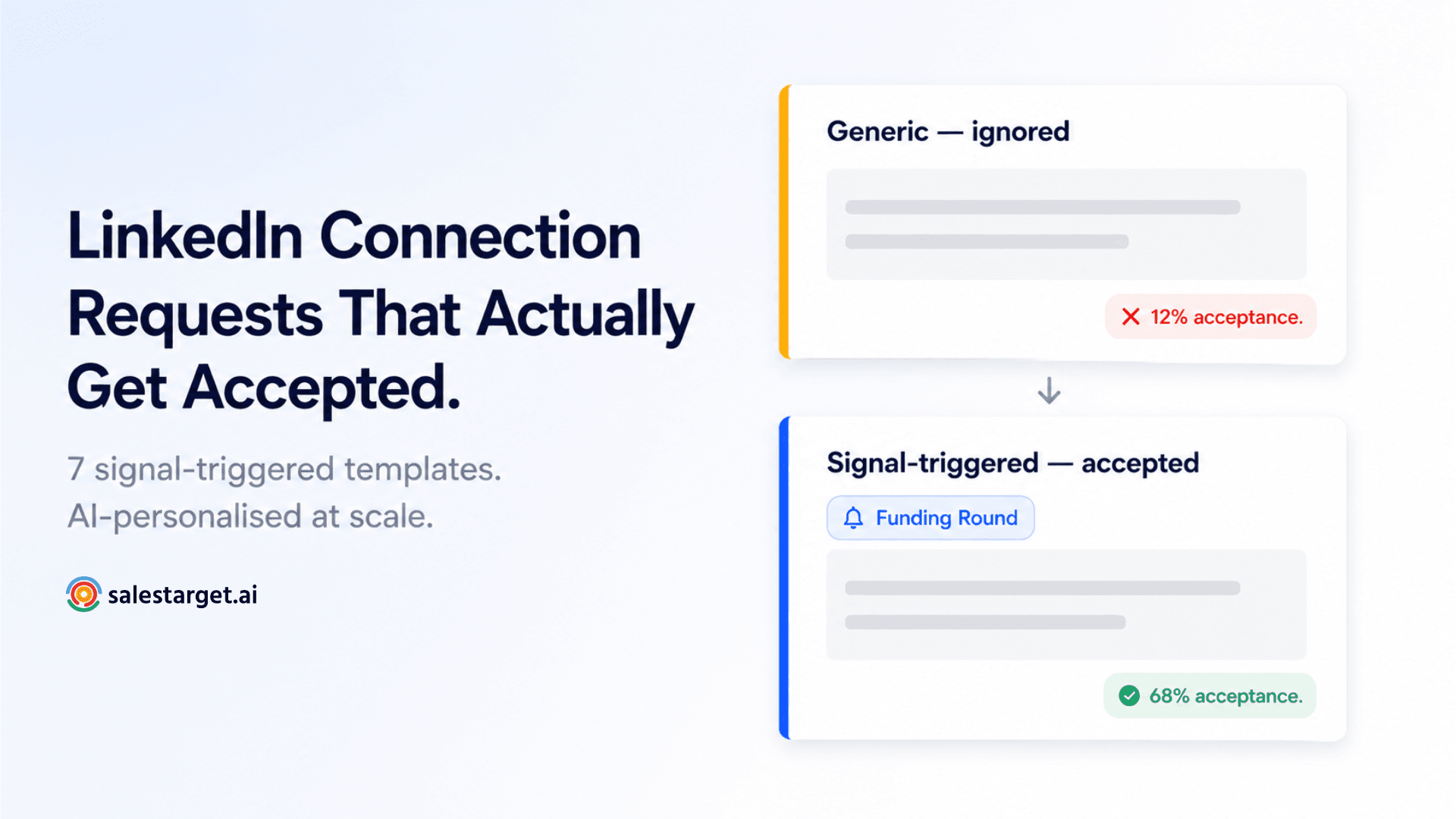
- Generic connection requests get ignored. Signal-triggered, AI-personalised ones get accepted at 2–3x the rate.
- The best connection request messages open with the signal — the specific, timely reason you reached out today — not a pitch or a job title reference.
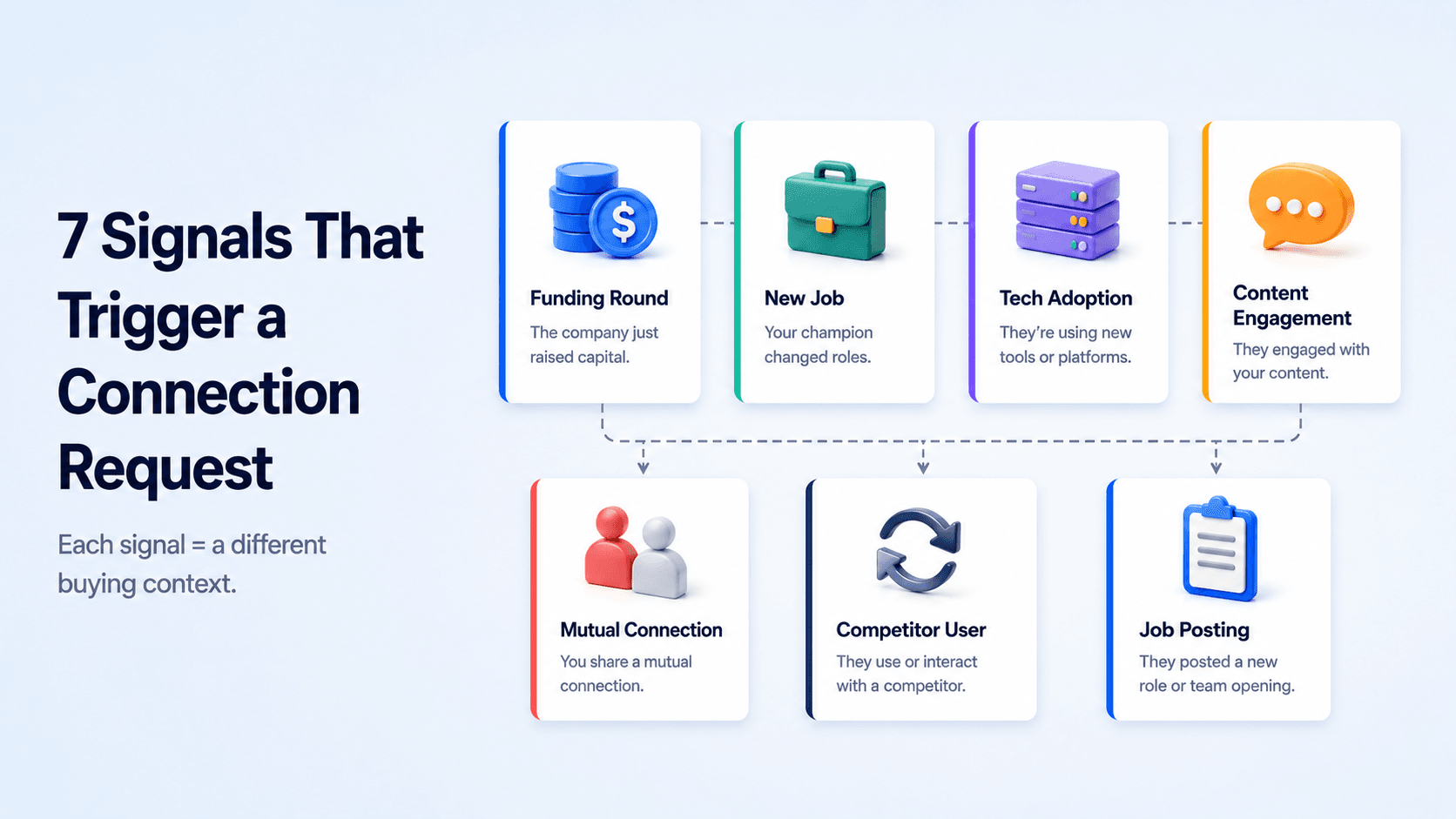
- 7 signal types covered: funding round, new job, tech adoption, content engagement, mutual connection, competitor user, job posting.
- Personalised messages achieve up to 44% more acceptances and 67% higher response rates than generic ones — SalesMind AI Research 2026.
- SalesTarget's AI LinkedIn Personalisation generates signal-triggered connection requests at scale — no manual research per prospect required.
87% of LinkedIn connection requests sent in B2B outreach contain zero personalisation. They land in inboxes as "I'd like to add you to my professional network" or a slight variation of it — and they get ignored at the same rate. The SDRs getting 60–70% acceptance rates aren't writing better generic messages. They're writing messages tied to something that just happened in the prospect's world.
Why Generic Connection Requests Get Ignored
LinkedIn's algorithm in 2026 factors acceptance rate into your account's trust score. Accounts with low acceptance rates — below 20–25% — get their weekly connection request capacity reduced automatically. So sending generic requests at volume doesn't just produce poor results; it actively caps your ability to send more requests in future weeks.
The reason generic requests fail is straightforward: they give the prospect no reason to accept. A connection request without context asks the recipient to make a decision based on your profile alone. If your headline is weak or your profile doesn't immediately signal relevance to their world, the default answer is decline or ignore.
A signal-triggered connection request changes that calculation. It tells the prospect: I reached out now, specifically, because something just happened in your world that makes this conversation timely. That context does the selling before a single follow-up message is sent.
📊 What Personalisation Does to Acceptance Rates (2026)
- 44% more acceptances for personalised connection requests vs generic ones — SalesMind AI Research 2026
- 67% higher response rate from personalised messages overall — SalesMind AI Research 2026
- 18–22 percentage point lift for requests referencing a specific detail vs blank requests — PhantomBuster LinkedIn Personalisation Study, December 2025
- 2–3x higher acceptance when the message is triggered by a recent event vs unprompted cold outreach — nrev.ai LinkedIn Connection Research 2026
The Anatomy of an Accepted Connection Request
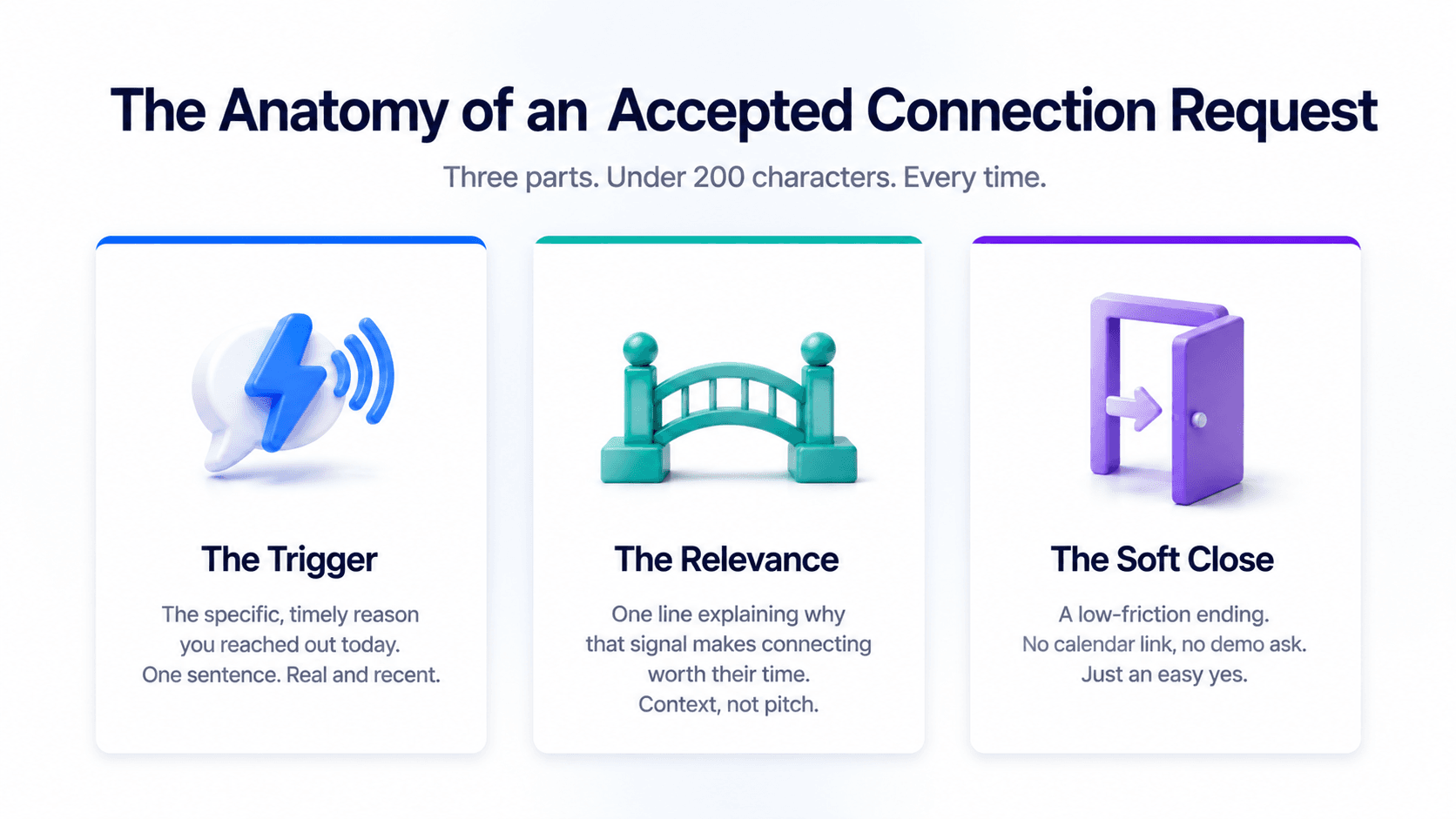
LinkedIn caps connection notes at 300 characters. Many practitioners recommend staying under 200 — notes get truncated in mobile notifications, and a message that reads cleanly in 160 characters lands better than one requiring a click-through to finish. That constraint forces clarity, which is actually an advantage.
Every accepted connection request in B2B outreach has the same three-part structure:
1. The trigger. The specific, real, timely reason you reached out today. One sentence. Not "I came across your profile" — that's not a trigger, it's a non-reason. A trigger is a job change, a post they published, a funding round, a hiring signal, a mutual connection context. Something that happened recently and specifically.
2. The relevance. One brief line explaining why that trigger made connecting worth their time. This is context, not a pitch. It answers "why are you telling me this" without asking for anything.
3. The soft close. A low-friction ending that doesn't ask for a call, a demo, or a commitment. "Thought it made sense to connect" or "Happy to share what we're seeing" is enough. The connection request is not the place to close — it's the place to get in the door.
The Three-Part Structure in Practice
Trigger → Relevance → Soft close
Generic (fails): "Hi [Name], I'd love to connect and learn more about what you're working on at [Company]."
Signal-triggered (works): "Saw [Company] just closed a Series B — congrats. We help scaling sales teams build outbound without burning LinkedIn limits. Thought it made sense to connect."
7 Signal-Triggered LinkedIn Connection Request Templates for 2026
Each template below is built around a specific B2B buying signal. The signal is what put this prospect on your list. The template uses that signal as the opener — not a generic reference to their role or industry.
All templates are under 200 characters. Personalisation fields are in brackets — these are the specific details AI pulls from live signal data at the point of send.
Signal 1 — Funding Round
A funding announcement signals growth, new headcount, and new budget. Companies that just closed a round are actively building — which means they're evaluating tools, hiring SDRs, and scaling outbound. This is one of the highest-intent signals available for outreach timing.
Template — Under 200 characters
Saw [Company] just closed [round size/type] — congrats on the milestone. We help [role type] at scaling teams build outbound pipeline before the hiring push lands. Thought it made sense to connect.
Signal 2 — New Job / Role Change
A prospect who has just started a new role is in a 90-day window where they're evaluating tools, processes, and vendors. They have budget authority or influence, they want to make an early impact, and they're more open to new conversations than at any other point in their tenure. This is the most time-sensitive signal on this list — the window closes fast.
Template — Under 200 characters
Congrats on the new role at [Company], [First Name]. Most [job title]s I speak with in the first 90 days are figuring out the outbound stack — happy to share what's working. Worth a quick connect?
Signal 3 — Tech Adoption
When a company's tech stack shows a recent addition — a new CRM, a new sales engagement platform, a new data tool — it signals that they're actively investing in their sales infrastructure. That's a buying context. A message that acknowledges a specific tool they've just adopted shows that you've done the work and understand their stack.
Template — Under 200 characters
Noticed [Company] recently added [tool name] to the stack — good move for [relevant use case]. We plug in alongside it to handle the LinkedIn side of outbound. Might be relevant — thought I'd connect.
Signal 4 — Content Engagement
A prospect who published a post — or commented substantively on one — about a topic relevant to what you sell has told you, publicly, what's on their mind. That's the best possible signal for a connection request because the opener writes itself. You reference what they said, not what you sell.
Template — Under 200 characters
Your post on [specific topic] landed well — [one-line genuine reaction to what they said]. We're working on the same problem from the tooling side. Thought it made sense to connect.
Signal 5 — Mutual Connection
A shared first-degree connection is social proof before the conversation starts. It doesn't require that you know the mutual connection well — just that the name creates a bridge. Use this signal carefully: don't imply an endorsement that wasn't given. Reference the connection as context, not as a guarantee.
Template — Under 200 characters
[Mutual name] and I have worked together on [relevant context]. Saw you're also in [space/industry] — thought it made sense to connect given the overlap. No agenda, just expanding the network.
Signal 6 — Competitor User
When technographic data shows a prospect is using a direct competitor's tool, they've already validated the category — they know they need the solution, they're paying for it, and they're potentially open to a better one. This is a high-intent signal that requires careful framing. Don't criticise the competitor. Reference the category and position an alternative angle.
Template — Under 200 characters — handle carefully
Looks like [Company] is already investing in [category — e.g. LinkedIn outreach]. We take a different approach on [specific differentiator] that a few teams have switched for. Worth a connect to share the angle?
Signal 7 — Job Posting
A company actively hiring SDRs, BDRs, or sales managers is scaling outbound. That means they're building a team that will need tools, processes, and infrastructure. A job posting for a sales role is one of the clearest proxies available for "this company has outbound budget and intent right now."
Template — Under 200 characters
Saw [Company] is hiring [role]. Scaling an outbound team is the right move — we help teams like yours set up the LinkedIn and email infrastructure before the new hires start. Thought it made sense to connect.
How to Personalise These at Scale Using AI vs Manually
The seven templates above work. The question is whether you can execute them at scale without spending 5–10 minutes per prospect sourcing the signal, writing the message, and verifying it reads naturally before sending.
Manual approach (works up to ~30 prospects per week): Research each prospect's profile directly on LinkedIn. Check their recent posts, their company news feed, their hiring page, and their tech stack via Sales Navigator. Write a custom opener for each one. Review and send. At 5 minutes per prospect, 30 prospects is 2.5 hours of research before a single message goes out.
AI approach (works at any volume): Define your signal parameters — which triggers to watch for across your prospect list (funding, job change, tech adoption, recent post, hiring). AI monitors those signals automatically and generates a personalised connection request for each prospect at the point of send, using the live signal as the opener. The output reads as manually researched without the manual research overhead.
The critical difference is review. AI-generated personalisation should be spot-checked, especially for high-value targets — not because AI gets the signal wrong, but because tone can drift toward corporate phrasing that doesn't read as a genuine human message. The review step takes seconds per message, not minutes. The research step is gone entirely.
Manual vs AI Personalisation at Scale
Time cost comparison
| Task | Manual (per prospect) | AI (per prospect) |
|---|---|---|
| Signal sourcing | 3–5 min | Automated |
| Message drafting | 2–3 min | Automated |
| Review and send | 1 min | 10–15 sec |
| Total per prospect | 6–9 min | Under 20 sec |
| 100 prospects | 10–15 hours | ~30 min (review only) |
How SalesTarget's AI LinkedIn Personalisation Generates These Automatically
SalesTarget's AI LinkedIn Personalisation is built into the campaign layer — it's not a separate research tool you run before importing your list. When you build a LinkedIn outreach campaign in SalesTarget, the AI monitors your prospect list for the signal types you've defined — funding, job changes, tech adoption, recent posts, hiring activity — and generates a personalised connection request for each prospect using the live signal as the opener.
The signal sourcing is handled by Lead Explorer, which surfaces buying signals across your prospect list in real time. When a prospect triggers a signal you've set — a funding announcement, a new hire, a LinkedIn post on a relevant topic — the AI drafts the connection request and queues it for review. You approve or edit, and it sends during the prospect's active hours via LinkedIn Smart Scheduling.
The result is a campaign where every connection request reads as if you spent five minutes on each prospect's profile — because the AI did exactly that, at scale, without the manual overhead.
What to Send After Acceptance
Getting accepted is step one. What you send next determines whether the conversation moves forward or goes cold. The acceptance message — sent within 24–48 hours of the connection being accepted — should pick up the same thread as the connection request. If your request referenced a funding round, the acceptance message continues that conversation. It doesn't reset to a generic opener.
The acceptance message has one job: open a dialogue. Not pitch, not close, not ask for a meeting. Ask one relevant question about their situation — tied to the same signal that got you connected — and keep it under 100 words.
The acceptance message mistake that kills warm connections
Sending a pitch or a calendar link immediately after acceptance is the fastest way to undo a signal-triggered connection request that worked. The prospect accepted because your message felt human and relevant. A boilerplate follow-up with "I'd love to show you a 30-minute demo of our platform" signals that the personalised opener was bait. Keep the same signal thread, keep the same tone, and ask one question. That's it.
Generate signal-triggered connection requests at scale — automatically.
SalesTarget's AI LinkedIn Personalisation monitors your prospect list for buying signals and writes the connection request for you. No manual research. No generic openers.
✓ 50 credits ✓ 7-day trial ✓ No credit card required




