Your team sent 400 connection requests last week. About 90 were accepted, a handful replied, and half of those replies said "wrong person." Meanwhile, the email sequence kept chasing a prospect who had already answered on LinkedIn. That is what most LinkedIn outreach software does in practice: it sends volume and loses the thread.
The right LinkedIn outreach software finds decision-makers who match your ideal customer profile, personalizes each request and message, follows up based on what the prospect does, and logs every action in a CRM. Choose the tool that does all four in one workflow, with account safety limits built in. SalesTarget.ai runs LinkedIn and email in a single sequence, on top of its own B2B database and CRM.
The Changing Role of LinkedIn Outreach in B2B Sales Prospecting
LinkedIn outreach has moved from a side task reps squeezed in between calls to a core prospecting channel with its own process and metrics.
From Manual Connection Building to Automated Prospecting
Manual outreach caps the number of quality touches a rep can make in a day, and most of the time goes to research, not messaging. Automation takes over the repetitive steps: sending requests, queuing follow-ups, pausing on replies. Reps keep the part that needs judgment, which is deciding who deserves a conversation.
The Shift Toward Personalized, Multi-Touch Sales Engagement
Buyers ignore a single generic pitch. A connection request, a short message after acceptance, a follow-up, and an email touch add up to a pattern that reads as real attention. Multi-touch only works if every touch knows what the previous one said.
Why B2B Sales Teams Need a Structured LinkedIn Outreach Process
Without a process, outreach depends on whoever feels like sending that day. A structured process fixes the list criteria, the message order, the gap between touches, and the point where a human takes over. That makes results repeatable across SDRs, BDRs, and agency account managers. Our guide to LinkedIn outreach software for B2B sales teams covers the setup in more depth. For a step-by-step look at planning before launch, see our pre-launch blueprint for efficient personal B2B campaigns.
Understanding LinkedIn Outreach Software and Its Role in Lead Generation
LinkedIn outreach software automates the repeatable steps of prospecting on LinkedIn (finding profiles, sending requests, messaging, following up) and tracks the results.
Core Functions of LinkedIn Outreach Software
Six functions matter: prospect search, connection requests, messaging, conditional follow-ups, scheduling, and analytics. A seventh, account safety, decides whether you can keep running the other six. Tools that skip one force you to patch the gap with a spreadsheet.
LinkedIn Prospecting, Connection Automation, and Messaging Workflows
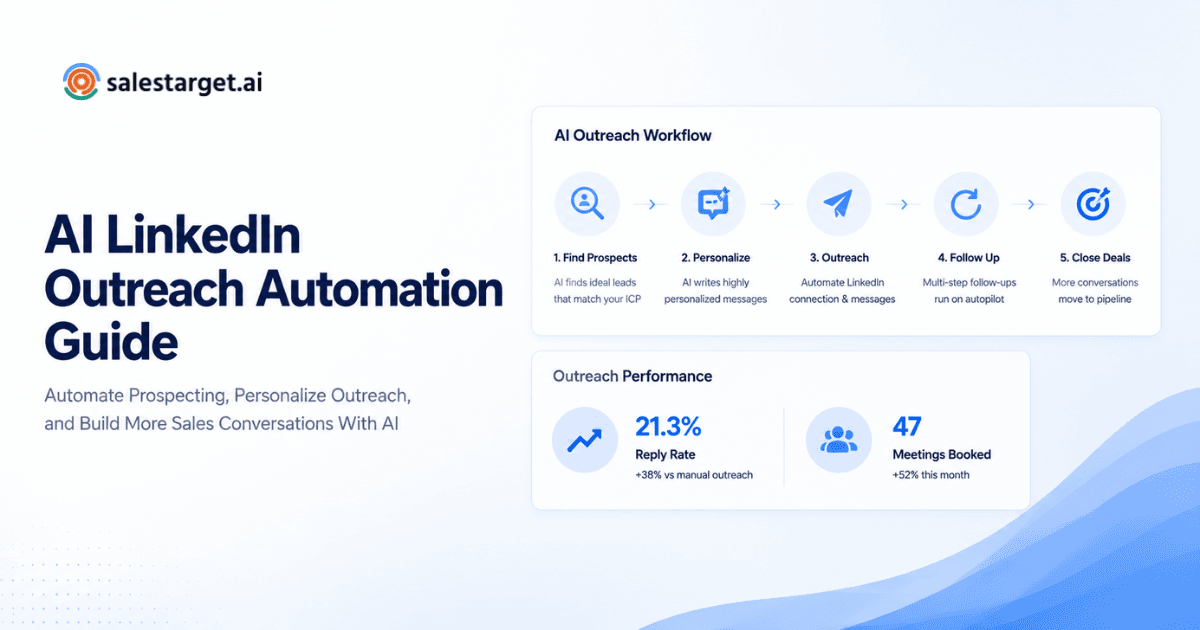
A workflow is a chain: build the list, send the request, wait for acceptance, send message one, then branch on reply or silence. The software holds that chain together, so no prospect sits in the middle with nobody assigned to them.
The Role of AI Personalization in Modern LinkedIn Outreach
AI reads each profile and drafts an opening line tied to the person's role and industry. Good personalization is relevant, not clever. SalesTarget.ai adapts messages to each profile, and its AI Copilot drafts full sequences from a plain-English description of your audience.
Key Challenges That Limit LinkedIn Outreach Performance
Most weak campaigns fail in one of four places, and the fix differs for each.
Reaching the Wrong Decision-Makers and Target Accounts
Titles mislead. A "VP of Operations" at a 20-person company and at a 2,000-person company buy differently. Filtering on title alone pulls in the wrong buyers. Stack seniority, department, company size, revenue, and tech stack. Lead Explorer lets you do this across 840M+ professional profiles.
Low Connection Acceptance and Message Response Rates
Weak acceptance traces back to an empty profile, a vague request, or the wrong persona. Split acceptance by persona before you rewrite any copy. If one persona accepts at half the rate of the others, the list is the problem, not the message.
Inconsistent Follow-Ups and Disconnected Sales Activities
Here is friction most articles skip: LinkedIn and email often run as separate tools. A prospect replies on LinkedIn, and three days later an email sequence nudges them anyway. That reads as sloppy and burns the lead. A reply on either channel should stop both.
Difficulty Tracking Prospect Engagement and Lead Quality
When activity lives inside the outreach tool and not the CRM, nobody can say which accepted connections turned into pipeline. Acceptance shows interest in your name. It says nothing about lead quality.
Essential Features to Look for in LinkedIn Outreach Software
Judge every tool against these seven features. Missing two or more should end the evaluation.
Advanced Prospect Search and ICP-Based Targeting
Look for filters that cover industry, role, seniority, department, company size, revenue, location, and tech stack. Intent data is a strong addition. SalesTarget.ai carries 4,000+ intent and buyer signals, including Bombora Intent Topics, so you can start with accounts already researching your category.
Automated Connection Requests and Personalized Messaging
Requests should be short and free of pitch. Messages should pull more than a first name from the profile. Check that you can edit templates per segment, so a CFO and a Head of Sales never get the same text.
AI-Powered Message Personalization
Test it on 20 real prospects. Does the output change with role and industry? Do 500 messages share the same sentence skeleton? Can a rep edit before sending? If the answer to the last one is no, move on.
Conditional Follow-Up Sequences and Campaign Scheduling
Sequences should branch on three states: accepted, replied, and no response. Scheduling should respect each prospect's timezone, set working-hour limits, and add human-like delays. SalesTarget.ai's LinkedIn Outreach module does all three.
LinkedIn Engagement Tracking and Campaign Analytics
You need acceptance rate, reply rate, and positive reply rate per campaign and per persona. A single blended number hides the segments that drag your results down.
CRM Integration and Multichannel Sales Automation
Campaign leads should land in the CRM without a CSV import, and email should sit in the same flow as LinkedIn. SalesTarget.ai's CRM connects with HubSpot, Salesforce, Zoho, Google Calendar, Calendly, Slack, and Zapier.
Account Safety Controls and Outreach Limits
LinkedIn's User Agreement restricts automated activity, and weekly invitation limits apply to most accounts. No tool removes that risk. Safety controls lower it by keeping activity inside human-like patterns. Look for rate limits, warm-up logic, and auto-pause safeguards, all of which SalesTarget.ai builds in.
How to Evaluate and Select the Right LinkedIn Outreach Software
Score each tool on the six checks below, then run a 14-day pilot on one ICP segment before you commit.
Identify Sales Goals and Prospecting Requirements
Decide what the tool must deliver: booked meetings, pipeline, or lead lists for clients. An agency running outbound for ten clients needs different separation between campaigns than a founder selling alone.
Compare Automation Capabilities and Personalization Options
Ask for a demo built on your actual prospects, not sample data. Sample data always looks good. Watch what the AI writes for a niche role you sell to.
Evaluate Lead Targeting and Data Enrichment Features
Find out whether the tool finds leads or only imports them. SalesTarget.ai enriches at the moment you find a lead, so contacts are verified when you pull them, not whenever the data was first scraped.
Assess Campaign Management and Reporting Capabilities
Check that you can pause one campaign without touching others, clone a winning sequence, and see results by persona. Reporting that stops at "messages sent" is a vanity dashboard.
Review CRM Integrations and Existing Sales Workflows
Native integration beats a connector chain. Ask what happens at the moment a prospect replies: does a task get created, does an owner get assigned, does the deal move? Each manual answer is a leak.
Compare Pricing, Scalability, and Overall Platform Value
Ask how the pricing model changes as you add seats, campaigns, and accounts. Then count the tools you would still need to buy for data, email validation, and a CRM. One platform on one bill changes that math. You can test this directly: start a free trial of SalesTarget.ai and run your pilot there.
Building a LinkedIn Outreach Strategy That Generates Qualified Leads
A working strategy moves in six steps, from a defined ICP to a qualified pipeline.
Define Your Ideal Customer Profile and Target Accounts
Start with firmographics, then add timing. SalesTarget.ai's ICP Builder works with business events such as funding rounds, hiring spikes, and leadership changes on a 30 to 90 day lookback. A company that just hired a new sales leader is a better target than one that matches on size alone.
Build Decision-Makers Lists Using Relevant Prospect Filters
Build one list per persona. Mixing a CRO and an SDR manager in one campaign makes the analytics unreadable. Keep lists small enough that a rep can sanity-check the first 25 names by hand.
Create Personalized Connection Requests and Message Sequences
Send a blank request or a single line. Then run three or four touches: a message after acceptance, a follow-up that offers something useful, and a soft ask. Each message should earn the next one.
Develop Follow-Up Campaigns Based on Prospect Engagement
Build three branches. Accepted with no reply gets a value follow-up. A reply stops the sequence and assigns an owner. No acceptance after your set window moves to an email touch.
Combine LinkedIn and Email for Multichannel Prospecting
Validate the email address before it enters the sequence. SalesTarget.ai's Email Outreach adds unlimited inboxes with AI warm-up, inbox rotation, and SPF, DKIM, and DMARC checks, so the email side protects sender reputation. Context carries between channels, so a LinkedIn reply never triggers a cold email.
Qualify Interested Prospects and Move Them Into the Sales Pipeline
Unibox pulls every reply into one view and sorts it as Interested, Follow-Up, or Not a Fit. Interested leads sync to the CRM deal pipeline, and follow-up tasks are created automatically.
Measuring LinkedIn Outreach Performance and Lead Conversion
Track one funnel: acceptance, reply, positive reply, meeting, pipeline. Measure each stage per persona.
Connection Acceptance Rate and Prospect Engagement
Acceptance rate is accepted requests divided by sent requests. Read it by persona and by message version. It tells you whether your targeting and profile are credible, nothing more.
Message Reply Rate and Positive Response Rate
Reply rate is replies divided by accepted connections. Positive reply rate counts only interested answers. Treat "wrong person" replies as list feedback: log them, find the shared title or company size, and fix the filter.
Qualified Lead and Meeting Conversion Rates
Define "qualified" before launch, in writing. Then count meetings against qualified leads, not against sends. SalesTarget.ai reports 2.4X more meetings from the same leads for teams using its CRM.
Campaign Performance and Sales Pipeline Contribution
Connect each campaign to deals created and deals won. The AI Copilot answers this in plain language, so a RevOps lead can ask which campaigns drove revenue without building a report.
Using Outreach Analytics to Improve Campaign Results
Change one variable at a time: the opening line, the persona, or the delay between touches. Run each test for two weeks. Changing three things at once teaches you nothing.
Why Choose SalesTarget.ai for LinkedIn Outreach and B2B Prospecting?
SalesTarget.ai combines B2B data, LinkedIn and email outreach, email validation, a CRM, and an AI Copilot in one workspace. Apollo gives data and engagement, but deliverability and a CRM are bolt-ons. Instantly, Smartlead, and Lemlist center on cold email and deliverability, and leave the database and CRM to other tools.
Find and Enrich Decision-Makers With Lead Explorer
Lead Explorer covers 840M+ verified professional profiles and 146M+ business entities across 50+ data sources. Search in plain English or stack filters. One-click enrichment unlocks verified emails and phone numbers, and leads move to sequences with no CSV.
Combine LinkedIn and Email Outreach in One Workflow
LinkedIn requests, DMs, follow-ups, and email steps run in one coordinated sequence. A reply on one channel is visible on the other. That removes the double-chase problem described earlier. Learn more on the LinkedIn Outreach page.
Improve Email Deliverability With Email Validator
Email Validator checks addresses with MX and SMTP tests, flags disposable domains, and scores risk. It works through bulk list cleaning or a real-time API and connects to 60+ platforms. SalesTarget.ai reports 90% of emails validated before sending.
Manage Prospect Activities Through Built-In CRM
Campaign leads land in the CRM automatically, and every email and call is logged on the lead timeline. The CRM includes a click-to-call dialer. SalesTarget.ai reports 3.2X faster deal cycles, 91% follow-up completion, and about 6 hours saved per rep per week.
Simplify Sales Workflows With AI Copilot
AI Copilot is free inside the platform. Chat to find leads, generate personalized sequences with A/B variations, query deals and tasks, and get flagged on at-risk deals. It handles the grunt work. Strategy stays with your team.
Common LinkedIn Outreach Software Selection Mistakes to Avoid
Five mistakes account for most wasted software spend.
Prioritizing Automation Volume Over Lead Quality
A tool that sends 200 requests a day to the wrong list just reaches the wrong people faster. Pick targeting first, volume second.
Overlooking Personalization and Prospect Relevance
If your message could go to any prospect in the list, it will convert like it. Relevance comes from the data behind the message, which is why enrichment belongs in the same platform as outreach.
Ignoring LinkedIn Account Safety and Platform Limits
A restricted account stalls the whole campaign and the rep running it. Treat safety controls as a buying requirement. Ask vendors what the tool does when it detects unusual account behavior.
Choosing Tools Without CRM and Email Integration
A LinkedIn-only tool leaves you copying replies into a CRM by hand. Within a month, nobody does it, and pipeline data goes stale.
Measuring Campaign Success Through Connections Alone
Connections are cheap to collect and easy to inflate. Judge a campaign by positive replies, meetings, and pipeline created.
The Future of LinkedIn Outreach Software in B2B Sales
The direction is clear: less manual research, tighter channel coordination, and prioritization driven by buyer signals.
AI-Driven Prospect Research and Personalized Engagement
AI will pull more of the research load, summarizing a prospect's role, company news, and recent activity before a rep writes a word. Reps will review and send, not start from a blank page.
Automated Multichannel Sales Engagement
LinkedIn, email, and phone will run as one sequence with shared context. Tools that treat them as separate products will feel increasingly dated.
Intent-Based Prospect Targeting and Lead Prioritization
Intent topics and business events will decide who gets contacted first. Teams that rank leads by buying signals reach fewer people and book more meetings.
Connected Sales Workflows From Prospecting to Conversion
The gap between finding a lead and closing a deal will shrink to a single workspace. Handoffs between tools are where leads die, and consolidation removes them.
Turning LinkedIn Outreach Into a Consistent B2B Lead Generation Channel
The pain at the start of this post has one root: disconnected tools. Bad lists, split channels, and untracked replies all come from stitching a data tool, a LinkedIn tool, an email tool, and a CRM together. SalesTarget.ai replaces that stack with one platform. It finds and enriches the right decision-makers, runs LinkedIn and email in one sequence, validates contacts before you send, and tracks every reply through to the deal. Built for outbound teams, not enterprise bloat. Start with SalesTarget.ai and run your first LinkedIn and email campaign from one workspace.