Your SDR built a list of 2,000 fresh contacts on Friday. By Monday, 180 bounced, your sending IP got flagged, and the campaign meant to book meetings instead booked a spot on a blacklist. That is the quiet cost of skipping email list verification: dead pipeline and a domain nobody trusts.
Email list validation checks every address on your list before you hit send, confirming the syntax is correct, the domain accepts mail, and the mailbox actually exists. Bad addresses get flagged and removed. Fewer bad addresses means fewer bounces. Fewer bounces means inbox providers keep trusting your domain and IP, so more of your good emails land in the inbox instead of spam or nowhere at all.
Good B2B teams treat this step the same way they treat a CRM update: a rule, not an afterthought.
Why Invalid Email Addresses Raise Bounce Rates and Damage Sender Reputation
Invalid addresses raise bounce rates since mail servers reject them at the door, either right away (hard bounce) or after a short delay (soft bounce). Each rejection gets logged by the receiving mail server and shared, directly or indirectly, with reputation trackers that inbox providers use to score your domain and IP.
A healthy bounce rate for a permission-based list sits under 2%, with anything above 5% signaling a real deliverability problem, per HubSpot's benchmark data. Push past that line on a regular basis and Gmail, Outlook, and Yahoo start routing your mail to spam by default, no matter how good the copy is.
Old contact lists make this worse than most reps expect. People change roles, companies get acquired, inboxes get shut down. A list that was clean six months ago is not clean now.
Email List Validation and the Checks Behind It
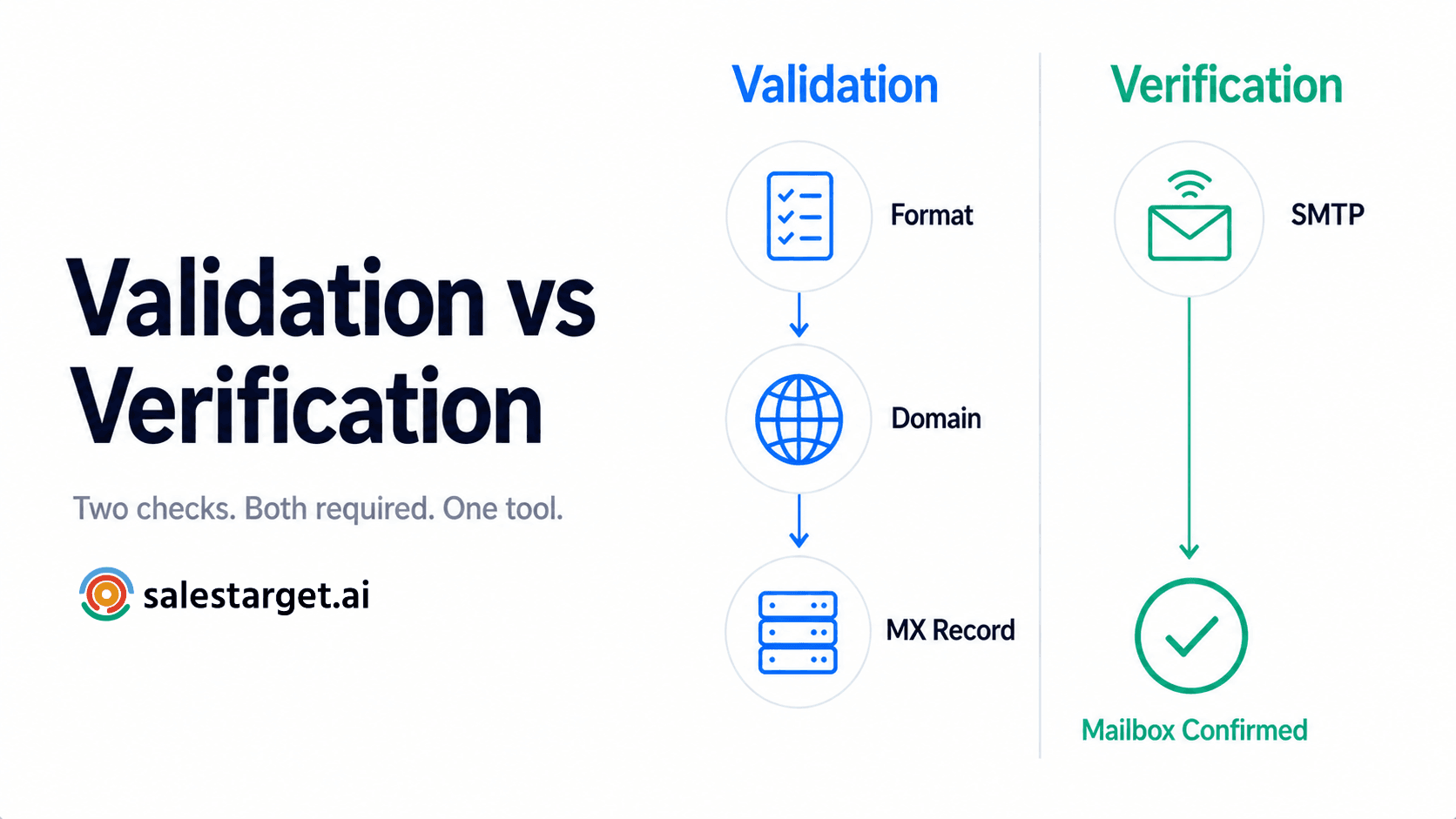
Email list validation runs each address through a set of checks before a single send goes out. No single check catches everything, which is why B2B email validation stacks several methods together.
Syntax and formatting checks for malformed addresses
The first pass catches typos and formatting errors: missing "@" symbols, double dots, invalid characters, extra spaces pasted in from a spreadsheet. This step alone can flag 5 to 10% of a raw, manually built list.
Domain and MX record validation
Next, the tool confirms the domain exists and has a valid MX (Mail Exchange) record, meaning a real mail server is set up to receive messages for that domain. No MX record means no delivery, full stop.
SMTP verification for mailbox availability
SMTP (Simple Mail Transfer Protocol) verification pings the receiving server to check if the specific mailbox is active, without sending an actual email. This step separates "the domain is real" from "this exact person can still be reached."
Detection of disposable, role-based, and risky email addresses
Disposable addresses (Mailinator, Guerrilla Mail, and similar) are built to self-destruct. Role-based addresses (info@, support@, hello@) rarely belong to a named buyer and drag down reply rates even when they do not bounce. Strong email verification software flags both, along with addresses tied to known spam traps.
Classification of valid, invalid, unknown, and catch-all results
A solid tool does not just say "yes" or "no." It sorts results into valid, invalid, unknown (the server would not confirm either way), and catch-all (the domain accepts all mail regardless of whether the mailbox exists). That last category needs its own handling, covered further down.
The Connection Between Bounce Rates and Sender Reputation
Bounce rate is not just a number on a dashboard. It is one of the strongest signals inbox providers use to decide where your next email lands.
Hard bounces and soft bounces
A hard bounce means the address is permanently invalid: wrong domain, deleted mailbox, does not exist. A soft bounce is temporary: a full inbox, a server that is down, a message too large. Hard bounces do far more reputation damage and should trigger an instant suppression, not a retry.
Domain reputation, IP reputation, and inbox placement
Inbox providers score your sending domain and IP separately. A pattern of hard bounces on either one lowers your score, which lowers inbox placement even for recipients whose addresses were perfectly valid.
Blacklist risks caused by repeated low-quality sending
Repeated high-bounce sends can get a domain or IP added to a blacklist maintained by services like Spamhaus. Getting removed can take days or weeks, and it stalls every campaign running through that domain in the meantime, not just the one that triggered it.
Lost pipeline and wasted outreach capacity
Every bounced email is a rep-hour spent researching a contact who was never reachable, a sequence slot burned on dead weight, and a real prospect pushed back a day once sending volume got capped after a reputation hit.
A Pre-Send Email List Validation Workflow
A repeatable workflow beats a one-off cleanup.
Step 1: Standardize and deduplicate contact records
Fix formatting, strip whitespace, and remove duplicate rows before validation even starts. Deduplication alone typically trims 5 to 15% off a list pulled from multiple sources.
Step 2: Run bulk email verification
Run the full list through an email verification software tool that checks syntax, MX records, and mailbox status in one pass. Bulk verification should return a status for every row, not a partial sample.
Step 3: Segment valid, catch-all, unknown, and risky contacts
Split results into separate segments. Valid contacts go straight to the campaign. Catch-all, unknown, and risky contacts get held for a smaller, controlled test.
Step 4: Suppress invalid addresses across outreach tools and CRM
Invalid addresses need to disappear from every system that could send to them again, not just the one campaign tool you happened to be using. A gap here is how "cleaned" lists end up dirty again three weeks later.
Step 5: Test a small segment before increasing sending volume
Send to a small batch first (200 to 500 contacts), watch bounce and complaint rates for 24 to 48 hours, then scale up. Ramping slowly protects a domain still building reputation.
Email Validation for Cold Email Outreach
Cold outreach carries more risk than a nurture send to existing customers: the list is newer, less permission-based, and harder to trust by default.
Validating newly sourced B2B contacts
Every batch of newly sourced contacts, whether pulled from a database, scraped, or bought, needs validation before a single sequence step fires. Newly enriched contacts get verified at the moment they are found, not weeks after the data was first collected, and that timing matters since contact data goes stale fast.
Rechecking stored contacts before campaign reuse
A contact validated six months ago is not still validated today. Reps reusing an old list for a new sequence should re-run verification first: job changes and mailbox closures happen constantly in B2B databases.
Managing catch-all contacts through smaller test batches
Catch-all domains accept mail whether the mailbox is real or not, so a validator cannot fully confirm them. Route these into a smaller batch, watch for bounces and replies, then decide whether to keep sending.
Tracking bounce patterns by list source and sending domain
Bounce rate by source tells you which list provider, scraper, or import method is producing bad data. One source running at 8% bounce, with another sitting at 1%, signals which one to cut, not just clean.
Maintaining one suppression list across sales systems
A contact that bounced or unsubscribed in one tool should never reappear in another. A single, shared suppression list keeps email, LinkedIn, and CRM systems in sync so nobody accidentally re-adds a dead contact to a new sequence.
Ongoing Email Hygiene for a Reliable B2B Database
Validation at send time solves today's campaign. Ongoing hygiene keeps next quarter's campaign from repeating the same problem.
Validation at lead capture and list import
Check every contact the moment it enters the CRM, whether it came from a form fill, an import, or manual entry by a rep. Catching bad data at the door costs far less than catching it after a send.
Revalidation schedules based on list age
Contacts sitting untouched for 60 to 90 days need a recheck before their next use. B2B contact data decays fast, and a "validate once and forget it" policy quietly rebuilds the exact problem you solved months ago.
Automatic removal of bounced and unsubscribed contacts
Bounced and unsubscribed contacts should drop out of active sequences without a rep needing to remember to remove them by hand. Manual cleanup gets skipped under deadline pressure, and that is exactly when reputation damage happens.
Shared data-quality rules for sales, marketing, and RevOps teams
Sales, marketing, and RevOps teams pulling from the same database need one shared standard for what counts as clean, not three separate definitions across three separate tools.
Choosing Email Verification Software for B2B Outreach
Not every validation tool checks the same things or handles B2B contact patterns the same way.
Core MX, SMTP, domain, and disposable-email checks
At a minimum, the tool needs MX record checks, SMTP-level mailbox verification, domain validation, and disposable-address detection. A tool missing any one of these four is running partial verification and calling it complete.
Clear status labels for risky and catch-all contacts
Look for a tool that separates "risky" and "catch-all" from a flat valid or invalid split. A binary result hides the exact contacts that need a smaller test batch instead of a full send.
Bulk processing, API access, and CRM connections
B2B teams need bulk processing for list cleanup and a real-time API for validating contacts the moment they enter a workflow, plus native connections into the CRM and outreach tools already in use.
Accuracy testing with a sample of your own data
Run a sample of your own contacts through the tool before committing a full list to it. Accuracy varies by provider and source, so a vendor's published number will not always match your actual data.
Data security, retention policies, and transparent pricing
Confirm how long the tool stores uploaded contact data and where. B2B contact lists carry business information that should not sit indefinitely on a server with no clear retention policy.
Why Choose SalesTarget.ai?
SalesTarget.ai builds email list verification into the same platform that finds, enriches, and reaches your contacts, so validation never sits as a separate step in a separate tool.
Verified prospect discovery and enrichment through Lead Explorer
Lead Explorer finds contacts and enriches them in the same click, pulling verified professional email, personal email, and phone number the moment a lead gets added, instead of days or weeks after the record was first collected.
Access to 840M+ profiles and 99% verified contact data, according to SalesTarget.ai
SalesTarget.ai reports access to over 840 million professional profiles and 146 million business entities, with 99% verified contact data according to its own figures. Independent research puts annual B2B contact decay between 22.5% and 70%, which is why point-in-time verification beats a one-time database purchase. A comparison of accurate list-building tools breaks down how that stacks up against other providers.
Built-in MX and SMTP checks through Email Validator
The Email Validator module runs MX, SMTP, domain, and disposable-address checks in real time or in bulk, and connects across 60+ CRMs, ESPs, and website builders so cleanup does not stay locked in one system.
Verified contacts moved directly into email and LinkedIn sequences
Once a contact passes verification, it moves straight into an email outreach or LinkedIn outreach sequence with no CSV export or manual re-upload between steps, closing the gap where lists tend to go stale again.
Bounce activity, replies, tasks, and deals tracked in the built-in CRM
Bounce events, replies, and follow-up tasks all land in the built-in CRM automatically, so a rep can see which contacts bounced and why without digging through a separate reporting tool.
Campaign and follow-up support from the free AI Copilot
The free AI Copilot can flag at-risk sequences, draft follow-ups for the contacts who did land in the inbox, and surface which campaigns are producing real replies instead of just opens.
Start a free demo to see a live list validated in the platform before your next send.
Email Validation Mistakes and Edge Cases
Even teams running validation on a regular schedule make a few repeat mistakes.
Treating a valid email address as a guaranteed safe recipient
"Valid" means the mailbox exists. It does not mean the person still works there, wants to hear from you, or won't mark your message as spam on sight. Validation reduces bounce risk; it does not remove every reason a send can go badly.
Sending to every catch-all address at full volume
Catch-all domains cannot be fully confirmed, so blasting them at full volume defeats the purpose of validating in the first place. Route them into smaller test batches instead.
Relying on one-time validation for an aging list
A list validated in January and reused in September carries months of job changes, closures, and role turnover baked in. Revalidate before reuse, not just before first use.
Keeping bounced contacts active in future sequences
A contact that hard bounced once should be suppressed everywhere, permanently. Reps who manually re-add bounced contacts to a "new" campaign are rebuilding the exact reputation risk they just cleaned up.
Ignoring complaints, authentication, engagement, and sending volume
Bounce rate is one input among several. Google began requiring sender authentication (SPF, DKIM, DMARC) for bulk senders in 2024, with Microsoft following in 2025. Low engagement or a sudden jump in sending volume can hurt inbox placement even on a fully validated list.
Assuming email validation can detect every spam trap
Pristine spam traps (addresses that were never real, built only to catch bad senders) can pass basic checks since they look valid on the surface. No tool catches 100% of these, one more reason to ramp volume slowly and watch complaint rates.
Reduce Bounces Before Your Next Campaign With SalesTarget.ai
That Friday list with 180 bounces was never a copy problem or a targeting problem. It was a data problem, and data problems compound: one bad send lowers reputation, lower reputation lowers inbox placement on the next send, and the pipeline that should have come from that list never shows up. Bad contact data carries real, measurable cost, and poor data quality alone costs organizations millions of dollars a year in wasted outreach.
Email list verification fixes this at the source, catching bad addresses before they cost a domain's reputation instead of after. SalesTarget.ai builds that check into the workspace where contacts get found, enriched, reached across email and LinkedIn, and tracked through close, so a clean list is the default state, not a separate project a rep has to remember to run.
Start free with SalesTarget.ai and validate your next list before it costs you a domain.