TL;DR
- B2B email lists decay at roughly 22–30% per year — about 2% of your contacts become invalid every month, according to industry research including ZeroBounce's 2026 Email List Decay Report.
- The main causes are job changes, domain shutdowns, abandoned inboxes, and company acquisitions — all structural, all unavoidable without regular re-verification.
- A decayed list doesn't just bounce — it damages future campaigns too. One high-bounce send suppresses deliverability across your entire domain for weeks.
- The Email Verification Status chart in SalesTarget shows your live valid rate across all verified lists — the first place to look when campaign performance drops unexpectedly.
- Fix: re-verify any list older than 90 days before use. Build it into your workflow, not your recovery plan.
The list you built last quarter is already worse than it was. Not because you did anything wrong. Because people changed jobs, companies got acquired, inboxes got abandoned, and domains went dark — all without telling you. Email list decay is one of the most consistent findings in outbound sales research, and it's one of the most consistently ignored problems in outbound sales practice.
Here's why it happens, how fast it compounds, and what the solution actually looks like in practice.
What email list decay actually means
Email list decay is the process by which valid email addresses in your database become invalid over time — not because of anything you did, but because of changes in the real world that your database doesn't know about.
An address decays when:
- The person leaves the company and their work email gets deactivated
- The company shuts down, gets acquired, or rebrands — and the old domain goes dark
- The email provider retires or deactivates the account after a period of inactivity
- The person stops using the address and it eventually becomes a recycled spam trap
None of these events are visible to you unless you check. Your CRM doesn't update automatically when someone changes jobs. Your enrichment data doesn't refresh when a domain expires. The address just sits there, looking valid, until you send to it and it bounces.
How fast it happens — and how it compounds
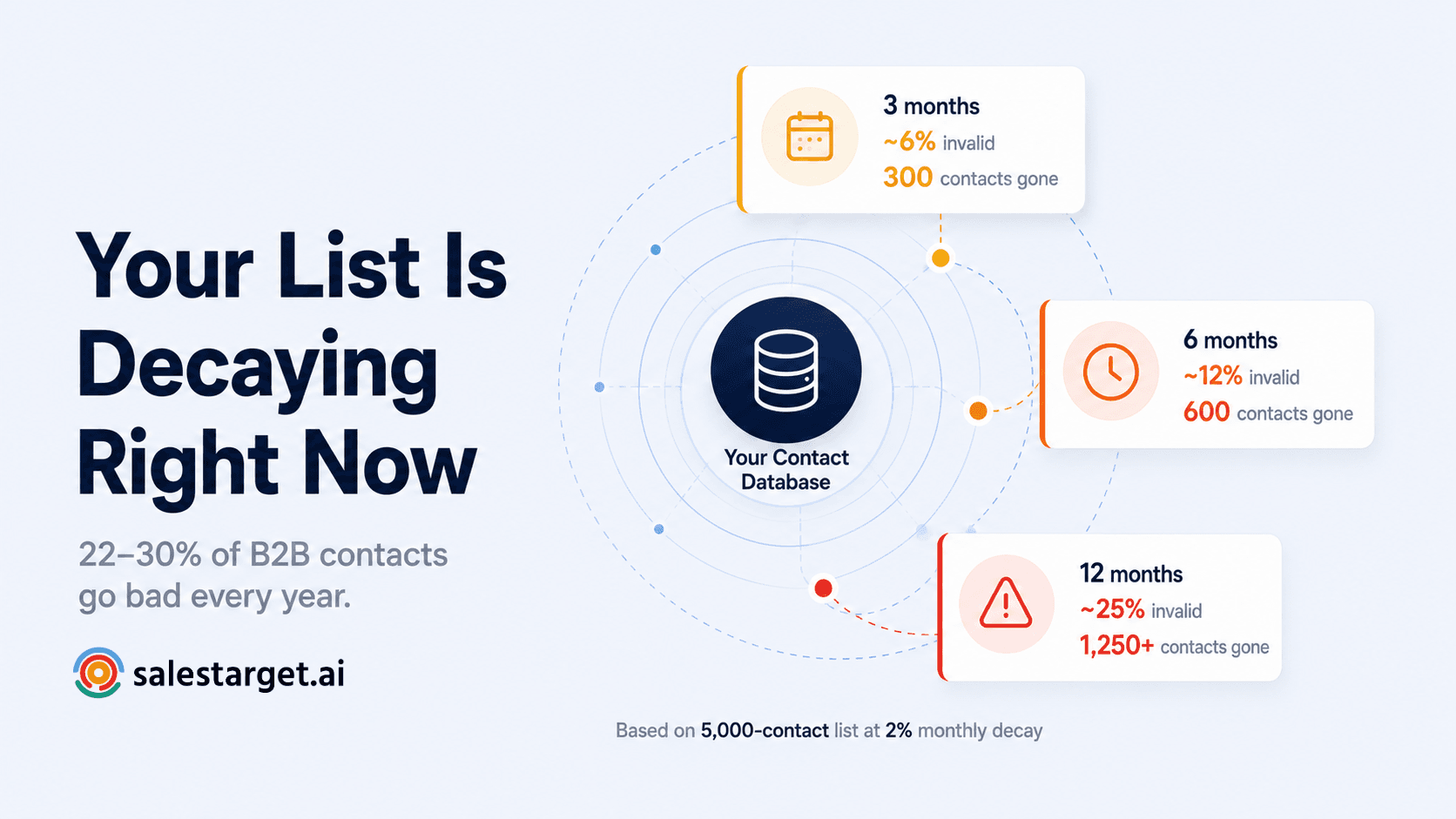
Industry research consistently puts the B2B email list decay rate at 22–30% annually. ZeroBounce's 2026 Email List Decay Report found that at least 23% of email addresses checked were invalid or risky — down slightly from 28% in 2024. At the monthly level, that works out to roughly 2% of your contacts becoming invalid every month.
| List size | After 3 months | After 6 months | After 12 months |
|---|---|---|---|
| 1,000 contacts | ~60 invalid | ~120 invalid | ~225–300 invalid |
| 5,000 contacts | ~300 invalid | ~600 invalid | ~1,125–1,500 invalid |
| 20,000 contacts | ~1,200 invalid | ~2,400 invalid | ~4,500–6,000 invalid |
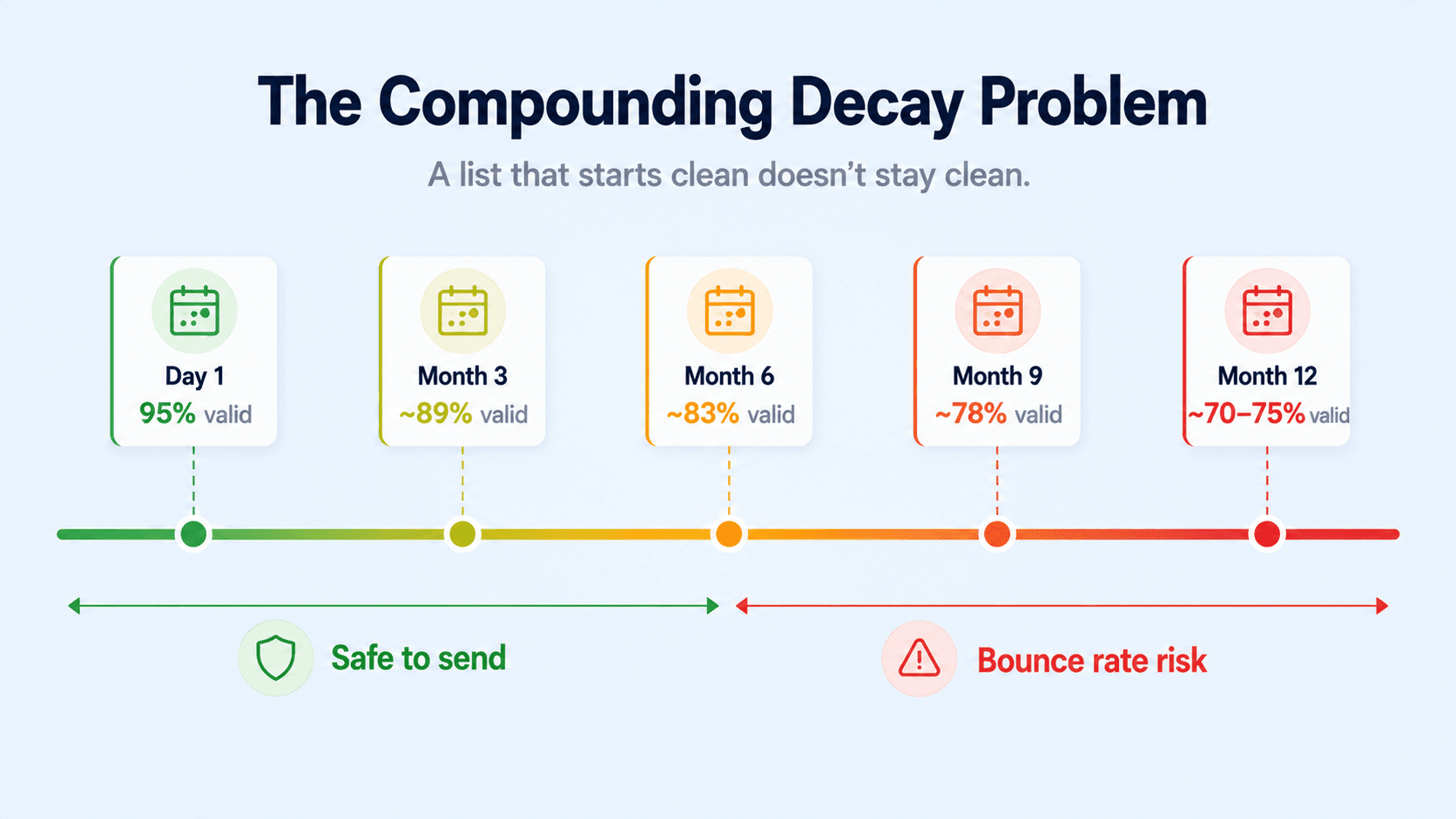
The compounding effect is the problem most teams underestimate. At 2% monthly decay, a list that starts at 95% valid will drop to around 78% valid by month nine — without you sending a single email from it. By the time you launch a campaign, you could already be sitting on a bounce rate problem before the first send goes out.
The compounding damage problem
Why one bad campaign hurts the next
Email list decay doesn't just damage the campaign you run with the decayed list. A high-bounce rate from one send damages your domain's reputation with inbox providers — and that reputation damage affects every campaign you run from that domain afterward. Your next send to a perfectly clean list still lands in spam more often because your domain reputation took a hit from the previous send. The damage is cumulative and cross-campaign. This is why treating decay as a "clean up after the bounce" problem is fundamentally wrong — it needs to be caught before the send.
The four main causes — and which lists are most at risk
1. Job changes
The biggest driver of B2B list decay. When someone leaves a company, their work email is typically deactivated within days. Industry research suggests a significant proportion of job-related email addresses change within 12 months. Any segment heavy in mid-level roles — where turnover is highest — decays fastest.
2. Domain shutdowns and acquisitions
When a company shuts down, gets acquired, or rebrands, its old domain either goes dark or starts redirecting. Every contact at that domain becomes invalid simultaneously. A single acquisition in your target market can invalidate dozens of contacts in your list overnight.
3. Abandoned inboxes
Personal email addresses on consumer providers — Gmail, Yahoo, Outlook — are more stable than work addresses, but not immune. Accounts that go inactive for extended periods can be deactivated. And some abandoned accounts eventually get repurposed as recycled spam traps.
4. Data vendor staleness
Purchased lists and third-party enrichment data is validated once — at the point of collection. From that moment, it decays. The gap between when the data was verified and when you use it determines how much decay has accumulated. A list purchased six months ago already has months of decay baked in before you run your first campaign.
How to measure your list health in SalesTarget
The Email Verification Status donut chart on your Lead Validation dashboard is the fastest way to see where your overall list quality stands. The chart shows the cumulative ratio of valid vs invalid addresses across all lists you've verified — updated in real time as you run new verification jobs.
What to look for:
- Valid rate above 85% — healthy. Your data sources are clean and your verification habit is working.
- Valid rate 70–85% — caution. Your lists are aging or your data sources have quality issues worth investigating.
- Valid rate below 70% — action required. Your campaigns are carrying significant bounce risk. Audit your data sources before your next send.
If your valid rate is trending down across consecutive verification jobs, that's a signal about your data sourcing — not just individual list quality. The problem is upstream, and cleaning individual lists won't fix it permanently.
Building a re-verification habit that actually holds
The right approach to decay is not reactive — it's systematic. Three rules that keep list quality consistent:
Rule 1: Verify before every major campaign, not after the last one bounced.
Run your list through SalesTarget's Bulk Email Verifier before every campaign launch. Not quarterly. Not annually. Before every send that matters. The cost is 1 credit per address. The cost of skipping it is a bounce-damaged domain that affects weeks of future outreach.
Rule 2: Any list older than 90 days gets re-verified before use.
A list verified three months ago has accumulated roughly 6% decay. That sounds manageable — but at 500 contacts it's 30 dead addresses. At 5,000 contacts it's 300. At those numbers, a single campaign send will push your bounce rate above the 2% threshold that triggers inbox provider flags.
Rule 3: Check your dashboard valid rate before and after every campaign.
Your Email Verification Status chart is a leading indicator. If it's trending down between campaigns, you know your data quality is degrading before your bounce rate confirms it. Fix the source, not the symptom.
The highest-risk segments to prioritize
Where to focus first
If you have a large existing database and can't verify everything at once, prioritize in this order: (1) Any segment you haven't sent to in 6+ months. (2) Contacts sourced from purchased or third-party lists. (3) CRM contacts in roles with high turnover — SDRs, junior marketing, early-stage startups. (4) Any segment where your last campaign had a bounce rate above 1.5%. These are where decay has had the most time to compound and where the per-credit ROI of verification is highest.
Your list is decaying right now. Here's how to stay ahead of it.
SalesTarget's Bulk Email Verifier processes your entire list — catching every address that has gone bad since your last verification. Your Email Verification Status dashboard shows your live valid rate across every list you've ever run.
✓ 50 credits ✓ 7-day trial ✓ No credit card required
Frequently Asked Questions

See It In Action: Book Your Free Demo
Get a personalized walkthrough and see how it works for your team.
Book My Demo →



