Most sales teams don't fail at prospecting because they lack data. They fail because the data they have doesn't match the way they sell. A phone-first team in Germany, an SDR pod running LinkedIn and email sequences, and a RevOps lead building automated enrichment all need "sales intelligence," yet the right tool for each is different.
The short answer: the best sales intelligence tools for B2B sales teams are the ones that fit your sales motion. ZoomInfo suits enterprise teams that want broad data plus buyer intent data across many systems. Apollo.io and SalesTarget.ai suit teams that want to find contacts and run outreach in the same place, with SalesTarget.ai also adding a built-in CRM. Cognism suits phone-heavy teams selling into Europe. LinkedIn Sales Navigator suits relationship-led selling on LinkedIn. Lusha and Seamless.AI suit reps who need fast contact lookups. Clay suits operations teams that want to build their own enrichment workflows.
Below, each tool is reviewed on what it does well, where it falls short, and which team it suits, followed by a comparison table and a practical way to test your shortlist.
What Sales Intelligence Tools Actually Do
Sales intelligence tools collect and organize information about companies and the people who work there, then help sellers decide who to contact, when, and with what message. In practice, that usually means four layers:
- Contact and company data: names, roles, business emails, phone numbers, company size, industry and technology used.
- Signals: events that suggest timing, such as funding, hiring, leadership changes, job moves or topic-level research activity (buyer intent data).
- Enrichment: filling in or refreshing missing fields on records you already have.
- Activation: getting that information into a CRM, a sequence or a rep's inbox without manual copying.
How they differ from a contact database or a CRM ?
A contact database answers "who exists?" A CRM answers "what have we already done with this person?" Sales intelligence sits between the two: it answers "who should we contact next, and why now?" Many sales prospecting tools blur these lines, which is why comparing them only on database size misses the point.
Individual tools vs a sales intelligence platform
Some of the tools below do one job well, such as contact lookups or enrichment, and expect you to connect them to the rest of your stack. Others try to cover data, signals, outreach and pipeline in one product. Neither approach is right for every team. If you are deciding between a stack of point tools and a single system, our guide to choosing a sales intelligence platform for B2B teams covers that platform-level decision in depth. This article stays focused on the individual tools.
The Best Sales Intelligence Tools for B2B Sales Teams, by Sales Motion
The eight tools below are not ranked. Each is grouped by the motion it supports best. Database figures are the vendors' own published claims, checked on their official sites in October 2026; treat them as vendor statements, not independently audited numbers.
1. SalesTarget.ai — prospecting, outreach and CRM in one workflow
Best for: SDR and BDR teams, agencies and growing sales teams that want discovery, verification, multichannel outreach and pipeline tracking without stitching tools together.
SalesTarget.ai is an AI-powered B2B sales platform. Its Lead Explorer searches what the company states are 840M+ professional profiles and 96M+ business entities drawn from 50+ data sources, using either plain-English AI search or stacked filters for industry, role, seniority, company size, revenue, location, tech stack and intent topics. Selected leads are enriched in one click with professional email, personal email, phone and mobile, verified at the point of enrichment rather than when the record was first collected. Intent topics come from Bombora, alongside business-event filters such as funding rounds, hiring spikes and leadership changes, with a 30–90 day lookback.
Strengths
- Enriched leads move directly into cold email sequences or LinkedIn outreach campaigns, and email and LinkedIn steps can run in one multichannel sequence.
- Email outreach includes unlimited connected inboxes, automatic warm-up, inbox rotation, AI-written sequences and a unified inbox (Unibox) that sorts replies by intent.
- Built-in validation (MX/SMTP checks, disposable-address detection and risk scoring) runs before sending.
- A built-in CRM logs email activity automatically, creates follow-up tasks when leads reply and includes a dialer; it also syncs with HubSpot, Salesforce, Pipedrive and Zoho.
- An AI Copilot helps build lists, draft sequences and personalize messages.
Limitations
- Newer to the category than long-established data vendors, so teams with strict enterprise procurement or niche regional needs should test coverage in their target markets during evaluation.
- Intent data is topic-based (Bombora) plus business events; teams that need website-visitor identification or conversation intelligence will need another tool.
- Teams that are happy with an existing CRM and sequencer may use only part of the platform.
Choose it if: you want one workspace where a rep can find a prospect, verify the contact, send a coordinated email and LinkedIn sequence and track the deal.
2. ZoomInfo — broad enterprise data and signals
Best for: Enterprise and upper mid-market organizations with dedicated sales operations and many connected systems.
ZoomInfo describes itself as an AI go-to-market platform with data on 500M+ contacts and 100M+ companies. Beyond contact and company search, it offers buyer intent data, website-visitor identification, CRM enrichment, predictive modeling, AI agents through its Copilot and GTM Workspace products, and access for AI assistants through an MCP server. It states that its data is built from public web sources, filings, job postings and a contributory network, with human researchers verifying records.
Strengths
- Wide range of data types (firmographic, technographic, intent, org charts) in one vendor.
- Native integrations with Salesforce, HubSpot and Microsoft Dynamics 365, plus 120+ other tools according to ZoomInfo.
- Strong fit for territory planning, routing and data management across large teams.
Limitations
- The breadth of the platform means meaningful setup and ongoing administration; value depends on having someone who owns it.
- Smaller teams that mainly need contacts and sequences may use only a fraction of what it offers.
Choose it if: you run a large, multi-team go-to-market operation and need one data source feeding many systems.
3. Apollo.io — data plus engagement for outbound teams
Best for: Startups, SMBs and mid-market outbound teams that want a contact database and sales engagement in one product.
Apollo states it provides access to 240M+ contacts and 30M+ companies, with waterfall enrichment, buying signals (intent, job changes, website visits), email sequencing, a parallel dialer, deliverability features such as domain warming and inbox rotation, and AI agents that research, write outreach and follow up. It also offers a Chrome extension and 200+ integrations.
Strengths
- Prospecting, sequencing and calling live together, which suits reps who want fewer tabs.
- Waterfall enrichment can improve record completeness.
- Works inside other tools through its Chrome extension and integrations.
Limitations
- A broad feature set can take time to configure well; teams should be deliberate about which modules they actually use.
- As with any large database, test contact accuracy in your specific region and industry before scaling.
Choose it if: you want a widely used prospecting-plus-engagement tool and are comfortable running your CRM separately.
4. Cognism — compliant, phone-verified data for EMEA
Best for: Mid-market and enterprise teams selling into Europe, especially phone-first outbound teams.
Cognism positions itself around European B2B data and compliance. It offers phone-verified mobile numbers that go through additional verification layers, states that Director-level and above data is refreshed every 30 days, and provides Do-Not-Call coverage across Europe. Signals include intent, hiring, job joins and funding. It also offers CRM enrichment, an API and MCP access, and exports to Salesforce, HubSpot and Pipedrive.
Strengths
- Strong emphasis on GDPR-aware data practices and DNC screening for European markets.
- Phone-verified mobiles suit teams where calls drive pipeline.
- CRM enrichment helps keep inbound and existing records complete.
Limitations
- It is primarily a data and enrichment layer; you will still need a sequencing or engagement tool for outreach.
- Cognism itself says teams with at least five salespeople tend to see the most value, so very small teams may find it more than they need.
Choose it if: Europe is a core market and calling is central to your motion.
5. LinkedIn Sales Navigator — relationship-led prospecting on LinkedIn
Best for: Account executives and social sellers who prospect and build relationships primarily on LinkedIn.
Sales Navigator is a prospect research tool built on LinkedIn's network of 1B+ members, with 50+ search filters, saved searches, lead and account alerts (such as job and role changes), lead and account recommendations, InMail, and AI features including Account IQ, Lead IQ and Message Assist. Higher plans add Buyer Intent, TeamLink warm-introduction paths and CRM integrations with Salesforce, HubSpot, Microsoft Dynamics 365 and Oracle Sales.
Strengths
- Role and job-change information comes directly from LinkedIn profiles.
- TeamLink and Relationship Map help find warm paths into accounts.
- AI summaries reduce account research time before calls.
Limitations
- It is not designed as an email and phone contact database, so teams running email or phone outreach usually pair it with an enrichment tool.
- Several features, including Buyer Intent, TeamLink and CRM integrations, are only on higher plan tiers.
Choose it if: your buyers are active on LinkedIn and warm, relationship-led outreach matters more than volume.
6. Lusha — fast lookups and signals for reps and AI agents
Best for: Individual reps, SDR teams and RevOps teams that want quick contact reveals plus data delivered into other tools.
Lusha states it covers 515M+ contacts and 29M+ companies, with 26 buying signals (funding, hiring surges, leadership changes, job changes) refreshed weekly. It is available through a Chrome extension, its own workspace, an API and an MCP server for AI assistants, and offers lookalike prospecting, AI recommendations and native apps for Salesforce, HubSpot, monday CRM, Zoho, Pipedrive and Bullhorn.
Strengths
- Low-friction lookups while browsing LinkedIn or company sites.
- Signals are dated, named company events rather than anonymous intent scores.
- Publishes its own accuracy and data-decay measurements, which helps buyers evaluate it.
Limitations
- Its core strength is the data layer; teams running complex multichannel sequences should check whether its engagement features cover their needs or plan to pair it with an outreach tool.
- Bulk, ICP-wide list building is possible but less central to the product than quick lookups and enrichment.
Choose it if: your reps need reliable contact details fast, inside the tools they already use.
7. Seamless.AI — real-time contact search
Best for: SDRs, account executives and founders who prospect high volumes of individual contacts.
Seamless.AI describes itself as a real-time search engine rather than a static database: it searches the public web when a user looks up a contact. It offers a Chrome extension, buyer intent and job-change tracking, CRM enrichment, AI-generated pitch intelligence, built-in emailing and calling, AI agents, and integrations it states number 6,000+. It also publishes very large data-volume claims, which are best judged through your own sample tests.
Strengths
- Contact lookup across any website through the Chrome extension.
- Combines data, engagement and AI writing in one product.
- Job-change tracking supports champion-follow-up plays.
Limitations
- Real-time lookup quality can vary by segment, so test accuracy against your own ICP rather than relying on headline numbers.
- Teams that need deep firmographic segmentation for account-based programs may want a more structured database.
Choose it if: your motion is rep-driven, contact-by-contact prospecting and speed of lookup matters most.
8. Clay — build-your-own enrichment and signal workflows
Best for: RevOps teams and "GTM engineers" who want to design custom enrichment, scoring and routing workflows.
Clay is a data and workflow platform rather than a single database. It offers a marketplace of 200+ data and AI providers, waterfall enrichment across multiple providers, AI research agents (Claygents), signal tracking such as job changes and promotions, visual workflows, a native sequencer, CRM enrichment and ad-audience syncing.
Strengths
- Combines many data sources to improve coverage on hard-to-find contacts.
- AI agents can research custom data points (for example, hiring pages or product announcements) that standard databases do not hold.
- Highly flexible scoring and routing logic.
Limitations
- It is a builder's tool: getting value requires someone comfortable designing workflows, so it is not a plug-and-play prospect list for individual reps.
- Flexibility means more decisions to make and maintain.
Choose it if: you have operations capacity and want enrichment and signals tailored to your exact ICP.
Sales Intelligence Tools Compared
Use this table to shortlist two or three tools, then test them using the method further below.
| Tool | Primary purpose | Standout capabilities | Ideal users | Key consideration |
|---|---|---|---|---|
| SalesTarget.ai | Prospecting, outreach and CRM in one workflow | Point-of-enrichment verification; Bombora intent + business events; email + LinkedIn sequences; built-in CRM and dialer | SDR/BDR teams, agencies, growing sales teams | Test coverage in niche regions; no website-visitor ID |
| ZoomInfo | Enterprise GTM data and intelligence | Intent data, visitor ID, CRM enrichment, AI agents, 120+ integrations | Enterprise and upper mid-market | Needs dedicated admin ownership |
| Apollo.io | Data plus sales engagement | Waterfall enrichment, sequences, parallel dialer, AI agents | Startups to mid-market outbound teams | Configure only the modules you need |
| Cognism | Compliant EMEA data | Phone-verified mobiles, European DNC coverage, 30-day refresh for Director+ | Phone-first teams selling into Europe | Needs a separate engagement tool |
| LinkedIn Sales Navigator | Relationship-led prospecting | 50+ filters, job-change alerts, TeamLink, Account IQ | AEs and social sellers | No email/phone database; key features on higher tiers |
| Lusha | Fast contact data and signals | Chrome extension, 26 weekly signals, API and MCP | Individual reps and RevOps | Pair with an outreach tool for complex sequences |
| Seamless.AI | Real-time contact search | Web-wide lookups, job changes, pitch intelligence | High-volume individual prospectors | Sample-test accuracy by segment |
| Clay | Custom enrichment workflows | 200+ provider marketplace, waterfall enrichment, AI research agents | RevOps and GTM engineers | Requires workflow-building skills |
Essential Features to Evaluate in Sales Intelligence Software
Feature lists look similar across vendors. These are the questions that actually separate them:
- Coverage where you sell. Ask for counts in your target countries, industries and seniority levels, not global totals.
- When verification happens. A contact verified at the moment you enrich it is more useful than one marked "verified" at an unknown date.
- Signal type and freshness. Know whether signals are topic-level intent, named company events, or LinkedIn activity, and how often they refresh.
- Enrichment of existing records. Check whether the tool can refresh your CRM, not just add new leads.
- Activation path. Count the steps between finding a contact and that contact being in a live sequence. Native pushes beat CSV exports.
- Compliance controls. For European or regulated markets, look for documented GDPR practices, opt-out handling and DNC screening.
- Daily usability. If reps won't open the tool, the data quality is irrelevant. Include two or three reps in the trial.
How to Choose: Match the Tool to Your Team
By sales motion
| If your motion is… | Start your shortlist with… |
|---|---|
| Multichannel outbound (email + LinkedIn) with a lean team | SalesTarget.ai, Apollo.io |
| Phone-first selling into Europe | Cognism |
| Relationship-led, LinkedIn-heavy account selling | LinkedIn Sales Navigator + an enrichment tool |
| Rep-driven, contact-by-contact prospecting | Lusha, Seamless.AI |
| Enterprise GTM with many connected systems | ZoomInfo |
| Ops-built enrichment and scoring | Clay |
By team size
Small teams usually gain the most from fewer tools: one place to find, verify, contact and track prospects reduces the admin that slows a two- or three-person team. Larger organizations can justify specialist layers because they have people to connect and maintain them.
By target market
Regional coverage varies more than vendors admit. A tool that is strong in North American tech can be thin in DACH manufacturing or APAC services. Always test against your real ICP.
A simple way to test your shortlist
- Pick 100 target accounts that match your ICP, including a few you know well.
- Run the same account list through two or three tools.
- Score each tool on contacts found per account, verified email rate, phone connect rate on a small call block, and whether signals appear on accounts you know are active.
- Time how long it takes a rep to go from search to first message sent.
- Choose the tool with the best results on your list, not the best demo.
How Sales Intelligence Connects to Your Wider Sales Workflow

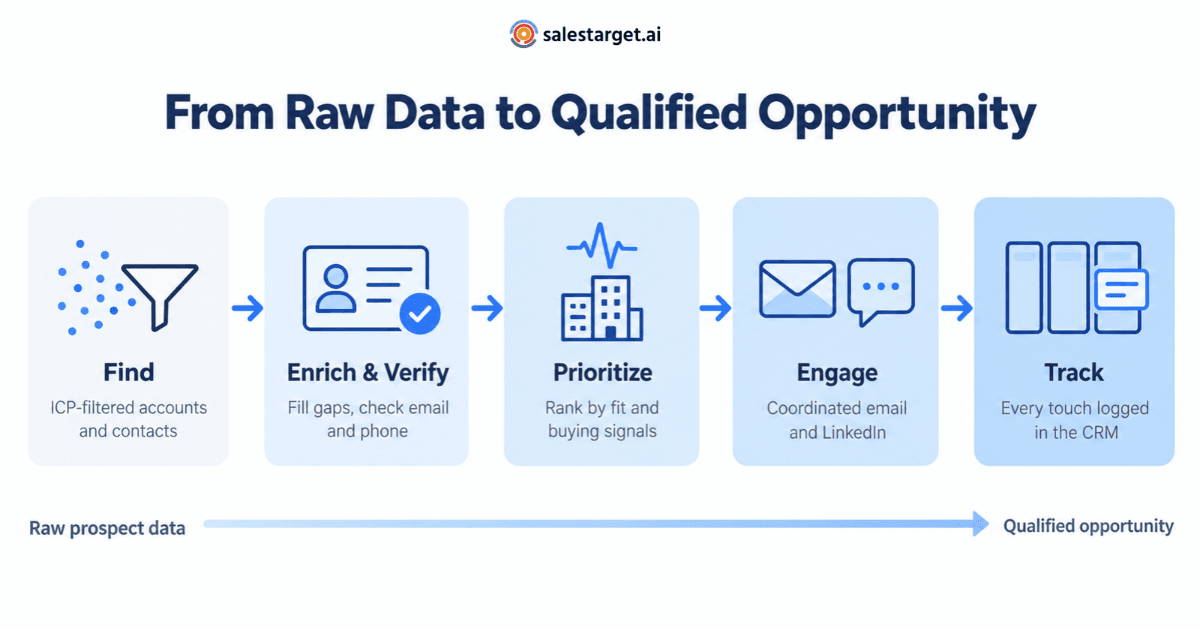
Sales intelligence only creates pipeline when it flows into the next step. A typical outbound workflow looks like this:
- Lead generation: build an ICP-filtered account and contact list, layered with signals so the top of the list is the most timely.
- Contact enrichment and validation: fill missing fields and verify emails and phones before anything is sent, protecting sender reputation.
- Email outreach: personalize first lines using role, company and signal context; run sequences from warmed inboxes.
- LinkedIn outreach: add connection requests and messages that carry the same context, so channels support each other rather than repeat.
- CRM: log every touch and reply automatically, so ownership, follow-ups and reporting stay accurate.
Every handoff between separate tools, such as an export, an import or a field-mapping screen, adds delay and a chance for records to fall out of sync. That is the practical case for connecting these steps, whether through integrations or a single platform like SalesTarget.ai.
Common Mistakes When Choosing and Using Sales Intelligence Tools
- Choosing on database size. A bigger global number does not mean better coverage in your market.
- Trusting accuracy claims without a sample test. Every vendor publishes strong numbers; only your own test tells you how they hold up on your ICP.
- Buying signals without a follow-up plan. Intent alerts that no one is assigned to act on simply pile up. Define who responds, with which sequence, within what time.
- Sending unverified contacts. Bounces damage domain reputation and hurt every later campaign.
- Letting data go stale. People change jobs constantly. Lusha's own published measurement found that 12.25% of US sales leaders changed roles within twelve months, so refresh records before reuse.
- Adding tools no one owns. Each new tool needs an owner, integrations and training, or it quietly drags on B2B sales productivity.
Choosing the Right Tool for Your Team
There is no single best tool, only the best fit for how your team sells. Start from your motion, shortlist two or three B2B sales tools from the table above, and run them against the same real account list before committing.
If your team wants prospect discovery, verified contact data, email and LinkedIn outreach, and pipeline tracking to work as one connected flow, explore how SalesTarget.ai brings them together and test Lead Explorer against your own ICP.