TL;DR
- Managing replies across 10+ cold email accounts manually is a productivity killer — missed replies, slow response times, and zero visibility across campaigns.
- A unified inbox consolidates every reply from every sending account into a single dashboard, sorted and categorised by AI.
- AI reply categorisation (Interested / Not Interested / OOO / Auto-Reply) eliminates manual triage so your team acts only on the replies that matter.
- SalesTarget's Unibox routes interested replies directly into your CRM pipeline — no copy-paste, no lost leads.
- If you run outbound at scale and your team is still tabbing between Gmail tabs, this changes everything.
Your SDR sends 2,000 cold emails a week across 12 sending accounts. Replies come in. Some are hot. Some are OOO. Some are unsubscribes buried under three auto-forwards. Your rep opens Gmail tab number seven trying to find the one that said "let's talk Thursday." They don't find it in time. The deal goes cold before it starts.
This is not a workflow problem. It is a structural problem — and a unified inbox is the fix.
The Reply Management Problem at Scale
Cold email infrastructure has evolved fast. Most outbound teams now run multiple sending domains, rotate inboxes for deliverability, and spread campaigns across 5, 10, sometimes 20+ accounts. That is the right move for cold email outreach at volume — inbox rotation protects sender reputation and keeps your sequences landing in primary tabs.
But nobody solved the reply side of that equation.
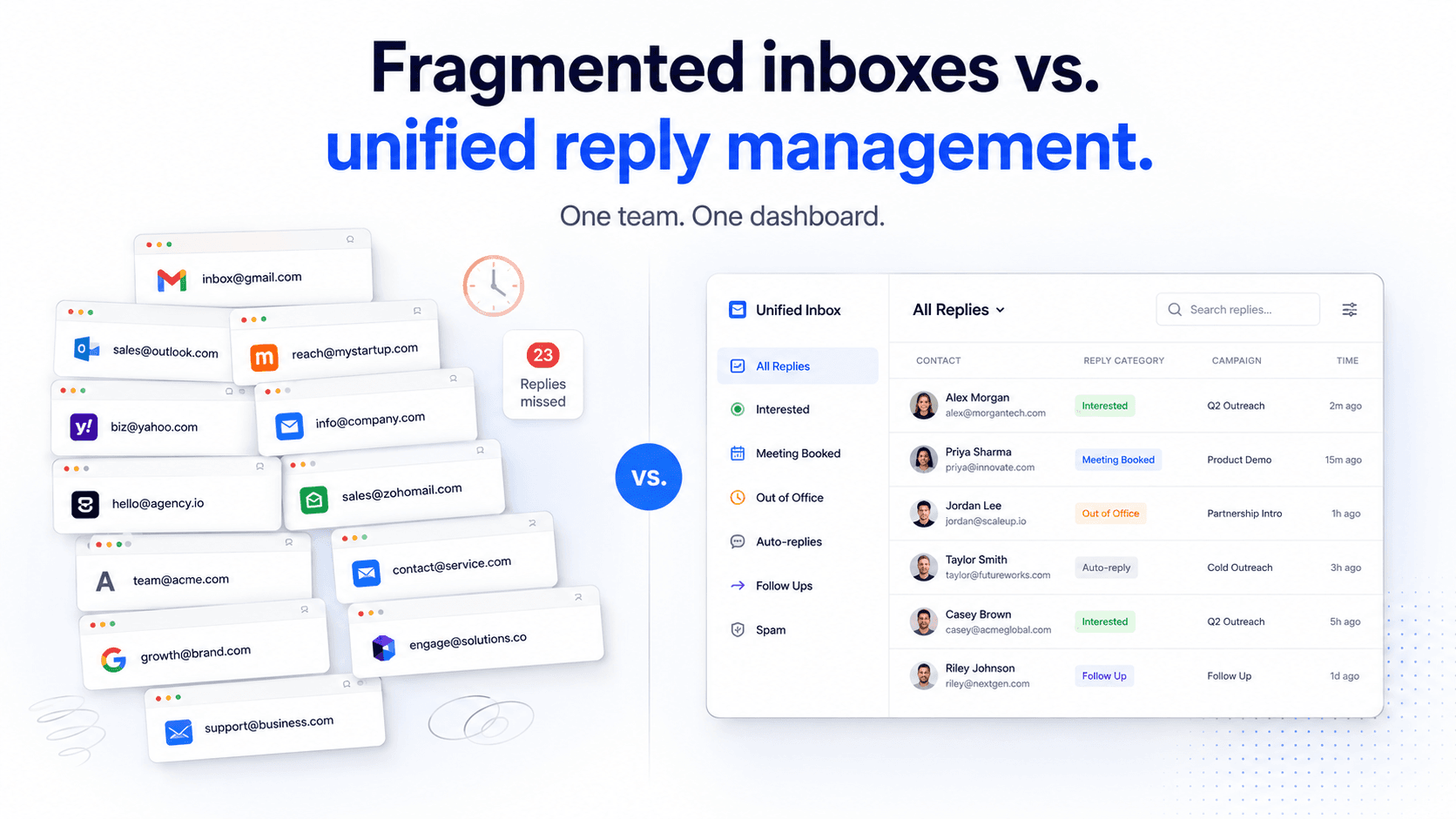
When you send from 12 accounts, replies come back to 12 accounts. Your SDR now has 12 inboxes to monitor. Multiply that by three reps and you have 36 Gmail tabs open at any given moment. The operational overhead alone — logging in, checking, context-switching — burns hours every week. And the cost of a missed reply from a warm prospect is not just time. It is pipeline.
What goes wrong without centralised reply management
| Problem | Impact | Severity |
|---|---|---|
| Missed interested replies | Warm prospects go cold, pipeline lost | Critical |
| Slow response time | Reply-to-meeting conversion drops sharply after 1 hour | Critical |
| Manual categorisation | Reps waste time triaging OOOs, unsubscribes, and bounces | High |
| No team visibility | SDR leaves, nobody knows which replies are pending | High |
| CRM handoff friction | Interested replies don't get logged — deals fall through cracks | High |
Research from outbound sales platforms shows that reply response time is one of the strongest predictors of meeting conversion — the longer a rep takes to respond to an interested reply, the lower the chance that lead books a call. Managing replies across fragmented inboxes directly suppresses this metric.
What Is a Unified Inbox for Cold Email?
A unified inbox is a single dashboard that aggregates all replies from every connected sending account into one place. Instead of checking 12 separate Gmail inboxes, your team sees every reply — from every account, every campaign, every sequence — in one feed.
It is not a forwarding rule. It is not a shared inbox built for newsletters. It is infrastructure specifically designed for the reply volume and categorisation needs of cold email outreach at scale.
The core function is consolidation. But the value of a properly built unified inbox goes further than that — it adds intelligence on top of consolidation. AI categorises each reply automatically so your reps never have to open an email just to decide whether it is worth opening.
What a unified inbox does (and does not do)
| It does | It does not |
|---|---|
| Pull replies from all connected sending accounts | Replace your email client for non-outbound email |
| Categorise replies by intent using AI | Automatically send follow-ups (that is your sequence) |
| Surface hot replies at the top of your queue | Read your mind about deal priority |
| Route interested leads into CRM with one action | Close deals — that is still your job |
| Give managers visibility across the whole team's replies | Bypass your sending infrastructure |
Why a Unified Inbox Matters: Response Time, Reply Rate Tracking, and Team Handoffs
Consolidation is the foundation. But there are three specific operational wins that make a unified inbox worth deploying.
1. Response time
Speed of reply is one of the most leveraged variables in cold email conversion. An interested prospect who gets a human response within 30 minutes of replying is significantly more likely to book a meeting than one who waits four hours. A unified inbox means your rep sees the reply the moment it lands — not when they happen to check account number eight.
2. Reply rate tracking by campaign
When replies are scattered across 12 inboxes, your reporting is blind. A unified inbox lets you see which campaigns are generating positive replies, which sequences are producing objections, and which accounts are getting OOOs — all in one view. That feedback loop is what lets you iterate your messaging fast.
3. Team handoffs
When an SDR books a meeting, the AE needs context. When an SDR is OOO, someone needs to cover their replies. Without a shared reply layer, this breaks. A unified inbox gives the whole team — SDRs, AEs, managers — a shared operational surface. Reply ownership, reply status, and reply history stay with the lead, not the individual rep's inbox.
How AI Reply Categorisation Works
Not all replies are equal. Out of 100 replies to a cold email campaign, you might have 8 genuinely interested, 15 OOO, 12 polite declines, 40 unsubscribes, and 25 auto-replies from corporate mail servers. Without categorisation, your rep has to open every single one to find the 8 that matter.
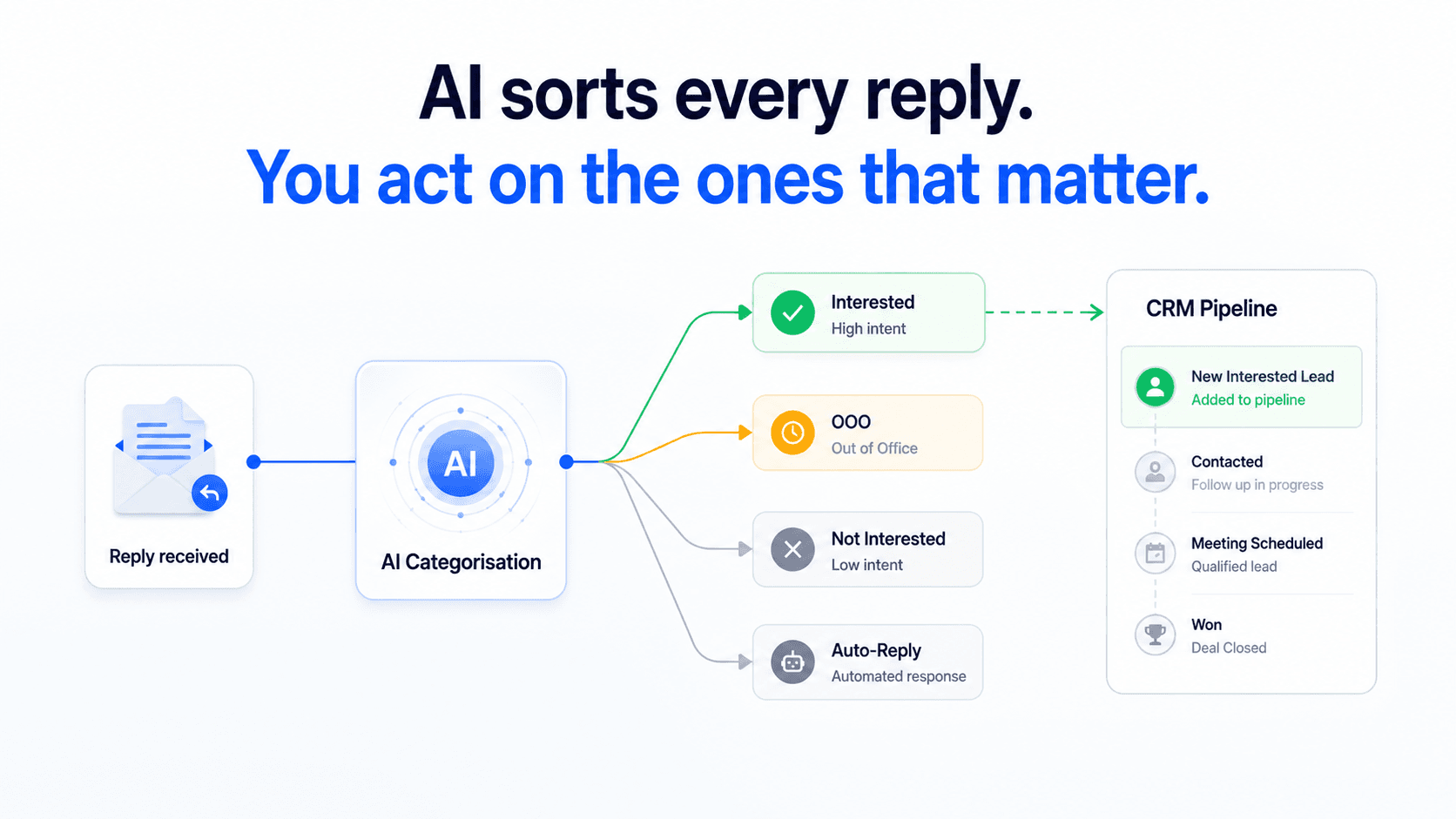
AI reply categorisation reads the reply content and assigns an intent label automatically. The categories map to the actions your team actually needs to take:
| Category | What it signals | Recommended action |
|---|---|---|
| Interested | Prospect wants to continue the conversation | Reply within 30 min, move to CRM |
| Out of Office | Prospect is away, will return | Resume sequence after return date |
| Not Interested | Clear decline or unsubscribe intent | Remove from sequence, log objection |
| Auto-Reply | System-generated, no human intent | Deprioritise, no action needed |
The practical impact: your reps open their unified inbox and the Interested pile is already surfaced. They skip the noise entirely. According to Instantly's cold email benchmark data, the average positive reply rate for B2B cold email sits between 3–8% depending on sequence length and targeting quality — meaning the large majority of replies your team receives are not actionable. AI categorisation reclaims every hour spent manually sorting the other 92–97%.
The categorisation feedback loop
Why it compounds over time
As more replies are categorised, the patterns that generate Interested replies become visible in your campaign analytics. You learn which subject lines, which openers, and which sequences produce the highest positive-reply rates — and you iterate. The unified inbox is not just an operational tool. It is a feedback mechanism for your messaging strategy.
How SalesTarget's Unibox Works
SalesTarget's Unibox is built natively into the platform — not bolted on as an integration. That distinction matters. Because your sending accounts, your sequences, and your reply inbox all live in the same system, the Unibox has full context for every reply it categorises: which campaign it came from, which step in the sequence triggered it, and what the prospect's history looks like.
Here is how it works end-to-end:
Step 1 — Connect your sending accounts
Every inbox you use for connects to SalesTarget. Once connected, all replies route automatically into Unibox — there is no forwarding configuration, no Zapier glue, and no manual setup per account.
Step 2 — Replies land in a single feed
Every reply — regardless of which sending account received it or which campaign it came from — appears in your Unibox dashboard. The feed shows sender, campaign source, reply category, and the reply content in preview. No tab-switching. No missed replies sitting in an account you checked yesterday.
Step 3 — AI categorises each reply on arrival
The moment a reply lands, SalesTarget's AI reads the content and assigns a category: Interested, Not Interested, Out of Office, or Auto-Reply. The categorisation is immediate — your team sees the label before they open the reply. Interested replies are surfaced to the top of the queue automatically.
Step 4 — Your team replies, and sequences pause automatically
When a rep replies to an Interested lead directly from Unibox, SalesTarget pauses any further automated sequence steps for that contact. You never accidentally send a follow-up to someone who already replied positively and is mid-conversation.
Step 5 — Route to CRM with one action
Interested leads move directly into SalesTarget's CRM from Unibox — one click, full contact context, conversation history attached. No copy-paste into a separate system. No data entry. The lead arrives in your pipeline ready for the AE to pick up.
What to Do With Interested Replies: The CRM Handoff Workflow
An Interested reply is the highest-value output of any cold email sequence. The moment a prospect responds positively, two things need to happen fast: a human needs to reply, and the lead needs to enter a deal pipeline so it is tracked, owned, and visible.
The handoff from cold email to CRM is where deals most commonly fall through the cracks in outbound teams that are still running manual processes. The rep replies, books a call, and then… forgets to log it. Or logs it in the wrong place. Or logs it three days later with incomplete context.
With SalesTarget, the handoff workflow looks like this:
| Step | Action | Who |
|---|---|---|
| 1 | Interested reply flagged in Unibox | Automated (AI) |
| 2 | SDR sends personalised reply from Unibox | SDR |
| 3 | Sequence paused automatically for this contact | Automated |
| 4 | Lead pushed to CRM with full reply history | SDR (one click) |
| 5 | AE picks up deal in pipeline, books meeting | AE |
| 6 | Deal tracked through pipeline stages | AE / Manager |
The entire handoff — from positive reply to CRM entry — happens without leaving SalesTarget. No copy-paste between tools. No context lost. No deal falling through a gap between a cold email platform and a CRM that was never properly integrated.
📊 Why reply speed matters for pipeline
- B2B email reply rates average 1–5% for cold outreach — every positive reply is genuinely hard-won (Mailchimp B2B benchmarks)
- Time-to-reply is one of the most significant factors in meeting conversion — research from outbound sales platforms shows response time within the first hour materially outperforms delayed responses
- Pipeline leakage most commonly happens at the reply-to-CRM handoff — not earlier in the sequence
Unified Inbox Mistakes to Avoid
Mistake 1: Using a shared Gmail inbox as a unified inbox substitute
Why it fails
Forwarding all cold email replies to one shared Gmail address gives you volume without intelligence. You still have to manually sort Interested from OOO from unsubscribes. You lose campaign attribution. You have no sequence pause automation. And you have a shared mailbox where three reps are accidentally replying to the same prospect simultaneously.
Mistake 2: Not pausing sequences when a reply comes in
The damage it causes
If your reply management is disconnected from your sequence engine, a prospect can reply "yes, let's talk" on Step 3 and still receive Steps 4 and 5 automatically. This is a conversion killer. The prospect who was warm gets a follow-up email that implies you did not read their reply. SalesTarget's Unibox pauses the sequence the moment a reply is detected — no configuration required.
Mistake 3: Letting interested replies sit without a defined handoff process
The operational gap
Centralising replies is the first step. Having a clear rule for what happens to Interested replies — who replies, within what timeframe, and how they enter the CRM pipeline — is what turns unified inbox from a tool into a workflow. Document the process before you run your first campaign through it.
Mistake 4: Ignoring OOO replies
Missed opportunity
Out-of-office replies usually contain a return date. That is a re-engagement trigger. Teams using a unified inbox with AI categorisation can identify OOO replies and schedule a follow-up for the day after the prospect returns — turning an auto-reply into a pipeline touch that most competitors will have missed entirely.
Stop managing 12 inboxes. Start managing one.
SalesTarget's Unibox consolidates every reply from every sending account — with AI categorisation so your team only touches the replies that matter.
✓ 50 credits ✓ 7-day trial ✓ No credit card required