TL;DR
- Most LinkedIn outreach fails because it's a single message, not a sequence. A structured 5-step flow changes that.
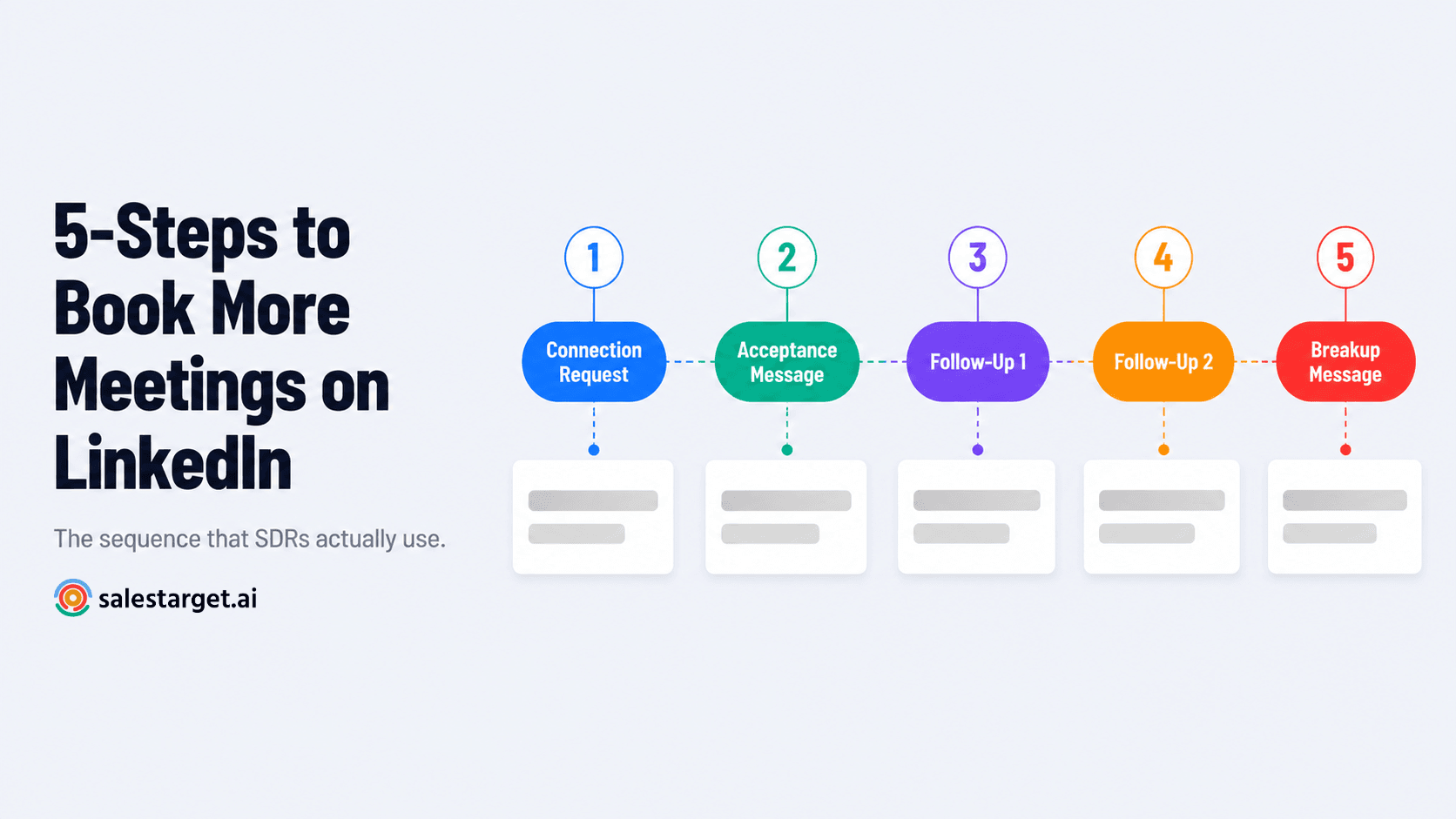
- The sequence: Connection Request → Acceptance Message → Follow-Up 1 → Follow-Up 2 → Breakup Message — each step has a distinct job.
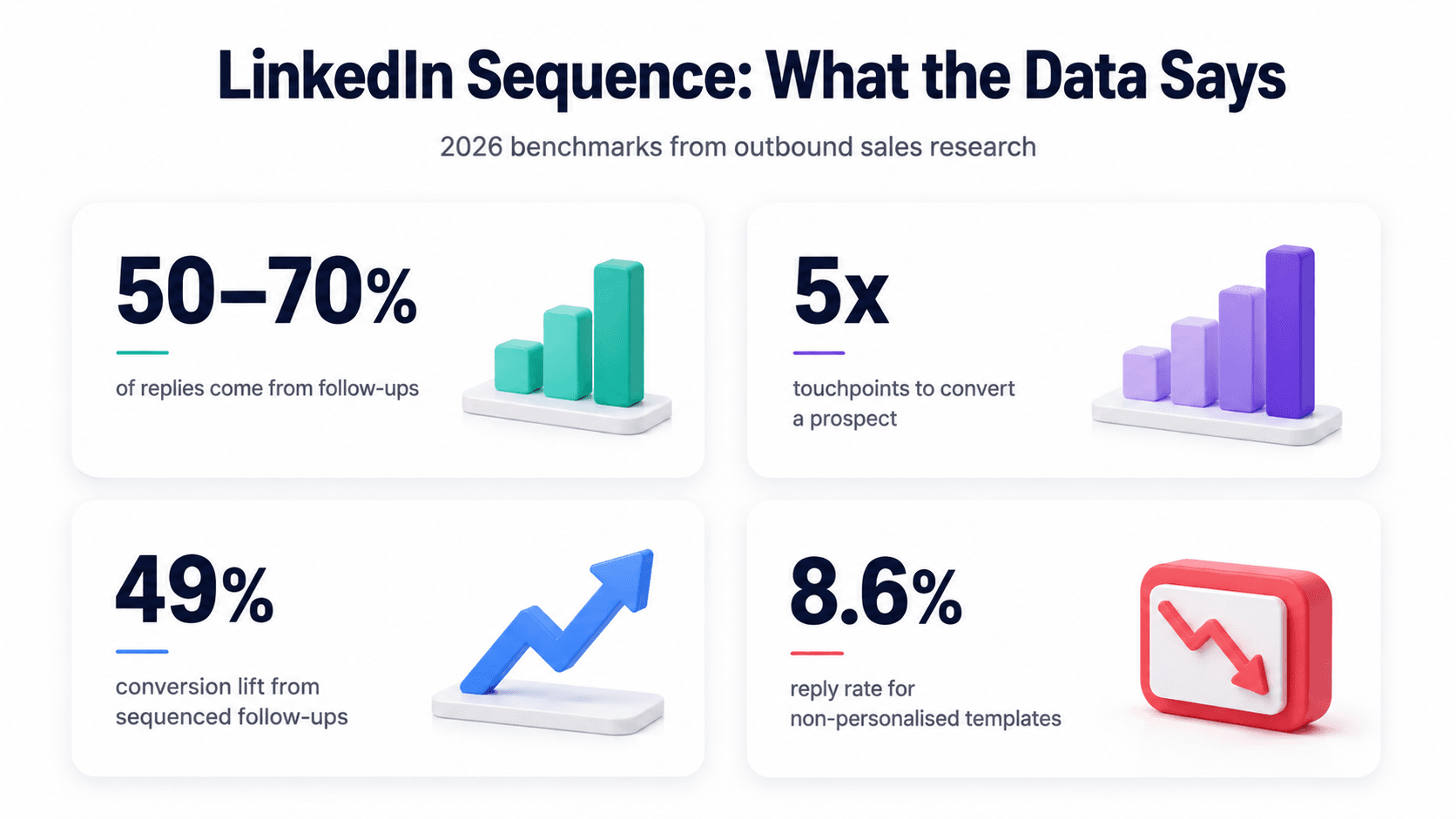
- Follow-up messages account for 50–70% of all replies in LinkedIn outreach campaigns — most reps never send them.
- Timing, personalisation, and safe sending limits are not optional — they're what separate accounts that scale from accounts that get restricted.
- SalesTarget's Sequence Builder automates this entire flow — with AI personalisation and smart scheduling built in at every step.
Most SDRs send one LinkedIn message and wonder why nobody replies. The ones consistently booking meetings aren't sending better single messages — they're running a sequence. There's a difference, and it's worth understanding before you send another connection request into the void.
Why a Sequence Beats a Single Message Every Time
Your prospect isn't ignoring you because they're not interested. They're ignoring you because they're busy, your message landed on a bad day, or they didn't have enough context to say yes on the first touch. That's not a rejection — it's a timing problem.
Research from outbound sales platforms consistently shows that the majority of LinkedIn replies don't come from the first message. They come from the second and third touchpoints — after the prospect has seen your name more than once and has a clearer sense of why you're reaching out. Specifically, data from LinkedIn outreach campaigns shows that follow-up messages account for 50–70% of total responses, yet a significant portion of reps never send a second message at all.
A LinkedIn message sequence solves this. Instead of one shot, you have a planned series of touchpoints — each with a specific purpose, a specific tone, and a specific timing window. The goal isn't to harass a prospect into a call. It's to stay visible, add value at each step, and make it easy for them to say yes when the timing is right.
📊 LinkedIn Sequence Benchmarks (2026)
- 50–70% of replies come from follow-up messages, not the first touch — Laxis LinkedIn Outreach Research
- 5 touchpoints is the average needed to convert a LinkedIn prospect into a conversation — Cleverly LinkedIn Benchmarks 2026
- 49% improvement in conversions from sequenced follow-ups spaced 2–5 days apart vs one-off outreach — Martal.ca 2026
- 10–25% reply rate is the benchmark for well-run LinkedIn sequences; top performers hit 30–50% with personalisation — Cleverly 2026
The 5-Step LinkedIn Message Sequence That Books Meetings
This is the structure. Each step has one job. Don't merge them, don't skip them, and don't try to close on step one.
Step 1 — The Connection Request (Day 0)
The connection request is not a pitch. Its only job is to get accepted. That means short, relevant, and human — not a feature dump or an opener that screams "I copied this from a template."
LinkedIn gives you 300 characters for a connection note. Use maybe half of them. The best connection requests reference something specific — a shared context, a relevant trigger, or a one-line reason why connecting makes sense for both sides. No ask, no pitch, no link.
Connection Request Template
Day 0 — Max 300 characters
Hi [First Name] — I work with [relevant role/team type] on improving their outbound pipeline. Saw your background in [specific area] and thought it made sense to connect. No pitch — just expanding my network in the space.
What to personalise: The "[specific area]" field. Pull it directly from their LinkedIn headline, a recent post they made, or their company's current focus. One genuine detail doubles your acceptance rate.
Step 2 — The Acceptance Message (Day 1–2 after connection)
They accepted. That's a signal of mild interest — nothing more. The acceptance message is your first real conversation starter. Its job is to open a dialogue, not close a deal. Send it within 24–48 hours of the connection being accepted, while your name is still fresh.
Keep it under 100 words. Lead with something useful or relevant to them — a stat, a question, an insight tied to their role or industry. End with a soft open question that's easy to answer. Absolutely no calendar link, no product pitch, no "I'd love to show you a demo."
Acceptance Message Template
Day 1–2 — Under 100 words
Thanks for connecting, [First Name]. Quick question — are you currently running any structured outbound from LinkedIn, or is it more ad hoc right now? Asking because most [job title]s I talk to are generating pipeline from email but haven't fully systematised LinkedIn yet. Curious where you sit on that.
Why this works: It diagnoses before it sells. The prospect reads it and thinks "this person is curious about my situation, not just trying to push a product." That's the difference between a reply and a read receipt.
Step 3 — Follow-Up 1: The Value Add (Day 5–6)
No reply from Step 2 doesn't mean no interest. It means they were busy, distracted, or not ready. Follow-Up 1 arrives 3–4 days after the acceptance message. Its job is to give them something useful — a resource, an insight, a specific data point — that justifies the second touchpoint without feeling like a chase.
This is the step most SDRs skip or botch. They send "just following up on my last message" — which adds zero value and signals desperation. Don't do that. Bring something to the table.
Follow-Up 1 Template — The Value Add
Day 5–6 — Under 120 words
Hey [First Name] — didn't want my earlier message to get buried. Sharing something that might be useful regardless: [one-line insight or resource relevant to their role — e.g. "we put together a breakdown of what LinkedIn sequence timing actually looks like for SaaS SDRs — happy to send it over if useful"]. No strings attached. Worth a look if [specific pain point] is something you're working on. Let me know.
Timing note: Three to four days between Step 2 and Step 3 is the sweet spot. Too soon feels like nagging. Too late and the context is lost. If you're running this through a LinkedIn outreach sequence tool, set the delay to trigger only after the connection has been accepted and Step 2 has been sent — not on a fixed calendar date.
Step 4 — Follow-Up 2: The Soft CTA (Day 10–11)
This is where you make a specific, low-friction ask. Not "book a 45-minute demo" — that's too heavy for a cold LinkedIn sequence. Instead, offer a binary choice that makes it easy for them to respond either way. The goal is a reply, not a commitment.
Send this 4–5 days after Follow-Up 1. By now, your name has appeared in their inbox three times. If they've been opening your messages without replying, this step is often where they finally respond — the ask is concrete enough to prompt a decision.
Follow-Up 2 Template — The Soft CTA
Day 10–11 — Under 80 words
Hey [First Name] — still on my radar. Would a quick 15-min call be useful to explore whether [specific outcome — e.g. "a structured LinkedIn sequence"] is something worth testing for your team? Or if you'd rather I just send over a short case study first, that works too. Either way is fine — just let me know which is easier.
Why binary CTAs work: Open-ended asks ("what does your schedule look like?") require mental effort. Binary choices ("call or case study?") lower the barrier to a reply because both options move the conversation forward and neither feels like a hard close.
Step 5 — The Breakup Message (Day 14–16)
The breakup message is one of the most underused and highest-converting steps in a LinkedIn outreach sequence. Its job is to close the loop — professionally, without pressure — and leave the door open for a future conversation.
Done well, it often triggers replies from prospects who've been meaning to respond but kept pushing it off. The psychology is straightforward: telling someone you're moving on creates a small sense of finality that prompts action. It also protects your account from carrying dead weight — prospects who haven't engaged across four touchpoints are unlikely to convert this cycle.
Breakup Message Template
Day 14–16 — Under 60 words
Hey [First Name] — last note from me. Sounds like the timing isn't right, which is completely fine. If [specific pain point] ever becomes a priority, feel free to reach back out — happy to pick up the conversation then. Hope things are going well.
What to do after the breakup: Move unresponsive prospects to a 90-day re-engagement list, not your bin. Situations change — new quarter, new budget, new priorities. A prospect who didn't reply in March might be actively looking in June.
The Full Sequence at a Glance
| Step | Message | Timing | One Job | Length |
|---|---|---|---|---|
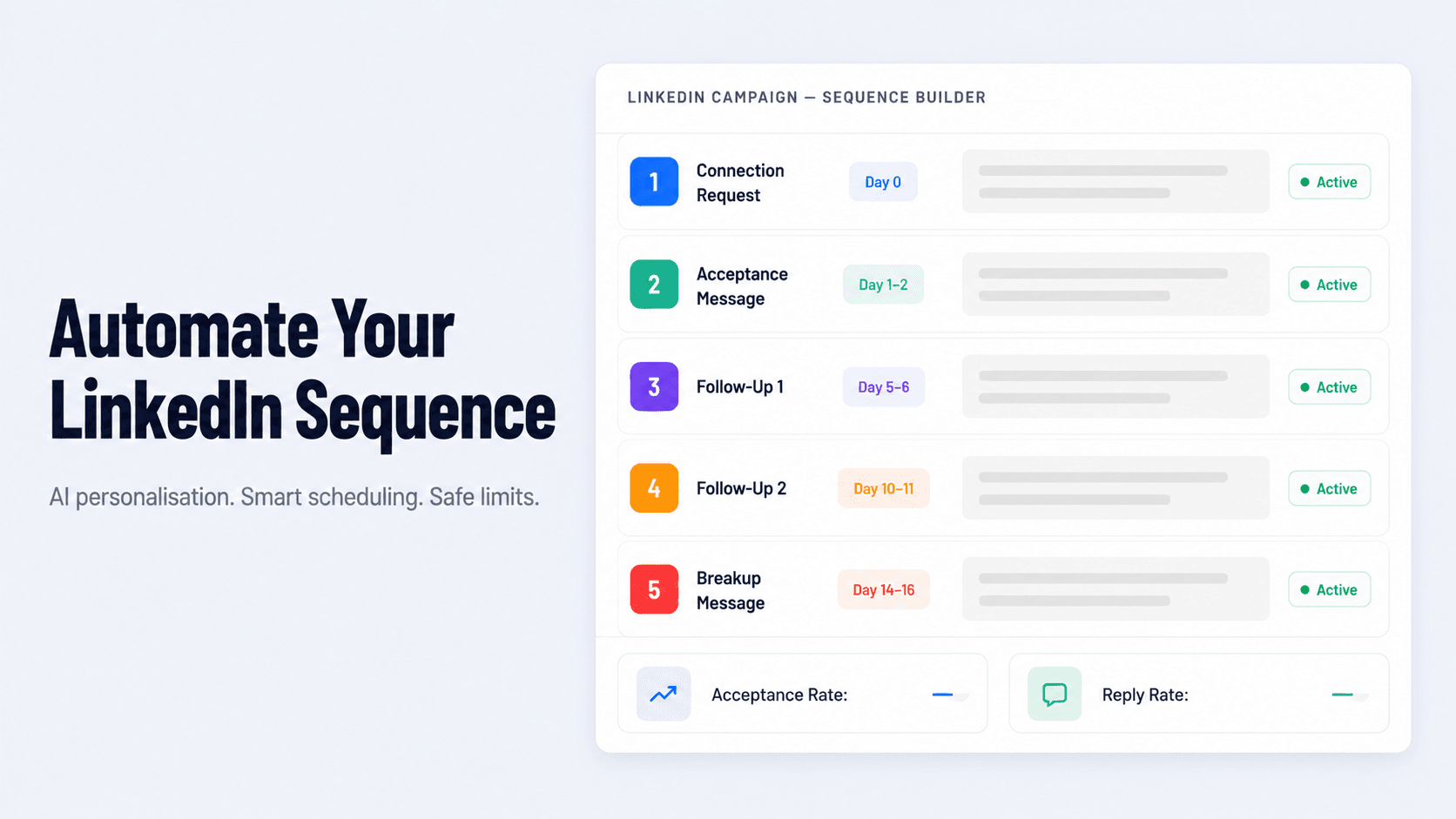
| 1 | Connection Request | Day 0 | Get accepted | Under 150 chars |
| 2 | Acceptance Message | Day 1–2 | Open a conversation | Under 100 words |
| 3 | Follow-Up 1 | Day 5–6 | Add value, re-engage | Under 120 words |
| 4 | Follow-Up 2 | Day 10–11 | Make a soft ask | Under 80 words |
| 5 | Breakup Message | Day 14–16 | Close the loop, stay human | Under 60 words |
The Mistakes That Kill LinkedIn Sequences Before They Start
The sequence structure above works. What breaks it is execution. These are the four mistakes that wipe out a sequence's results regardless of how good the templates are.
Pitching in the connection request
Critical mistake
The connection request is not message zero of your pitch. It's a social handshake. Prospects who receive a pitch in the connection note decline it at a significantly higher rate — and a high decline rate damages your account's trust score with LinkedIn, which caps how many requests you can send weekly.
Using the same template for everyone
Critical mistake
Pre-made templates with zero personalisation average an 8.6% reply rate. That's not a sequence problem — it's a relevance problem. Every message in your sequence should contain at least one piece of personalisation that couldn't have been sent to any other prospect without changing it.
Sending too fast, too often
Critical mistake
LinkedIn's weekly connection request limit is reputation-based in 2026 — accounts with strong acceptance rates can send up to 200 requests per week, while accounts flagged for spam behaviour can drop to 50 or fewer. Sending multiple messages in quick succession, or running volume that exceeds safe daily limits, is the fastest way to trigger a restriction. Space your steps. Respect the gaps.
Stopping after one message
Critical mistake
If 50–70% of LinkedIn replies come from follow-ups and you're not sending them, you're leaving the majority of your potential pipeline on the table. One message is not a sequence. It's a one-night stand with your outreach list.
How to Build This Exact Sequence in SalesTarget
Running this sequence manually across 50+ prospects is where it breaks down. You miss follow-up windows. You send the wrong step to someone who already replied. You forget to check whether your timing is landing during the right part of the prospect's working week. That's where SalesTarget's LinkedIn Campaigns and Sequence Builder comes in.
Here's what building this 5-step sequence looks like inside the platform:
1. Build the sequence structure. In the Sequence Builder, you map out each of the five steps — connection request, acceptance message, follow-up 1, follow-up 2, breakup — and set the delay between each step. Each step is its own node. The sequence only advances when the previous step has been sent and the delay window has passed.
2. Add AI personalisation at each step. SalesTarget's AI LinkedIn Personalization pulls from each prospect's profile — their role, company, recent activity, and industry signals — and inserts relevant personalisation into the message at the point of send. Not mail-merge variables. Actual contextual personalisation generated per prospect.
3. Set smart scheduling rules. LinkedIn Smart Scheduling ensures your messages send during the hours your prospects are actually active on the platform — not at 2am their time because that's when the queue processed. This alone has a measurable impact on open and reply rates.
4. Apply safety limits automatically. SalesTarget's LinkedIn Safety and Compliance layer enforces daily and weekly send limits that keep your account within LinkedIn's safe operating zone. You don't manage the caps manually — the platform does it, and your account stays clean.
5. Track results in one place. Every sequence's performance — acceptance rate, reply rate, step-by-step drop-off, meetings booked — is tracked in LinkedIn Analytics and CRM. You can see exactly where your sequence is losing people and fix the message, the timing, or the targeting without rebuilding everything from scratch.
When to Add Email to Your LinkedIn Sequence
The 5-step sequence above is LinkedIn-only. For a large number of prospects, that's enough. But for high-priority accounts — your top 20–30 targets in a given month — combining your LinkedIn sequence with a parallel email touchpoint produces significantly better results.
The approach is simple: after Follow-Up 1 on LinkedIn with no reply, trigger a single email that references the LinkedIn connection and adds a new angle. It's not repeating the same message in a different channel — it's using email to add a data point, a case study, or a relevant insight that gives the prospect a second reason to engage. LinkedIn provides the familiarity. Email provides the depth.
SalesTarget's multichannel outreach feature lets you build LinkedIn and email into a single sequence — so the two channels are coordinated, not running in parallel silos. For a full playbook on how to combine the two effectively, the LinkedIn and Email Multichannel Outreach Playbook covers the exact structure.
What a High-Performing Sequence Actually Looks Like
To make this concrete — here's how the same 5-step sequence plays out differently depending on execution quality.
| Step | Low-performing version | High-performing version |
|---|---|---|
| Connection Request | "I'd like to add you to my professional network." | Specific, short, references something real about them |
| Acceptance Message | "Thanks for connecting! We help companies like yours…" | Opens with a relevant question about their situation |
| Follow-Up 1 | "Just following up on my last message…" | Shares something useful, no ask |
| Follow-Up 2 | "Would you have 30 mins for a full demo this week?" | Binary choice, low friction, easy to reply to |
| Breakup Message | No message sent — prospect just goes cold | Professional close, door left open, 90-day re-engage noted |
The difference between the two columns isn't talent — it's having a system. The low-performing version is someone winging it. The high-performing version is someone running a repeatable sequence with clear rules at every step.
Stop winging it. Build the sequence once and let it run.
SalesTarget automates your 5-step LinkedIn sequence — with AI personalisation, smart scheduling, and safety limits built in. Set it up in minutes.
✓ 50 credits ✓ 7-day trial ✓ No credit card required
Frequently Asked Questions

See It In Action: Book Your Free Demo
Get a personalized walkthrough and see how it works for your team.
Book My Demo →



