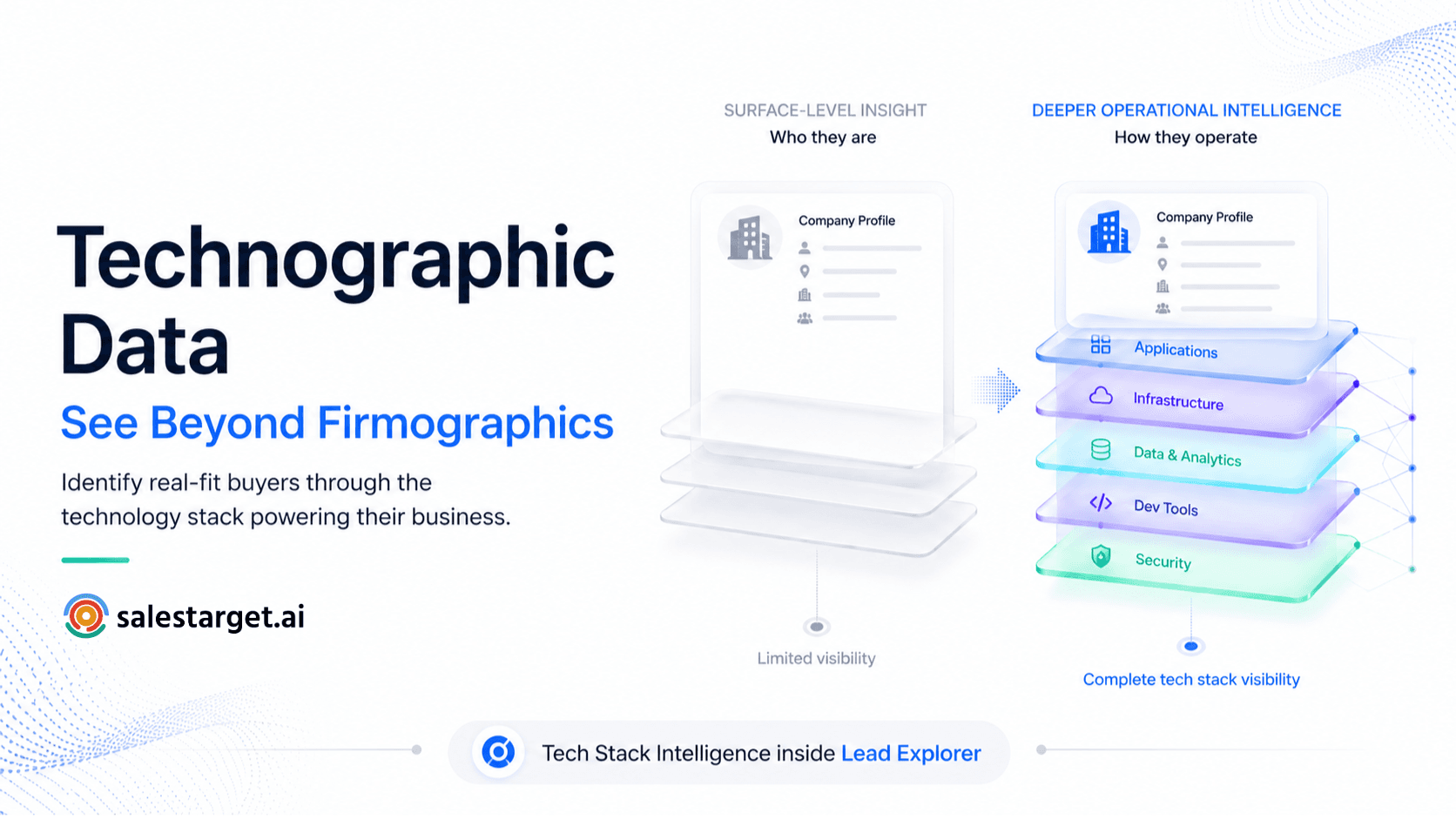
TL;DR
- Technographic data is information about the technology stack a company uses — what CRM they run, what marketing tools they rely on, what sales platforms their reps use every day
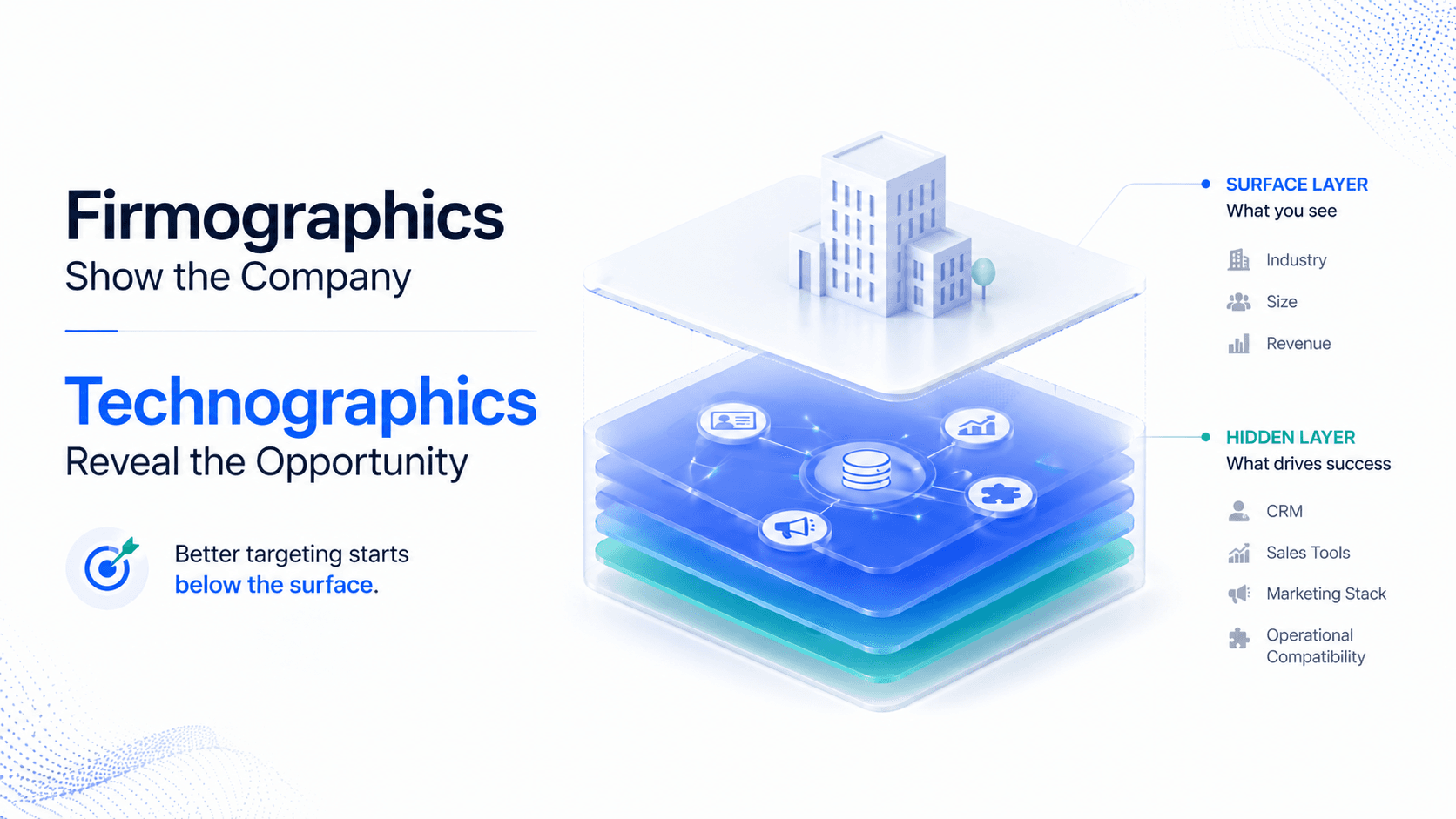
- Firmographic data tells you who a company is (industry, size, revenue). Technographic data tells you what they use — and what they're likely to buy next
- 45% of B2B companies use technographic data for account targeting. Teams using it see 28% higher conversion rates and are 50% more likely to exceed revenue goals
- The average company now runs 100+ software applications. Over 60% of B2B software purchases are replacements — meaning tech stack data tells you who's ripe for a switch
- SalesTarget.ai's Tech Stack filter lets you search by specific tool (e.g. 'HubSpot') or by category (e.g. 'CRM') across 840M+ profiles — applied before the list is built, not after
- Technographic data without verified contacts is a research project. Firmographic data without technographic filters is a guess. Combined in one search: it's a pre-qualified list
The Prospect List Problem Nobody Talks About
Here is a scenario that plays out in B2B sales teams every week: an SDR builds a list filtered by industry (SaaS), headcount (50–500), and geography (US). They spend credits enriching it, write personalised outreach, and launch the sequence.
Two weeks later: 3% reply rate. Most replies are polite nos. The SDR can't figure out why.
The answer is usually technographic. The list contained companies that looked right on paper but were completely wrong for the product. A company running a legacy on-premise CRM with no API access is a fundamentally different prospect from one already running HubSpot with a modern integrated stack. A company with a full sales engagement platform already in place is not a displacement opportunity — it's a competitor's account. Firmographic data told the SDR who they were. Technographic data would have told them what those companies actually needed.
⚠️ The cost of missing tech stack data
According to Gartner's 2024 Software Buying Behavior Survey, 60% of buyers regret a software purchase within 12–18 months. That churn and replacement cycle is your opening — but only if you know who's running what. Without technographic data, you're targeting companies that are either not ready, already locked in, or operating infrastructure your product can't fit.
What Is Technographic Data?
Technographic data is structured intelligence about the technology stack a company uses — the software, hardware, cloud infrastructure, and digital tools that power their operations. Think of it as firmographic data's technical counterpart: where firmographics tell you a company's size, industry, and revenue, technographics tell you they run Salesforce for CRM, AWS for cloud, and Marketo for marketing automation.
| Data type | What it tells you | Example | Used for |
|---|---|---|---|
| Firmographic | Who the company is | Industry: SaaS · Headcount: 200 · Revenue: $10M · HQ: Austin, TX | Defining ICP, qualifying market size |
| Technographic | What technology they use | CRM: HubSpot · Email: Outreach · BI: Tableau · Cloud: AWS | Qualifying fit, personalising outreach, finding displacement opportunities |
| Intent (Bombora) | What they're researching right now | Surging on 'CRM software', 'sales automation', 'B2B lead generation' | Timing outreach to active research windows |
The three data types work together — not in isolation. Firmographics define the market. Technographics identify the best-fit accounts within it. Intent data tells you which of those accounts are actively researching right now. Running any one without the others leaves gaps in your targeting that show up as low reply rates and wasted enrichment credits.
📊 Market context
The technographic data market grew from $367M in 2020 to over $1.17B by 2025, driven by a 26.1% compound annual growth rate. 45% of B2B companies now use technographic data for account targeting alongside firmographic (55%) and predictive data (47%). Teams using technographic targeting see 28% higher conversion rates and are 50% more likely to exceed revenue goals.
Firmographic vs. Technographic: The Targeting Gap
Most SDR teams filter by firmographics alone. Industry. Headcount. Revenue. Geography. That gets you a list of companies that fit a profile — but it does not tell you whether those companies can actually use your product, whether they're already using a competitor, or whether they have the infrastructure to adopt what you're selling.
| Targeting approach | What you know | What you're guessing | Result |
|---|---|---|---|
| Firmographic only | Industry, size, revenue, location | Tech stack, buying readiness, competitive situation | Big list, low conversion, wasted credits |
| Firmographic + Technographic | All firmographic + CRM, marketing stack, sales tools | Buying urgency, timing | Smaller, sharper list — higher reply rate |
| Firmographic + Technographic + Intent | All above + active research behaviour | Very little — this is precision prospecting | Smallest list, highest conversion, lowest waste |
Example: You sell a sales engagement platform. Your ICP is B2B SaaS companies, 50–500 employees, $5M–$50M revenue. Without technographic data, your list includes:
- Companies with no CRM at all — not ready to buy a sales engagement tool
- Companies already running Outreach or SalesLoft — direct competitors, hard displacement
- Companies running HubSpot with no sales engagement layer — your ideal displacement opportunity
With technographic filters applied before the search, only the third category makes the list. Every enrichment credit spent is on a real prospect.
How Technographic Data Is Collected — and Why Freshness Matters
Not all technographic data is equal. The collection method determines what you can trust.
| Collection method | What it detects | Limitation | Reliability |
|---|---|---|---|
| Pixel/tag scanning (BuiltWith, Wappalyzer) | Front-end JavaScript, tracking pixels, analytics tags | Only sees public-facing tools — misses backend systems, anything behind authentication | Medium — good for marketing stack, weak for CRM/sales tools |
| Job posting analysis | Technologies mentioned in job descriptions and requirements | Signals what teams are implementing, not necessarily what's installed today | Medium-high — real-time signal, but indirect |
| DNS/subdomain inspection | SaaS validation records, tooling footprints in DNS TXT records | Technical and incomplete — useful as a validation layer, not primary source | Low-medium — best as a tie-breaker |
| Third-party data providers | Aggregated multi-source intelligence at scale | Data freshness varies by provider — monthly vs. weekly refresh cycles matter significantly | High — if provider refreshes frequently and cross-validates sources |
⚠️ The freshness problem
Stale technographic data produces false positives — targeting companies that already switched away from the tool you're referencing — and missed opportunities — ignoring companies showing new buying signals. A RevOps team built a 'perfect' outbound segment: companies running Marketo, 200–1,000 employees, hiring SDRs. The results failed because a chunk of those accounts had quietly switched to HubSpot months earlier, and the messaging landed like it was written for someone else. Best-in-class providers update technographic data weekly or more frequently.
The Five High-ROI Use Cases for Technographic Data in B2B Sales
1. Competitive displacement
Over 60% of B2B software purchases are replacements, not first-time purchases. Competitive displacement is the highest-ROI use case for technographic data. Target every company running a competitor's product. Build messaging around migration pain points specific to that tool. You know what they're running, what the common frustrations are, and what switching would look like. That's not a cold pitch — it's a warm, contextually relevant conversation.
2. Integration and compatibility targeting
Your product integrates with Salesforce. Filter for companies running Salesforce, layer in a firmographic fit (50–500 employees, SaaS), and you have a list of prospects who can actually adopt what you're selling without a rip-and-replace. You're not introducing risk — you're extending what they already have. Shorter sales cycles, higher close rates.
3. Gap-in-stack identification
A company running HubSpot for CRM with no sales engagement platform, no data enrichment tool, and no LinkedIn automation is showing you a clear technology gap. You're not displacing anything — you're filling a hole in their stack they likely already know exists. The outreach angle writes itself.
4. ICP refinement from closed-won data
Analyse your best existing customers for tech stack patterns. If HubSpot + Outreach + Bombora appears in 60%+ of your best accounts, filter your prospect database by that exact combination. Teams that add two or three technographic filters to their existing firmographic criteria consistently cut prospecting time in half — because the resulting list is smaller but dramatically more qualified.
5. Renewal timing and buying window targeting
When technographic data includes adoption dates or contract signals, you can time outreach to align with annual renewal windows. A company that adopted a competitor's tool 11 months ago is approaching renewal. Layer that with Bombora intent signals showing they're actively researching alternatives, and your outreach lands at exactly the right moment in exactly the right conversation.
How SalesTarget.ai's Tech Stack Filter Works
SalesTarget.ai's Tech Stack filter inside Lead Explorer lets you search by specific tool or by technology category — applied before the search runs, so every result is pre-qualified by definition.
| Filter type | What you can search | Example use case |
|---|---|---|
| Specific tool | Search for companies using a named product | 'Uses Salesforce' — find companies running Salesforce for CRM targeting |
| Technology category | Search by tool category without naming a specific product | 'Uses a CRM' — find companies with any CRM in place (i.e. they have the process maturity to need what you sell) |
| Tech stack exclusion | Filter OUT companies using specific tools | 'Does not use Outreach' — exclude companies already running your competitor |
| Stack combination | Layer multiple tech filters simultaneously | 'Uses HubSpot AND does not use a sales engagement platform' — gap-in-stack targeting |
The Tech Stack filter sits in the same filter panel as firmographic criteria — industry, company size, revenue, geography. This means you define your ICP and your technographic fit in one search, not two separate steps across two separate tools.
🎯 The filter-first advantage
SalesTarget.ai's targeting filters are applied before the search runs across 840M+ professional profiles. The list you pull is pre-qualified on both firmographic and technographic criteria simultaneously. You have not enriched anyone who doesn't fit — which means every credit spent on enrichment is spent on a real prospect who can actually use your product.
Technographic Targeting in Practice: A Step-by-Step Workflow
- Analyse your closed-won accounts: Pull your last 20 best customers. What CRM do they use? What marketing automation? What sales tools? Look for patterns — these become your technographic ICP.
- Identify your displacement targets: What competitor products are your ideal customers switching from? These become your competitive technographic filters.
- Define your gap-in-stack profile: What tools do your best customers NOT have before they buy from you? A company using HubSpot but not a sales engagement platform is your classic gap-in-stack prospect.
- Set filters in Lead Explorer before the search: Apply firmographic filters (industry, size, revenue, geography) and technographic filters (specific tools or categories) simultaneously using the Tech Stack filter. Run the search.
- Layer intent signals on top: Add Intent Topics filter to surface accounts that are also actively researching relevant topics right now. ICP fit + tech stack match + intent signal = Tier 1 priority.
- Enrich and act: Unlock verified contacts, tech stack confirmation, and firmographic data in one click. Push directly to CRM or launch outreach sequence — no exports, no tab switching.
📊 The output difference
A list built on firmographic filters alone typically requires 40–60% manual post-qualification before SDRs can start outreach. A list built on firmographic + technographic filters requires essentially none. Every account has already been filtered for both company profile and technology fit. That difference in pre-qualification compounds across every sequence slot, every enrichment credit, and every SDR hour.
Conclusion: The Filter That Changes Your Conversion Rate
Most SDR teams filter by industry and headcount and wonder why their lists underperform. The answer is almost always the same: the list was built without technographic context. Companies that look right on paper but run incompatible infrastructure, are locked into competitor contracts, or have no operational gap for your product are noise — and noise is expensive.
Technographic data is not a premium feature for enterprise teams. SalesTarget.ai's Tech Stack filter includes it at every plan tier, applied inside the same filter panel as firmographic criteria, before the search runs. The list you pull is pre-qualified on both dimensions simultaneously.
Stop building lists from firmographics alone. Add the tech stack filter — and watch what happens to your reply rate.
Filter by tech stack, not just company size.
Lead Explorer — 840M+ profiles, technographic + firmographic filters, verified contacts at $49/mo.
50 credits · 7-day free trial · No credit card required.





