TL;DR
- Finding a decision-maker's email is not the hard part — finding one that actually delivers without bouncing is
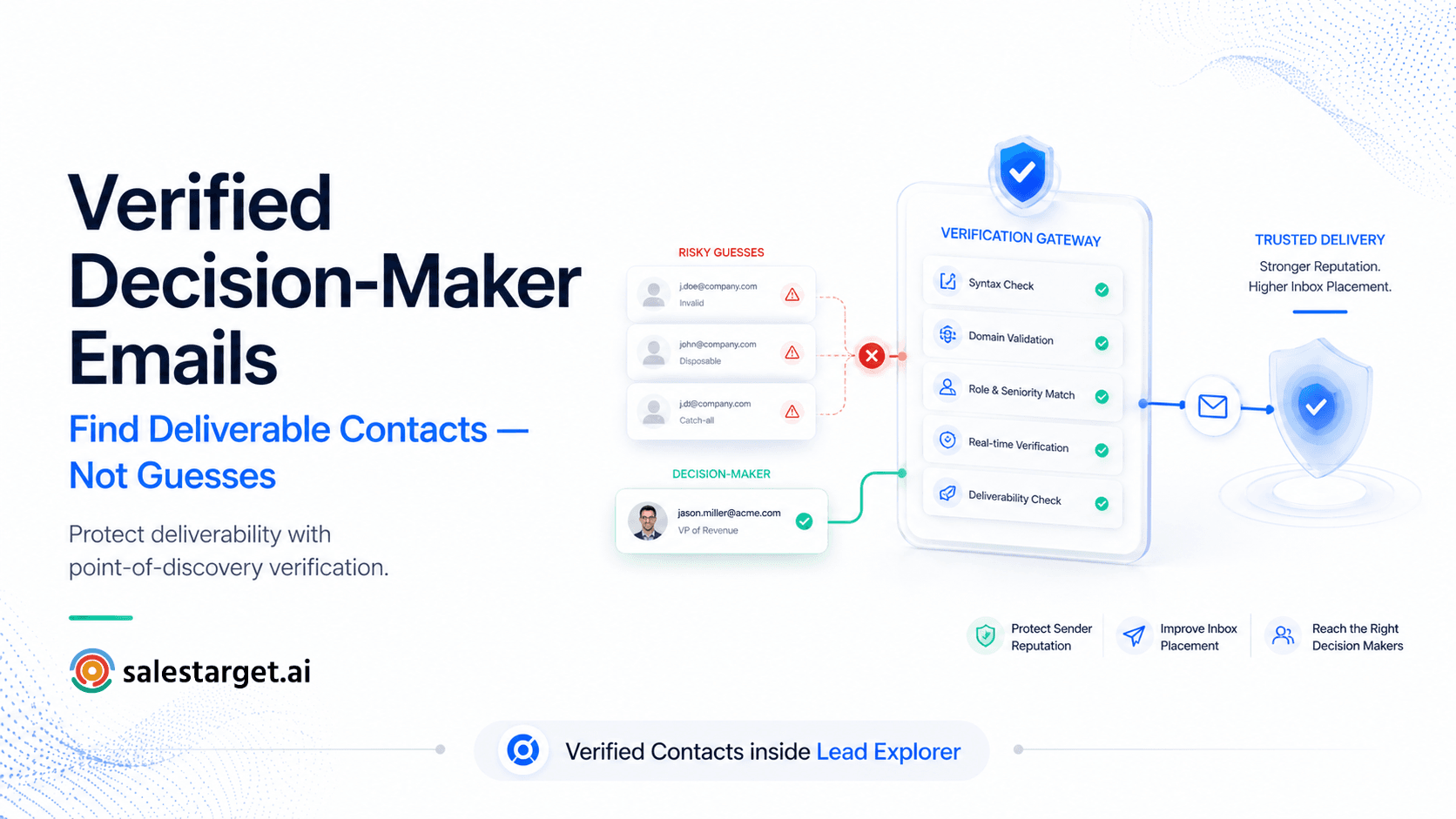
- Email permutation guessing (firstname@company.com) produces 15–25% bounce rates. Verified contact data from point-of-discovery enrichment targets under 5%
- Independent third-party testing has reported lower email accuracy rates for some static database providers compared to live verification models, reinforcing the importance of real-time validation. Certain independent benchmarks have reported double-digit hard bounce rates for static verification tools, depending on list quality and verification timing.
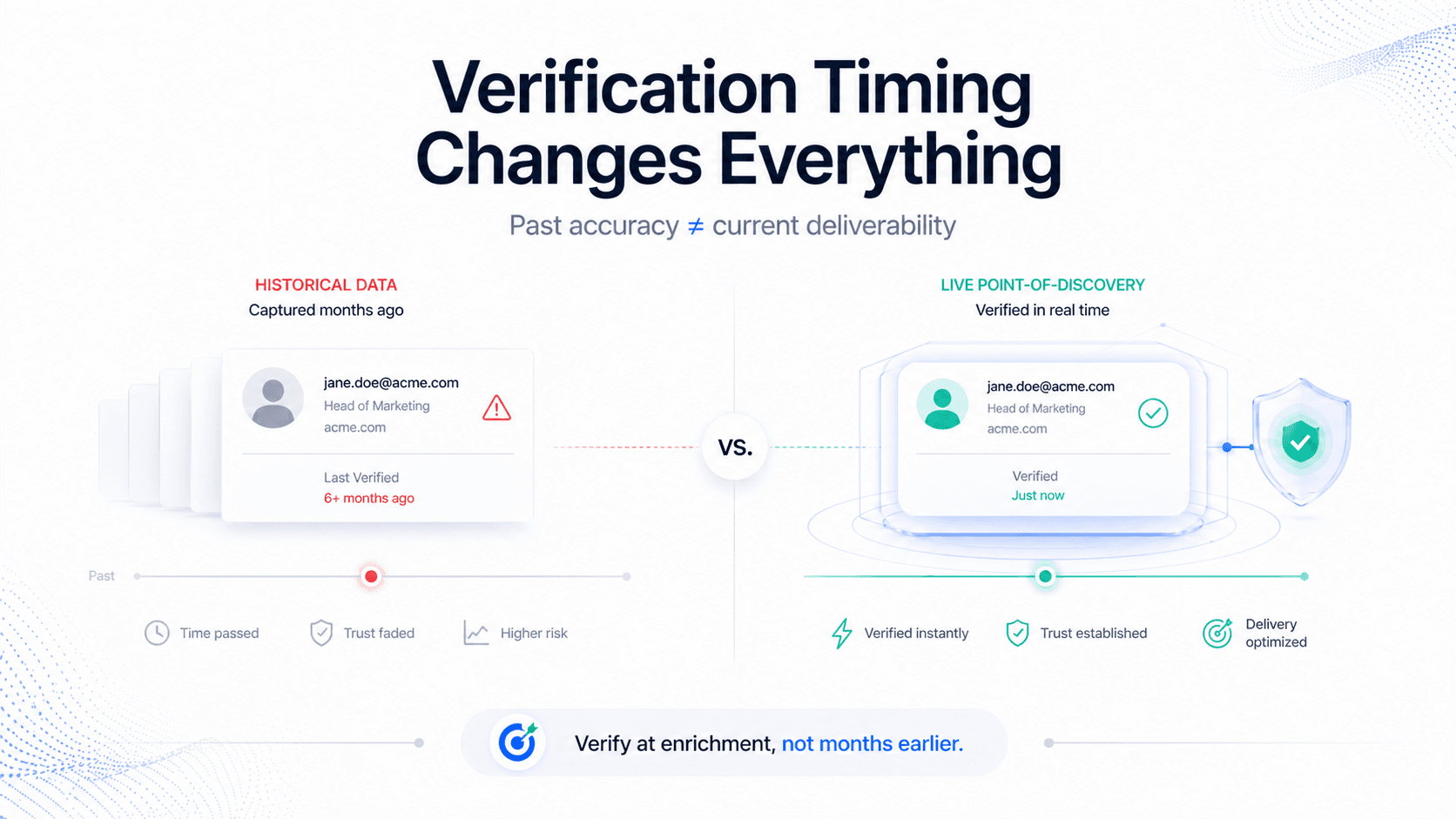
- The critical distinction: historical verification (checked when added to database) vs point-of-discovery verification (checked live when you unlock the contact). SalesTarget.ai uses point-of-discovery
- The Has Email and Has Phone Number toggles in Lead Explorer let you filter contacts by availability before spending enrichment credits — so you only pay for contacts you can actually reach
- A bounce rate above 5% risks your sending domain being flagged by Gmail, Yahoo, and Microsoft — the damage compounds across every future campaign you send
The Bounce Rate Nobody Talks About
Here is a scenario that plays out in outbound teams every week: an SDR builds a list of 300 decision-makers, enriches them, launches a cold email sequence, and gets back a 22% bounce rate notification from their email tool.
Not 22% reply rate. 22% bounce rate.
By the time that notification arrives, the damage is already done. Two hundred and sixty-six emails delivered successfully. Sixty-six bounced. High bounce rates and spam complaints can significantly damage domain reputation, increasing the likelihood of spam folder placement, throttling, or sender trust degradation across Gmail, Yahoo, and Microsoft ecosystems. Miss that threshold enough times and your domain goes to junk — not just for this campaign, but for every email your entire team sends from that domain indefinitely.
The root cause is almost never the email copy. It is almost always the contact data. And the contact data problem comes down to one question almost no SDR thinks to ask before they enrich: when was this email address actually verified?
⚠️ The deliverability stakes in 2026
Gmail and Yahoo introduced strict bulk sender requirements in February 2024. Microsoft followed with similar enforcement for Outlook, Hotmail, and Live from May 2025. Consistently elevated bounce rates increase the risk of spam filtering, throttling, and reduced inbox placement, particularly under modern bulk sender requirements. Domain reputation damage is cumulative — a single high-bounce campaign can suppress deliverability across all outreach for weeks. The email you send to the right person with the wrong address costs more than you think.
Why Most Email Finding Methods Produce High Bounce Rates
There are five common ways SDRs try to find decision-maker email addresses. Each has a different reliability profile — and a different cost in bounces when it fails.
| Method | How it works | Bounce rate risk | Best for |
|---|---|---|---|
| Email permutation guessing | Construct firstname@company.com, f.lastname@company.com, etc. using common patterns | High — 15–25%. Pattern may be wrong, person may have left the company, or domain may not match | Last resort. Never use at scale without verification |
| LinkedIn manual lookup | Find the person, check contact info or use InMail — no email directly | N/A — LinkedIn doesn't provide email | Confirming role and company. Not an email source |
| Chrome extension scraping (Hunter, Skrapp) | Extension scrapes publicly visible emails from LinkedIn profiles or company websites | Medium — 10–15%. Catches public-facing emails but misses anyone not publicly listed | Quick single lookups. Low volume prospecting |
| Static database lookup (Apollo, Lusha, ZoomInfo basic) | Pull email from a pre-built database verified at time of collection | Medium-high — 15–27% depending on provider and data age. B2B data decays at 30% annually | High-volume prospecting — requires post-pull verification |
| Point-of-discovery enrichment (SalesTarget.ai) | Email checked against live records the moment you unlock the contact — not when it was added to database | Low — targets under 5%. Verified at the moment of use, not months earlier | Any scale outbound where deliverability matters |
The fundamental issue with methods 3 and 4 is data age. B2B contact data decays at approximately 25–30% annually — meaning one in four contacts becomes inaccurate every year. An email address verified six months ago when it was added to a database may belong to someone who has since changed roles, companies, or had their email domain migrated. Historical verification tells you the email was valid then. It says nothing about right now.
Historical Verification vs Point-of-Discovery Verification
This is the most important concept in B2B email finding — and the one most email finder tools actively obscure in their marketing.
| Historical verification | Point-of-discovery verification | |
|---|---|---|
| When the check happens | When the contact was first added to the provider's database | The moment you unlock the contact — checked live against current records |
| What it reflects | The state of the email address weeks, months, or years ago | The current state of the email address right now |
| Decay risk | High — 30% of B2B data becomes inaccurate annually | Minimal — verified at point of use |
| Who uses it | Apollo, Hunter.io, Lusha, ZoomInfo on base plans | SalesTarget.ai — verification happens at enrichment credit use |
| Expected bounce rate | 15–27% in independent testing | Targets under 5% |
| Seller transparency | Most sellers describe data as 'verified' without specifying when | Point-of-discovery is the specific architectural claim that matters |
📊 What independent tests show
A 2025 benchmark by Dropcontact tested 20,000 real contacts across 15 email-finding tools. Hunter.io's results: a 32.5% effective enrichment rate and an 11.2% hard bounce rate — meaning roughly 1 in 9 emails found by Hunter bounces. Independent testing suggests some historical-verification databases may experience materially lower deliverability accuracy than live-verification systems, particularly as data ages. For a tool whose primary job includes finding emails, 73% is a significant problem at any volume above a few hundred contacts.
The question to ask any email finder vendor before committing: "Is contact data verified when it was added to your database, or when I unlock it?" That single answer tells you which verification model you are paying for.
The Has Email and Has Phone Number Toggles: Filter Before You Spend
One of the most practical features in SalesTarget.ai's Lead Explorer for reducing wasted credit spend is the Has Email and Has Phone Number filter toggles. These let you filter your search results by contact availability before you spend any enrichment credits.
| Toggle | What it does | Why it matters |
|---|---|---|
| Has Email | Filters results to show only contacts for whom a verified email is available to unlock | You don't spend credits on contacts where only a company domain is on record — you only see contacts you can actually reach via email |
| Has Phone Number | Filters results to show only contacts for whom a direct dial or mobile number is available | Phone-first sequences start with verified numbers — no credits spent on contacts with only company switchboard numbers |
| Both combined | Shows only contacts with both email and phone available | For multi-channel sequences — ensures every contact on the list can be reached via both channels before a single credit is used |
This matters because most email finder tools charge credits for every lookup attempt — whether or not valid contact data is returned. If you enrich 500 contacts and 200 of them return no verified email, you've spent credits on 200 contacts you cannot reach. The Has Email toggle eliminates this category of waste entirely.
💡 The credit efficiency calculation
On a 500-contact enrichment run without a Has Email filter: if 35% of contacts have no verified email available (typical for mixed lists), you spend credits on 175 contacts you cannot use. On the Launch plan at $49/mo (2,000 monthly credits), that's 87 wasted credits — roughly 4.4% of your monthly allowance — before a single sequence is launched. The Has Email toggle costs zero credits and recovers that entire waste.
B2B Email Finder Tool Comparison: 2026
| Hunter.io | Apollo.io | Lusha | ZoomInfo | SalesTarget.ai | |
|---|---|---|---|---|---|
| Primary use case | Email finding + verification | All-in-one prospecting + outreach | Email + phone for LinkedIn | Enterprise B2B database | Prospecting + enrichment + outreach all-in-one |
| Verification model | Historical — verified on collection | Historical — verified on collection | Historical — verified on collection | Historical — verified on collection | Point-of-discovery — verified at enrichment |
| Reported bounce rate (independent) | 11.2% hard bounce (Dropcontact 2025, 20K contacts) | ~27% (73% accuracy in independent testing) | Varies — phone data stronger than email accuracy | 15–20% on base plans per community reports | Targets under 5% |
| Email accuracy claim | Not publicly stated | Not publicly stated | Not publicly stated | Not publicly stated | Point-of-discovery — checked live |
| Phone numbers | No direct dials — email only | Yes — on Professional+ | Yes — strength of platform | Yes — on higher plans | Yes — via enrichment credits |
| Has Email / Phone toggle | ❌ No pre-filter | ❌ No pre-filter | ❌ No pre-filter | ❌ No pre-filter | ✓ Yes — filter before spending credits |
| Database size | 107M+ contacts (domain-crawled) | 275M+ contacts | 50M+ profiles | 300M+ contacts | 840M+ professional profiles |
| Built-in outreach | Basic sequences | Strong — A/B testing, dialer | ❌ Integration required | ❌ Integration required | Email + LinkedIn outreach built in |
| Entry price | $34/mo (annual) | $49/user/mo (annual) | $49/user/mo | ~$14,995/year | $49/mo — all features included |
| Free trial | 25 searches/mo free plan | Free plan — 60 emails/mo | Free — 70 credits/mo | ❌ No trial | 50 credits — 7 days — no credit card |
⚠️ On using email accuracy stats honestly
Bounce rate data in the email finder market is notoriously difficult to verify at scale. The Dropcontact 2025 benchmark (20,000 contacts, 15 tools) is the most rigorous independent test we have cited. Apollo's 73% accuracy figure comes from Cleanlist's independent testing published March 2026. SalesTarget.ai’s verification architecture is built to improve deliverability by validating contact data at the point of enrichment, which can reduce stale-data risks associated with historical verification — it is what the model is designed to produce, and is consistent with what point-of-discovery verification produces across comparable platforms using the same approach. We have not run an independent head-to-head test at scale. If accuracy is your primary decision criterion, request a trial dataset from any vendor and test it against your own ICP before committing.
How to Verify an Email Address Before Sending
Even with point-of-discovery verification, adding a verification step before launching high-volume sequences is good practice — especially when using contacts from any static database source.
The four technical checks that email verification runs
| Check | What it does | What it catches |
|---|---|---|
| MX record lookup | Confirms the domain has active mail exchange records — i.e. the company's email system actually exists | Domains with no MX records, recently expired domains, company shutdowns |
| SMTP handshake (ping) | Connects to the mail server and asks if the address exists — without sending an email | Deleted accounts, addresses that no longer exist on the server |
| Role-based address detection | Flags generic addresses like info@, support@, admin@, sales@ | Emails that go to a shared inbox, not a specific person — unlikely to book a meeting |
| Catch-all domain detection | Identifies domains that accept all email regardless of whether the specific address exists | Dangerous for deliverability — these don't bounce but often go unread. Hunter flags these; many tools miss them |
Role-based addresses and catch-all domains are the two most underappreciated sources of deliverability damage. An email that doesn't bounce is not necessarily an email that reaches a person. SalesTarget.ai's verified contacts check for both at the point of enrichment — filtering out contacts where the email exists technically but is unlikely to reach a decision-maker.
What a High Bounce Rate Actually Costs You
The direct cost of a bounced email is obvious — a wasted send slot, a wasted sequence step, an SDR hour spent on outreach that never arrived. The indirect cost is significantly higher and less visible.
| Bounce rate | Domain reputation impact | What happens next | Recovery time |
|---|---|---|---|
| Under 2% | Healthy — inbox providers treat you as a legitimate sender | Normal deliverability across all campaigns | N/A — maintain this rate |
| 2–5% | Caution zone — inbox providers start noting the pattern | Slight deliverability reduction. Marginal increase in promotions folder routing | 2–4 weeks of clean sending to recover |
| 5–10% | Flagged — Gmail and Yahoo actively throttle your domain | Significant portion of emails routed to spam or junk. Open rates drop across all campaigns | 4–8 weeks minimum. Domain warmup may be required |
| 10%+ | Danger zone — Microsoft/Gmail may reject outright | Emails rejected before delivery. Full domain reputation rebuild required | 2–3 months. Some domains never fully recover |
| SalesTarget.ai target | Under 5% — point-of-discovery verification | Improved deliverability potential through fresher verification practices | N/A |
⚠️ The compounding damage
Domain reputation damage does not only affect the campaign that caused it. A 15% bounce rate on a 500-contact sequence affects the deliverability of every subsequent email your entire team sends from that domain — including follow-up sequences, warm prospect replies, and inbound lead responses. One bad campaign can suppress all outreach for weeks. This is why the verification model matters more than the per-credit price.
The Step-by-Step Workflow for Finding Verified Decision-Maker Emails
- Define the decision-maker role before you search: Know the job title, seniority, and department before opening any tool. 'VP of Sales', 'Head of RevOps', 'Sales Director' — the more specific the role, the less post-search manual filtering required.
- Set ICP filters in SalesTarget.ai's Lead Explorer first: Industry, company size, revenue, geography, tech stack — using the targeting filters. A verified email for a contact at the wrong company is still a wasted credit.
- Enable the Has Email toggle before the search runs: Filter results to show only contacts for whom a verified email is available to unlock. Every result you see is reachable. No credits spent on contacts with no verified email on record.
- Enable Has Phone Number if you're running multi-channel: If your sequence includes a call step, filter for phone availability at the same time — before spending credits on either.
- Unlock enrichment on the filtered list: Use your enrichment credits on the pre-filtered, pre-qualified list. Each credit unlocks a contact that has passed both ICP filtering and contact availability filtering — point-of-discovery verification runs at the moment of unlock via SalesTarget.ai's verified contacts.
- Check for role-based and catch-all flags before sequencing: Review enriched contacts for any role-based addresses (info@, support@) flagged during verification. Remove these before adding to sequence — they represent technical delivery without reaching a person.
- Launch sequence and monitor bounce rate in real time: If bounce rate exceeds 3% in the first 50 sends, pause the sequence and audit the contact source. At under 3%, continue. Protect the domain above everything else.
Conclusion: Verify at Enrichment, Not at Collection
The email finding market has conditioned SDRs to think about contacts in volume — how many emails can I pull, how many credits do I have, how big can I make this list. The wrong metric.
The right metric is deliverable emails. Not found emails. Not verified-at-some-point emails. Emails that arrive in an inbox today, because the address was checked against live records today.
The Has Email toggle in SalesTarget.ai's Lead Explorer filters your search results to show only contacts with verified emails available — before you spend a credit. The point-of-discovery verification at enrichment checks that email against live records at the moment you unlock it. And the verified contacts architecture is what keeps bounce rates under 5% when historical verification tools are producing 11–27%.
Find less. Verify better. Protect the domain. That’s the modern email finding framework built for evolving 2026 deliverability standards.
Start with 50 free verified contacts — no guessing, no bouncing.
Lead Explorer · Has Email toggle · Point-of-discovery verification · from $49/mo
50 credits · 7-day free trial · No credit card required.





