
TL;DR
- CRMs without active deduplication typically run 10–25% duplicate records — most teams have no idea their numbers are that high.
- Merging duplicates the wrong way deletes pipeline history — the right process preserves every activity and deal.
- Dead leads should be archived, not deleted — you lose reporting context and reactivation opportunities otherwise.
- Cleanup without prevention rules just creates the same mess again within a quarter.
- SalesTarget.ai's CRM flags likely duplicates at the point of entry, so the problem doesn't compound after cleanup.
Somewhere in your CRM right now, a contact named "John Smith" and a contact named "J. Smith" are quietly sitting in two different pipelines, both owned by different reps, both convinced they're talking to a live deal. This isn't a rare edge case. It's the default state of a CRM that's been growing for more than a year without anyone actively managing it.
Why CRMs Get Messy
No one sets out to build a messy CRM. It happens through accumulation — a CSV import from a trade show, a list pulled from an old campaign tool, a rep manually re-creating a contact because the search didn't surface the existing one. Each event is small. The compounding effect isn't.
The scale of this is bigger than most teams assume. CRMs without active deduplication routinely run 10–25% duplicate records, and roughly 70% of organizations report struggling with duplicate or inconsistent data due to a lack of matching technology, according to research compiled by Prospeo. Separately, industry benchmark data referenced by Cleanlist's CRM data quality study puts "good" at under 5% duplicates, with most unmanaged CRMs running well past that. The cost isn't abstract either — sales departments lose an estimated 550 hours annually per rep dealing with inaccurate CRM information, per data cited in Landbase's duplicate record analysis.
Step 1: Identify Duplicates (Matching Rules)
Exact-match on email alone misses most real duplicates. "John Smith" at john@company.com and "J. Smith" at j.smith@company.com are the same person with no overlapping field to catch automatically. A workable matching approach layers several signals instead of relying on one.
| Matching Signal | Catches | Misses |
|---|---|---|
| Exact email match | Same person, same email entered twice | Same person with a personal vs. work email, or a typo'd address |
| Name + company | Same person entered with different emails or job titles | Name variants ("J. Smith" vs "John Smith"), nicknames |
| Fuzzy name matching | Misspellings, abbreviations, nickname variants | Company name inconsistency ("IBM" vs "International Business Machines") |
| Phone number match | Same person across records with different names or emails on file | Shared office lines, outdated numbers |
Run all four together as a combined matching pass, then manually review borderline matches before merging — automated fuzzy matching is good at surfacing candidates, not at making the final call on ambiguous cases.
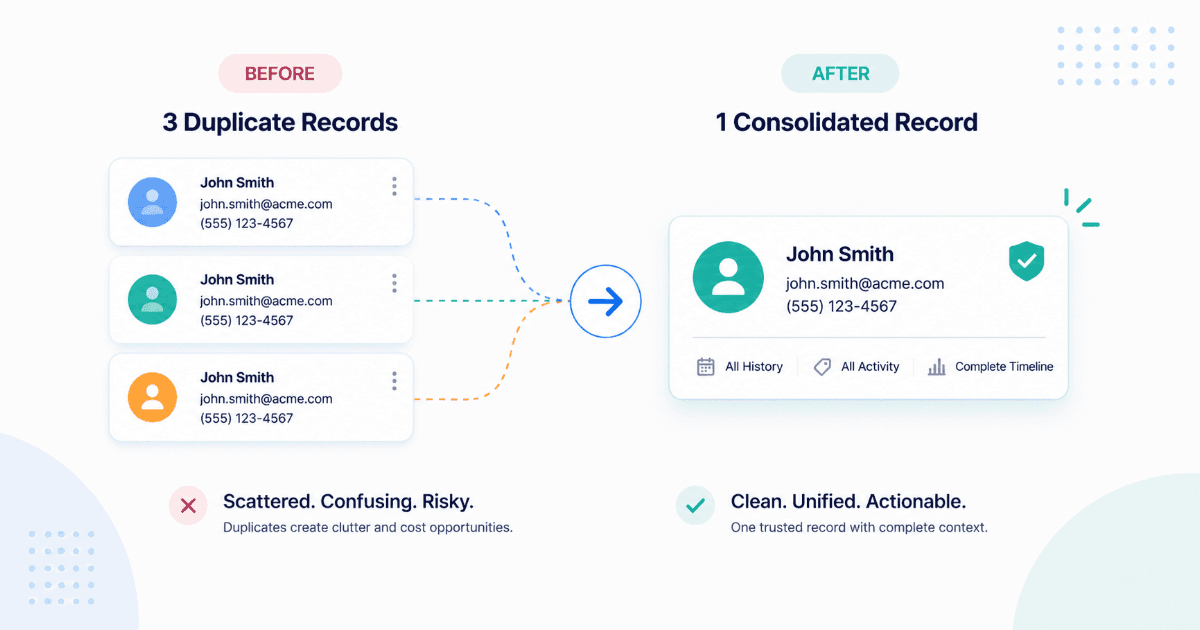
Step 2: Merge Without Losing Activity History
This is where most home-grown cleanup efforts go wrong. The instinct is to pick the "better" record and delete the other one — but that silently deletes every email, call log, and deal tied to the deleted record. The right approach uses survivorship rules: deciding, field by field, which value the merged record should keep, rather than declaring one whole record the winner.
| Field Type | Survivorship Rule |
|---|---|
| Contact info (email, phone, title) | Most recently updated value wins — these change as people move roles |
| Activity history (emails, calls, meetings) | Combine from both records — never overwrite, always merge into one timeline |
| Open deals | Reattach to the surviving record, flag for owner review if owned by different reps |
| Lead source / original creation date | Keep the earliest record's data — it reflects the true first-touch history |
Before running any bulk merge, export a backup of the affected records. Merges are very hard to fully reverse once activity history has been recombined — a backup is your only real safety net if a matching rule turns out to be too aggressive.
Step 3: Archive (Don't Delete) Dead Leads
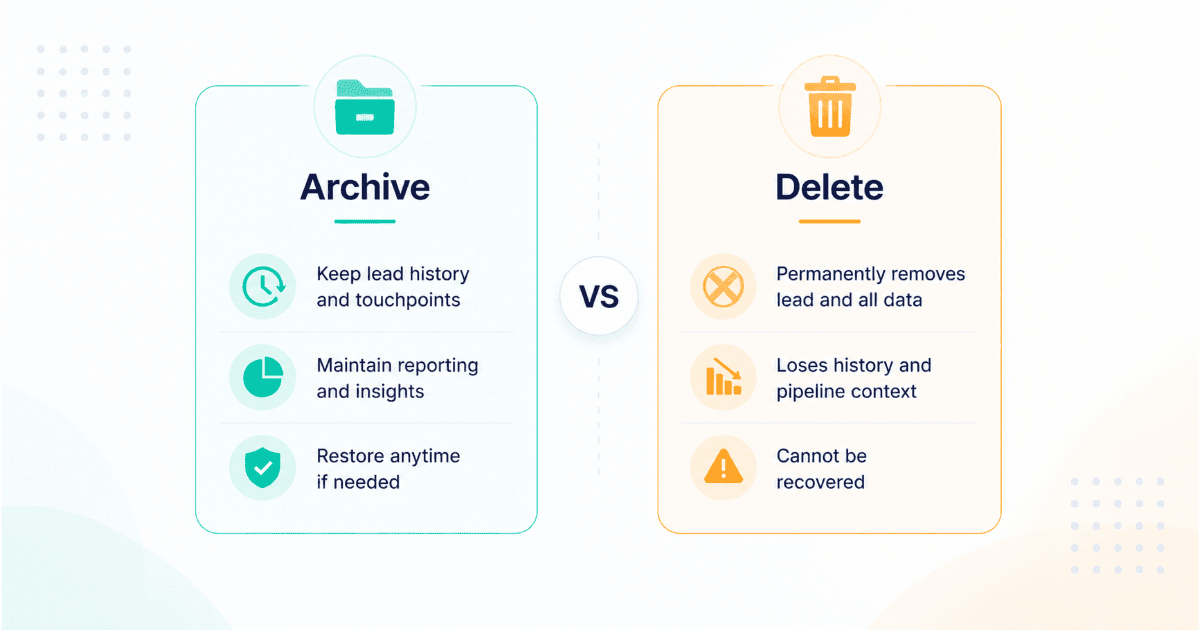
A "dead" lead — no activity in 6+ months, a bounced email, a closed-lost deal with no recent touches — feels like it should just be deleted. Resist that instinct. Deleting destroys reporting history (your win-rate and source-attribution numbers get permanently skewed) and removes any chance of reactivating that contact later if circumstances change — a company that wasn't ready a year ago may be ready now.
Archiving solves both problems: the record stays out of active pipelines and rep queues, but the history and the option to reactivate stay intact.
| Signal | Action |
|---|---|
| No activity in 6+ months, no open deal | Archive, tag for quarterly reactivation review |
| Bounced or invalid email, no other contact method | Archive, flag for re-enrichment before any future outreach |
| Closed-lost with no recent engagement | Archive, keep linked to original deal record for win-rate accuracy |
| Contact has explicitly opted out | Suppress and archive — never delete an opt-out record, since you need the suppression history |
Step 4: Set Ongoing Dedup Rules to Prevent Recurrence
A cleanup without prevention is a temporary fix. Industry data referenced by 2026 CRM deduplication methodology study notes that without ongoing controls, duplicates compound with every integration sync, list import, and form submission — the same mess you just cleaned will rebuild itself within a quarter or two if nothing changes structurally.
Three controls matter most going forward: enforce duplicate checks at the point of entry so reps see a warning before creating a record that already exists, require all imports to run through a matching pass before they land in the CRM rather than after, and set a recurring quarterly audit so drift gets caught early instead of accumulating for another year.
How SalesTarget.ai's CRM Prevents Duplicate Creation
The most effective fix to duplicate sprawl is stopping it before it happens. Lead management in SalesTarget.ai flags likely duplicates the moment a new contact is created or imported, instead of letting the same person quietly accumulate three separate records across different campaigns. Combined with a single, unified view of CRM activity per contact, reps see the full history in one place — so there's no incentive to re-create a record just because the existing one didn't surface in a quick search.
Mistakes to Avoid
Deleting the "losing" record in a merge
Mistake
This silently destroys every email, call, and deal tied to that record. Use field-level survivorship rules instead of an all-or-nothing pick.
Bulk-merging without a backup
Mistake
Merges are difficult to fully reverse once activity history is recombined. Export a backup before running any bulk operation.
Deleting dead leads instead of archiving
Mistake
Deletion permanently skews your win-rate and source-attribution reporting, and removes any future reactivation option.
Cleaning up once and stopping there
Mistake
Without point-of-entry duplicate checks, the same mess rebuilds within a quarter or two. Cleanup needs a prevention layer to last.
Stop cleaning up the same CRM twice a year.
Catch duplicates at the point of entry, with full activity history kept intact.
✓ 50 credits ✓ 7-day trial ✓ No credit card required