Sales teams often work across multiple tools for prospecting, outreach, follow-ups, and pipeline tracking. When these systems are not connected, reps spend more time updating records, moving data, and checking different platforms than speaking with potential buyers.
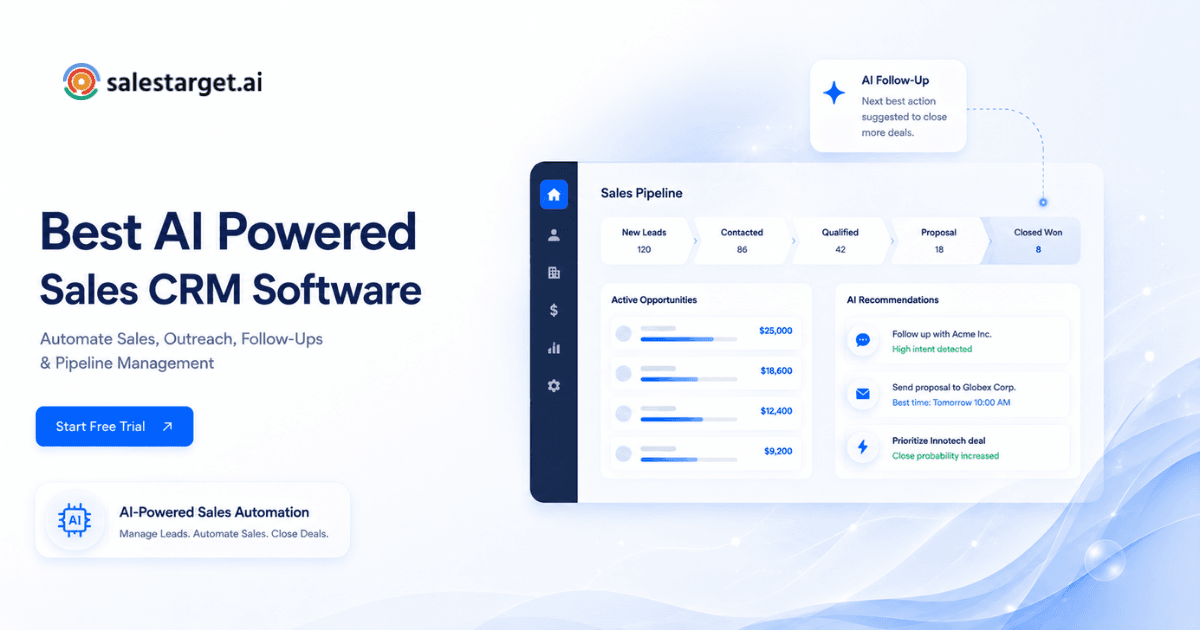
AI-powered sales CRM software is designed to reduce that manual work. These platforms use automation and artificial intelligence to support tasks such as contact organization, follow-up scheduling, sales activity tracking, lead prioritization, and pipeline visibility. Some platforms, including Salestarget.ai, combine lead discovery, outreach, and CRM workflows in one system, while others focus mainly on CRM management with AI-assisted features.
This guide explains what AI sales CRM software does, how it supports sales teams, which platforms are commonly used in 2025, and what to consider before choosing the right system for your business.
Too Many Sales Tools Are Slowing Down Your Sales Process
A typical B2B sales stack may include separate tools for lead data, email outreach, LinkedIn activity, email verification, calendar scheduling, and CRM management. Each tool may store information differently, which can create extra work for sales reps and operations teams.
According to Salesforce's State of Sales report, sales reps spend only 28% of their time selling. The remaining time is often spent on administrative work, internal meetings, data updates, and tool management.
When sales tools are disconnected, teams may face incomplete pipeline data, delayed follow-ups, and inconsistent reporting. The cost is not only the software subscription fees. The larger issue is the time lost when reps need to move between systems instead of focusing on active opportunities.
What Is AI-Powered Sales CRM Software?
AI-powered sales CRM software is a CRM system that uses artificial intelligence to help automate or simplify sales tasks. These tasks can include lead scoring, contact enrichment, activity logging, follow-up reminders, email drafting, pipeline analysis, and sales forecasting.
A traditional CRM mainly records sales activity. An AI-powered CRM can help interpret activity and suggest what action should happen next.
The AI layer can support several parts of the sales process. It may help identify relevant leads, organize contact data, suggest personalized messages, schedule follow-ups, summarize calls, and highlight pipeline risks. Platforms like SalesTarget.ai combine lead data, outreach channels, and CRM workflows into one product, which can help teams manage more of the sales process from a single workspace.
How AI Sales CRM Software Automates the Sales Process?
Automatically capturing and organizing sales activities
AI sales CRM platforms can automatically log emails, calls, meetings, notes, and outreach activity into the contact or deal record. This reduces the need for reps to manually update every interaction and helps keep the customer timeline more accurate.
AI-powered follow-up reminders and task management
AI can monitor engagement signals such as email opens, replies, meeting activity, or previous touchpoints. Based on these signals, the system can suggest or create follow-up tasks. This helps reps stay consistent and avoid missing important next steps.
Automating email outreach and prospect communication
Some AI CRM systems can help create email sequences, personalize messages, and recommend outreach timing. Salestarget.ai's Email Outreach feature, for example, supports AI-assisted sequence creation, follow-up steps, and message variations. These features are useful for teams that manage outbound campaigns and want to reduce repetitive writing and setup work.
Tracking conversations, deals, and customer interactions
A strong AI CRM should give reps and managers a complete view of each lead or opportunity. When email, LinkedIn, phone, and meeting activity are connected to the same deal record, teams can review sales conversations without searching through multiple tools.
Using AI insights to prioritize sales opportunities
AI can help prioritize leads by looking at fit, engagement, intent signals, and sales activity. For example, some platforms analyze company events, hiring activity, funding updates, website behavior, or campaign engagement to help reps identify accounts that may be more likely to respond.
Why Businesses Need an AI-Powered Sales CRM System
Improve visibility across the sales pipeline
An AI-powered CRM can help teams maintain a clearer view of deal stages, pending tasks, recent activity, and upcoming follow-ups. This is especially useful for sales leaders and RevOps teams that need accurate pipeline data for forecasting and planning.
Help sales reps spend more time with buyers
When a CRM reduces manual data entry, list management, and repetitive follow-up work, reps can spend more time on sales conversations. The goal of AI CRM software is not to replace the salesperson, but to reduce the admin work that slows them down.
Reduce manual CRM updates and repetitive work
Manual CRM updates are one of the most common reasons sales data becomes incomplete. Auto-logging and workflow automation can improve CRM adoption because reps do not have to record every activity by hand.
Support faster decision-making for sales leaders and RevOps teams
AI-powered reporting can help leaders identify patterns such as which sequences perform best, where deals are getting stuck, which reps need coaching, and which accounts require immediate follow-up. These insights can support better decision-making without relying only on manual reports.
Key Features to Look for in the Best AI-Powered Sales CRM Software
AI lead management and contact enrichment
A useful AI sales CRM should help teams organize, enrich, and manage lead data. Some platforms include built-in databases, while others depend on third-party data providers. Salestarget.ai's Lead Explorer is an example of a built-in prospecting feature that gives users access to professional and business profiles, along with enrichment options for contact details.
Automated email and LinkedIn sales workflows
For outbound sales teams, it is helpful when email and LinkedIn workflows can be managed from the same platform. This allows reps to coordinate touchpoints, maintain context, and avoid switching between separate tools for each channel.
Follow-up automation and sales reminders
Follow-up automation helps sales teams stay consistent. A good CRM should create reminders, assign tasks, and track completion based on replies, meetings, campaign activity, and deal stage changes.
Deal tracking and pipeline management
Pipeline management features should make it easy to view deal stages, deal value, owner, next action, and recent communication. For outbound teams, it is especially useful when leads from campaigns can move into the CRM without manual imports or spreadsheet updates.
AI-generated notes and sales insights
AI-generated notes can help reps summarize calls, meetings, or conversations more efficiently. The AI Copilot in SalesTarget.ai is one example of an assistant designed to support research, workflow guidance, deal insights, and sales task management.
CRM integrations with existing sales tools
Even if a platform includes many built-in features, integrations are still important. Teams should check whether the CRM connects with their calendar, video meeting tools, team communication apps, marketing systems, and existing CRM or sales platforms.
Best AI Sales CRM Platforms Compared
Salestarget.ai
Salestarget.ai is an AI sales platform that combines a B2B lead database, email and LinkedIn outreach, email validation, CRM features, and AI-assisted workflows. It is designed for teams that want to manage prospecting, outreach, and deal tracking in one workspace. The platform may be suitable for outbound-focused teams that want to reduce dependency on separate tools for lead discovery, sequencing, validation, and CRM management. It also positions itself as an alternative to Apollo, Instantly, and Woodpecker, especially for teams looking for built-in CRM and multichannel outreach features.
Salesforce Einstein CRM
Salesforce Einstein adds AI capabilities to Salesforce CRM, including forecasting, lead scoring, analytics, and sales recommendations. It is commonly used by larger organizations with complex sales processes and dedicated CRM administrators. However, outbound teams may still need separate tools for lead data, cold email sequencing, and LinkedIn outreach.
HubSpot AI CRM
HubSpot offers CRM features with AI-supported tools for deal insights, email tracking, content assistance, and conversation intelligence. It is often a good fit for inbound-led teams, marketing-driven organizations, and businesses that want an easy-to-use CRM. For advanced outbound prospecting or LinkedIn automation, teams may need additional tools or integrations.
Zoho CRM with AI features
Zoho CRM includes Zia, an AI assistant that can support deal predictions, contact suggestions, and sales activity insights. It is known for competitive pricing and a broad ecosystem of business applications. Zoho can be a strong option for teams already using the Zoho suite, though outbound sales teams may still require separate tools for cold email and LinkedIn workflows.
Pipedrive AI CRM
Pipedrive is focused on visual pipeline management and sales activity tracking. Its AI features help with deal predictions, recommendations, and contact insights. It is popular with small and mid-sized teams because of its simple interface. However, teams that need built-in lead databases, LinkedIn outreach, or email warm-up may need to connect additional tools.
How to Choose the Best Sales CRM Software for Your Team
Best sales CRM for startups
Startups usually need a CRM that is quick to set up, easy to learn, and flexible enough to support early sales processes. A startup team may benefit from a platform that includes prospecting, outreach, and CRM features together, especially when they do not have time or resources to manage multiple tools.
Best sales CRM for small businesses
Small businesses should look for CRM software that reduces manual work and does not require heavy administration. Important factors include ease of use, pricing transparency, automation, contact management, and integrations with the tools the team already uses.
Best sales CRM for outbound sales teams
Outbound sales teams should prioritize systems that support lead discovery, email sequencing, LinkedIn outreach, follow-up automation, and pipeline tracking. If reps need to export data from one tool, upload it into another, and then update a CRM manually, the sales process becomes slower and harder to manage.
Running outbound across too many tools? Review whether a unified platform can reduce manual work and improve visibility.
Choosing between CRM automation, integrations, and pricing
When comparing CRM software, consider three main questions: How much manual work does the platform remove? Does it connect with your current tools? And what is the total cost after considering the tools it may replace? A platform with a higher seat price may still be cost-effective if it reduces the need for multiple separate subscriptions.
Questions to ask before selecting CRM sales software
- Does it include a lead database, or do I need a separate data vendor?
- Can it run email and LinkedIn sequences natively?
- Does it auto-log activity, or will reps update records by hand?
- How fast is implementation?
- Will it replace tools I'm already paying for?
If the answer to the first three is "no," the CRM may still require additional tools around it. That does not make it a bad choice, but it is important to understand the complete sales stack before buying.
Why Choose Salestarget.ai?
Manage leads from discovery to closing in one platform
For teams evaluating Salestarget.ai, one of the main considerations is its unified workflow. The platform is designed to support lead discovery, enrichment, outreach, deal tracking, and CRM activity from one workspace. This can reduce the need for manual imports, exports, and repeated data entry across separate systems.
Find and enrich prospects with 840M+ verified profiles
Lead Explorer provides access to a large professional and business contact database. Teams can use it to search for prospects, review company information, and enrich selected contacts with available details such as work email, phone, and other contact fields. As with any data platform, teams should review data quality, compliance, and fit for their target market before relying on it at scale.
Run email and LinkedIn outreach without switching tools
Salestarget.ai supports email sequences and LinkedIn outreach in the same platform. This can help outbound teams coordinate messages across channels and keep activity connected to the same lead or deal record.
Keep sales data accurate with built-in email validation
The Email Validator helps check email quality before outreach begins. Email validation can reduce bounce risk, protect sender reputation, and improve campaign hygiene. Teams should still combine validation with good list management, responsible sending practices, and regular data refreshes.
Track deals with an auto-logged CRM
Campaign leads can move into the CRM so reps can track activity, follow-ups, and deal progress. Auto-logging helps reduce manual updates and gives managers a clearer view of recent sales interactions.
Use AI Copilot for sales research and workflow assistance
The AI Copilot is designed to assist with sales research, sequence creation, CRM queries, and workflow guidance. It can help users find leads, draft outreach, review campaign activity, and identify next actions. Teams should use AI-generated suggestions as support, while still reviewing messaging, targeting, and sales decisions manually.
Common Mistakes When Choosing an AI Sales CRM
Choosing a CRM without real sales automation
Not every CRM that uses the word "AI" provides meaningful automation. Some systems offer basic rules or templates but still require reps to complete most tasks manually. Before choosing a CRM, check whether it can actually reduce data entry, follow-up tracking, message creation, and pipeline maintenance.
Buying a CRM that creates more manual work
A CRM should make sales work easier, not more complicated. If reps need to manually log every call, import contacts from other tools, or build reports from raw data, adoption may become difficult. Usability and automation should be evaluated before purchase.
Using separate tools for leads, outreach, and deal tracking
Using separate tools is not always wrong, but it can create data gaps if the systems are not well integrated. Teams should consider whether their current stack creates too much manual work or whether a more connected platform would improve efficiency.
Ignoring CRM usability for sales reps
A CRM may have many features, but it will not help if reps do not use it consistently. The interface should be easy to understand, and common actions such as adding leads, updating deals, creating tasks, and reviewing activity should be simple.
Focusing only on features instead of sales workflow fit
A long feature list does not always mean the software is the right fit. The best CRM depends on the team's sales motion. Outbound teams, inbound teams, enterprise sales teams, and small businesses may all need different workflows, reporting, and automation levels.
How AI CRM Software Helps Teams Close More Deals
Keeping every lead interaction organized
When every email, call, meeting, and LinkedIn message is recorded in one timeline, reps can understand the full history of a lead before taking the next action. This also helps managers review stalled deals and identify where follow-up is needed.
Helping reps follow up at the right time
AI can help track engagement signals and recommend follow-up timing. While automation cannot replace good sales judgment, it can help reps stay consistent and avoid losing opportunities because of missed tasks.
Reducing delays between outreach and sales conversations
When prospecting, outreach, and CRM activity are connected, teams can move faster from lead discovery to first contact. This reduces delays caused by exporting lists, cleaning data, uploading contacts, and manually creating sequences.
Giving managers better pipeline visibility
A centralized CRM dashboard can help managers review campaign activity, deal progress, meetings, open tasks, and sales performance. According to Gartner, sales technology and centralized pipeline data can support more informed forecasting and coaching. The key is making sure the data is accurate, updated, and easy for the team to use.
Conclusion: Choosing the Best AI-Powered Sales CRM Software for Your Growth
The main challenge for many sales teams is not the lack of tools. It is the difficulty of managing too many disconnected tools at the same time. When lead data, outreach, follow-ups, and CRM updates live in separate systems, reps spend more time on administration and managers get less reliable pipeline visibility.
The best AI-powered sales CRM software should help teams reduce manual work, keep sales activity organized, improve follow-up consistency, and make pipeline data easier to understand. SalesTarget.ai is one example of a platform that brings lead discovery, contact enrichment, email and LinkedIn outreach, and CRM tracking into one workspace.
Before choosing any CRM, teams should compare their workflow needs, existing tool stack, budget, data requirements, and automation goals. The right platform is the one that helps reps spend less time managing software and more time building sales conversations.