You spent hours building a prospect list, wrote a sharp cold email sequence, warmed your domains for weeks, and hit send. Then 8% of your emails bounced. Your sender reputation tanked. Half your follow-ups landed in spam. The campaign was dead before the first reply came in.
The best B2B sales email verification techniques catch this before it happens. They layer syntax checks, domain validation, MX record lookups, SMTP mailbox verification, catch-all detection, and disposable email filtering to confirm every address on your list can actually receive mail. Run these checks before you send, and your bounce rate drops below 1%, your sender reputation stays clean, and more emails reach the inbox.
That is the difference between outbound that generates pipeline and outbound that burns your domain.
The Real Cost of Sending to Unverified B2B Emails
Hard bounces and their effect on sender reputation
A hard bounce means the email address does not exist. The receiving mail server rejects it permanently. Every hard bounce is a signal to inbox providers that you are sending to bad data. Cross the 2% hard bounce threshold, and providers like Google and Microsoft start throttling or spam-foldering your messages across all campaigns, not just the one with bad addresses.
Poor contact data and wasted sales activity
Reps spend time personalizing emails to contacts who will never see them. Sequences fire follow-ups to dead addresses. Activity metrics look busy, but pipeline stays flat. According to Gartner research, poor data quality costs organizations an average of $12.9 million per year in wasted effort and missed revenue.
How bad lists hurt inbox placement
Inbox providers track your bounce rate, spam complaints, and engagement signals at the domain level. A single campaign with a 5%+ bounce rate can drag down deliverability for every sending account on that domain. The damage compounds: fewer emails reach the inbox, reply rates drop, and the algorithm pushes even more of your mail to spam.
Why old prospect data becomes risky over time
B2B contact data decays at roughly 22.5% per year. People change jobs, companies get acquired, domains expire. A list you verified six months ago may have 10% or more invalid addresses today. In high-turnover sectors like tech startups, annual decay rates can reach 30% to 70%. If you are reusing old CRM contacts without rechecking them, you are sending blind.
How B2B Email Verification Works
Email syntax and format validation
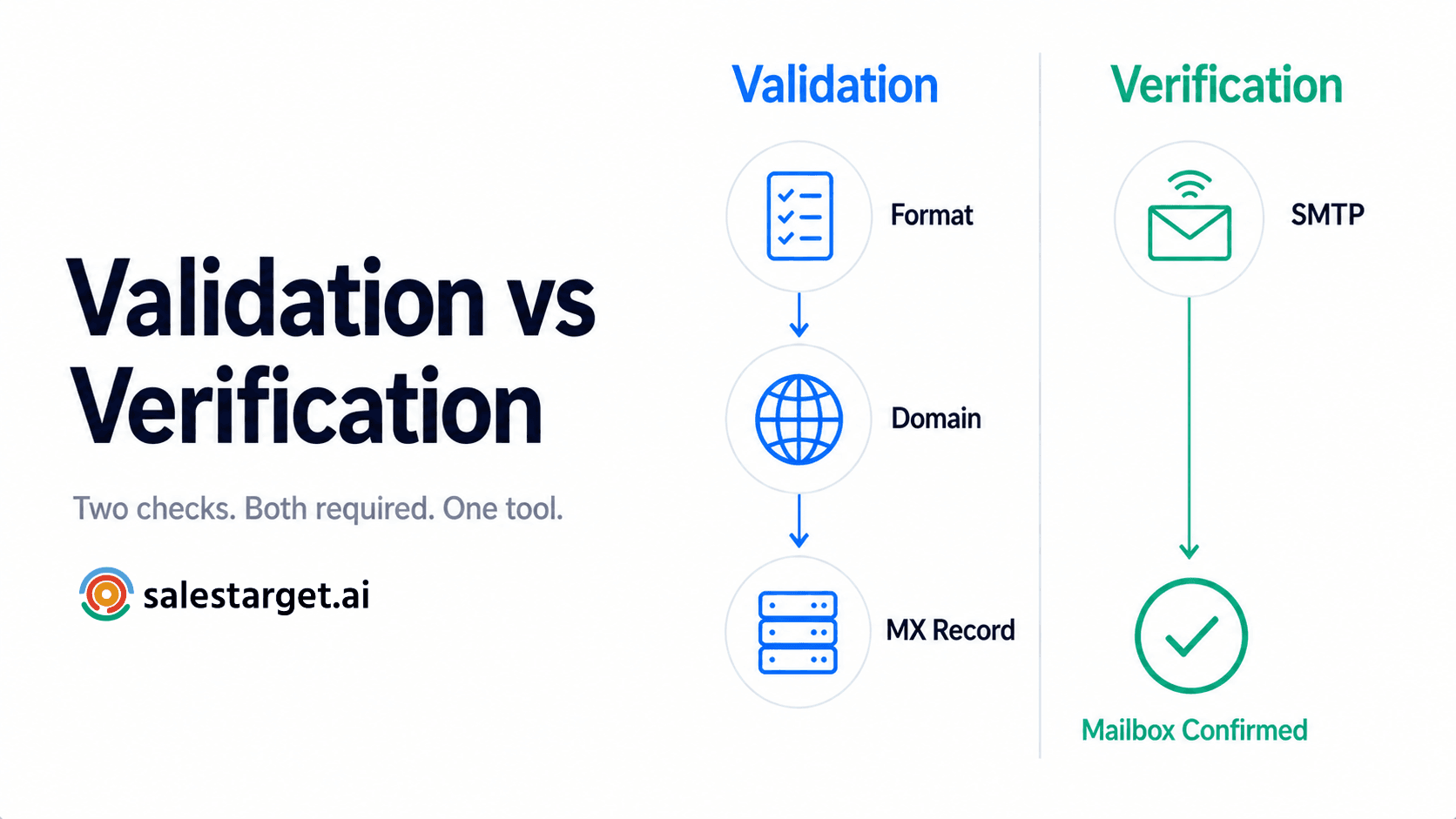
The first check confirms the email follows a valid format: a local part, an @ symbol, and a domain. This catches typos, missing characters, and obviously malformed addresses before any network calls happen.
Domain and DNS checks
The system queries DNS to confirm the domain in the email address actually exists and has active DNS records. If the domain is dead or unregistered, every address on it is invalid.
MX record verification
MX (Mail Exchange) records tell the internet which mail server handles email for a domain. If no MX records exist, the domain cannot receive email. This check filters out domains that look real but have no mail infrastructure.
SMTP mailbox verification
This is the deepest check. The verification system connects to the recipient's mail server and simulates a send (without delivering a message) to see if the specific mailbox exists. A valid response means the address is live. A rejection means it is not.
Catch-all domain detection
Some domains are configured to accept mail sent to any address, real or fake. These "catch-all" domains make it impossible to confirm whether a specific mailbox exists, because the server says "yes" to everything. Catch-all detection flags these so you can handle them separately.
Disposable and role-based email checks
Disposable emails come from temporary inbox services (Guerrilla Mail, Temp Mail) and are worthless for sales outreach. Role-based addresses (info@, sales@, support@) go to shared inboxes, not individual decision-makers. Both should be filtered out before sequencing.
Best B2B Sales Email Verification Techniques
Validate email format before deeper checks
Run syntax validation first. It is fast, free, and catches the obvious garbage: spaces, double dots, missing domains. This saves API calls on addresses that were never going to pass anyway.
Confirm the business domain is active
Query DNS for the domain. If it returns no records, drop every contact on that domain. Do not waste SMTP calls on dead infrastructure.
Check MX records for mail delivery
After confirming the domain exists, verify it has MX records pointing to a live mail server. Domains without MX records cannot receive email, period.
Use SMTP verification to check mailbox status
SMTP verification is the most reliable way to confirm a specific mailbox is live. SalesTarget.ai's Email Validator runs MX and SMTP checks together, returning a clear status for each address so you know exactly which contacts are safe to send to.
Detect catch-all domains before sending
Catch-all domains accept everything. That does not mean every address on them is real. Flag catch-all results and send to them in small, controlled batches. Monitor bounces from those sends and suppress any that fail.
Identify disposable and temporary email addresses
If a prospect gave you a Mailinator or Temp Mail address, they are not a real buyer. Filter these out automatically. SalesTarget.ai's verification flags disposable domains and removes them before they reach your outreach sequence.
Verify contacts in real time during prospecting
The best time to verify is the moment you find the lead. When verification happens at the point of enrichment (not days or weeks later), you never add a bad address to your pipeline in the first place. SalesTarget.ai's Lead Explorer enriches and verifies contact data in the same click, so every email is checked before it enters your workflow.
Reverify older leads before reusing them
Any contact sitting in your CRM for 90+ days should be rechecked before a new campaign. Job changes, domain migrations, and company closures happen constantly. A quick bulk reverification catches the ones that went bad since your last send.
Building a Clean B2B Email List Before Outreach
Remove duplicate and invalid contacts
Deduplicate by email address first, then by name + company combination. Remove any address that failed syntax or SMTP checks. Start with a clean foundation.
Separate valid, risky, catch-all, and unknown emails
Do not lump every "non-bounced" address into one sending list. Segment by verification status: send to valid addresses at full volume, batch catch-all addresses carefully, and exclude unknown or risky results until you can recheck them.
Recheck contacts that have been sitting in the CRM
CRM data gets stale fast. Before launching any campaign from stored contacts, run the list through verification again. This is especially true for contacts older than 90 days or sourced from third-party providers.
Remove previous hard bounces from future campaigns
Maintain a suppression list of every address that has ever hard-bounced. Never send to them again. Some teams skip this step and keep re-adding old bounced addresses to new campaigns, which hammers sender reputation repeatedly.
Validate uploaded CSV lists before sequencing
If your team uploads CSV prospect lists from events, purchased databases, or scraped sources, verify every address on the file before importing it into a sequence. SalesTarget.ai lets you bulk-verify uploaded lists inside the platform before any email goes out.
How Email Verification Improves Deliverability
Lower hard bounce rates
Verified lists consistently keep hard bounce rates below 1%. That is well under the 2% threshold where inbox providers start penalizing your domain.
Better sender reputation
Fewer bounces and fewer spam complaints mean inbox providers trust your sending domain. That trust compounds over time: the longer you maintain a clean reputation, the higher your inbox placement rate climbs.
Cleaner sending lists
Removing invalid, disposable, and risky addresses means every email in your sequence goes to a real person at a real company. Your campaign metrics reflect actual engagement, not noise.
Stronger inbox placement
When your sender reputation is clean and your bounce rate is low, inbox providers route your emails to the primary inbox instead of promotions or spam. That is where replies happen.
More reliable outreach data for sales teams
Verified contact data means your CRM and reporting reflect reality. Reps can trust that activity metrics (sends, opens, replies) map to actual prospect engagement, not phantom contacts.
Where Email Verification Fits Into the B2B Sales Process
During lead discovery and enrichment
Verify at the point of capture. When you find a prospect in Lead Explorer or enrich a contact from LinkedIn, the email should be checked before it enters any list or sequence.
Before adding prospects to cold email sequences
Every contact should pass verification before it hits a live outreach sequence. No exceptions. One bad batch can damage deliverability for your entire domain.
Before reusing old CRM contacts
Contacts that have been sitting idle for months need a fresh check. Treat CRM data as perishable.
Before launching large bulk outreach campaigns
The larger the send volume, the more damage bad addresses can do. Verify the full list, segment by status, and send to verified-only addresses first.
After contact data changes or job moves
When a prospect changes companies, their old email address dies. If your enrichment tool detects job changes (SalesTarget.ai surfaces these through buyer signals and business events), reverify the new contact data before reaching out.
Choosing the Right B2B Email Verification Software
SMTP and MX verification
The tool must check both MX records and SMTP mailbox status. Syntax-only checkers miss too much.
Catch-all and risk detection
Look for clear catch-all flagging and a risk score so you can make informed sending decisions, not binary pass/fail.
Real-time and bulk verification
You need real-time verification during prospecting and bulk verification for cleaning stored lists. Both modes matter.
Clear verification statuses
The tool should return distinct statuses (valid, invalid, catch-all, risky, unknown) so you can segment your list properly.
Sales outreach and CRM integration
Verification should connect directly to your outreach sequences and CRM. If you have to export, verify elsewhere, and re-import, you will skip the step when you are busy. That is when bounces spike.
Lead enrichment and contact data accuracy
The best email verification tool is one that sits inside your enrichment workflow, not bolted on after the fact. Verification at the point of enrichment means the data is fresh the moment you act on it.
Why Choose SalesTarget.ai
Find and enrich prospects with Lead Explorer
SalesTarget.ai's Lead Explorer gives you access to 840M+ verified professional profiles and 146M+ business entities. Search by industry, role, seniority, tech stack, or intent signals. One-click enrichment pulls verified email, phone, and mobile, and the contact is verified at the moment of enrichment.
Verify contact data before outreach with Email Validator
The built-in Email Validator runs MX, SMTP, disposable-email, and risk-scoring checks. Bulk-clean stored lists or verify in real time as you prospect. SalesTarget.ai validates 90% of emails before sending, keeping bounce rates low and sender reputation protected.
Run email sequences with built-in deliverability checks
Email Outreach includes unlimited inboxes with AI warm-up, intelligent inbox rotation, and SPF/DKIM/DMARC checks. Sequences are built with deliverability protection baked in, not patched on from a separate tool.
Combine email and LinkedIn outreach in one flow
Run coordinated email and LinkedIn sequences from one platform. Context carries across channels, so when a prospect does not open your email, your LinkedIn follow-up already knows.
Keep sales activity inside the built-in CRM
Leads land in the CRM automatically from campaigns. Every email, call, and reply is logged to the lead timeline. No manual imports, no lost data.
Use AI Copilot across prospecting and outreach
The AI Copilot generates personalized email sequences, finds leads across 840M+ profiles, tracks campaign performance, and flags at-risk deals. It handles the repetitive work so reps focus on conversations that close.
If you want to see how verification, enrichment, and outreach work together in one platform, start with a free demo.
Email Verification Mistakes That Still Lead to High Bounce Rates
Relying on syntax checks alone
Syntax validation catches formatting errors. It cannot tell you if the mailbox exists. Teams that stop at syntax will still bounce on dead addresses, deactivated accounts, and domains with no mail server.
Treating every catch-all email as safe
A catch-all domain accepts mail to any address. That includes addresses that belong to no one. Sending your full volume to unverified catch-all addresses is a fast way to spike bounces.
Using old verified lists without rechecking them
A list verified three months ago is not verified today. B2B contact data changes constantly. Reverify before every campaign.
Sending to unknown SMTP results
When SMTP verification returns an "unknown" status (the server did not give a clear answer), do not treat that address as valid. Segment it out and test in small batches.
Ignoring contacts who changed companies
A verified email becomes invalid the day someone leaves that company. If you are not monitoring job changes and reverifying, you are sending to dead mailboxes.
Uploading third-party lists directly into campaigns
Purchased or scraped lists are the most common source of high bounce rates. Always verify the entire list before importing. No exceptions.
Email Verification Edge Cases Sales Teams Should Watch
Mail servers that block SMTP verification
Some corporate mail servers (especially Microsoft 365 tenants) block the SMTP handshake that verification tools use. The result comes back as "unknown" even though the mailbox is valid. In these cases, cross-reference with other signals: does the contact appear on LinkedIn at that company? Does the domain have active MX records? Send in small batches and monitor.
Catch-all domains that accept invalid addresses
A catch-all domain will return "valid" for literally any string before the @. The only way to confirm real mailboxes on these domains is to send a small test batch and watch for bounces. Do not blast your full list.
Temporary mail server errors
An SMTP timeout or 4xx response does not mean the address is bad. It means the server was temporarily unavailable. Retry these after a few hours. Do not immediately suppress them.
Recently disabled employee mailboxes
When someone leaves a company, their mailbox may stay active for weeks before IT disables it. Verification will show it as valid, but the person is gone. Cross-check with LinkedIn or job-change signals.
Valid emails that become stale after job changes
This is the most common edge case in B2B outreach. The email was real when you found it, but the person moved to a new company. SalesTarget.ai's intent signals and business-event tracking (hiring spikes, leadership changes) help flag these before you waste a send.
Best Practices for Keeping B2B Email Data Clean
Verify new contacts at the point of capture
Do not batch-verify once a month. Verify the moment a contact enters your system. SalesTarget.ai does this by default: enrichment and verification happen in the same action inside Lead Explorer.
Reverify stored contacts before new campaigns
Set a rule: any contact older than 90 days gets reverified before it goes into a live sequence. Make it a workflow step, not something reps have to remember.
Maintain a hard-bounce suppression list
Every hard bounce goes on the suppression list permanently. Sync this list across all sending accounts and outreach tools. Never re-send to a confirmed dead address.
Monitor bounce rates by sending account
Track bounce rates per inbox, per domain, and per campaign. A spike on one sending account can reveal a bad list segment or a domain-reputation issue before it spreads.
Keep verification connected to prospecting and outreach
Verification should not live in a separate tool with a separate workflow. When it is built into the same platform where you find leads, run sequences, and manage deals, the data stays clean by design. That is how SalesTarget.ai structures it: find the lead, verify it, sequence it, and close it in one workspace.
Conclusion: Build Better Outreach With Verified B2B Contact Data
High bounce rates are not a deliverability problem. They are a data problem. Every bounced email traces back to a contact that was never verified, was verified too long ago, or was pulled from a source that nobody checked.
The fix is straightforward: verify every email before it enters a sequence, reverify stored contacts before reuse, suppress hard bounces permanently, and keep verification built into your prospecting workflow so it happens automatically.
SalesTarget.ai puts all of this in one platform. Lead Explorer finds and enriches prospects with real-time verification. Email Validator runs MX, SMTP, and risk checks before any send. Email Outreach protects sender reputation with warm-up, rotation, and authentication. And the built-in CRM keeps every verified contact, every reply, and every deal in one place.
Stop stitching point tools together. Start with SalesTarget.ai and run outbound on clean, verified data from day one.