TL;DR
- Most SDRs send LinkedIn messages whenever they have time. That is a deliverability and reply rate problem.
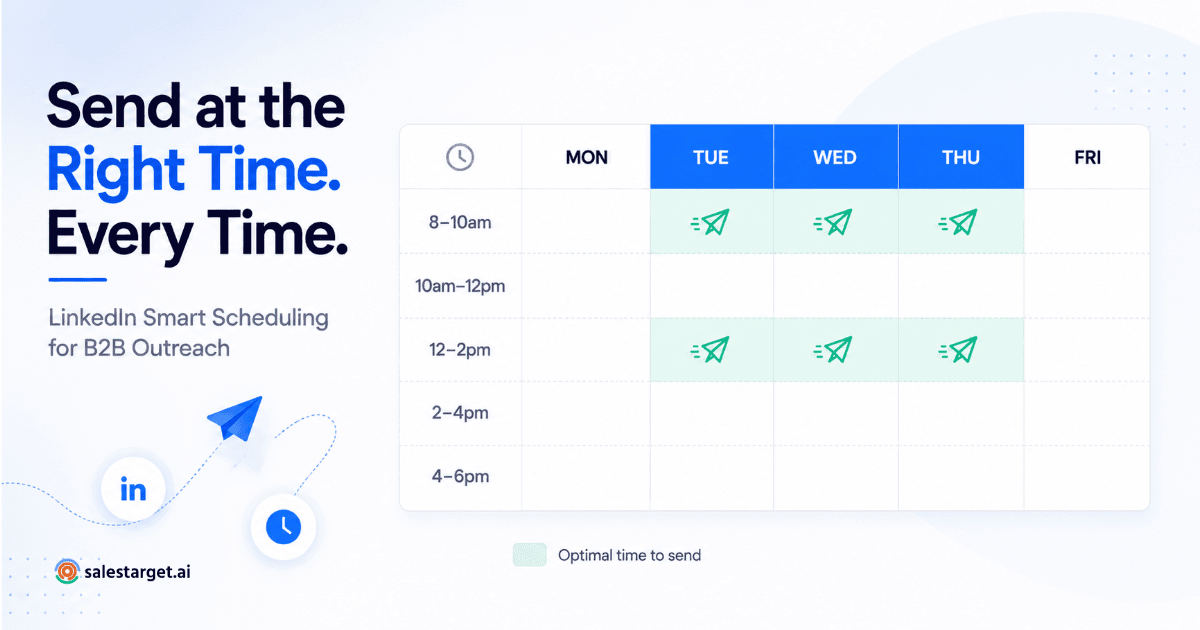
- Tuesday through Thursday, 8–10am and 12–2pm in your prospect's timezone, consistently outperform other windows for B2B LinkedIn outreach.
- Fixed-time scheduling is a red flag for LinkedIn's algorithm — human behavior is never perfectly uniform.
- Smart scheduling randomizes send times within high-performance windows to mimic human behavior and protect your account.
- SalesTarget's LinkedIn Smart Scheduling handles timezone detection, send-window logic, and randomization automatically.
You wrote a solid connection request. Your follow-up sequence is tight. Your ICP is dialed in. And yet — reply rates are flat. Before you rewrite the copy, check when you are sending. LinkedIn outreach timing is the variable most SDRs never touch, and it is quietly killing campaigns that should be working.
Why Timing Is the Hidden Variable in LinkedIn Outreach
B2B LinkedIn outreach lives and dies by context. A perfectly written message sent at the wrong moment — Friday at 5pm, Monday morning when inboxes are already chaos — gets buried or ignored before your prospect even reads the first line.
Timing affects two things simultaneously: your reply rate (whether prospects actually respond) and your account safety (whether LinkedIn flags your activity as automated). Both matter. Most outreach guides treat them as separate conversations. They are not.
When you send messages in predictable bursts — same time every day, perfectly spaced intervals — LinkedIn's systems recognize the pattern. Real humans do not message with machine precision. That behavioral mismatch is how automated accounts get flagged, throttled, or restricted.
Smart scheduling solves both problems at once. It sends your messages inside the windows where reply rates are highest, while randomizing the exact timing so your activity looks organic. This is what separates teams running sustainable LinkedIn outreach automation from teams burning through accounts every quarter.
Best Days to Send LinkedIn Messages — What the Data Shows
Not all weekdays perform equally. LinkedIn's own research on professional engagement, combined with outbound sales platform data, consistently points to the same mid-week window as the highest-performing period for B2B outreach.
| Day | Performance | Why |
|---|---|---|
| Tuesday | High | Inbox cleared from Monday. Prospects in active work mode, not context-switching into the week. |
| Wednesday | High | Peak mid-week engagement. Professionals are deep in execution, not weekend-planning mode. |
| Thursday | High | Strong for follow-ups. Prospects wrapping up decisions before the weekend tend to be more responsive. |
| Monday | Medium | High inbox competition. Prospects triaging the week — your message competes with everything that arrived over the weekend. |
| Friday | Low–Medium | Attention drops after midday. Works for certain personas (founders checking feeds), but not for most B2B SaaS buyers. |
| Weekend | Avoid | Low professional engagement and a clear signal of automation to LinkedIn's systems. |
The practical takeaway: concentrate your LinkedIn outreach automation on Tuesday through Thursday. Do not split your sequence evenly across all five days on principle — let performance data drive the distribution.
Best Hours to Send — And Why Timezone Matters More Than You Think
Day selection is only half the equation. The hour you send in is where most teams leave the most reply rate on the table — especially when running global campaigns without timezone logic built in.
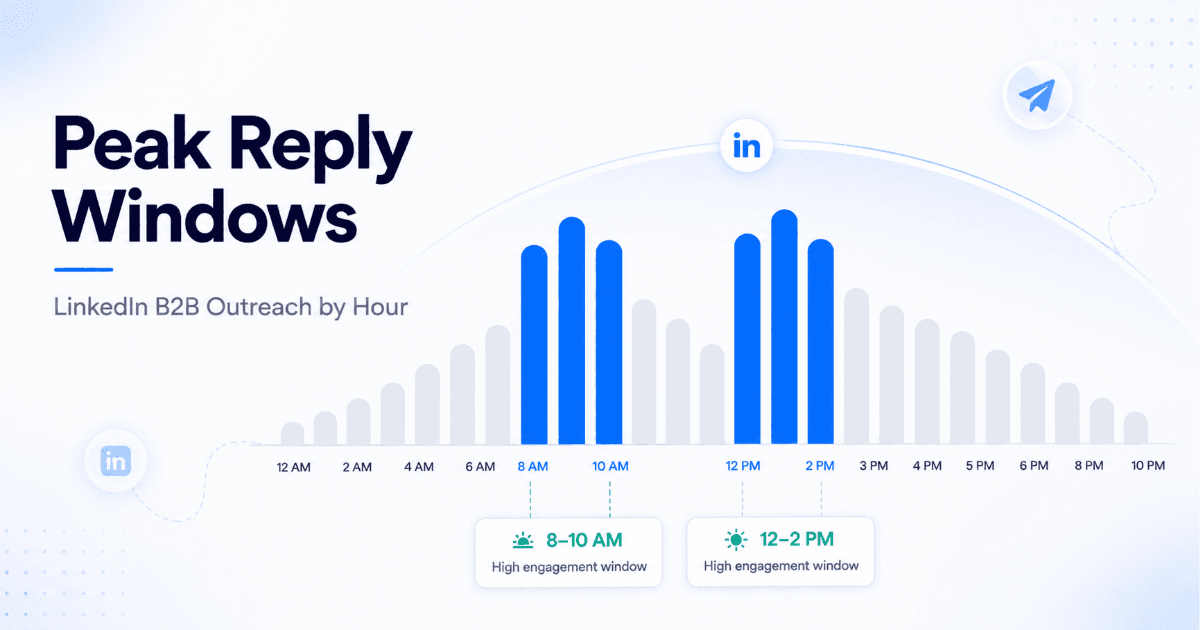
Two windows consistently outperform across B2B roles and industries:
The Two High-Performance Windows
In your prospect's local timezone — always
8:00am – 10:00am — The morning focus window. Professionals are at their desk, LinkedIn is open, and they have not yet hit peak context-switching mode. This window works particularly well for first-touch connection requests and opening messages.
12:00pm – 2:00pm — The midday check window. Lunch breaks and natural workflow pauses create a second spike in LinkedIn activity. Follow-up messages and value-add touchpoints perform strongly here.
The critical phrase in both cases: in your prospect's local timezone. If you are an SDR based in Bengaluru running sequences into London and New York simultaneously, sending at 9am IST means your London prospects receive your message at 4:30am and your New York prospects at 11:30pm the night before. That is not outreach — that is noise.
Timezone-aware scheduling is not a nice-to-have for global teams. It is the baseline requirement for LinkedIn outreach that performs consistently across geographies.
Why Random Scheduling Beats Fixed Scheduling Every Time
Here is what most teams do when they first set up LinkedIn outreach automation: they pick a time — say, 9:00am — and schedule every message to go out at exactly that time every day. It feels organised. It is actually a liability.
LinkedIn's systems are trained to detect non-human behavior patterns. Perfect, clockwork timing is one of the clearest signals. Real people do not send connection requests at exactly 09:00, 09:05, 09:10, and 09:15 every single morning. That cadence is a pattern, and patterns get flagged.
📊 Human vs. Automated Timing Patterns
- Human behavior — Messages sent across variable intervals: 8:47am, 9:23am, 10:02am, 12:34pm. Natural drift across the day.
- Fixed automation — Messages sent at identical intervals: 9:00am, 9:05am, 9:10am. Machine-readable pattern.
- Smart scheduling — Messages randomized within high-performance windows: 8:51am, 9:17am, 9:44am. Human pattern, data-driven window.
Smart scheduling gives you the best of both: you stay inside the windows where reply rates peak, and your timing looks organic because it is randomized within those windows. This is why it is the foundation of LinkedIn automation safety and compliance — not just a convenience feature.
How SalesTarget's Smart Scheduling Works
SalesTarget's LinkedIn Smart Scheduling is built around three core mechanics that work together automatically — you set the parameters, the system handles the execution.
| Mechanic | What It Does | Why It Matters |
|---|---|---|
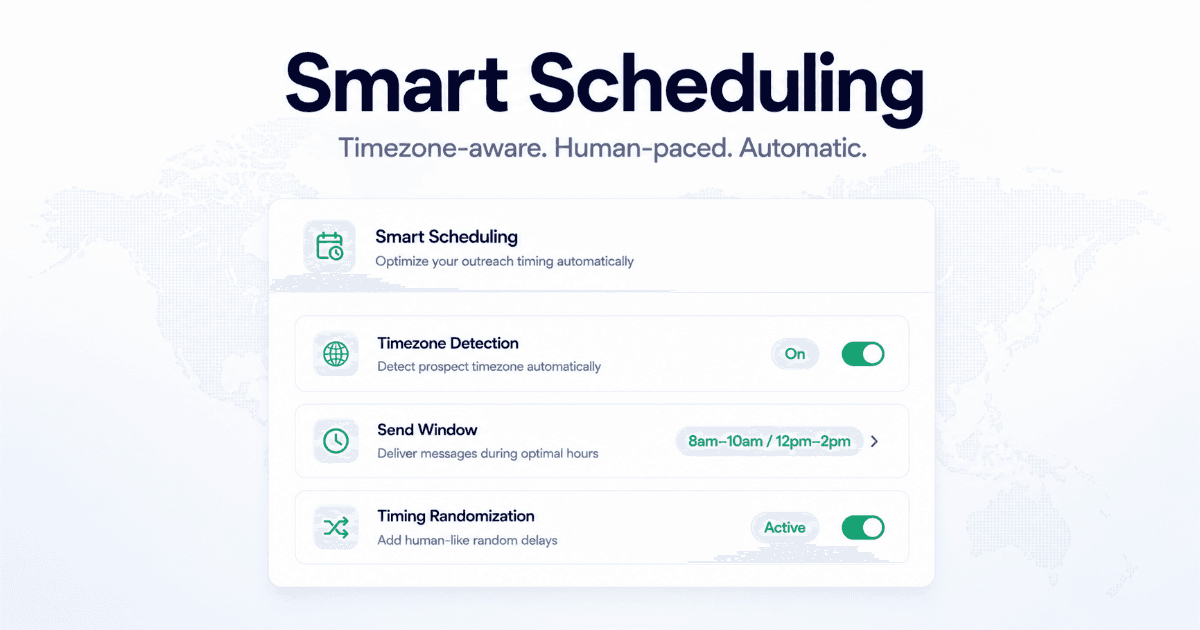
| Timezone Detection | Detects each prospect's local timezone from their profile data and schedules messages relative to their local time — not yours. | Your 9am window lands at 9am for every prospect, regardless of where they are. |
| Send-Window Logic | You define your active outreach hours (e.g. 8am–6pm, Monday–Thursday). All messages are queued to send only inside that window. | Eliminates off-hours sends that signal automation and waste message volume on low-engagement periods. |
| Timing Randomization | Within your defined window, SalesTarget randomizes the exact send time for each message — no two messages go out at identical intervals. | Mimics organic human behavior, protecting your account from LinkedIn's automated activity detection. |
The result is a sequence that behaves the way a disciplined, high-output SDR would behave if they were manually managing their LinkedIn prospecting tips into a real daily routine — except it scales across hundreds of prospects simultaneously without you touching it.
For teams running multichannel sequences, Smart Scheduling also coordinates LinkedIn send times with email touchpoints — so your outreach does not stack up on the same prospect from two channels at exactly the same moment. That kind of coordination is what separates a sequence that feels like a system from one that feels like spam.
Setting Up Smart Scheduling: Step-by-Step
Here is how to configure LinkedIn Smart Scheduling inside SalesTarget for a standard B2B SaaS outreach campaign.
-
Go to LinkedIn Outreach → Smart Scheduling
Inside your SalesTarget dashboard, navigate to the LinkedIn Outreach section and open Smart Scheduling settings. -
Set your active sending days
Select Tuesday, Wednesday, and Thursday as your primary active days. You can include Monday and Friday if your campaign volume requires it — but weight mid-week days more heavily. -
Define your send windows
Set Window 1: 8:00am – 10:30am. Set Window 2: 12:00pm – 2:00pm. These are your high-performance hours. Keep windows tight — do not open the full 9am–6pm day and expect the system to do the heavy lifting on timing. -
Enable timezone detection
Toggle on prospect-local timezone scheduling. This tells SalesTarget to calculate send times relative to each prospect's location — not your account's location. -
Enable timing randomization
Confirm that send-time randomization is active within your windows. This is on by default in SalesTarget — verify it is not disabled. -
Set your daily send limit
Stay within safe daily limits — typically 20–40 connection requests per day for a healthy account. Smart Scheduling distributes these across your active windows automatically. -
Launch and monitor in LinkedIn Analytics
Run for at least two weeks before making timing adjustments. Use SalesTarget's LinkedIn Analytics dashboard to track acceptance rate, reply rate, and response time by day and hour — then refine your windows based on what your specific ICP data shows.
Three Mistakes That Kill Your LinkedIn Outreach Timing
Mistake 1: Scheduling in Your Own Timezone for a Global List
The problem
If your active window is 9am–11am in your timezone and your prospects are across three continents, roughly two-thirds of them are getting your messages at completely wrong local times. Fix: always enable prospect-local timezone scheduling before a campaign goes live. SalesTarget's Smart Scheduling handles this automatically.
Mistake 2: Opening the Full Day as Your Send Window
The problem
Setting your window as 8am–6pm and letting the system spread messages across the entire day sounds like it gives you more flexibility. In practice it dilutes your volume across low-performance hours. Concentrate sends into the two proven windows — morning and midday — and your same daily message volume will generate materially higher reply rates.
Mistake 3: Treating Timing as a Set-and-Forget Decision
The problem
The data-backed windows are a strong starting point — not a permanent answer. Different ICPs, industries, and seniority levels show different peak engagement times. A VP of Sales at a 500-person SaaS company has a different day shape than a founder at a 10-person startup. Run your first campaign with standard windows, then review your analytics and refine. Let your own data override the defaults over time.
For a full breakdown of safe daily limits, connection request thresholds, and account protection settings, see the SalesTarget guide to using smart scheduling for LinkedIn messages.
Stop Sending at the Wrong Time. Start Winning More Replies.
SalesTarget's Smart Scheduling sends every LinkedIn message in your prospect's timezone, inside your best-performing windows, with randomized timing that looks human — automatically.
✓ 50 credits ✓ 7-day trial ✓ No credit card required




