Most B2B sales teams do not struggle to find lead generation tools. They struggle to pick the right ones - and to connect them into a workflow that actually moves prospects from a search result to a booked meeting. The typical outcome is a stack of three or four overlapping tools that each cover part of the process, with reps switching tabs, re-entering data, and losing context at every handoff.
Sales lead generation tools are the platforms and software that help sales teams identify target companies, discover decision-makers, collect verified contact information, evaluate lead quality, and prepare prospects for outreach. When chosen well, they eliminate manual research, reduce wasted outreach, and keep every rep focused on the prospects most likely to convert.
This guide walks through the five stages of a practical sales prospecting workflow, explains what tool capabilities matter at each stage, and offers a selection framework you can apply regardless of team size. If you need a broader comparison of tools across inbound and outbound, see this guide to lead generation tools and platforms for sales.
👉 Explore SalesTarget.ai Lead Explorer - Search 840M+ verified profiles, enrich contacts, and push leads to outreach in one workflow.
The Five Stages Where Sales Lead Generation Tools Do the Work
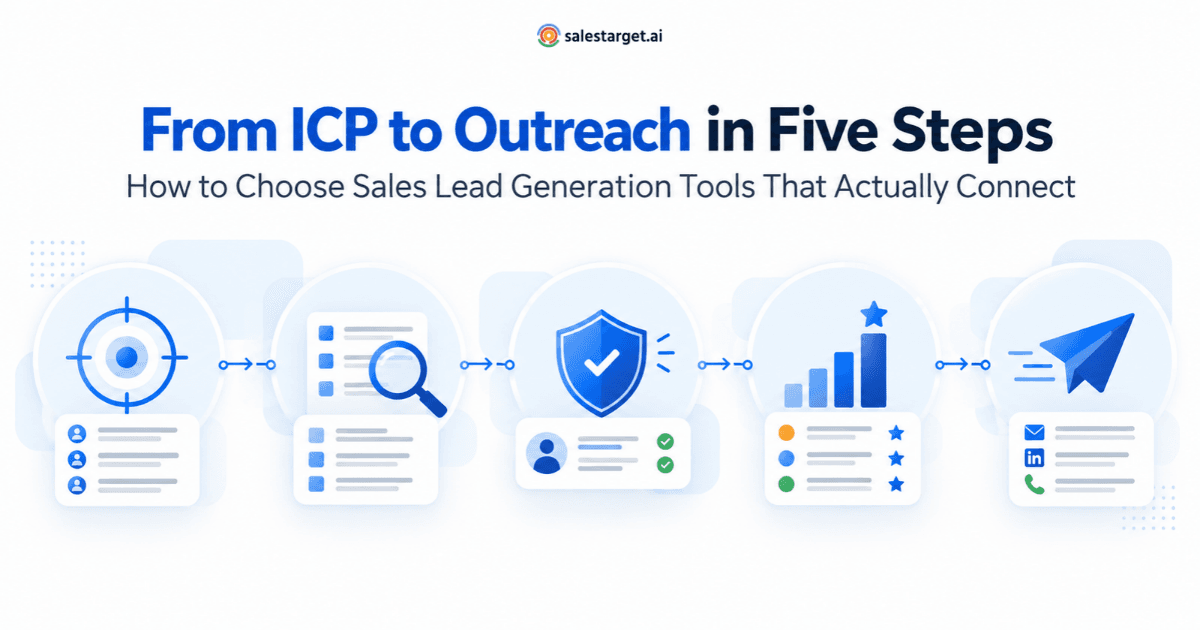
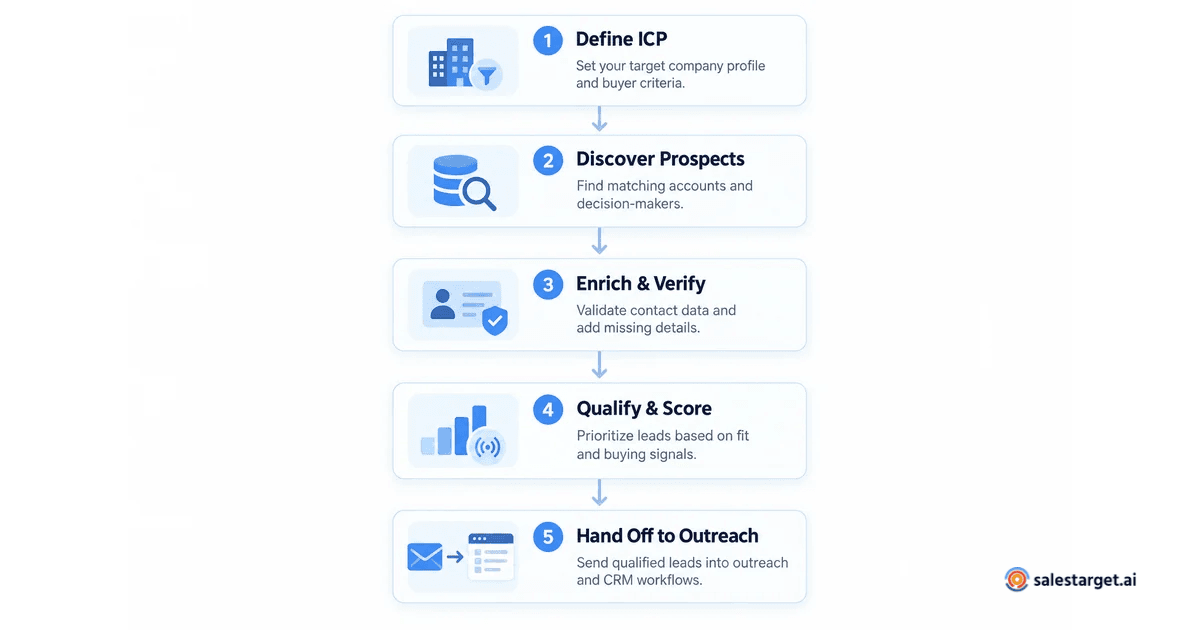
Before evaluating any individual tool, it helps to map the stages of the workflow it needs to support. Nearly every B2B sales prospecting process follows the same sequence, regardless of team size or deal complexity.
- ICP definition and targeting - Deciding which companies and job titles to pursue based on firmographic and technographic criteria.
- Prospect discovery - Searching databases, signals, and filters to build a list of potential buyers who match your ICP.
- Contact enrichment and verification - Adding verified email addresses, phone numbers, company details, and tech stack data to each prospect record.
- Lead qualification and prioritization - Scoring and ranking prospects based on fit and buying intent so reps work the most promising leads first.
- Outreach handoff - Moving qualified, enriched leads into email sequences, LinkedIn campaigns, or a CRM pipeline without manual re-entry.
A sales lead generation tool can cover one, several, or all of these stages. Knowing which stages your current process handles well - and which ones leak time or data - is the fastest way to decide what to buy.
Stage 1: ICP Definition and Targeting
Every effective prospecting workflow starts by defining who to pursue. An Ideal Customer Profile is a set of company-level and contact-level attributes that describe the accounts most likely to buy, expand, and retain. Without a clear ICP, even the best database becomes a random list.
What to look for in a tool
- Firmographic filters: industry, company size (headcount and revenue), geography, and company type.
- Technographic filters: the ability to search by technology stack so you can target companies already using complementary or competing products.
- Saved ICP templates: the option to save filter combinations so every rep starts from the same criteria without reconfiguring each search.
Some platforms treat ICP definition as a built-in feature. SalesTarget.ai's Lead Explorer, for example, includes an ICP Builder that lets you define your target parameters once and apply them automatically to every search across 96M+ business entities. Other tools require you to configure targeting criteria manually in each session, which introduces inconsistency as teams scale.
Stage 2: Prospect Discovery
Once your ICP is defined, the next step is finding companies and decision-makers who match it. This is the core function of B2B lead databases and sales prospecting tools. The differences between them come down to database size, data freshness, search flexibility, and whether the tool surfaces passive lists or active buying signals.
Key capabilities to evaluate
- Database coverage: How many professional profiles and business entities does the tool index? Coverage gaps in your target industry or region will limit results regardless of filter quality.
- Search flexibility: Can you search by natural language, or only by rigid filter panels? AI-powered search lets reps describe what they need conversationally, which speeds up discovery for complex or niche ICPs.
- Buying signals and intent data: Does the tool surface accounts that are actively researching topics relevant to your product? Intent data - such as Bombora topic signals, funding events, hiring surges, or leadership changes - helps reps prioritize accounts that are already in a buying cycle rather than cold-starting every conversation.
The practical difference between a basic lead list provider and a modern sales lead generation tool is signal coverage. A static list gives you names; a signal-aware platform tells you which of those names are worth contacting this week.
Stage 3: Contact Enrichment and Verification
Discovering a prospect is only useful if you can reach them. Enrichment tools fill in the data a rep needs to personalize outreach - verified email, direct phone number, job title, seniority level, and company firmographics. Verification ensures that the contact data is deliverable before it enters a sequence, protecting sender reputation and preventing wasted steps.
What separates good enrichment from bad
- Point-of-enrichment verification: The best tools verify contact data when you request it, not when the data was originally collected. Stale databases that verify on ingestion lose accuracy as people change jobs and email systems change.
- Breadth of enrichment fields: Look for tools that return more than just an email address. Company revenue, tech stack, recent funding, and organizational hierarchy all help reps personalize their first touch.
- Credit efficiency: Enrichment tools typically charge per record. Tools that let you check data availability before spending a credit - for example, toggling a "has email" or "has phone" filter before enriching — save budget on records that would return incomplete data.
Platforms that combine discovery and enrichment in one step avoid the common problem of exporting a list from one tool, uploading it to an enrichment service, waiting for results, then importing the enriched records back. SalesTarget.ai's Lead Explorer handles enrichment with a single click within the same interface where prospects are discovered, returning verified emails, phone numbers, and company data without a separate tool or CSV round-trip.
Stage 4: Lead Qualification and Prioritization
Not every prospect who matches your ICP is ready to buy. Lead qualification tools help reps decide which prospects to work first by combining ICP fit with buying intent.
Practical qualification criteria
- Fit score: How closely does the prospect's company match your ICP attributes? Industry, size, revenue range, and technology stack are the most reliable fit indicators.
- Intent score: Is the account showing buying signals? High intent topics, recent funding, new leadership hires, or visits to competitor websites suggest active evaluation.
- Accessibility: Can you actually reach the decision-maker? A high-fit, high-intent account with no verified contact data is not yet workable.
The simplest effective approach is a two-axis matrix: plot ICP fit against intent signal strength. High fit and high intent get immediate outreach. High fit and low intent go into a nurture cadence. Low fit gets deprioritized regardless of intent. Tools that layer intent data on top of ICP filters - rather than treating them as separate features - make this prioritization automatic instead of manual.
Stage 5: Outreach Handoff
The final stage is getting qualified, enriched prospects into your outreach system - whether that is an email sequence tool, a LinkedIn automation platform, or a CRM - without losing the data and context you just built.
What to check before committing to a tool
- Native integrations: Does the lead generation tool push directly into your CRM, email outreach platform, or LinkedIn automation tool? Every manual export-and-import step introduces data loss and delay.
- Field mapping: When a lead is pushed to your CRM, do enrichment fields (company size, tech stack, intent score) transfer automatically, or do they need manual mapping?
- Single-workspace advantage: All-in-one platforms that combine prospecting, enrichment, outreach, and CRM in one workspace avoid the handoff problem entirely. SalesTarget.ai , for instance, lets reps go from search to enrichment to an email or LinkedIn sequence without leaving the platform, with every interaction logged automatically in its built-in CRM. For teams that already use HubSpot, Salesforce, Pipedrive, or Zoho, it also syncs directly into those systems.
The cost of a broken handoff is hard to see in a dashboard, but easy to feel: reps spend time re-entering data, leads sit untouched for days, and enrichment insights get lost between systems. When evaluating a sales lead generation tool, test the complete path from search to outreach - not just the search.
How to Choose Between Modular Tools and an All-in-One Platform
Sales teams typically face a choice between assembling a stack of specialized tools - one for data, one for enrichment, one for sequences, one for CRM - or adopting a single platform that covers most or all of the workflow.
When a modular stack works
- Your team has a dedicated RevOps or sales operations person who can maintain integrations, troubleshoot data flows, and keep tools in sync.
- You need deep specialization in one area (for example, you handle enterprise accounts that require a specialized intent data vendor with niche industry coverage).
- Your existing CRM or outreach tool already performs well and you only need to fill one specific gap.
When an all-in-one platform works
- Your team is small (fewer than ten reps) and nobody owns tool maintenance as a full-time job.
- Your current stack has data leakage problems - leads get lost between systems, enrichment data does not transfer, and reps waste time on manual re-entry.
- You want to shorten the time between discovering a prospect and starting outreach, which means fewer tools in the path.
Neither approach is universally better. The right answer depends on your team size, technical resources, and where the biggest friction lives in your current process.
Three Mistakes Sales Teams Make When Choosing Lead Generation Tools
- Buying for database size alone. A tool that indexes 500 million profiles but has poor coverage in your specific industry or geography will underperform a smaller, more focused database. Always test coverage against your actual ICP before committing.
- Ignoring data freshness. Enrichment data degrades quickly. People change jobs, companies restructure, and email domains rotate. A tool that verifies data on enrichment is fundamentally more reliable than one that verified its records six months ago on ingestion.
- Evaluating the search without testing the handoff. Demos tend to showcase discovery and filtering. The real test is what happens after: Can you push an enriched lead into your outreach tool with one click? Does the CRM receive all the enrichment fields? If the handoff is manual, you will lose time and data on every lead.
Getting Started: A Practical Evaluation Checklist
Before signing up for any sales lead generation tool, run through these checks:
- Map your current workflow. Write down each step from ICP definition to outreach launch. Identify where manual work, tab-switching, or data re-entry slows the process.
- Test with your actual ICP. Run a real search using your target industry, company size, geography, and job titles. Compare the number and quality of results across tools.
- Check enrichment accuracy. Enrich a sample of 20 to 50 records and manually verify a subset. Look for bounce rates, outdated job titles, and missing phone numbers.
- Test the full handoff. Push enriched leads into your CRM or outreach tool and confirm that all fields transfer. If the integration drops enrichment data, the tool creates more work than it saves.
- Evaluate signal coverage. If intent data matters to your process, test whether the tool surfaces relevant buying signals for your market - not just generic web activity.
👉 Explore SalesTarget's Lead Explorer — Try the full workflow free: search, enrich, and push to outreach from one platform.