TL;DR
- Most cold email templates fail because the structure is wrong for the situation — a pain-led opener and a trigger-event email need completely different architectures.
- This post covers 6 templates — one per use case — with line-by-line annotations explaining the specific mechanism behind every element.
- The four elements every high-reply cold email shares: a specific subject line, a problem-first opening, a single credibility signal, and one frictionless ask.
- Industry data from Woodpecker shows average cold email reply rates of 8–10% for well-targeted campaigns — the templates here are built to hit the top end of that range.
- Templates are only as good as the personalisation and deliverability behind them. See how SalesTarget handles both.
The average B2B buyer receives over 120 emails a day. Research from Woodpecker puts the average cold email reply rate at 8.5% for well-targeted outreach — but the gap between the top 10% of campaigns and the bottom half is not luck or list size. It is structure. The wrong template in the wrong situation kills reply rates regardless of how good the targeting is. A case study email sent to someone who has never heard of you lands differently than a pain-led opener. A curiosity subject line on a referral email wastes the borrowed credibility you started with. This post gives you six templates — one per situation — and breaks down exactly why each line earns its place.
Why Most B2B Cold Email Templates Stop Working (And What Changed in 2026)
The templates that worked in 2022 are the templates that get ignored in 2026. Three things changed the cold email environment significantly over the past two years.
First, AI writing tools made it trivially easy to generate cold email copy at scale — which means the average inbox is now flooded with AI-sounding emails that follow identical structures. The "I noticed you recently" opener, the three-feature bullet list, the "would you be open to a quick call?" close — buyers have been conditioned to scan and delete these in under two seconds.
Second, Gmail and Outlook's AI-assisted filtering has become more aggressive. Emails that look templated — excessive formatting, multiple links, generic openers — are more likely to be filtered before they reach the primary inbox. Deliverability is now a copywriting problem as much as a technical one.
Third, buyer attention has become the scarce resource. The emails that earn replies in 2026 are short, specific, and feel like they were written for one person — not adapted from a template someone found on a blog. The irony is that templates are still the right starting point. The difference is knowing which template fits which situation, and knowing how to adapt the specific elements that make each one work.
📊 2026 Cold Email Benchmarks (Woodpecker Industry Data)
- Average reply rate: 8.5% for well-targeted B2B campaigns
- Top-performing campaigns: 15–27% reply rate
- Average open rate: 45–50% for verified, warmed domains
- The gap between average and top performers is almost entirely explained by specificity of targeting and structure of the first three lines — not volume.
What Every High-Reply Cold Email Has in Common
Across every template type below, four structural elements appear in every high-performing cold email. These are not stylistic preferences — they are functional components. Remove any one of them and reply rate drops.
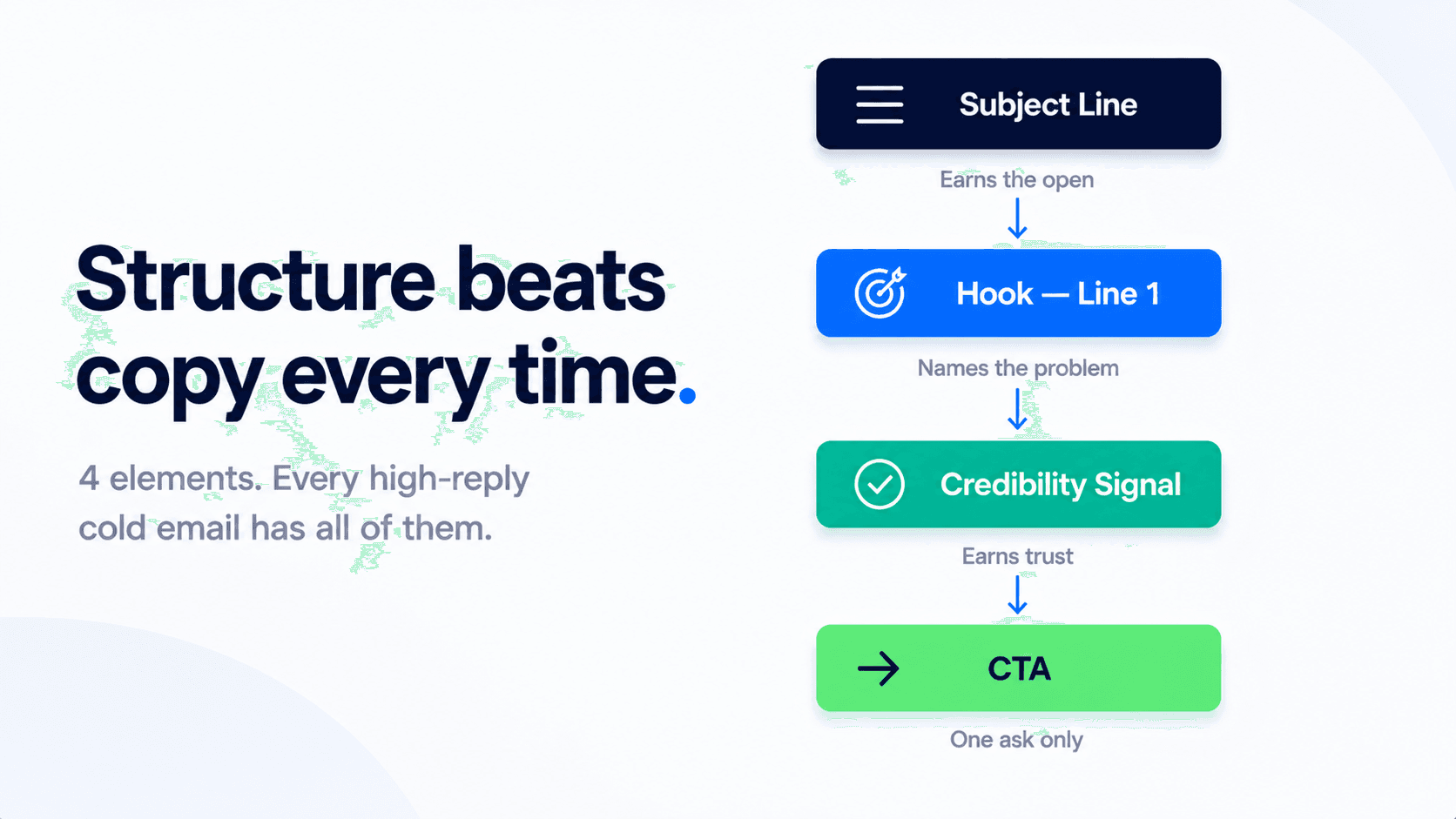
| Element | What it does | The rule |
|---|---|---|
| Subject line | Earns the open — nothing else matters if this fails | Specific enough that it could not have been sent to anyone else on your list |
| Line 1 — The hook | Names the problem or situation before the reader can scan away | Must be about them, not about you — zero product mentions in line 1 |
| Line 2 — Credibility signal | Gives the reader a reason to believe you can help | One signal only — a relevant result, a shared context, a named reference, or a founding story |
| CTA — The ask | Converts interest into a response | One ask, lowest possible friction — a yes/no question beats a calendar link every time at cold stage |
Template 1 — Pain-Led Opener
Best for: Cold outreach to a new ICP segment where you have no prior relationship, no referral, and no trigger event. The most versatile template type. Woodpecker data shows pain-led emails consistently outperform feature-led emails by 2–3x on positive reply rate when the problem named is specific and accurate.
Template — Copy this
Subject: [Company] + the [specific problem] problem
Hi [First name],
Most [job title]s at [company type] companies spend [X hours / $ amount] dealing with [specific problem] every [week/month] — usually without a clean way to fix it.
We built [product] specifically for this — [one-line outcome, no feature list]. [1–2 companies similar to theirs] use it to [result].
Worth a 10-minute call to see if it's relevant for [Company]?
| Element | Why it works |
|---|---|
| Subject line | Naming the company + a specific problem creates pattern interrupt — it reads like an internal thread, not a sales email. The word "problem" triggers curiosity without being clickbait. |
| Line 1 — Hook | Leads with a cost or time impact, not a feature. The reader recognises themselves before you have mentioned your product once. This is the line that earns the second line. |
| Line 2 — Credibility | One outcome only — no feature list. Named companies similar to the recipient borrow their credibility without requiring the reader to know your brand. Keep names industry-relevant, not just impressive. |
| CTA | "10-minute call" reduces friction versus "30-minute demo." Framing it as "see if it's relevant" removes the pressure of a sales meeting — the reader is evaluating fit, not committing to anything. |
Template 2 — Trigger Event / Signal-Based
Best for: Reaching out within 2–4 weeks of a specific buying signal — new funding round, a relevant job posting, a leadership hire, or a product launch. This template type consistently produces the highest positive reply rates of any cold email format when the signal is genuinely relevant, because the timing justification is real and the prospect can see it.
Template — Copy this
Subject: Congrats on [specific trigger] — quick thought
Hi [First name],
Saw that [Company] [specific trigger event — raised Series A / launched X / hired a VP of Sales]. Companies at that stage usually start running into [specific problem that the trigger creates or amplifies].
[Product] helps [job title]s at [company type] [specific outcome] — [1 named company] went from [before state] to [after state] in [timeframe].
Is this on your radar right now, or is the timing off?
| Element | Why it works |
|---|---|
| Subject line | Acknowledgement emails have consistently high open rates because they feel human. "Quick thought" signals brevity and low pressure — the reader expects a short email, not a pitch deck. |
| Line 1 — Hook | Names the trigger, then immediately connects it to a problem it creates. This is the critical move — without the problem connection, the trigger is just flattery. The logic has to be: "this thing you did creates this challenge." |
| Line 2 — Credibility | A before/after result in a specific timeframe is the most efficient credibility format. It answers "does this work" in one sentence without requiring the reader to process a case study. |
| CTA | "Is this on your radar, or is the timing off?" is a binary question that is easy to answer either way. Giving the prospect permission to say "not now" paradoxically increases reply rate — it removes the fear of being sold to before replying. |
Template 3 — Referral / Name-Drop
Best for: When a current customer, mutual connection, or industry peer suggested the outreach. Borrowed credibility is the most powerful cold email opener available — open rates on referral emails run 15–25% higher than any other template type because the subject line triggers immediate recognition. Use this template only when the reference is genuine and the referrer is aware.
Template — Copy this
Subject: [Referrer name] suggested I reach out
Hi [First name],
[Referrer name] mentioned you're currently dealing with [specific problem or goal] at [Company] — they thought it was worth us connecting.
We help [job title]s [specific outcome]. [Referrer's company or a relevant peer company] used [product] to [result in one line].
Do you have 15 minutes this week or next?
| Element | Why it works |
|---|---|
| Subject line | A known name in the subject line is the single highest open-rate trigger in B2B cold email. The reader opens to find out what the referrer said — the open is almost guaranteed if the name is recognised. |
| Line 1 — Hook | Connects the referral immediately to a specific problem or goal — the referrer's name is the credibility, so the first line can move straight to relevance. Do not waste line 1 on pleasantries after a referral open. |
| Line 2 — Credibility | Using the referrer's own company as the proof example is the strongest credibility move available here — the prospect can verify the result with a person they already trust. |
| CTA | A direct time request ("this week or next") is appropriate here because the credibility level is higher than a cold opener. The trust transfer from the referrer makes a direct ask feel natural rather than presumptuous. |
Template 4 — Case Study / Proof-Led
Best for: Mid-market or enterprise buyers who are evaluating solutions and need social proof before engaging. This template performs best when the named company in the proof is recognisable to the prospect's industry — the more closely the proof company resembles the recipient's company, the higher the reply rate.
Template — Copy this
Subject: How [Similar company] solved [problem] in [timeframe]
Hi [First name],
[Similar company] — [one-line description of why they're relevant to the recipient] — was dealing with [specific problem]. They used [product] to [specific result] in [timeframe].
Given that [Company] is [one reason they face the same situation], I thought it was worth flagging.
Happy to share the full breakdown — worth a look?
| Element | Why it works |
|---|---|
| Subject line | A named company solving a named problem in a specific timeframe reads like a case study headline — it triggers curiosity about the method, not just the outcome. The reader opens to find out how, not just what. |
| Line 1 — Hook | The parenthetical description of why the named company is relevant is the critical element — it pre-empts the objection "that company is nothing like us" by explicitly establishing the parallel before the reader forms the thought. |
| Line 2 — Credibility | "Given that [Company] is [reason]" makes the connection between the proof and the prospect explicit. This is the sentence most case study emails omit — they present the proof but never close the loop on why it is relevant to this specific recipient. |
| CTA | "Worth a look?" is the lowest-commitment ask possible. It positions the next step as reading a breakdown, not booking a demo — appropriate for a mid-market buyer who is still in evaluation mode. |
Template 5 — Curiosity / Pattern Interrupt
Best for: Highly saturated inboxes where conventional openers are being filtered out mentally before they are read. This template works by breaking the expected structure of a cold email — leading with a counter-intuitive statement or question that forces the reader to pause. It has a higher risk profile than pain-led templates (it can miss if the curiosity hook is too vague) but a higher ceiling when it lands correctly.
Template — Copy this
Subject: Probably not the right time — but worth asking
Hi [First name],
Most [job title]s I talk to say [specific assumption about how they currently handle the problem] — and then find out three months later that it cost them [specific consequence].
Not saying that's the case at [Company]. But if [specific condition is true for them], it might be worth 10 minutes.
[First name] — is [specific condition] something you're dealing with right now?
| Element | Why it works |
|---|---|
| Subject line | Conceding bad timing in the subject line is a pattern interrupt — it reads like something a human wrote, not a template. The reader opens because it is unexpected, not because it promised something. |
| Line 1 — Hook | The "most people do X and then discover Y" structure creates a mild threat without being fear-mongering. The specificity of the consequence is what makes it land — a vague consequence is easy to dismiss. |
| Line 2 — Credibility | "Not saying that's the case" is a disarming move. It reduces defensiveness and repositions the sender as someone sharing a pattern they have observed, not someone trying to create fear to force a meeting. |
| CTA | Ending on a direct yes/no question about a specific condition gives the prospect an easy, low-commitment way to self-qualify. A "yes" reply is a warm lead — they have confirmed the problem exists before the call is even booked. |
Template 6 — Follow-Up Bump (Touch 2 or 3)
Best for: Re-surfacing after no reply to touch one. This is the most under-used template type in B2B outreach — and the one with the most meetings booked relative to emails sent. Research from Belkins shows that over 50% of replies in a well-structured sequence come from follow-up touches, not the opening email. The biggest mistake is re-pitching on the follow-up. The bump template works by doing the opposite: acknowledging the silence, reframing, and asking one new question.
Template — Copy this
Subject: Re: [original subject line]
Hi [First name],
Wanted to make sure my last note didn't get buried. Not trying to chase — just [one new angle, reframe of the problem, or a new data point you didn't include in touch one].
Still think there's something here for [Company] — but totally understand if the timing isn't right. Worth a quick reply either way?
| Element | Why it works |
|---|---|
| Subject line | Threading the follow-up as a reply to the original email preserves the conversation context and increases open rate — it appears as a continuation, not a new cold email. Most email platforms handle this automatically with Re: threading. |
| Line 1 — Hook | "Not trying to chase" pre-empts the reader's instinct to feel pursued. Adding a new angle or data point means the follow-up delivers value the first email didn't — it is not a reminder, it is a new reason to reply. |
| Line 2 — Tone | Acknowledging that timing might not be right is a low-pressure close that often generates the reply touch one didn't. Busy people sometimes need explicit permission to respond with "not now" before they'll respond at all. |
| CTA | "Worth a quick reply either way" invites a no as much as a yes. This dramatically reduces the psychological cost of responding and is the primary reason bump emails get replies that openers don't. |
Before and After: The Most Common Template Mistakes
The difference between a template that gets ignored and one that gets a reply is usually three sentences. Here are the two rewrites that have the biggest impact on reply rate.
Mistake 1: Opening with your company, not their problem
Before — Gets deleted
"Hi [Name], I'm reaching out from Acme, a leading provider of sales automation solutions for B2B companies. We help businesses like yours improve their outreach efficiency with AI-powered tools..."
After — Gets read
"Hi [Name], most Sales Directors at 50–200 person SaaS companies spend 6+ hours a week managing outreach sequences that should be running themselves..."
Mistake 2: Asking for a demo instead of a conversation
Before — Gets ignored
"Would you be open to a 30-minute demo so I can show you how Acme works and walk you through our pricing options?"
After — Gets replies
"Worth a 10-minute call to see if this is relevant for [Company]?"
💡 Personalisation is what activates the template
Every template above has bracketed variables — and those variables are where the reply rate is won or lost. A pain-led opener with a generic "[problem]" placeholder performs like every other cold email. The same template with a specific, accurate problem that the prospect actually recognises performs like a warm referral. SalesTarget's AI personalisation engine fills those variables at scale — pulling from company data, job titles, and real-time signals so each send reads like it was written for one person. For subject line optimisation specifically, the SalesTarget subject line guide covers the patterns that drive the highest open rates by industry and persona.
Stop adapting templates. Start building sequences that personalise themselves.
SalesTarget's AI sequence builder fills every template variable with real prospect data — so every email reads like it was written for one person, at scale.
✓ 50 credits ✓ 7-day trial ✓ No credit card required
Frequently Asked Questions

See It In Action: Book Your Free Demo
Get a personalized walkthrough and see how it works for your team.
Book My Demo →