Most B2B sales teams don't have a tool problem — they have a connection problem. The average revenue team uses between six and ten different software applications across prospecting, outreach, engagement, and pipeline management. Each tool generates its own data, follows its own logic, and operates in its own silo. The result? Duplicated contacts, inconsistent messaging, lost follow-ups, and sales reps spending more time toggling between dashboards than actually selling.
AI sales tools have matured rapidly. They can now identify high-intent prospects, personalize email sequences at scale, automate LinkedIn outreach, qualify leads using behavioral signals, and manage entire pipelines with minimal manual input. But adopting these tools individually — without a strategy for how they connect — often creates more friction than it solves.
This guide takes a different approach from typical tool roundups. Instead of listing the “top 10” AI sales tools, we focus on something more valuable: how to evaluate, select, and connect AI sales tools into a single, efficient B2B sales workflow. Whether you’re building your first AI-powered sales stack or restructuring an existing one, you’ll find practical frameworks, selection criteria, and integration strategies that keep your team focused on revenue rather than tool management.
Explore AI-Powered Sales Solutions
Understanding the Role of AI Sales Tools in Modern B2B Sales
Before evaluating specific solutions, it helps to understand what AI sales tools actually do differently from traditional sales software. Conventional CRMs and outreach platforms automate repetitive tasks — scheduling emails, logging calls, moving deals through stages. AI sales tools go further: they automate decision-making within those tasks.
Consider the difference:
- A traditional email tool sends a pre-written sequence on a fixed schedule. An AI-powered email tool analyzes recipient behavior, adjusts send times, rewrites subject lines, and determines which prospects to prioritize based on engagement signals.
- A traditional CRM stores contact records. An AI-powered sales platform enriches those records with firmographic data, buyer intent signals, and relationship mapping — then recommends which leads to pursue next.
- A traditional LinkedIn tool sends connection requests. An AI LinkedIn automation tool personalizes messages based on prospect profiles, company news, and shared connections.
The shift is from tools that execute instructions to tools that make recommendations and adapt in real time. This distinction matters because it changes how you should evaluate and integrate these tools. A connected AI sales workflow isn’t just about linking software — it’s about creating a system where intelligence flows from one stage to the next.
The Five Categories of AI Sales Tools (and What Each One Does)
AI sales tools typically fall into five functional categories. Understanding these categories helps you identify where your workflow has gaps and where you’re over-investing in overlapping solutions.
1. Prospect Discovery and Lead Intelligence
These tools help you find the right people to sell to. They go beyond basic company directories by layering AI-driven filters like buyer intent signals, technographic data, and ideal customer profile (ICP) matching. Instead of manually researching prospects on LinkedIn or company websites, sales reps can access enriched databases that surface decision-makers most likely to buy.
For example, platforms like SalesTarget.ai provide access to over 840 million B2B professional profiles and 146 million business records, combined with buyer intent data and ICP-based prospecting filters. This means reps start with qualified prospects rather than raw contact lists.
2. Email Outreach and Personalization
AI email tools compose, personalize, and optimize cold email campaigns. Rather than writing individual emails or relying on static templates, these tools generate contextually relevant messages tailored to each prospect’s role, industry, recent company news, or behavioral signals. They also handle deliverability optimization, send-time intelligence, and A/B testing at scale.
3. LinkedIn and Social Outreach Automation
LinkedIn remains one of the most effective channels for B2B engagement. AI-powered LinkedIn outreach automation tools can personalize connection requests, automate follow-up messages, track profile visits, and engage with prospect content — all while maintaining a natural, human-like cadence.
4. Sales Intelligence and Conversation AI
These tools act as an AI sales copilot — assisting reps in real time with deal insights, competitive intelligence, next-best-action recommendations, and meeting preparation. They analyze pipeline data, surface risk signals, and suggest strategies for advancing stalled deals.
5. CRM and Pipeline Management
AI-enhanced CRMs go beyond storing deal data. They automate data entry, predict deal outcomes, score leads based on engagement patterns, and flag at-risk opportunities. The best solutions provide a built-in CRM that connects directly to prospecting and outreach activities so every touchpoint feeds into one pipeline view.
Why Disconnected AI Sales Tools Create More Problems Than They Solve
Here is where most sales teams go wrong: they adopt best-in-class tools for each category without considering how those tools share data, hand off leads, and coordinate workflows.
The symptoms of a disconnected sales stack are predictable:
- Prospect data lives in multiple systems with different formatting, creating duplicates and conflicting records.
- Outreach sequences on email and LinkedIn operate independently, leading to prospects receiving overlapping or contradictory messages.
- Lead scores from the prospecting tool don’t flow into the CRM, so reps manually re-qualify leads they’ve already researched.
- Sales managers lack a unified view of pipeline health because deal data is fragmented across three or four dashboards.
- Reps spend 30–45 minutes per day switching between tools, copying data, and updating records manually.
A 2023 Salesforce State of Sales report found that sales reps spend only 28% of their time actually selling. The rest goes to administrative tasks, data entry, and navigating between tools. AI sales tools are supposed to reclaim that time — but when they don’t talk to each other, they just redistribute the administrative burden rather than eliminating it.
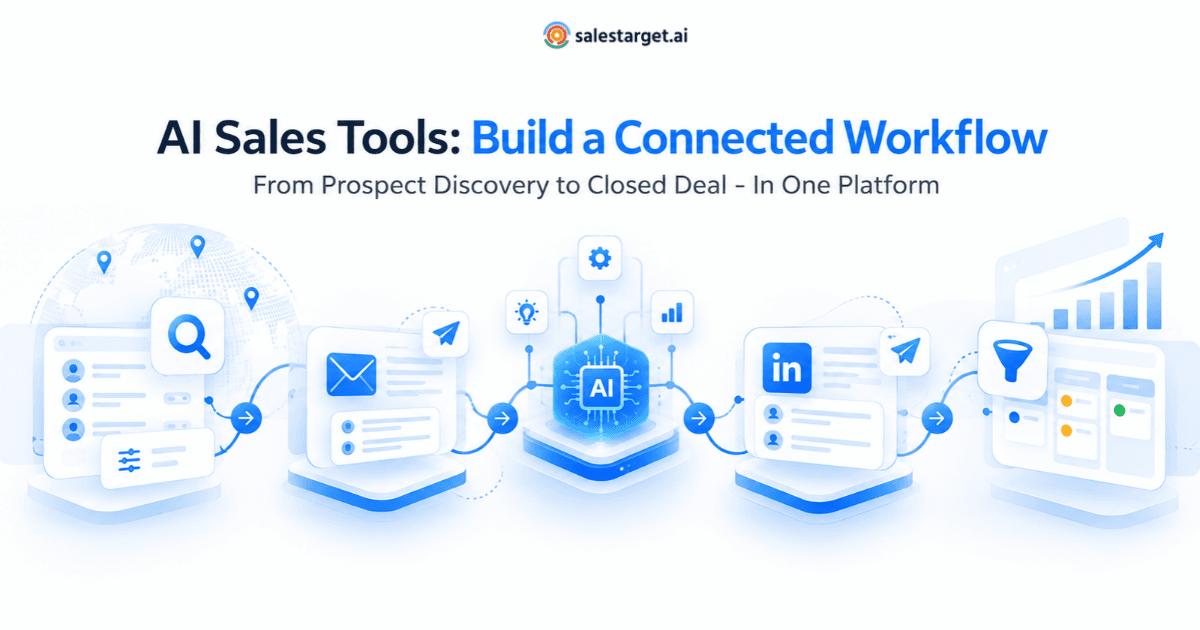
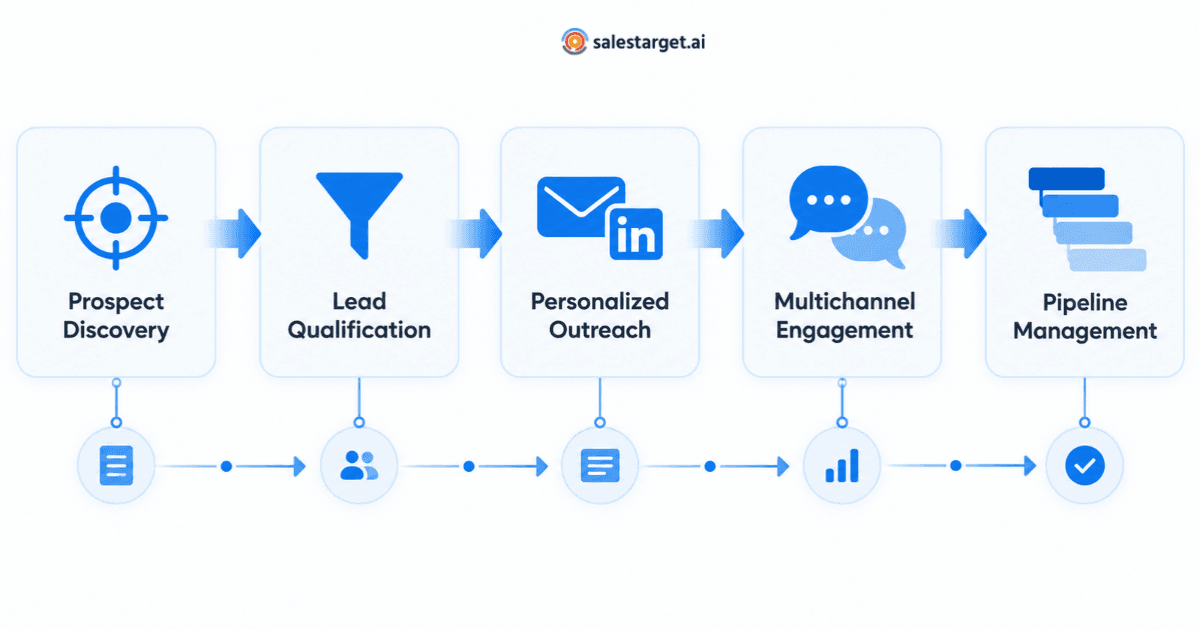
How to Build a Connected AI Sales Workflow: A Five-Stage Framework
Building a connected workflow requires thinking about AI sales tools as components of a system rather than standalone solutions. Here’s a practical five-stage framework:
Stage 1: Define Your Ideal Customer Profile with Data, Not Assumptions
Before selecting any tool, document your ICP using data from your last 50–100 closed-won deals. Identify patterns in industry, company size, job titles, technology stack, and buying triggers. AI-powered lead generation platforms can then use these criteria to surface prospects that match your best customers — rather than just anyone who fits a broad demographic filter.
Stage 2: Centralize Prospect Discovery and Enrichment
Choose a prospect intelligence platform that serves as your single source of truth for contact and company data. This platform should provide:
- Verified contact information (email addresses, phone numbers, LinkedIn profiles)
- Firmographic and technographic data
- Buyer intent signals that indicate active research or purchasing behavior
- Email validation to maintain deliverability
- ICP scoring to prioritize your prospect list automatically
SalesTarget.ai’s Lead Explorer, for instance, combines these capabilities with email validation and intent data, so sales reps work from a single, clean prospect list rather than cross-referencing multiple databases.
Stage 3: Connect Outreach Across Email and LinkedIn
The biggest coordination failure in B2B sales is treating email outreach and LinkedIn outreach as separate campaigns. A connected workflow ensures:
- Prospects receive a coordinated sequence across both channels (e.g., LinkedIn connection request on Day 1, personalized email on Day 3, LinkedIn follow-up on Day 5).
- Engagement signals from one channel inform the other (e.g., if a prospect opens your email but doesn’t reply, the system triggers a LinkedIn message).
- All touchpoints log automatically to the CRM, so reps see a complete engagement timeline without manual data entry.
Platforms that offer integrated email and LinkedIn outreach within one interface eliminate the need for separate sequencing tools and reduce the risk of over-contacting prospects.
Stage 4: Let AI Handle Lead Qualification and Prioritization
Once prospects are engaged, AI should automatically score and prioritize leads based on:
- Email engagement (opens, clicks, replies)
- LinkedIn interaction (profile views, message responses, content engagement)
- Website visits and content downloads
- Buyer intent signals from third-party data providers
- Fit score based on ICP alignment
This scoring should flow directly into your CRM pipeline, so sales reps see a rank-ordered list of their hottest leads every morning — without running manual reports or checking multiple dashboards.
Stage 5: Unify Pipeline Management in One System
The final stage closes the loop. Every prospect interaction — from the first AI-powered prospecting query to the final deal — should be visible in one pipeline view. This requires a CRM that’s either built into your sales platform or tightly integrated with your outreach and intelligence tools.
A truly connected pipeline shows:
- How each lead was sourced (which prospecting criteria matched)
- Every outreach touchpoint across email and LinkedIn, with engagement data
- AI-generated insights on deal health and next-best actions
- Revenue forecasts based on real engagement patterns, not rep estimates
How to Evaluate AI Sales Tools: A Practical Selection Framework
Not all AI sales tools are created equal, and features alone don’t determine value. Use this framework to evaluate any AI sales tool before committing:
Data Quality and Coverage
An AI tool is only as good as the data it works with. Ask:
- How large is the contact and company database? (Hundreds of millions of records vs. tens of millions makes a real difference for niche B2B markets.)
- How frequently is the data refreshed?
- Does the platform verify email addresses before you send?
- Can it provide buyer intent signals, not just static firmographic data?
Workflow Integration
The most important evaluation criterion — and the one most teams skip:
- Does this tool share data natively with the other tools in my stack?
- Can outreach activities from this tool feed directly into my CRM without manual export/import?
- Does it support multichannel sequencing (email + LinkedIn) in one interface, or do I need a separate orchestration tool?
- Does it offer API access or native integrations with my existing systems?
AI Capability Depth
Many tools label basic automation as “AI.” Distinguish between:
- Rule-based automation (if/then triggers) — useful but not AI
- Machine learning-driven optimization (send-time optimization, predictive lead scoring) — genuine AI
- Generative AI capabilities (email personalization, AI sales copilot features) — the current frontier
Total Cost of Ownership
Consider not just the subscription cost but also:
- How many separate tools will this replace?
- What is the onboarding and training time?
- Will I need additional tools to connect this platform to my workflow?
- What are the data export options if I decide to switch?
Seven Mistakes B2B Teams Make When Adopting AI Sales Tools
1. Buying the Category Leader Without Assessing Fit
The most popular tool isn’t always the right tool. A category leader built for enterprise sales teams with 500+ reps may be overbuilt and overpriced for a 15-person sales team. Evaluate based on your team’s size, deal cycle, and current tech stack — not market rankings.
2. Choosing Best-of-Breed for Every Function
Selecting the top-rated tool for prospecting, a different one for email, another for LinkedIn, and a separate CRM creates a fragmented stack that requires expensive integrations and constant maintenance. In many cases, an integrated platform that covers 80% of each function outperforms five specialized tools that don’t communicate.
3. Ignoring Data Hygiene
AI tools amplify whatever data they receive. If your contact database is filled with outdated emails and wrong job titles, AI will personalize outreach to the wrong people faster. Prioritize platforms that include built-in data verification and email validation rather than assuming your data is clean.
4. Automating Before Defining the Process
AI sales automation should encode a proven process, not substitute for one. If your team doesn’t have a clear, documented workflow for prospecting, qualifying, and engaging leads, adding AI will automate chaos. Define your sales process first, then use AI tools to accelerate it.
5. Overlooking Onboarding and Adoption
A tool your reps don’t use delivers zero ROI. Evaluate each platform’s learning curve, in-app guidance, and the time from sign-up to first productive use. The best AI sales tools feel intuitive from day one rather than requiring weeks of training.
6. Neglecting Channel Coordination
Running email and LinkedIn outreach as separate, uncoordinated campaigns leads to prospects receiving duplicate or contradictory messages. Ensure your tools can sequence across channels and share engagement data so every touchpoint builds on the last.
7. Failing to Measure Workflow Efficiency, Not Just Tool Output
Teams often measure each tool’s output in isolation (emails sent, LinkedIn messages delivered, contacts added). The metric that actually matters is workflow throughput: how many qualified opportunities did your connected system generate per rep per month? If adding a new tool increased activity but didn’t increase qualified pipeline, it’s adding noise, not value.
Why Integrated AI Sales Platforms Are Replacing Stacked Point Solutions
The market is shifting. Early AI sales tools were standalone solutions that each did one thing well. The next generation consolidates multiple functions into unified platforms that handle prospecting, outreach, engagement, and pipeline management in one place.
The advantages of this integrated approach are significant:
- One login, one interface, one data model — eliminating tool-switching overhead
- Outreach sequences that natively span email and LinkedIn without third-party connectors
- Prospect data that flows directly into pipeline management without CSV exports
- AI insights that account for the full buyer journey, not just one channel
- Lower total cost of ownership compared to assembling and maintaining five to seven separate tools
SalesTarget.ai exemplifies this trend as an all-in-one AI-powered B2B sales platform. It combines Lead Explorer for prospect discovery across 840M+ profiles, AI-driven email and LinkedIn outreach automation, an AI Sales Copilot for real-time selling assistance, and a built-in CRM — all within one connected workflow. Instead of integrating separate tools for each sales function, teams can manage the entire prospecting-to-pipeline process in a single platform.
This doesn’t mean integrated platforms are the right choice for every team. Organizations with deeply embedded, heavily customized CRMs (like large Salesforce instances) may benefit more from targeted AI tools that plug into their existing infrastructure. The key question is: will adding this tool simplify or complicate my overall workflow?
Building Your Connected Sales Workflow: Where to Start
The AI sales tools landscape will continue to evolve, but the principle behind a connected workflow will not: every tool in your stack should make every other tool more effective. If adding a new solution creates a new data silo, requires manual data transfers, or introduces coordination overhead, it’s not solving a problem — it’s moving it.
Here’s a practical starting point:
- Audit your current stack: List every tool your team uses across the sales process. Identify where data gets stuck, where manual handoffs happen, and where reps lose time.
- Map your ideal workflow: Draw the journey from prospect identification to closed deal. For each stage, note what data should flow into the next stage automatically.
- Evaluate against the framework: Use the selection criteria above to assess whether your current tools — or a new integrated platform — can support that connected workflow.
- Start with the biggest friction point: Don’t try to overhaul everything at once. Identify the one handoff in your workflow that causes the most lost time or lost deals, and fix that first.
The right AI sales tools don’t just automate individual tasks — they create a system where prospect intelligence, personalized outreach, and pipeline management work as one connected process. That’s where the real competitive advantage lies.