TL;DR
- "Hi [First Name]" personalisation no longer works. In 2026, buyers detect it instantly, and LinkedIn's spam systems flag the patterns.
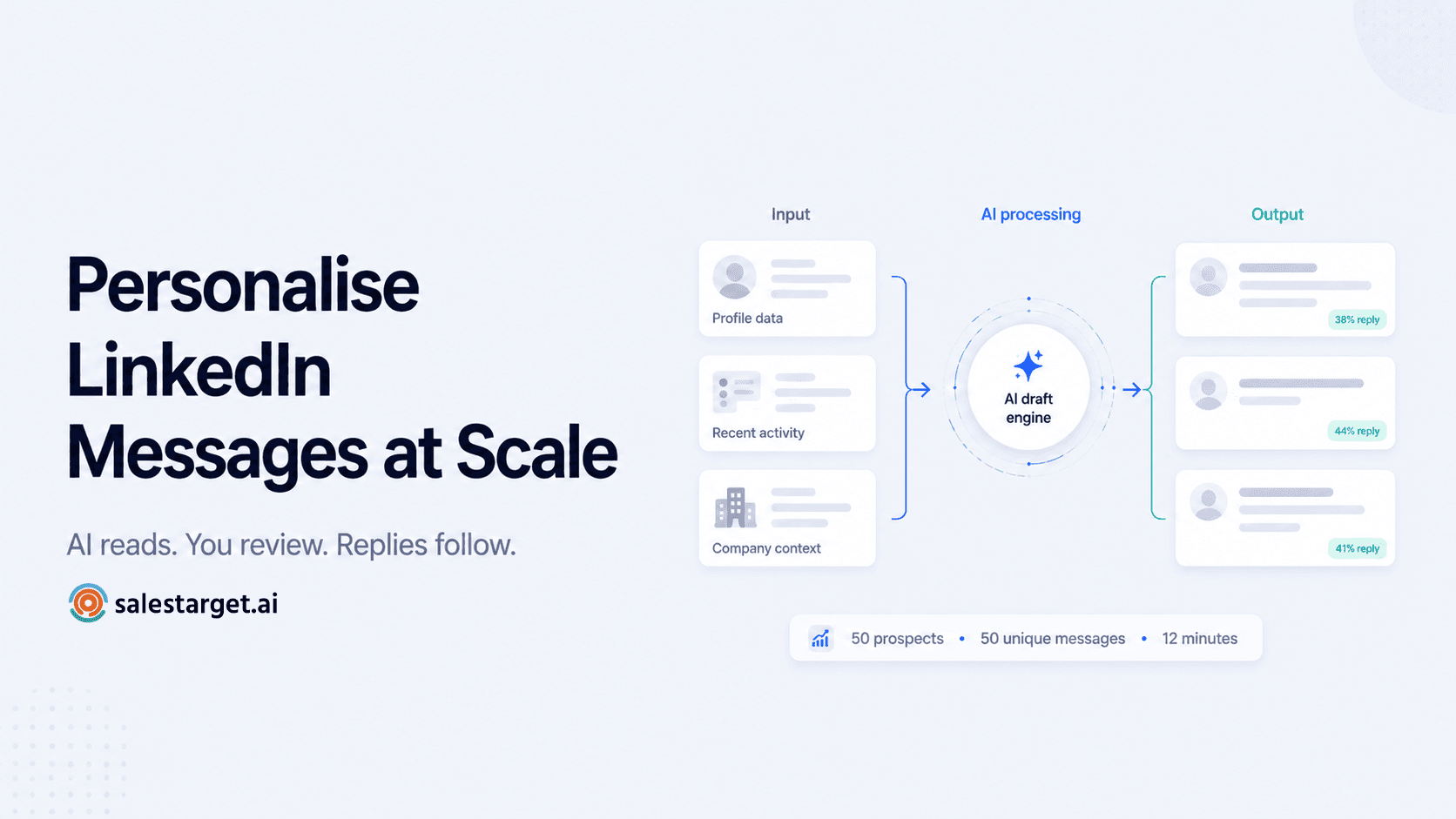
- AI personalisation done well isn't template variation — it's individual research delivered at scale. The AI reads each prospect's profile, posts, and company context, then drafts a message based on what it found.
- A five-layer personalisation framework — profile, activity, company, mutual context, and intent signals — separates messages that get replies from messages that get reported.
- Reply rates for AI-personalised messages average 30–50% when done properly, against 5–15% for cold-first templated outreach.
- Human review is non-negotiable. The teams winning with AI LinkedIn personalisation are using AI to draft, not to send unattended.
Every B2B decision-maker on LinkedIn now receives 40–80 outreach messages a week. Almost all of them open with some version of "I came across your profile and was impressed." The recipient deletes the message before reading the second line. This isn't a copy problem — it's a recognition problem. The buyer has seen this exact opening 200 times this quarter, and the pattern is now its own filter.
AI changes the math on personalisation, but only when it's used correctly. Used badly, it produces faster generic — the same templated message dressed up with surface-level variables. Used well, it produces individual research delivered at the speed of a templated send. This guide breaks down what AI personalisation for LinkedIn actually means in 2026, the five-layer framework that high-performing outbound teams use, and how to scale it without crossing into the automation patterns that LinkedIn now actively flags.
Why old personalisation no longer works
For most of LinkedIn's history, "personalisation" meant swapping a first name and company name into a template. That was sufficient in 2018 because most outreach was unpersonalised entirely. Adding any variable made a message stand out. In 2026, the floor has moved. Every spam tool can swap variables, every templated message looks personalised at the surface, and every buyer has learned to read past the opening line to detect whether the rest of the message could have been sent to anyone.
The test is simple: if the same message body would work for ten different prospects with only the name and company changed, it's not personalised. It's mail merge. Buyers detect this instantly. They scan the second sentence, see generic language about "your industry" or "companies like yours," and close the conversation before it starts. Worse, LinkedIn's 2026 algorithm penalises this pattern. Accounts that send near-identical message bodies at volume see weekly limits tighten and reply rates collapse — both manually and through automation.
The teams still winning with LinkedIn outreach have stopped competing on volume. They've moved to relevance — sending fewer messages, each tailored to the individual recipient, and getting reply rates that are 3–5x higher than templated outreach. The shift isn't about effort. It's about using AI to do the research work that real personalisation has always required, but at scale.
What AI LinkedIn personalisation actually is
There's a meaningful distinction between two things people both call "AI personalisation." Understanding which one you're using determines whether your reply rates climb or your account gets flagged.
| Type | What it does | Reply rate impact |
|---|---|---|
| Surface personalisation | AI inserts name, title, company, industry into a static template | 3–8% (same as templates) |
| Research-based personalisation | AI reads each prospect's profile, posts, company news, and signals — then drafts a message based on what it found | 30–50% |
The first type is templating with AI cosmetics. The second type is what works. The difference shows up in the message body: surface personalisation reads as "Hi Sarah, I see you're a VP at Acme — companies in your space are struggling with X." Research-based personalisation reads as "Hi Sarah, your post on Tuesday about why you moved from outbound SDRs to a hybrid pod model was the most honest take I've seen on that shift. Curious how you're measuring it three months in."
The first sentence in the second example only works for Sarah. It can't be copy-pasted to anyone else. That's the test of real personalisation, and that's what modern AI LinkedIn personalisation systems are built to produce — at the speed of bulk outreach, but with the specificity of individual research.
The five layers of real LinkedIn personalisation
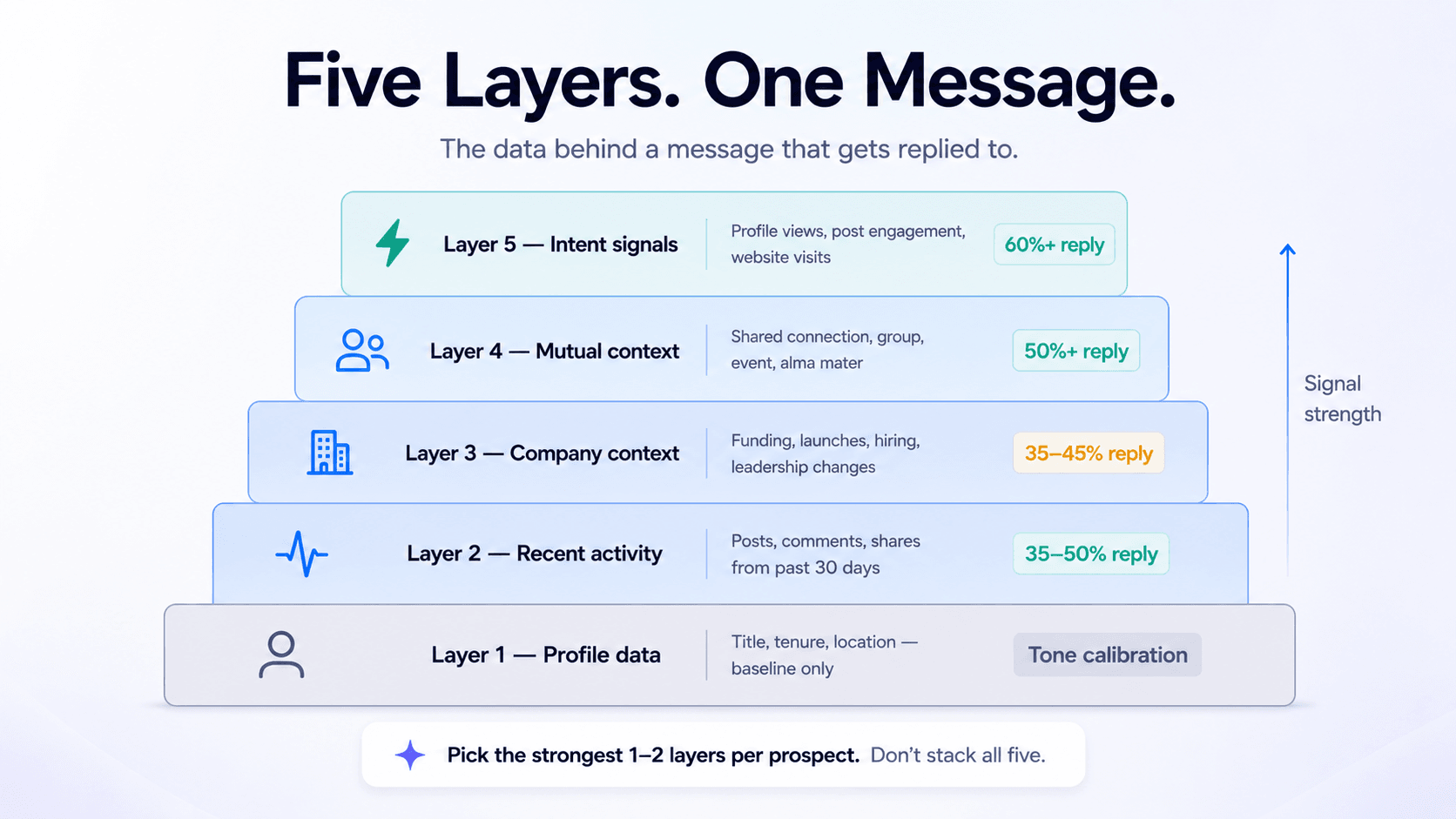
High-performing AI LinkedIn personalisation pulls from five distinct data layers. Most tools stop at the first one or two. The teams getting 40%+ reply rates use all five — not in every message, but selecting the most relevant one or two for each prospect.
Layer 1 — Profile data
Job title, seniority, tenure, location, education, career path. This is the baseline layer — useful for filtering and tone calibration, not for the message hook. A message that opens with "I see you're a VP of Marketing at Acme" uses Layer 1 only and reads as a template. Layer 1 should inform how the message is written (tone, vocabulary, seniority calibration), not what the message opens with.
Layer 2 — Recent activity
Posts the prospect has written, comments they've left on others' posts, articles they've shared, content they've reacted to in the past 30 days. This is the highest-signal layer for cold outreach. Referencing a specific post — and specifically what the prospect said in it, not just the topic — proves the message was written for them. Reply rates from activity-based personalisation routinely hit 35–50%.
Layer 3 — Company context
Recent funding rounds, product launches, leadership changes, hiring patterns, news mentions, press releases. This layer is especially powerful for prospects who don't post personal content but whose company is highly visible. A message referencing "Your team's Series B last month and the new sales hires you're making" lands differently than a message that ignores company context entirely.
Layer 4 — Mutual context
Shared connections, shared groups, shared events, shared employer history, alumni networks. A named mutual connection unlocks the highest acceptance rates available in cold outreach — typically 50%+. Layer 4 also includes softer mutual signals: same Slack community, same conference attended, same school. Each one converts "stranger" into "someone with verifiable common ground" in the prospect's mind.
Layer 5 — Intent signals
Profile views of your account, post engagement on your content, website visits if you can attribute them, job posting activity that signals a problem you solve. Layer 5 is where AI personalisation crosses into being almost unfair — the prospect has already raised their hand, and the message acknowledges that implicitly without being creepy. Reply rates from intent-triggered outreach can exceed 60%.
The selection rule
Don't stack all five layers into one message — it reads as surveillance. Pick the strongest one or two signals for each prospect and build the message around them. Layer 5 (intent) trumps everything when available. Layer 2 (activity) trumps Layer 3 (company) for content-creators. Layer 4 (mutual) trumps Layer 1 (profile) every time.
How AI does this at scale (and where it breaks)
The technical workflow behind AI LinkedIn personalisation isn't complicated, but the execution quality varies enormously. The basic pipeline runs in four steps:
1. Data collection. The AI reads each prospect's LinkedIn profile, scans their recent posts, pulls company data, and checks for mutual signals. This is the research layer — and the quality ceiling is set here. If the data is thin, the message will be thin.
2. Signal selection. The AI picks the strongest one or two personalisation hooks for each prospect. A prospect who posts daily gets Layer 2 (activity). A quiet prospect at a recently-funded company gets Layer 3 (company). A prospect who viewed your profile last week gets Layer 5 (intent). This selection logic is what separates good systems from generic ones.
3. Message generation. The AI writes a draft message based on the selected signal, calibrated to the prospect's seniority and the relationship stage (connection request, first message after acceptance, follow-up). The structure varies. The hook is always specific to the individual.
4. Human review. A real person reads each draft and approves, edits, or rejects. This step is what keeps AI personalisation from drifting into uncanny-valley territory. AI gets the hook right 80% of the time; the reviewer fixes the 20% where it misread the context.
Where this breaks: systems that skip step 4. Sending unreviewed AI-generated messages at scale produces predictable patterns — same sentence structures, same transitions, same phrases the model overuses. Buyers and LinkedIn both learn to detect these patterns, and the same automation triggers fire that templated outreach would. AI personalisation at scale only works when AI does the research and a human approves the send.
Patterns that make AI messages sound automated
Even well-built AI personalisation can fall into patterns that betray the source. Audit any AI-drafted message against this list before sending.
| Pattern | Why it reads as AI | Fix |
|---|---|---|
| Three-sentence paragraphs with parallel structure | Default LLM rhythm | Break the rhythm — short sentence, longer sentence, fragment. |
| "I noticed that..." / "I saw that you..." | Overused AI opening | Lead with the observation itself, not the act of noticing. |
| Em dashes — used twice — in one message | Signature AI punctuation | Use one em dash maximum per message, or switch to periods. |
| Generic flattery about expertise | "Impressive background" is something an AI says when it found nothing specific | If you can't say something specific, the layer is wrong — pick a different one. |
| "I'd love to" / "I'd be happy to" | Excessive politeness softeners | Replace with direct language: "Would be useful to..." or "Curious about..." |
| A question that asks for time before context is built | AI tends to close every message with "open to a quick call?" | Close with a question about their work, not a request for theirs. |
Templated vs. AI-personalised: same prospect, different outcome
The difference is easiest to see on a real comparison. Same target prospect, same goal, two different approaches.
Templated (reply rate: 4%)
"Hi Sarah, I came across your profile and was impressed by your experience as VP of Marketing at Acme. We help B2B SaaS companies like yours improve marketing ROI through our AI-powered platform. Companies like yours have seen 3x growth. Would love to schedule a quick 15-minute call this week to discuss how we can help. Let me know what works for you!"
AI-personalised (reply rate: 38%)
"Sarah — your post last Tuesday about killing your MQL metric and replacing it with pipeline-sourced revenue was the cleanest argument I've seen for that shift. Quick question: three months in, what surprised you about how the sales team responded? Asking because we're seeing the same debate at a few RevOps teams I work with."
The templated version fails everywhere: generic opener, generic value claim, premature ask. The AI-personalised version succeeds everywhere: specific reference Sarah can verify in two seconds, a question that signals genuine interest in her work, no ask, no link, no calendar request. Both took the sender the same amount of time. The difference is that the second one used AI to do the research the first one skipped.
A practical workflow for personalising at scale
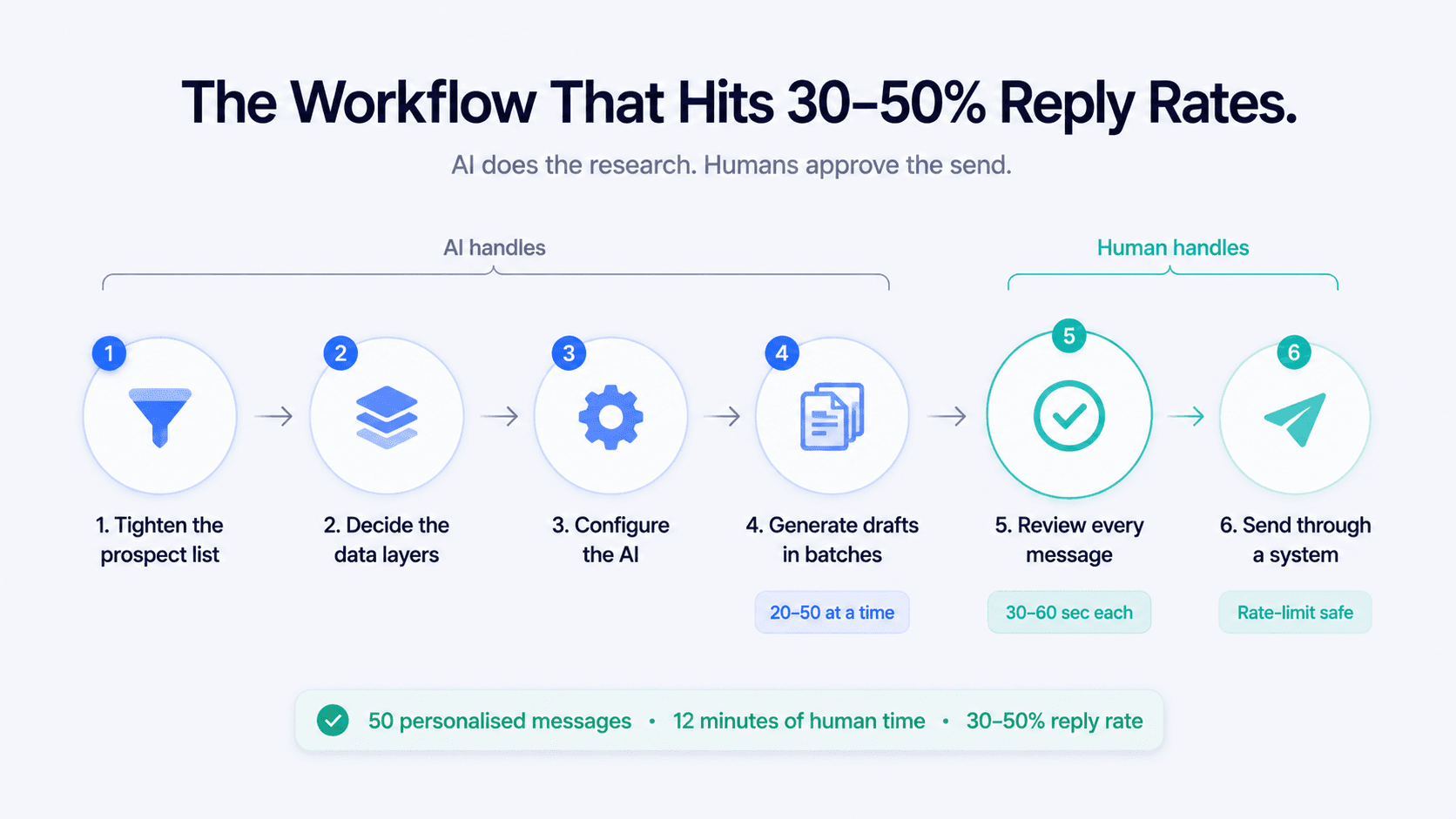
For outbound teams building this from scratch, the workflow below covers the full process — from prospect selection to send. Following all six steps consistently produces reply rates in the 30–50% range. Skipping any of them collapses the entire sequence.
Step 1 — Tighten the prospect list. AI personalisation only works when the prospect actually fits your ICP. Generic lists produce generic messages no matter how good the AI is. Define the persona narrowly — title, company size, industry, growth stage, tech stack — before any message is drafted.
Step 2 — Decide the data layers. For each campaign, pick which of the five personalisation layers you'll prioritise. A campaign targeting active content creators leans on Layer 2. A campaign targeting recently-funded companies leans on Layer 3. A campaign on profile-viewers leans on Layer 5.
Step 3 — Configure the AI. Give the AI the campaign context: who the prospects are, what problem you solve, what tone the message should carry, what NOT to include (no pitches, no links, no calendar requests in early messages). The cleaner the instruction, the cleaner the output.
Step 4 — Generate drafts in batches. Run the AI across 20–50 prospects at a time. Each draft should pull from the prospect's specific data — not a template with variables.
Step 5 — Review every message. Read each draft. Edit anything that sounds robotic. Reject any draft where the AI clearly misread the context or had nothing real to anchor on. Time investment per message: 30–60 seconds. The reviewer is doing quality control, not rewriting.
Step 6 — Send through a system, not a script. Use a multi-channel outreach platform that respects LinkedIn's rate limits, schedules sends during business hours in the prospect's timezone, and stops the sequence the moment a reply comes in. Reply-detection matters — sending a follow-up after someone has already responded immediately signals automation.
Best practices for AI personalisation in 2026
1. Lead with the observation, not the act of observing. "Your point about gross retention being the more honest metric" beats "I noticed your post about gross retention." Cut the meta-commentary.
2. Vary structure across the sequence. If your connection request used Layer 2 (activity), the follow-up should pull from a different layer. Repeating the same hook in different words reads as recycled.
3. Match tone to seniority. A CRO doesn't need a sales pitch. A junior marketing manager doesn't need consultant-speak. Calibrate vocabulary to the prospect's likely communication style — most AI systems can do this if instructed.
4. Keep the ask out of the first two messages. The first AI-personalised message should establish you read their work. The second should add value or context. The third can introduce what you do. Compressing this timeline collapses reply rates.
5. Track reply rates by signal layer. Over time, you'll find that one or two layers consistently outperform the others for your ICP. Lean into them. Stop using the layers that don't convert.
6. Coordinate LinkedIn with email. If a prospect has a high-confidence email, run them through a coordinated sequence. LinkedIn outreach automation works best when LinkedIn and email approach the same prospect from different angles on different days — not when both channels send the same message simultaneously.
Personalisation at the speed of templated outreach.
AI reads each prospect's profile, posts, and company context — then drafts a message that sounds like you spent 20 minutes researching them. You review and approve.
✓ AI personalisation ✓ Multi-channel sequences ✓ No credit card required
Closing thought
The shift in LinkedIn outreach over the last two years has been a shift in what "personalisation" means. Variable insertion no longer counts. Surface flattery no longer counts. What counts is messages that prove the sender did the work of understanding the individual prospect — and AI makes that level of research achievable at outbound scale, but only when paired with human review and a clear framework for what to look at.
If your LinkedIn reply rates have been falling, the problem is almost never the channel. It's the message. The five-layer framework above is a starting point. Pick the layers most relevant to your ICP, build the AI workflow around them, and keep the human review step in place. Sending half as many messages with five times the reply rate is not a trade-off. It's the only model that scales in 2026.





