Your reps burn hours clicking through LinkedIn profiles, pasting the same message, and tracking replies in a messy spreadsheet. Half your connection requests sit pending. The replies you do get fall through the cracks since they remain disconnected from your email sequences. Manual prospecting eats up selling time, and bolt-on tools leave your data scattered across too many tabs.
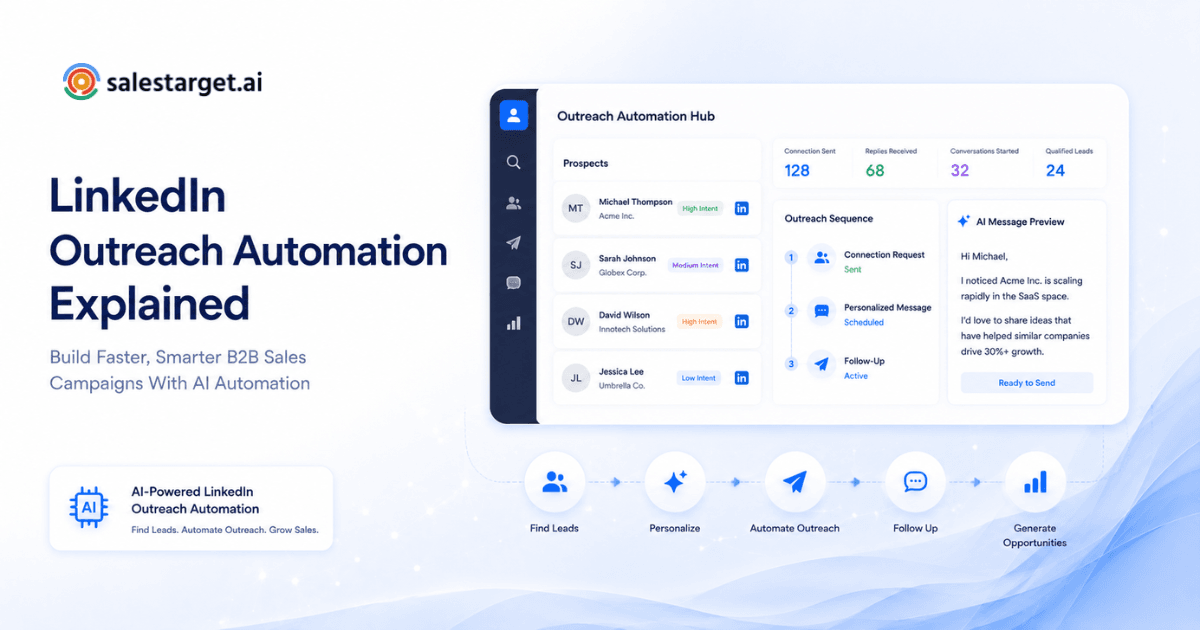
LinkedIn outreach automation is the process of using software to send connection requests, direct messages, and follow-ups to B2B prospects at scale. It replaces manual clicking with intelligent sequences running in the background. Modern platforms personalize each touchpoint using profile data and intent signals, stopping automatically the moment a prospect replies. By removing repetitive tasks, B2B sales teams run higher-volume campaigns and focus their energy on closing deals. This method turns an unpredictable daily chore into a measurable pipeline engine.
What Is LinkedIn Outreach Automation?
LinkedIn outreach automation uses software to manage outbound networking tasks without manual intervention. It triggers actions like profile views, connection requests, and sequential direct messages based on rules you set.
Sales teams use these platforms to build lists, set up messaging frameworks, and run campaigns that operate 24/7. The software handles the sending and tracking. When a prospect responds, the system notifies the sales representative to step into the conversation. This scales your reach far beyond what a human can do clicking one by one.
Manual LinkedIn outreach vs automated LinkedIn outreach workflows
| Feature | Manual LinkedIn Outreach | Automated LinkedIn Outreach |
|---|---|---|
| Speed | Slow. Reps send 20 to 30 messages per hour. | Fast. Software runs continuous background campaigns. |
| Consistency | Drops off when reps get busy with calls. | Runs daily without interruption. |
| Personalization | High effort per prospect. | Automated variable insertion (Name, Company, Industry). |
| Follow-ups | Hard to track. Relies on notes and memory. | Scheduled automatically in multi-step sequences. |
| Data Sync | Requires manual data entry into CRM. | Direct CRM sync for replies and activity logging. |
Why LinkedIn Outreach Automation Matters for Modern B2B Sales Teams?
B2B sales automation keeps your pipeline full without burning out your SDRs. It allows teams to engage prospects across multiple channels with perfectly timed touches.
Sales cycles require multiple touches. A McKinsey report shows B2B decision-makers use an average of ten different channels to interact with suppliers. Managing these touches by hand leads to missed follow-ups. Automated LinkedIn outreach guarantees that every prospect receives the right message at the exact right time.
Modern workflows run LinkedIn steps in the exact same flow as cold email. If a buyer ignores an email, the system sends a LinkedIn connection request two days later. This multichannel approach drives a much faster deal cycle. Reps stop acting as data entry clerks and spend their time actually talking to interested buyers.
How LinkedIn Outreach Automation Works Step by Step
Step 1: Define Your Target Audience and Ideal Customer Profile
Before you send a single message, you must know who you want to reach. A spray-and-pray approach burns your account reputation. Build a strict Ideal Customer Profile (ICP) based on company size, industry, revenue, and job title.
Advanced prospecting engines let you stack filters like industry, seniority, and tech stack across millions of verified professional profiles. You search using firmographic data to find the exact people who match your criteria.
Step 2: Find and Build Your Prospect List
Next, build a list of targets from your ICP. Scraping leads manually and cleaning spreadsheets wastes hours. You need a verified list ready for outreach.
A smarter workflow uses intent signals. You filter prospects by recent funding rounds, leadership changes, or Bombora Intent Topics. With one click, the system enriches the data, providing verified professional emails and mobile numbers right alongside the LinkedIn profile.
Step 3: Create Personalized LinkedIn Messages and Connection Requests
Cold pitches fail. Your messages must address the prospect's exact pain points. Write short, direct connection requests. Follow up with value-driven direct messages.
An AI Content Generator helps create human-like, varied copy. You use spintax to swap words and keep messages unique. Modern AI tools read your company material and draft replies that adapt to the prospect's role and industry.
Step 4: Launch Automated LinkedIn Outreach Campaigns
Load your list and your messaging into a sequence. Set daily limits to protect your account. The software takes over, sending requests and messages at human-like intervals.
Timezone-aware smart scheduling guarantees your messages land during working hours. Built-in safety features like rate limits and auto-pause safeguards keep your account secure from restrictions.
Step 5: Automate Follow-Ups and Manage Prospect Conversations
Most replies come after the third or fourth touch. Set your campaign to follow up automatically if the prospect does not respond.
Once they reply, the automation must stop immediately. A unified inbox pulls every reply into one view. You see the context, sort by intent, and assign owners without switching tabs.
Step 6: Connect LinkedIn Outreach With Your Sales Workflow
Sales outreach automation cannot live in a silo. It must connect to your CRM and email sequences.
With an integrated CRM, campaign leads land automatically. Every LinkedIn message and cold email logs to the lead timeline. If a lead replies, the system creates a follow-up task. You manage the entire customer lifecycle management process in one workspace without moving data manually.
Step 7: Track Campaign Results and Improve Outreach Performance
You must measure what works. Track connection acceptance rates, reply rates, and meetings booked.
Review your reports weekly. Find which subject lines or LinkedIn prompts generate the most interest. Drop the low-performing messages and double down on the winners. CRM analytics and reporting show you exactly which campaigns drive revenue.
Best Practices for Running Effective LinkedIn Outreach Campaigns
Personalization techniques that improve response rates
Generic pitches get ignored. Mention a recent company milestone or a shared connection. Use AI personalization to adapt the tone based on the prospect's seniority. A VP requires a different approach than an individual contributor.
Maintaining a natural approach with automated LinkedIn outreach
Do not send 100 requests in one hour. Set human-like delays. Add a three-minute gap between actions. Keep your daily limits below the platform's radar. This helps safeguard your account while keeping your outreach natural and authentic.
Avoiding common mistakes that reduce outreach performance
Stop pitching in the connection request. The goal of the first touch is to get accepted. Save the value proposition for the direct message. Never use long, formatted essays in DMs. Write like you text a colleague: short, punchy, and formatting-free.
Balancing automation with genuine sales conversations
Automation starts the chat. The human closes the deal. When an AI sales assistant flags a high-intent reply, jump in manually. Review the prospect's recent posts and customize your next response based on their active discussions. The LinkedIn outreach strategy stays human.
Benefits of LinkedIn Outreach Automation for B2B Sales Teams
Increase Prospecting Efficiency Without Adding Manual Workload
Salesforce reports that 72% of sales professionals say their biggest challenge is spending too much time on non-selling tasks. Reps save about 6 hours per week by dropping manual entry. Software handles the repetitive clicks. Your team spends that time preparing for demos and writing custom proposals.
Build a Predictable Sales Pipeline With Repeatable Outreach Processes
Automated sequences run every day. This creates a steady flow of fresh leads entering your funnel. You stop the feast-or-famine cycle that plagues manual sales teams.
Help SDRs and Sales Teams Focus on Qualified Sales Conversations
Advanced unified inboxes sort replies by intent automatically. Sales reps focus their efforts on prospects who demonstrate genuine interest. Automation handles the negative responses by removing them from the active sequence.
Reach More Target Prospects With Scalable LinkedIn Outreach Campaigns
A rep maxes out at a few dozen manual messages a day. Software scales this across your entire team. You touch hundreds of accounts weekly and maintain a personalized feel.
Improve Response Rates With Personalized Automated Outreach
Using conditional logic improves relevance. When a prospect clicks a link in your cold email, the system automatically sends a personalized LinkedIn message related to the content they viewed. This multichannel approach increases the chance of a reply.
Reduce Follow-Up Gaps With Consistent Prospect Engagement
Software never forgets a follow-up. It executes the fifth step of your sequence exactly on day twelve. This consistency captures deals that manual trackers drop.
Track Outreach Performance and Optimize Future Sales Campaigns
Data drives decisions. Knowing that CEOs reply 15% more to short messages allows you to adjust your templates. Continuous A/B testing refines your entire outbound motion.
How AI Is Changing LinkedIn Sales Automation?
AI-powered personalization for better prospect engagement
Old automation just swapped the first name. Modern AI reads the prospect's company description and writes a custom opening line. It adapts the value pitch to match the exact pain points of the prospect's industry.
Using AI to improve targeting and outreach timing
AI analyzes 4,000+ intent signals across 146M+ businesses. It spots when a company starts researching your category. It then triggers your campaign at the exact moment the buyer is looking for a solution.
The future of AI-driven B2B LinkedIn outreach
The next phase moves beyond sending messages. Conversational AI teammates will handle full chat sequences, answering basic pricing questions and booking meetings directly on the rep's calendar. Reps will only step in for the final closing call.
How SalesTarget.ai Supports LinkedIn Outreach Automation?
Run LinkedIn outreach together with email campaigns in one workflow
SalesTarget.ai combines Email Outreach and LinkedIn Outreach in one sequence. A lead receives an email on Monday, a profile view on Tuesday, and a LinkedIn DM on Thursday. Context carries across both channels seamlessly.
Connect prospect data, enrichment, and outreach in one platform
The platform connects data and sending. You find a lead in the 840M+ profile database. You click once to enrich and verify the contact data, then push it straight into your campaign. Enrichment happens at the moment you find the lead, providing verified contact data. A built-in Email Validator checks every address before sending.
Manage replies, conversations, and sales activities with built-in CRM workflows
Every email and call logs to the lead timeline automatically. The built-in AI dialer takes notes during your calls and saves them straight to the CRM. You track open deals, meetings, and pending tasks in one dashboard, keeping all activity in one place.
Common LinkedIn Outreach Automation Mistakes to Avoid
Sending the same message to every prospect
A generic script burns your leads. Buyers spot canned text instantly. Segment your lists tightly. Write different LinkedIn outreach campaigns for marketing directors and IT managers.
Over-automating without considering buyer intent
Pushing every scraped lead into a hard pitch wastes money. Check buyer signals first. Reach out to companies actively hiring or raising funds. Intent-based targeting yields far higher conversions than random volume.
Ignoring follow-ups and campaign analysis
Many users set up a campaign and never look at the metrics. You must test subject lines, message length, and follow-up timing. A campaign without analysis degrades over time.
Final Thoughts: Building Smarter B2B Sales Campaigns With LinkedIn Outreach Automation
Manual prospecting cannot keep up with modern B2B demands. Typing individual messages and hunting for contact info slows your pipeline to a crawl. LinkedIn lead generation automation takes the repetitive tasks off your plate. It scales your reach, personalizes your messaging, and guarantees no follow-up gets missed.
The real advantage comes from consolidating your workflow. Bouncing between a data scraper, an email sender, a LinkedIn tool, and a separate CRM causes data leaks and lost deals. Modern platforms put your B2B database, multichannel sequencing, and CRM in one workspace. You find who is buying, reach them everywhere, and close the deal without switching tabs. Running your entire outbound motion from a unified platform keeps your pipeline organized and efficient. Stop paying for scattered tools.
Start running your entire outbound motion from one platform today