How to Stay Safe with LinkedIn Automation in 2026: Limits, Rules & Best Practices
Here is a scenario that plays out dozens of times every week across sales floors and agency dashboards. A founder sets up LinkedIn automation on a fresh domain. They are pumped — the tool is running, the sequences are live, the connection requests are going out at 60 a day. By day 12, LinkedIn flags the account. The restriction notice arrives. Every active sequence stops dead.
It is not a hypothetical. It is one of the most common and most avoidable failures in outbound sales today.
The problem is not LinkedIn automation itself. The problem is that most teams treat it like a volume game — more requests, more messages, more pipeline. LinkedIn's algorithm disagrees. It is watching for patterns that fall outside normal human behaviour, and when it finds them, it acts fast.
The core tension in LinkedIn automation: You want scale. LinkedIn wants behaviour that looks human. The teams that win are the ones who figure out how to have both.
This guide breaks down exactly how to do that — the real limits, the rules that actually matter, the email infrastructure that keeps your pipeline alive, and the practices that separate teams running clean, sustainable outreach from the ones constantly recovering from restrictions.
What LinkedIn Is Actually Watching For
LinkedIn does not publish an official list of banned behaviours. What it does is monitor patterns. Every account on the platform generates a behavioural fingerprint — connection acceptance rate, message reply rate, timing of actions, IP consistency, profile completeness. Automation tools leave traces, and LinkedIn has gotten very good at reading them.
The signals that get accounts flagged:
- • Sending 50+ connection requests in a single day from an account with low acceptance history
- • Identical timing between every automated action — LinkedIn expects variation
- • Messages that are word-for-word identical across hundreds of sends
- • Routing through datacenter proxies that change IP addresses frequently
- • Thin profiles — no recommendations, low connection count, minimal activity — running high-volume sequences
- • A high ratio of withdrawn or ignored connection requests
Here is what most guides miss: LinkedIn is not just counting actions. It is scoring them. An account sending 25 connection requests a day with a 55% acceptance rate looks very different from one sending 80 with a 9% acceptance rate — even if the second account is technically within some tools' default limits. Quality of targeting matters as much as quantity of sends.
LinkedIn Automation Limits in 2026: The Numbers That Matter
No official thresholds are published by LinkedIn. What follows is based on observed patterns from the outreach community — the ranges that consistently produce safe, sustainable operation without triggering restrictions.
| Action | ✅ Safe Zone | ⚠️ Caution | 🛑 Risk Zone |
|---|---|---|---|
| Connection Requests / day | 15 – 25 | 26 – 39 | 40+ |
| Follow-up Messages / day | 20 – 30 | 31 – 49 | 50+ |
| Profile Views / day | 80 – 100 | 101 – 149 | 150+ |
| InMail Messages / day | 10 – 20 | 21 – 29 | 30+ |
| Pending Request Withdrawals | 10 – 15 / week | 16 – 25 / week | Bulk batch |
Important: New accounts need a ramp-up period. If your profile is under 60 days old or has fewer than 150 connections, start at the bottom of the safe zone (10–15 requests/day) and ramp up by 5 per week. Jumping straight to 25/day on a fresh account is one of the fastest paths to a restriction notice.
The Part Most Teams Skip: Email Warmup
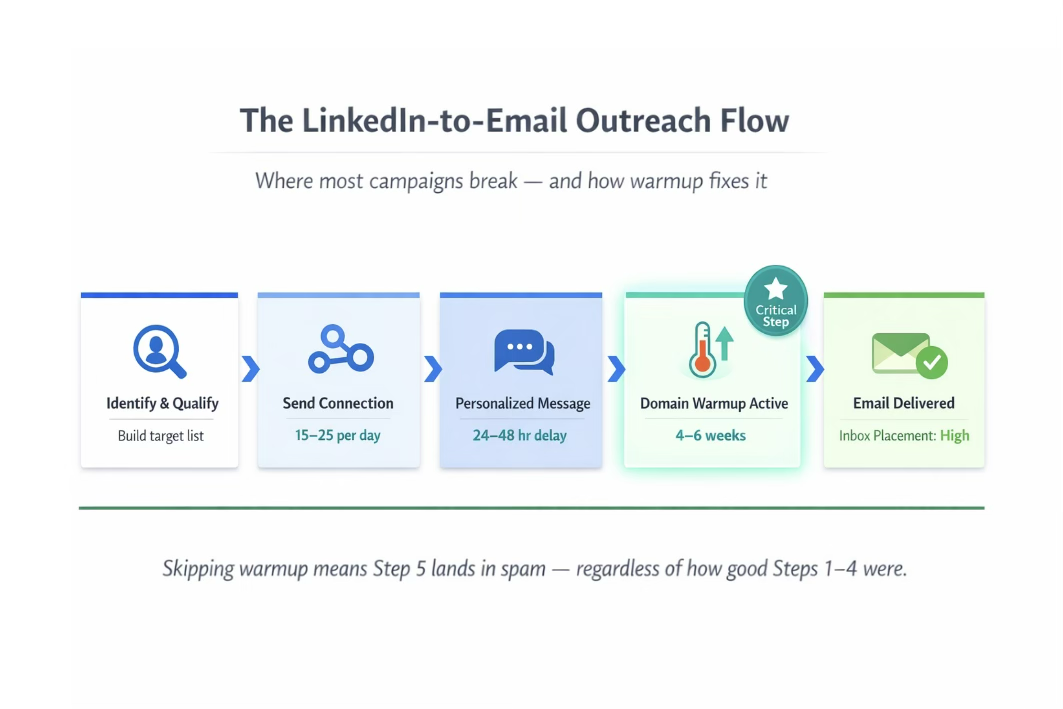
Most guides on LinkedIn automation stop at LinkedIn. This one does not — because most outbound motions do not stop there either. The standard B2B outreach sequence in 2026 is a coordinated multichannel motion where LinkedIn opens the door and email drives the conversion.
| Step | Action |
|---|---|
| Step 1 | LinkedIn connection request sent |
| Step 2 | Prospect accepts — personalized follow-up message sent within 24–48 hours |
| Step 3 | No reply after 2–3 touches — sequence moves to cold email |
| Step 4 | Email follow-up lands in inbox (or spam — and there's the problem) |
Step 4 is where campaigns collapse — quietly, invisibly, and expensively. If your sending domain has not been properly warmed up, cold emails go to spam. Open rates fall off a cliff. Replies dry up. And the team wonders why LinkedIn outreach "stopped working" — when the real problem is downstream in the email layer.
What email warmup actually does
Warmup is the process of building a domain's sending reputation before you use it for live outreach. A new domain has zero history with inbox providers. When you start sending cold emails from it immediately, those providers have no basis for trusting it — so they flag it. Warmup works by gradually increasing send volume while generating positive engagement signals over 4 to 6 weeks.
SalesTarget.ai's unlimited inbox warmup handles this automatically — building your domain's reputation while you focus on outreach strategy.
Side-by-Side: Warmup vs. No Warmup
This is not theoretical. Here is what the same campaign looks like with and without proper warmup infrastructure.
❌ NO WARMUP
- Domain: 3 weeks old, zero warmup
- LinkedIn running at 40 req/day from day 1
- Cold email fired immediately after LinkedIn
- Day 10: LinkedIn account restricted
- Email open rate: 4–6% (spam folder)
- Campaign paused. 3 weeks of work lost.
✅ WITH WARMUP
- Domain: 7 weeks old, 45-day warmup completed
- LinkedIn starts at 15 req/day, ramps to 25 by week 3
- Email sequence activates after 48-hr LinkedIn delay
- Week 6: LinkedIn account in good standing
- Email open rate: 34–42% (primary inbox)
- 47 qualified replies in 60 days from same prospect pool
The prospect list, the messaging, and the targeting were identical in both scenarios. The only difference was operational setup. That is how much infrastructure matters.
How to Build a Safe LinkedIn Outreach System: Step by Step
Safety is not one decision. It is a stack of decisions that compound. Here is how to build the stack correctly.
Step 1 — Build a credible LinkedIn profile before automating anything
LinkedIn's algorithm weighs account age and activity history. A thin, new profile running automated outreach is a red flag by default. Before any automation goes live:
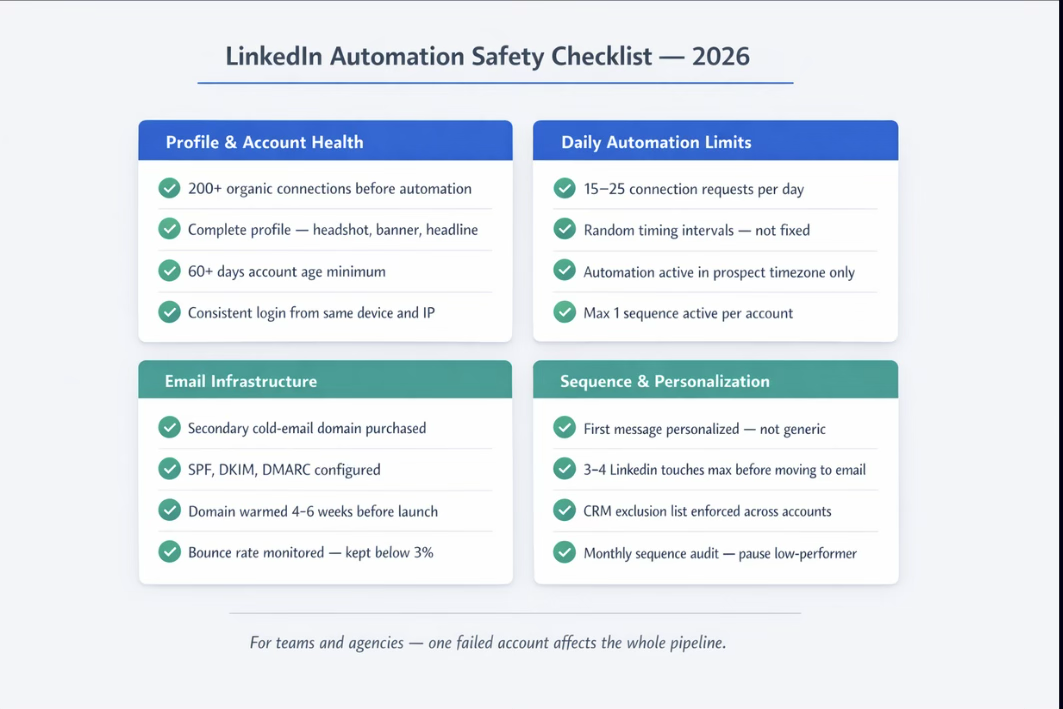
- ✓ 200+ organic connections minimum
- ✓ Complete profile: headshot, banner, headline, summary, experience, skills
- ✓ At least 4 weeks of natural activity — posting, commenting, reacting
- ✓ A few recommendations from real connections
- ✓ A consistent login pattern from the same device and IP
Step 2 — Configure your automation tool for human-like behaviour
Most restrictions are triggered not by what you send, but how you send it. The right configuration makes automated actions look natural:
| Setting | What to do |
|---|---|
| Daily send cap | 15–25 connection requests. Hard cap at 30. |
| Timing between actions | Randomize. Never fixed intervals — that signals a bot. |
| Active hours | Match your prospect's timezone. No 3am sends. |
| Proxy / IP | Use residential or mobile proxies — not datacenter. |
| Follow-up delay | Minimum 24–48 hours after connection accepted. |
| Pending requests | Withdraw requests older than 21 days — in small weekly batches. |
| Sequences per account | One active sequence per LinkedIn account — maximum. |
Step 3 — Set up email infrastructure before the campaign goes live
Not during. Not in parallel with the first week of outreach. Before.
- → Purchase a secondary domain — never cold email from your primary company domain
- → Configure SPF, DKIM, and DMARC on day one of domain setup
- → Run warmup for 4 to 6 weeks minimum before sending any live cold emails
- → Start live sending at 20–30 emails/day in weeks one and two
- → Monitor bounce rates (keep below 3%) and spam complaint rates (keep below 0.1%)
Step 4 — Write messages that earn replies, not just reach inboxes
Low acceptance and reply rates on LinkedIn are not just a messaging problem — they are an account safety risk. LinkedIn's algorithm interprets poor engagement as a signal that your outreach is unwanted, which accelerates restriction timelines.
What works in 2026: specific personalisation referencing a recent post, job change, or company announcement; one clear reason for connecting with no pitch; a question or useful resource. On AI personalisation: AI-generated personalisation can work well at scale — but it needs a human review pass before it goes live. An awkward or factually wrong personalisation line does more damage to reply rates than a simple, neutral opener. Use AI to draft. Use judgment to approve.
Running LinkedIn Automation at Scale: Teams and Agencies
For sales teams with multiple SDRs, or agencies managing outreach across client accounts, there are additional layers to get right.
| Common Mistake | Correct Approach |
|---|---|
| Multiple accounts, same IP | Each account gets its own dedicated proxy |
| Identical copy across accounts | Unique message frameworks per persona |
| Duplicate outreach to same prospect | Shared CRM with exclusion lists enforced |
| Client account launched same day as automation | Minimum 60-day account age + warmup before sequences |
| No sequence audit process | Monthly review of acceptance and reply rates per account |
| Single sending domain for all sequences | Separate warmed domain per client or campaign track |
The Bottom Line
LinkedIn automation works. The teams using it to generate consistent, scalable pipeline are not doing anything magical — they are just doing the basics correctly. They respect the platform's unwritten limits. They build profiles that have credibility before running sequences. They warm their email domains before cold outreach starts. They personalise messages well enough that prospects actually respond.
The rule that holds across every successful outreach operation: The teams sending the most messages are rarely the ones generating the most pipeline. The teams with the strongest infrastructure — warmed domains, safe automation limits, quality targeting — almost always are.
Build the foundation first. Then scale.
Rated 4.9/5 on G2 by verified users
SalesTarget.ai's LinkedIn automation platform is built with account safety, multichannel coordination, and sustainable outreach as core principles.
Start free with 100 credits →




