TL;DR
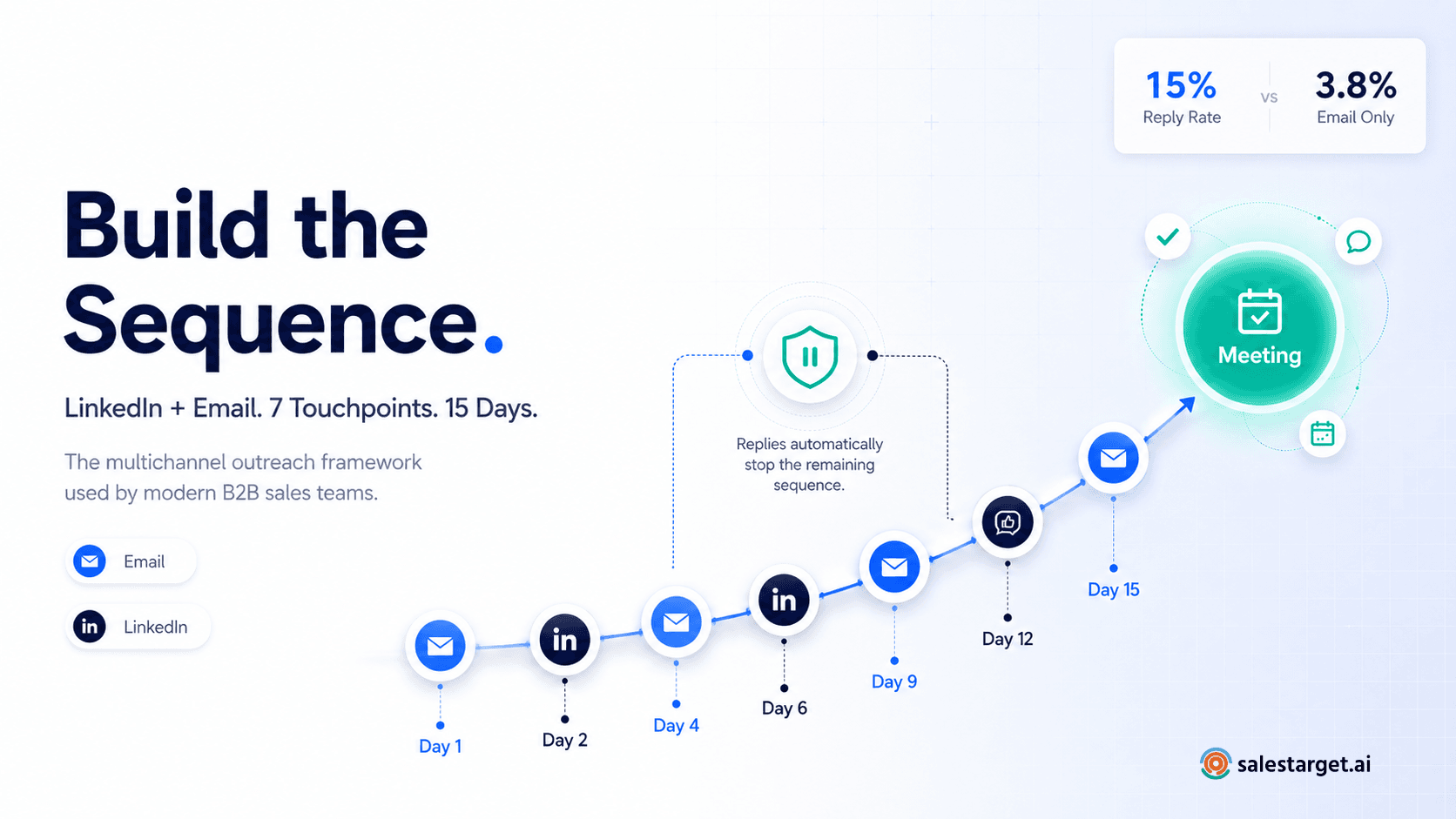
- Multichannel sequences combining LinkedIn and email produce 15% reply rates vs 3.8% for email alone — the gap is not marginal, it is structural
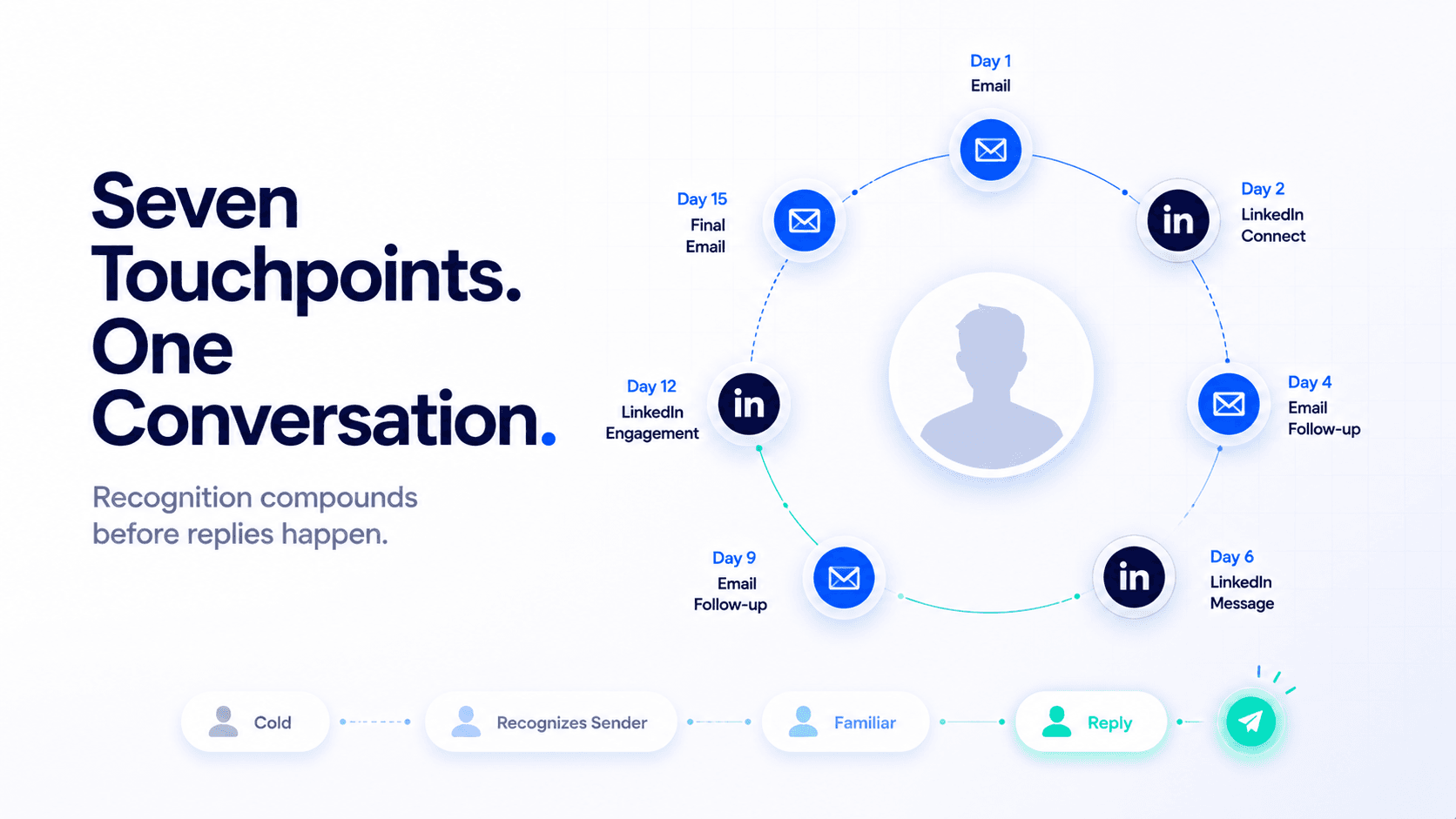
- The 7-touchpoint sequence that books meetings: Day 1 email → Day 2 LinkedIn connect → Day 4 email follow-up → Day 6 LinkedIn message → Day 9 email → Day 12 LinkedIn message → Day 15 final email
- LinkedIn safe limits in 2026: 20–30 connection requests per day, 100 per week maximum. Cloud-based automation is significantly safer than browser extensions — account restriction risk is not theoretical
- The sequence only works if both channels are coordinated — a reply on LinkedIn must pause the email sequence, and vice versa. Running them independently creates noise, not familiarity
- Personalisation at the channel level matters: LinkedIn messages 20–50 words max, cold emails 80–120 words, each referencing a different angle of the same value proposition
- SalesTarget's multichannel outreach platform runs this entire 7-touchpoint sequence natively — LinkedIn automation, email sequences, safety compliance, and unified reply management in one place
Most B2B sales sequences either run email only — and wonder why reply rates hover around 3–4% — or bolt LinkedIn on top as an afterthought, sending connection requests on the same day as cold emails with no coordination between them. The result is not multichannel outreach. It is single-channel outreach on two platforms simultaneously, and it performs accordingly. Enginy.ai's 2026 outreach data puts the difference at 15% reply rate for coordinated multichannel vs 3.8% for email alone. That gap does not come from using more channels. It comes from using them in the right order, with the right timing, without triggering LinkedIn's automation detection in the process.
This guide builds the sequence from scratch — the 7-touchpoint structure, the exact messaging approach for each channel, the LinkedIn safety limits that every guide glosses over, and how to set it up so that a reply on either channel automatically pauses the rest of the sequence.
Before You Build the Sequence: ICP and List Quality First
A multichannel sequence running to a poorly qualified list does not underperform — it actively damages you. At seven touchpoints per prospect, a bad list creates seven times the noise, seven times the unsubscribes, and seven times the LinkedIn account activity on contacts who will never convert. The sequence does not fix a targeting problem — it amplifies it.
Before building any sequence, define the ICP filters that qualify a prospect for multichannel outreach:
| Filter | Why it matters for multichannel | Check before adding to list |
|---|---|---|
| LinkedIn profile active | A sparse, inactive profile means low connection acceptance — wasting your daily quota | Profile updated in last 6 months, has a photo, 100+ connections |
| Verified business email | Invalid emails create bounces that damage sender reputation before the LinkedIn layer even fires | Validated — not catch-all, not disposable |
| Job title matches ICP seniority | Multichannel at the wrong seniority level wastes connection quota on non-decision-makers | Director level and above, or functional owner for the problem you solve |
| Company size and industry fit | Multichannel is a higher-effort sequence — reserve it for accounts that are worth the touchpoint investment | Matches your ICP headcount range and vertical |
💡 List size recommendation for multichannel
Start with 50–100 prospects per sequence run, not 500. At 20–30 LinkedIn connection requests per day, a list of 500 takes 3+ weeks to work through the LinkedIn layer alone. Smaller, high-quality lists run faster, produce cleaner data, and are easier to personalise. Once you validate the sequence with a small cohort, scale from there.
The 7-Touchpoint Sequence: Exact Structure and Timing
This is the sequence structure. Every step has a specific job. The order is not arbitrary — it is built around how recognition develops across channels over 15 days.
| Step | Day | Channel | Action | Job this step does |
|---|---|---|---|---|
| 1 | Day 1 | First cold email — problem-led, 80–120 words | Opens the conversation. Establishes the problem and your relevance to their role. | |
| 2 | Day 2 | Connection request with a brief personalised note — 20–30 words max | Creates a face and a profile behind the email they received yesterday. The sender is no longer anonymous. | |
| 3 | Day 4 | First email follow-up — different angle, 60–80 words | Advances the conversation with a new angle or use case. References neither the connection request nor the prior email explicitly. | |
| 4 | Day 6 | LinkedIn message (if connected) or profile view (if not) | If connected: a 2-sentence message that references the email thread, bridges both channels. If not connected: passive visibility signal — keeps you on their radar without pressure. | |
| 5 | Day 9 | Second email follow-up — social proof or specific result, 60–80 words | Adds credibility at the point where curiosity may exist but commitment has not formed. A specific result or relevant customer story works better than a generic follow-up. | |
| 6 | Day 12 | Engage with a prospect's recent post (like or comment) or send a short final LinkedIn message | Relationship signal — not a pitch. Engaging with their content triggers a notification and creates genuine familiarity without pressure. A comment on a relevant post is more effective than a follow-up message. | |
| 7 | Day 15 | Final email — permission-based close, 40–60 words | The break-up email done correctly. Not aggressive — acknowledges they may not be the right fit right now, leaves the door open. "If the timing isn't right, I'll leave you alone — but if it is, here's one last reason to reply." |
💡 The rule that makes this sequence work
Any reply on either channel — email or LinkedIn — must immediately pause all remaining steps. A prospect who replies on Day 6 LinkedIn should not receive the Day 9 email. This is the single most common failure in multichannel sequences and the one that destroys the most warm leads. Reply detection across both channels is not optional — it is the mechanism that makes the sequence professional instead of aggressive.
How to Write Each Touchpoint: Channel-Specific Messaging Rules
The sequence structure is the skeleton. The messaging is what determines whether it books meetings or gets ignored. Each channel has different norms, different length tolerances, and a different role in the conversation.
Email messaging rules
Email: the depth channel
Length
First email: 80–120 words. Follow-ups: 60–80 words. Final email: 40–60 words. The sequence gets shorter as it progresses — not longer. Long follow-ups signal desperation; short ones signal confidence.
Structure
Opening line: personalisation referencing their role, company, or a specific signal — not "I noticed you're the VP of Sales at {Company}" (everyone does this). A specific observation works better: "Most teams scaling past 20 SDRs at the Series B stage hit the same prospecting infrastructure problem." They do not need to know you know their stage — they feel the relevance.
Each follow-up changes angle
Email 2 takes a different angle from Email 1. Email 3 uses social proof or a specific result. Never repeat the same ask with different words — that is not follow-up, it is persistence without value.
Subject lines
Follow-up emails use the same subject line thread (Re: [original subject]) for emails 2 and 3. The final email gets a fresh subject line — it is a new conversation, not a persistence reminder.
LinkedIn messaging rules
LinkedIn: the recognition channel
Connection request note
20–30 words maximum. No pitch. A single sentence that references their role or company and suggests a mutual context — not "I'd love to connect." Example: "I work with SaaS growth teams on outbound — your background at [Company] made this worth reaching out directly." That is it. The email carries the pitch; the connection note carries the credibility signal.
Follow-up message (if connected)
2 sentences max. Reference the email: "Sent you an email about [topic] last week — wanted to connect here as well in case this channel is easier." This bridges both channels without being pushy about either one.
Content engagement (Step 6)
If they have posted recently — like or comment on a relevant post. The comment should be genuinely useful: add a perspective or ask a question that a professional would naturally ask. This is the highest-converting LinkedIn touchpoint in the sequence because it is the only one that is not asking for anything.
LinkedIn Safe Limits in 2026: What You Need to Know Before Automating
This is the section most multichannel guides skip, gloss over, or get wrong. LinkedIn's automation detection has become significantly more sophisticated since 2023, and accounts that exceed safe limits or use risky automation methods face restriction — which collapses the entire sequence for every prospect in the pipeline simultaneously.
📊 LinkedIn safe automation limits in 2026
- Connection requests: 20–30 per day maximum — 100 per week is the widely cited safe ceiling. New accounts should start at 10–15/day and ramp over 2–4 weeks
- Profile views: 80–100 per day — LinkedIn treats unusual spikes in profile views as a signal of automated activity
- Messages: 20–40 per day — applies to both connection messages and post-connection follow-up messages
- Total daily actions: 80–200 across all activity types — Aerosend's 2026 LinkedIn automation research puts the safe total action range at 80–200 per day depending on account age and history
- Weekend activity: Reduce volume by 40–50% on Saturday and Sunday — LinkedIn's detection is calibrated around human behaviour patterns, and humans do not send 30 connection requests on Sunday morning
Cloud-Based vs Browser Extension Automation: Why It Matters
Most LinkedIn automation guides treat tool choice as a feature preference. It is actually a risk decision. Browser extensions execute automation through your browser window — LinkedIn can detect the automated activity because it runs within the browser environment where their tracking scripts operate. Cloud-based automation runs on dedicated servers with separate IP addresses, separate session management, and behaviour patterns that are significantly harder for LinkedIn to detect as automated.
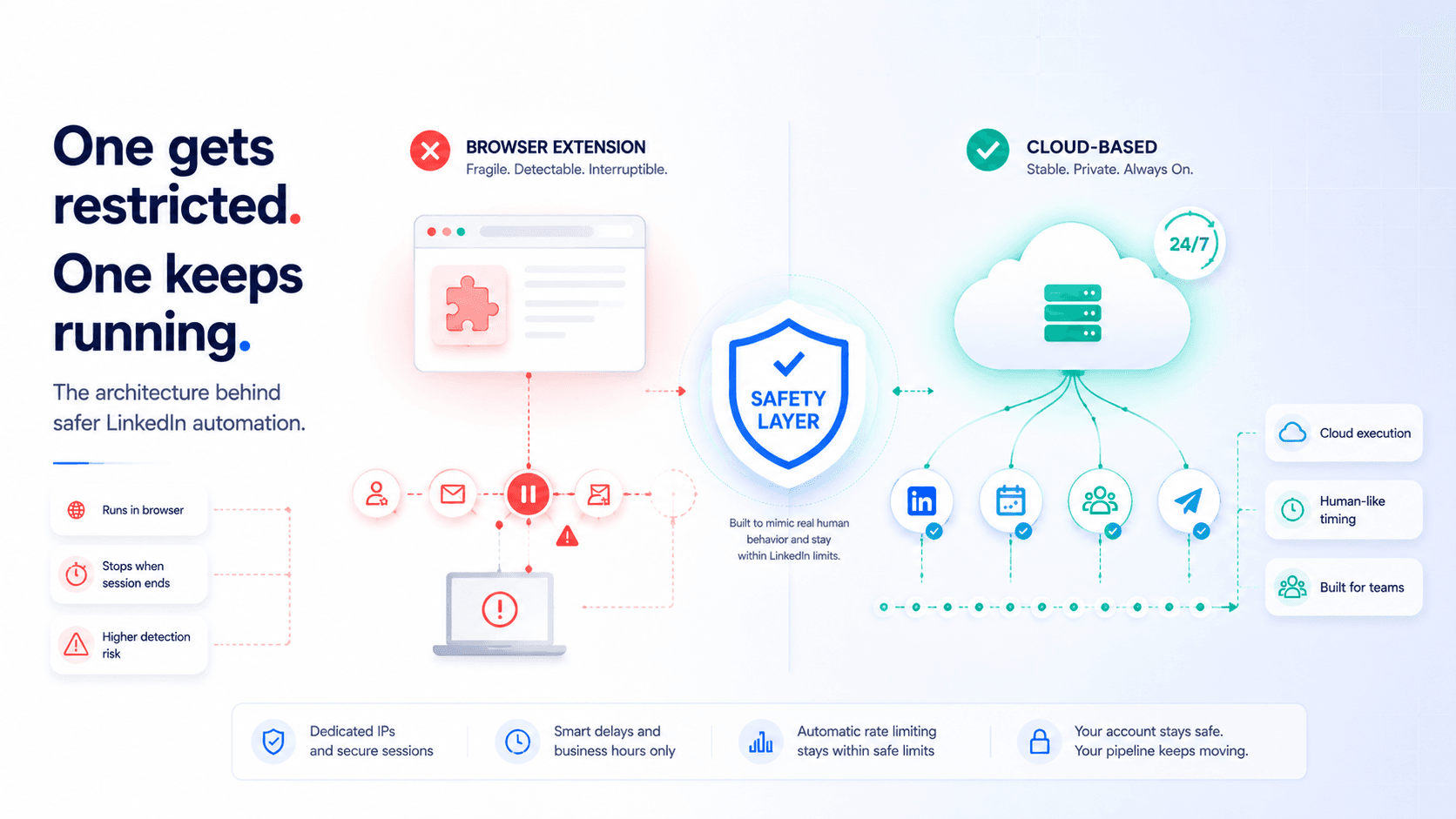
| Dimension | Browser extension | Cloud-based automation |
|---|---|---|
| Detection risk | High — runs inside LinkedIn's tracked environment | Low — dedicated IP, separate session |
| Requires computer on | Yes — stops when you close the browser | No — runs 24/7 on the server |
| Human-like timing | Depends on tool quality — often too fast | Built-in random delays and business-hours scheduling |
| Account restriction risk | Significantly higher | Significantly lower |
| Team scaling | Each rep needs own extension — no centralised control | Multi-account management from one dashboard |
SalesTarget's LinkedIn safety and compliance infrastructure is cloud-based — human-like delays, business-hours scheduling, and automatic rate limiting built into every sequence. The account restriction risk that makes many teams reluctant to use LinkedIn automation is a tool choice problem, not an automation problem.
How to Set This Up in SalesTarget
Steps 1–5 above apply to any platform. This section shows how to implement the full 7-touchpoint sequence in SalesTarget — where LinkedIn automation, email outreach, and reply management operate as a single coordinated system rather than three tools you are trying to stitch together manually.
Step 1: Build your ICP-filtered list in Lead Explorer
Use SalesTarget's Lead Explorer to filter prospects by industry, company size, job title, and LinkedIn activity signals. Verified email addresses are appended at the point of search — no separate validation step, no CSV export. The list goes directly into your campaign.
Step 2: Set up your multichannel sequence
In SalesTarget's multichannel outreach builder, configure the 7-step sequence with exact day intervals. Each step specifies the channel (LinkedIn or email), the action type, and the timing. LinkedIn steps use cloud-based automation with smart scheduling — human-like delays, business-hours sending, and rate limiting applied automatically.
Step 3: Write personalised messages for each step
SalesTarget's AI sequence generator produces channel-appropriate messages for each touchpoint using the prospect's role, company, and signal data. LinkedIn connection notes stay under 30 words; email follow-ups shift angle as the sequence progresses. Spintax variation ensures each message is unique at the inbox level, reducing spam filter risk across the email layer.
Step 4: Enable unified reply management
SalesTarget's Unibox monitors replies from both LinkedIn and email in a single inbox. When a reply arrives on either channel, the remaining sequence steps pause automatically — no manual intervention required. This is the mechanism that prevents warm leads from being accidentally followed up after they have already expressed interest.
Step 5: Monitor and optimise with campaign analytics
SalesTarget's campaign analytics surface reply rates by channel and by sequence step — showing you exactly which touchpoints are generating replies and which are being ignored. For multichannel sequences, this means you can identify whether the LinkedIn layer is adding value (are connection-accepted prospects converting at higher rates?) and adjust timing or messaging based on actual data rather than assumptions.
Common Mistakes That Get LinkedIn Accounts Restricted
Sending connection requests and emails on the same day
This is the most common sequencing mistake. The entire value of the LinkedIn touchpoint is that it creates recognition before the email arrives. Sending both on Day 1 produces two simultaneous cold approaches from the same sender — more aggressive than either channel alone, not more effective.
Using a new LinkedIn account at full volume immediately
New LinkedIn accounts sending 25+ connection requests per day from day one are flagged almost immediately. Accounts need a warmup period — start at 5–10 connections per day for the first 2 weeks, then gradually increase to the 20–30 range. This mirrors the email domain warmup process and is equally non-negotiable for automation at scale.
Blank connection requests at scale
Blank connection requests (no note) have lower acceptance rates than personalised notes and have a higher rejection rate — recipients who do not recognise you tend to ignore or decline rather than accept. A high rejection rate is itself a signal to LinkedIn that the account may be sending unsolicited requests.
Not withdrawing pending connection requests
Pending connection requests that are never accepted accumulate as a signal. Best practice is to withdraw pending requests after 2–3 weeks. Keeping hundreds of unaccepted pending requests on an account is a marker of automated sending activity.
Launch your multichannel sequence — safely, at scale.
LinkedIn automation, email sequences, safety compliance, and unified reply management — one platform, seven touchpoints, no account restrictions.
✓ 50 credits ✓ 7-day trial ✓ No credit card required





